Build a SaaS buyer segment map from 20 to 30 public phrases. In this guide to How to Build a SaaS Buyer Segment Map for SMB, Mid-Market, and Enterprise…
Last updated: November 15, 2026
Quick Answer: build a SaaS buyer segment map from 20 to 30 public phrases. In this guide to How to Build a SaaS Buyer Segment Map for SMB, Mid-Market, and Enterprise Language, the map turns public language into three buckets: SMB, mid-market, and enterprise. It is a working sheet that shows which words point to a smaller self-serve buyer, which words point to a growing team, and which words signal a long enterprise sales motion. It is most useful when you want segment fit without guessing from a logo wall or a vague home page.
Key takeaways
- A buyer segment map is not a persona deck. It is a list of visible clues that point to SMB, mid-market, or enterprise fit.
- The best clues are usually public language: pricing shape, implementation words, security terms, sales motion, and qualification copy.
- SMB language usually sounds quick, light, and self-serve. Enterprise language usually sounds controlled, formal, and process-heavy.
- Mid-market sits in the middle and often mixes ease with stronger admin, reporting, or rollout language.
- The map works best when it is tied to observable phrases, not assumptions about company size.
What is a SaaS buyer segment map?

A SaaS buyer segment map is a simple way to sort public signals into the buyer group they most likely target. It helps answer one question: is this product written for SMB, mid-market, or enterprise buyers?
The map is useful because the same software category can speak to different buyers in very different ways. A 14-day trial, a Stripe checkout, and “get started in minutes” usually point one way. A request for a demo, “talk to sales,” and a mention of SOC 2 Type II usually point another. The map lets a reader classify that language without guessing from company size alone.
Build the map around three labels and one rule. The labels are SMB, mid-market, and enterprise. The rule is that each label must be backed by visible clues on the site, in the product docs, or in qualification copy. If a phrase is not public, it does not belong on the map.
The cleanest maps use a 2-column setup: “signal” and “segment.” Some teams add a third column for “why it matters.” That extra note helps when a signal is mixed, such as a product that offers self-serve signup but still asks for a sales call before pricing. That pattern often sits between SMB and enterprise, which is where mid-market lives.
This is not the same as a persona map. A persona map asks who the user is. A buyer segment map asks what kind of buying motion the language suggests. That difference matters when you support a pillar like SaaS audience and positioning signals, because the same feature can be sold to a founder, a RevOps lead, or a procurement team. If you are unsure how to classify a site, consult a practitioner in product marketing or sales strategy and review the language against public pricing and qualification copy.
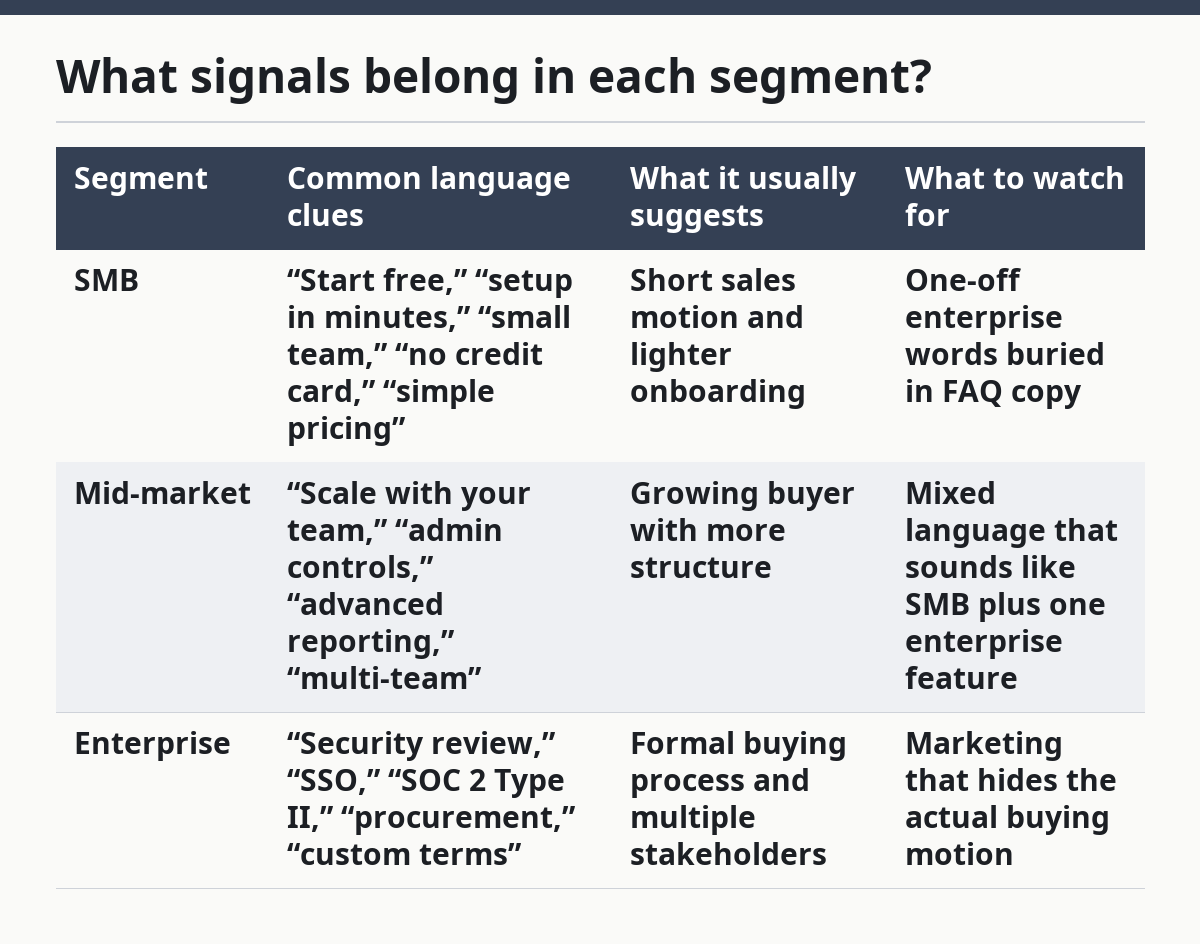
What signals belong in each segment?
The core signals are language about speed, control, and complexity, and the segment label usually shows up in all three. SMB language tends to favor quick setup, light admin, and easy access. Enterprise language leans on governance, security review, rollout, and procurement. Mid-market usually sits between the two and borrows from both. This is a practical heuristic, not a legal or commercial rule, so if the decision matters, consult a product marketing or sales specialist and check the source pages directly.
A good map looks for repeated patterns, not one stray line. One mention of “enterprise-ready” does not make the whole site enterprise-focused. A map becomes useful when the same tone appears in pricing, feature pages, and qualification copy.
| Segment | Common language clues | What it usually suggests | What to watch for |
|---|---|---|---|
| SMB | “Start free,” “setup in minutes,” “small team,” “no credit card,” “simple pricing” | Short sales motion and lighter onboarding | One-off enterprise words buried in FAQ copy |
| Mid-market | “Scale with your team,” “admin controls,” “advanced reporting,” “multi-team” | Growing buyer with more structure | Mixed language that sounds like SMB plus one enterprise feature |
| Enterprise | “Security review,” “SSO,” “SOC 2 Type II,” “procurement,” “custom terms” | Formal buying process and multiple stakeholders | Marketing that hides the actual buying motion |
The map should also note sales motion. A self-serve checkout and a demo request are not just conversion options; they are segment clues. If a site pushes a 15-minute demo and a sales call at the same time, that often signals a more complex buyer than a pure SMB offer. If the site talks about procurement, legal review, or custom contracts, that is usually a stronger enterprise sign than any adjective in the headline. If you are making a high-stakes call, consult a qualified revenue or legal professional and compare the wording with the pricing and terms pages.
The honest trade-off is that some products span segments. Collaboration tools, analytics tools, and security tools often do. In those cases, the map should not force a single label. It should mark the dominant language and note the second-tier segment if the site clearly speaks to both.
How do you build the map step by step?

You build the map by collecting public phrases, tagging them, and then scoring the weight of each clue. The process works best when the same site is reviewed at least twice, once for broad language and once for detail pages.
-
Collect 20 to 30 public phrases from the site. Pull lines from the home page, pricing page, demo form, product pages, and FAQ copy. Write the exact wording in a sheet so you do not rely on memory.
-
Tag each phrase as SMB, mid-market, or enterprise. Use a simple rule set: speed and simplicity usually map to SMB; admin and growth language usually map to mid-market; security, procurement, and control language usually map to enterprise. Keep one phrase per row. If the segment call affects pricing, targeting, or sales coverage, consult a specialist and verify the public copy again.
-
Mark the sales motion beside the phrase. Note whether the site offers self-serve signup, a demo, a contact form, or a sales-led path. A demo-only motion often changes the segment read, even when the copy sounds friendly.
-
Add a confidence note from 1 to 3. Use 1 for weak clues, 2 for medium clues, and 3 for strong clues. A line like “GDPR-ready” is weaker than “SOC 2 Type II” because the second is more specific and usually sits closer to enterprise language. According to the U.S. Department of Commerce’s NIST resources, security control language is most meaningful when it is specific and verifiable.
-
Group the strongest repeated signals. If four or five different pages keep saying “custom onboarding,” “role-based access,” and “security review,” that cluster points harder than any single phrase. If the map stays split, leave it split.
-
Write the segment call in plain English. End with a sentence like, “This site mostly speaks to enterprise buyers with some mid-market overlap.” That line is the point of the exercise, and it should be short enough to use in a brief.
This method works because it relies on observable text, not intuition. It also helps when a site says “for teams of all sizes,” which often means nothing. A map turns that kind of vague line into a testable claim.
Which language signals SMB vs enterprise?
SMB language sounds like speed, ease, and low friction, while enterprise language sounds like control, risk reduction, and process. The easiest way to spot the difference is to compare the verbs and nouns the site uses.
SMB copy often uses words like “start,” “try,” “launch,” “set up,” and “grow.” It tends to talk about one team, one workspace, or one simple workflow. It also often hides the complexity behind phrases like “no credit card required” or “up and running fast.”
Enterprise copy often uses words like “governance,” “deployment,” “permissions,” “security review,” and “procurement.” It may mention SSO, SCIM, audit logs, role-based access, and custom terms. Those are not random feature names; they are clues that the buying process will involve IT, legal, or security stakeholders. A source such as NIST or AICPA can help validate those controls, but the on-page language is still the main input.
Mid-market language borrows from both sides. It may promise speed but still mention admin controls, reporting, or multiple teams. That mix matters because mid-market buyers often want something easy to adopt without giving up control. They usually have more structure than SMB teams but do not need the full weight of an enterprise sale.
One mistake is treating any mention of security as enterprise-only. That is too blunt. A lot of SMB and mid-market products mention GDPR or basic security language because customers expect it. The real enterprise signal is when security becomes part of the buying path, not just a feature list.
The most useful test is to ask what the site expects the buyer to do next. If the next step is a signup form, the page is usually speaking SMB. If the next step is a demo request, a security review, or a conversation about procurement, the language is moving toward enterprise.
How do qualification signals show up on a SaaS site?
Qualification signals show up in the forms, pricing gates, and proof points that decide who can move forward. They are the strongest part of a SaaS buyer segment map because they reveal the sales motion, not just the marketing tone.
Look for phrases like “contact sales,” “book a demo,” “talk to an expert,” and “custom pricing.” Those usually mean the company wants to qualify the buyer before access. That pattern is common in enterprise sales motion because the process often includes legal review, security checks, and multiple decision-makers.
Then look for what the form asks for. A form that requests company name, work email, team size, and use case is trying to separate casual interest from serious demand. A form that adds budget, region, or deployment details is even more segment-specific. The more fields the form asks for, the more likely the product is aiming above pure SMB.
The site may also use proof language as a qualifier. Terms like “trusted by regulated teams,” “approved by security teams,” or “built for distributed organizations” are not just marketing flourishes. They hint at the kind of buyer the company wants to attract. In contrast, “for small teams” or “for solo founders” narrows the fit toward SMB.
A strong map should include these qualification signals because they often matter more than the headline. A homepage can sound broad, but a pricing page can make the segment clear in one line. That is why the map needs multiple page types, not just a single snapshot.
One useful standard to note is ISO 27001. If a site brings that standard into the open along with SSO, audit logs, or procurement language, the buyer motion usually shifts upward. That does not guarantee enterprise-only fit, but it raises the odds that the product expects a formal review. For a secondary check, compare the site with pricing page copy and sales-led SaaS positioning.
What mistakes make the map useless?
The biggest mistake is mapping by company size instead of language. A small startup can use enterprise language, and a large company can write like SMB if it sells through a simple checkout. The site text is the clue; headcount is not enough.
Another mistake is treating one word as proof. A single mention of “enterprise” does not make the whole site enterprise-focused. The cost of that mistake is a false map, which leads to bad positioning calls, poor keyword targeting, and weak sales handoff notes. The fix is to require repeated signals across at least 3 page types before you label the segment with confidence.
A third mistake is mixing audience and use case. “For marketers” is not a segment label. “For marketers at regulated firms who need audit logs” is closer, because it combines user type with buying motion. Keep those layers separate in the map so you do not flatten the signal.
A fourth mistake is using vague catch-all words like “modern,” “powerful,” or “smart” as if they tell you anything about the buyer. They do not. They add noise. If the map contains too many soft words, it will start to sound like every SaaS homepage ever written.
The last mistake is failing to name the trade-off. SMB language can boost signups, but it may scare off buyers who need proof and control. Enterprise language can attract larger deals, but it can slow the first step and narrow the top of the funnel. Mid-market language sits in the middle, which makes it flexible but also easier to blur.
How should you use the map once it is built?
You should use the map to align site language, sales motion, and qualification copy before you make a positioning claim. The map is not an archive; it is a decision tool.
Start by checking whether the dominant segment matches the offer path. If the language reads SMB but the sales team asks for long qualification calls, the site is sending mixed signals. If the language reads enterprise but the pricing page still pushes instant signup, that mix may confuse the buyer and the internal team at the same time.
Then use the map to spot overlap. Some products are genuinely split across segments, and the map should say so. A split map is not a failure. It is a warning that the site may need separate language for different buyer groups instead of one broad message.
The map also helps when comparing competitors. If three competitors all speak in enterprise terms and one uses plain SMB language, that difference matters. It can explain why one site gets faster signups while another gets longer sales cycles. That kind of read is useful in product marketing, content planning, and qualification copy.
Keep the map current. Public language changes when a company adds SSO, expands into regulated accounts, or shifts from self-serve to demo-led sales. A quick review every quarter is usually enough for most sites, unless the offer changes more often. A stale map is worse than no map because it creates false confidence.
If you need a broader lens on how these clues fit together, the hub on SaaS audience and positioning signals sits one level above this guide.
How do you tell if SaaS is aimed at enterprise buyers?
Enterprise buyers are usually signaled by process-heavy language, not just big-name logos. Look for words tied to security review, procurement, SSO, SCIM, audit logs, custom terms, and demo-led sales motion. A site that asks for a conversation before pricing is often speaking more to enterprise than SMB.
What language signals SMB vs enterprise?
SMB language tends to stress speed, simplicity, and self-serve access, while enterprise language stresses control, risk reduction, and approval steps. “Start free” and “set up in minutes” point one way. “Talk to sales,” “security review,” and “custom pricing” point the other.
How do buyer segments show up on a SaaS site?
Buyer segments show up in pricing shape, form fields, feature wording, and proof points. A self-serve checkout with light onboarding copy usually signals SMB, while demo gating and security language usually signal enterprise. Mid-market often appears as a mix of easy setup and stronger admin or reporting terms.
Drafted with AI; not yet reviewed by a person.