A SaaS help doc watchlist is usually 5 to 12 URLs checked on a schedule, so quiet product and limit changes do not slip past you. This guide to How to…
Last updated: November 15, 2026
Quick Answer: a SaaS help doc watchlist is usually 5 to 12 URLs checked on a schedule, so quiet product and limit changes do not slip past you. This guide to How to Build a SaaS Help Doc Watchlist for Quiet Product and Limit Changes is for people who need early warning from public signals, not a full product audit. The point is to watch the right help center articles, support pages, limits documentation, policy pages, and support notices before a small edit turns into a costly surprise.
Key takeaways
- Pick pages that can change product behavior without touching the marketing site.
- Watch the pages that carry limits, policy language, and support steps, not every article in the help center.
- Use a simple alert path first: change notice, date stamp, or diff, then review.
- Keep the watchlist narrow enough to check in under 15 minutes.
- Treat a single edit as a signal, not proof of product impact on its own; if the change could affect contracts, data handling, or access, consider asking a qualified professional to confirm the impact.
What pages belong on a SaaS help doc watchlist?
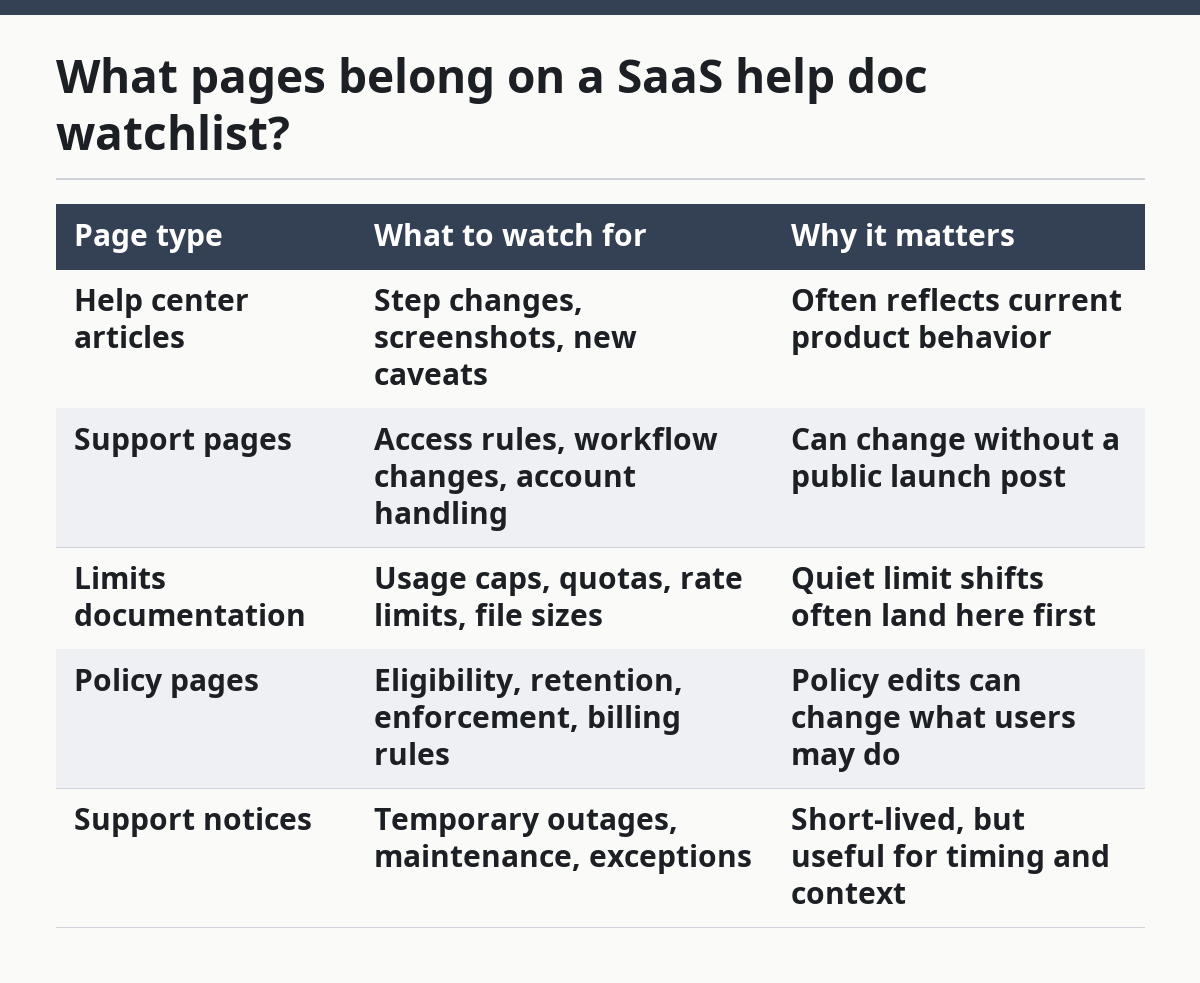
A SaaS help doc watchlist should cover the pages most likely to change user-visible limits or rules without a homepage update. That means help center articles, support pages, limits documentation, policy pages, and support notices before you spend time on deep reading. A watchlist that tracks the whole help center is too broad; a watchlist that tracks only release notes is too thin.
The clean way to think about this is by signal strength. Some pages announce change, some hide it in wording, and some only update when support policy shifts. The table below shows the main page types and what each one is good for.
| Page type | What to watch for | Why it matters |
|---|---|---|
| Help center articles | Step changes, screenshots, new caveats | Often reflects current product behavior |
| Support pages | Access rules, workflow changes, account handling | Can change without a public launch post |
| Limits documentation | Usage caps, quotas, rate limits, file sizes | Quiet limit shifts often land here first |
| Policy pages | Eligibility, retention, enforcement, billing rules | Policy edits can change what users may do |
| Support notices | Temporary outages, maintenance, exceptions | Short-lived, but useful for timing and context |
The practical rule is simple: if a page answers “what can I do?” or “how much can I use?” it belongs on the list. If a page only sells the product, it is less useful for this job. If a page has a date, a version label, or a support notice banner, it is worth watching more closely.
A good watchlist usually starts with 5 to 12 URLs, not 50. That range is small enough to review by hand and large enough to catch the pages that move most often. A bigger list tends to create noise, and noise is how real changes get missed.
How do I build the watchlist step by step?
You build the watchlist by choosing the right pages, assigning a check rhythm, and deciding what counts as a change before alerts start arriving. The goal is not to collect every help article; it is to keep a small set of pages under steady observation.
- List the product areas that can change quietly. Start with limits, billing, permissions, integrations, data retention, and support process pages. Those are the 5 most common places where wording changes can affect day-to-day use.
- Add the page types, not just the titles. Include one limits documentation page, one policy page, one support notice page, and the main help center article tied to each area. That gives you coverage across 4 kinds of public signal.
- Mark a review cadence for each page. Use shorter intervals for limits and policy pages, and a slower pass for stable help center articles. A weekly check is often enough for low-churn pages; a daily or 2-day check makes more sense for active support notices.
- Set a baseline copy for each URL. Save the title, the visible date if one exists, and the exact text blocks that matter. The baseline is what lets you spot a changed sentence instead of trusting memory.
- Choose one alert path. That can be browser change alerts, an RSS feed where one exists, or a diff tool that compares the old and new page text. Keep the first setup simple enough that it does not need a 30-minute handoff to maintain.
- Tag each page with its risk. Put a simple label on each one: limit, policy, workflow, or notice. That label tells you what kind of change matters, and it stops a cosmetic edit from getting the same priority as a quota change.
- Review the list once a month. Drop pages that have stayed static for several cycles, and add pages that started to carry new rule language. A watchlist that never shrinks becomes background noise.
The hardest part is restraint. A watchlist that tries to follow every help article in a product with 200 support pages will bury the useful changes under routine edits. A small list with clear categories is easier to keep current, and current is what matters.
Which alerts catch quiet changes fastest?
The fastest alerts are usually the ones that tell you a page changed, rather than the ones that ask you to hunt for the change by hand. That usually means diff alerts, page-monitor alerts, and feed-based checks where the page offers one. For public documentation, an RSS feed can be a clean fit when the page structure supports it; the RSS 2.0 specification is a common standard for feeds, and the RSS Board specification is the reference point many tools understand.
A second useful reference is the W3C Web Content Accessibility Guidelines (WCAG) 2.2. While it is not a change-monitoring standard, it matters because support pages that are easier to read and parse are easier to monitor without breaking when a layout shifts.
The trade-off is simple: automated alerts are fast, but they are blunt. They will flag image swaps, typo fixes, and layout edits right beside a real quota change. That is why the alert should only be step one. The second step is a quick human review of the changed paragraph, table, or notice block.
A practical alert stack looks like this:
- Page diff tool: best for full-text support articles and policy pages.
- Visual alert: useful when the page hides important changes in a banner or table.
- Feed alert: useful when the support system exposes a feed for new or updated articles.
- Manual check: still needed for pages that load text late or rewrite content based on region.
Do not make every page trigger the same kind of alert. A limits page that changes once a quarter deserves a different threshold than a support notice page that can change twice in a week. If every edit creates the same level of alarm, the watchlist stops being useful.
How do you separate signal from noise?
You separate signal from noise by deciding which words matter before the page changes, not after. On a help doc watchlist, the words that usually matter are limit names, plan references, file sizes, usage caps, retention periods, support windows, and policy verbs like “may,” “must,” or “cannot.” Cosmetic changes tend to touch examples, button labels, or article formatting instead.
A simple scoring approach helps keep reviews short. If a page change touches one of these 4 areas, treat it as high priority:
- a limit or quota
- a policy rule
- an access condition
- a support or maintenance notice
If the change only rewrites a heading or moves a screenshot, keep it in the log but do not rush it to the top. That keeps the watchlist from turning into a general-purpose page tracker.
The other filter is timing. A page that changes once in 18 months and then changes again 3 days later deserves attention. A page that changes every 2 weeks because of support copy cleanup may not. Frequency matters because it tells you whether the page is a stable reference or a living rulebook.
This is where many generic guides get it wrong: they treat every update as equally important. That is a bad fit for SaaS support content. A watchlist only works if it helps you notice the rare edit that carries meaning, not the common edit that only refreshes wording.
What mistakes break a help doc watchlist?
A help doc watchlist breaks when it is too broad, too manual, or too trusting of page titles. The most common failure is watching the whole help center and expecting the important edit to stand out. It usually will not, because a large support library can change on dozens of pages for routine reasons.
Another mistake is skipping the baseline. Without a saved copy of the page text, you end up relying on memory or a screenshot from 2 weeks ago. That misses small but important wording shifts in limits documentation, especially when the page keeps the same title and URL.
A third mistake is ignoring support notices because they feel temporary. Temporary notices can still matter if they explain a changed rule, a pause in a feature, or a new support window that affects customer work. A 24-hour notice can matter more than a polished help article that has not changed in months.
The last mistake is failing to assign ownership. A watchlist with no owner becomes a list of links nobody checks. Even a small list of 8 pages needs one person to review alerts, record changes, and clear dead entries on a regular schedule.
The cost of those mistakes is missed signal. The fix is not more pages; it is clearer scope. Watch fewer URLs, label them better, and keep the review cadence tight enough that the list stays worth opening.
When should you not rely on the watchlist alone?
You should not rely on the watchlist alone when the change could affect contracts, data handling, or product access in a way that needs formal confirmation. A help doc watchlist is a public-signal tool, not a full source of truth. It can show that a page moved, but it cannot tell you the whole story behind an operational, legal, or account-level decision.
That limitation matters most with policy pages and support notices. A wording change can be real without being complete, and a support article can lag behind the product or the enforcement rule. If the change carries financial, legal, or operational risk, the watchlist should be a trigger for further review, not the final answer. If that risk is material, consult a qualified professional before acting on the page alone.
The same caution applies when the page is clearly regional or account-specific. A support page may reflect one plan, one region, or one rollout stage. If you use the watchlist as if every update applies everywhere, you can overread a narrow notice and miss the scope.
For most teams, the right posture is modest. Use the watchlist to spot movement, then confirm the meaning with the page type, the date, and the surrounding language. That keeps the process honest and keeps the watchlist from pretending to be more than it is.
What should a simple watchlist look like in practice?
A simple watchlist should fit on one page and be easy to scan in under 15 minutes. The best version usually has 3 columns: URL, page type, and review rhythm. A fourth column for notes is useful, but only if the notes stay short and specific.
A basic structure might look like this:
- URL: the exact help center article or policy page
- Type: help article, support page, limits doc, policy page, or support notice
- Rhythm: daily, weekly, or monthly
- Signal: limit, policy, workflow, or notice
- Last checked: a date field so nothing disappears into the background
That format works because it is boring in the right way. It gives you one place to see which pages matter and how often they need review. If the list takes more than a few minutes to understand, it is too complicated.
A final rule helps keep it useful: do not keep pages just because they feel interesting. Keep them because they are likely to change user-facing limits, support rules, or policy language. That is the whole job of a SaaS help doc watchlist.
What is a help doc watchlist?
A help doc watchlist is a short list of support pages, limits documentation, policy pages, and support notices that you check on a schedule for quiet product changes. It is built for public signals, not for internal product news. The point is to catch wording shifts, limit changes, and support rule updates before they become a surprise.
Why monitor help docs for product changes?
Help docs often change before the marketing site does, especially when the update is about limits, access rules, or support policy. A support article can carry the first public trace of a new cap, a new workflow, or a new exception. That makes the watchlist useful when the product changes quietly.
How do support docs reveal product changes?
Support docs reveal product changes through wording shifts, new limits, updated policy language, and changed support notices. A page may keep the same URL and title while the rules inside it move. Watching the page over time helps spot those edits, but the change still needs review in context before it is treated as a confirmed product shift.
FAQ
How many pages should a SaaS help doc watchlist have?
A SaaS help doc watchlist usually starts with 5 to 12 URLs. That is small enough to review by hand and large enough to catch the pages that move most often.
How often should I check a help doc watchlist?
Use shorter intervals for limits and policy pages, and a slower pass for stable help center articles. A weekly check is often enough for low-churn pages, while active support notices may need a daily or 2-day check.
What is the most important signal on a watchlist?
The most important signal is a change to limits, policy language, access conditions, or support notices. Cosmetic edits like screenshots or headings should stay in the log, but they should not get the same priority.
Should I rely on a watchlist for legal or contract decisions?
No. Use the watchlist to spot movement, then confirm the meaning with the page type, the date, and the surrounding language. If the change could affect contracts, data handling, or access, consult a qualified professional.
Drafted with AI; not yet reviewed by a person.