How to Build a SaaS Release Note Index for Searchable Product Change History: a SaaS release note index is usually a 5-field system, and it should let…
Last updated: November 15, 2026
Quick answer: a SaaS release note index is usually a 5-field system, and it should let someone find a change in under 10 seconds. A SaaS release note index for searchable product change history is a searchable map of your release notes, changelog entries, and product updates, built so someone can find a change by feature, date, or product area in a few clicks. It works best for teams that publish often and need fast change lookup without reading every note line by line.
Key takeaways
- A release note index is not another changelog page; it is the search layer on top of it.
- Many indexes use a small set of fields: date, product area, feature tag, change type, and note link.
- Date filtering and tags do the heavy lifting, but only if the tag list stays controlled.
- A simple table or database is enough at the start; a search engine is only worth the extra maintenance when the note count grows.
- The main trade-off is speed for readers versus tagging work for editors.
What is a release note index?
A release note index is a searchable catalog that points to each release note, not the note text itself. In How to Build a SaaS Release Note Index for Searchable Product Change History, each changelog entry gets a record with fields such as publish date, product area, feature name, and a link back to the full update.
That structure matters because most readers do not want to scan 50 notes from a month and guess which one mentions billing, exports, or SSO. They want a clean lookup path. If the index is built well, a user can filter by date, sort by product area, and jump straight to the note that matters.
The index is also different from a raw changelog. A changelog can be a stream of posts in reverse order. An index is a reference tool. The first is good for browsing; the second is good for retrieval. That is why the page belongs in a SaaS product evidence and verification workflow instead of as a plain news feed.
A practical index usually tracks 5 fields: note title, date, product area, feature tag, and URL. The standard for dates should be consistent, and ISO 8601 is a solid choice because it sorts cleanly and avoids date-format confusion. The IETF RFC 3339 format is a close cousin worth using as a reference: https://www.rfc-editor.org/rfc/rfc3339
How do you build a release note index?
You build a release note index by turning each update into a structured record, then adding tags and filters that match how people search. The core job in How to Build a SaaS Release Note Index for Searchable Product Change History is to make 1 release note behave like a line item in a searchable list, not a paragraph buried in a blog archive.
A simple way to build it is with this workflow:
-
List every release note source. Gather release notes, changelog entries, and product updates from the places you already publish them. If the same update appears in 3 places, keep one canonical URL in the index and mark the others as duplicates or references.
-
Define 5 to 7 fields before you start tagging. Use a small schema such as title, date, product area, feature tag, change type, summary, and source URL. Fewer fields are easier to maintain than a sprawling sheet with 20 columns.
-
Use one date standard across the full index. Pick a format such as ISO 8601 and use it every time. That lets a search index sort March 2 and November 12 correctly without manual cleanup.
-
Create a controlled tag list. Keep product-area tags short and repeatable, such as billing, reporting, admin, integrations, or security. A controlled list is better than free text because it keeps the same feature from being labeled 4 different ways.
-
Add a search layer. Start with a spreadsheet or database if the note volume is small. Move to a search index when users need full-text search, faceted filters, or many entries across dates and product areas.
-
Test 3 common searches. Try “billing in April,” “export changes,” and “SSO last quarter.” If each search returns the right note in a few seconds, the index is doing its job.
-
Review tags on a schedule. A 30-day review cadence is enough for many teams. Old tags drift fast if no one checks them, and drift makes search results less trustworthy.
For teams that want a search backend, the inverted index model used by search engines such as Elasticsearch is the right mental model: store content in a way that makes lookup fast. The Elastic documentation on index settings and mappings is a useful reference point: https://www.elastic.co/guide/en/elasticsearch/reference/current/index-modules.html
Which fields should each entry have?
Each entry should have enough fields to answer the user’s likely follow-up in one pass. The minimum useful set is 5 fields: date, product area, feature tag, change type, and the link to the full release note.
A reader searching for product history usually thinks in one of 3 ways: “What changed?”, “When did it change?”, or “Where in the product does it belong?” That means the index should support date filtering, feature grouping, and change lookup without forcing the reader into full-text search first.
A good field set looks like this:
| Field | Why it matters | Example form |
|---|---|---|
| Date | Sorts the history and supports time filters | ISO 8601 date |
| Product area | Groups related updates | Billing, reporting, admin |
| Feature tag | Lets readers find one feature fast | CSV export, SSO, role limits |
| Change type | Distinguishes fixes from new features | Added, changed, fixed, removed |
| Source URL | Gets the reader to the full note | Canonical release note link |
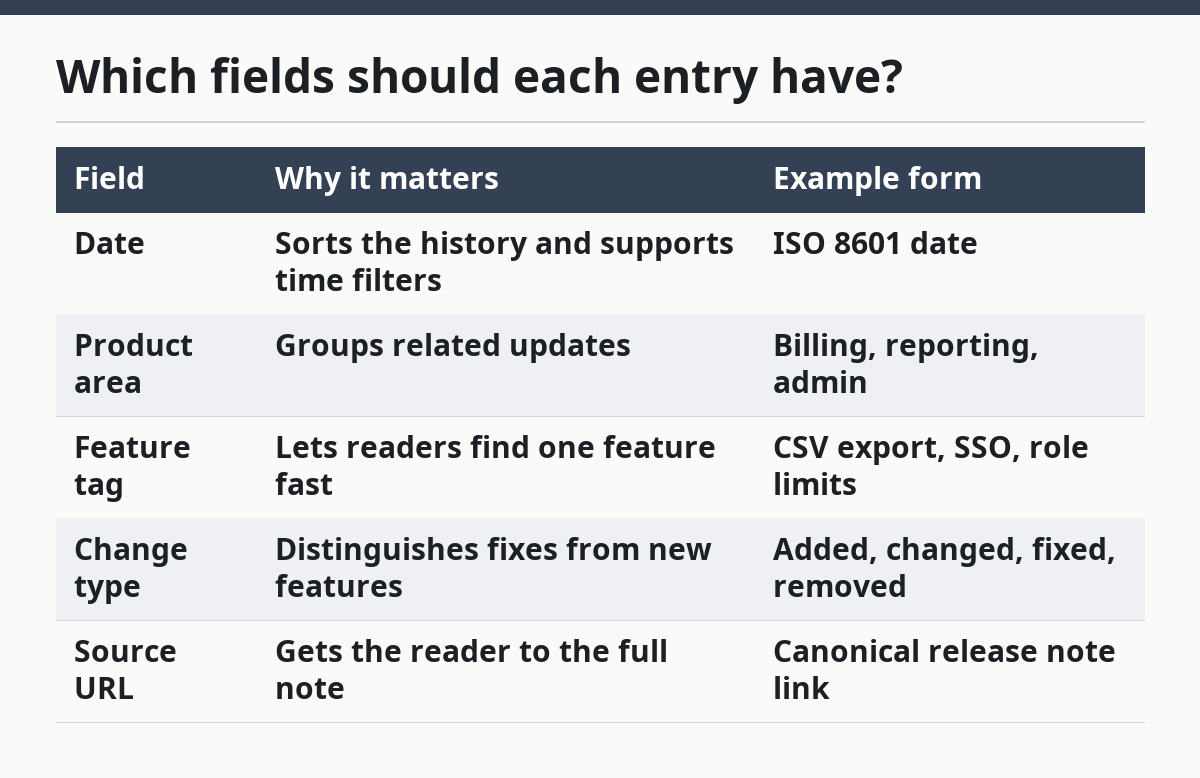
This structure is better than a free-form note archive because it makes the index useful in 2 directions at once: by time and by topic. The trade-off is editorial work. Someone has to tag the entry correctly, and that work grows with every new note.
Do not add too many fields too early. A 12-field schema can slow editors down and make old notes impossible to normalize. If a field does not help search, sort, or grouping, it probably does not belong in the index.
How do tags and date filters work together?
Tags and date filters work together by narrowing the result set from two sides: one tells the system what the note is about, and the other tells it when it happened. In How to Build a SaaS Release Note Index for Searchable Product Change History, that is often the fastest path to searchable product change history.
Tags do the semantic work. A tag such as “reporting” or “integrations” groups updates that belong together even when the note text uses different wording. Date filters do the timeline work. A user can move from “all reporting changes” to “reporting changes in Q2” without reading unrelated notes.
The best setup often uses 2 layers of filters:
- Primary filters: date range and product area
- Secondary filters: feature tag, change type, and source type
That order matters. If you put every filter on the same level, the search experience turns into a wall of options. A small set of primary filters keeps the index usable on a phone screen, where space is limited.
The main trade-off is precision versus maintenance. More tags create more precise searches, but they also create more cleanup. Fewer tags are easier to manage, but the search can become blunt. A controlled vocabulary of 10 to 20 tags is often easier to keep healthy than a long, open-ended tag list.
A good rule is to stop tagging at the level of business meaning, not wording. “Invoice export” and “CSV download” may be the same user-facing feature, so they should not become separate islands unless readers truly search for them differently.
Search index or spreadsheet?
A spreadsheet is enough for a small release note index, while a search index is better when people need fast retrieval across many notes. The choice depends on how many entries you have, how often they change, and how people search them.
Here is a general comparison:
| Option | Best for | Strength | Drawback |
|---|---|---|---|
| Spreadsheet | Small archives and early-stage teams | Easy to edit and audit | Search gets clumsy as rows grow |
| Database table | Structured internal workflows | Better validation and sorting | Still needs a front end for readers |
| Search index | Large archives and frequent lookups | Fast filtering by date and tag | More setup and tagging discipline |
The spreadsheet wins when the index is still close to 100 percent manual work. It is cheap to maintain and easy to fix. The downside is that it depends on human discipline, and the search experience often breaks down once the note count becomes large enough that scrolling is no longer enough.
A search index is the stronger choice when the reader needs 2 things at once: broad recall and quick narrowing. That includes product teams with long release histories, public changelogs with frequent updates, or support teams that need to answer “when did this change?” in under a minute. The cost is editorial overhead. Someone has to keep the tags, dates, and field names consistent.
The wrong choice is a search index for a tiny archive with 20 notes and no clear tagging process. In that case, a spreadsheet plus a clear naming rule is enough. The right tool is the one that keeps the history searchable without turning maintenance into its own job.
What usually goes wrong?
The index usually fails when tags drift, dates are inconsistent, or the source notes are duplicated across pages. Those 3 mistakes make search results noisy and make the history harder to trust.
Tag drift is the most common problem. One editor writes “billing,” another writes “payments,” and a third writes “invoicing” for the same area. The cost is split search results. The fix is a controlled tag list with a short review cycle, not a larger free-text field.
Date inconsistency is the next problem. If one entry uses March 5 and another uses 2025-03-05, sorting becomes harder and filters can behave oddly. The fix is to pick one date format and lock it down at the field level.
Duplicate source notes can create a mess. A user lands on 3 nearly identical entries and does not know which is current. The cost is confusion, not just clutter. The fix is one canonical URL per change, with references only when they add context.
A final mistake is over-grouping. If every update gets put into one giant “product updates” bucket, the index stops helping with feature lookup. A useful index needs at least 3 grouping dimensions: date, product area, and feature tag. Without those, the history is still searchable in name only.
What should a good index help someone do in 10 seconds?
A good index should help someone find one change, understand its place in the timeline, and open the original note in about 10 seconds. That is the real standard, not the number of rows or the size of the archive.
The reader should be able to answer 3 questions fast: “What changed?”, “When did it change?”, and “Where do I read the full note?” If the index cannot answer those, it is only a list. A searchable release note index is useful because it shortens the path from question to proof.
This is also why the page belongs in a product evidence workflow. It supports verification. A support agent, product analyst, or customer can trace a change by feature, date, and product area without guessing which blog post to open first. That is the practical value of a well-kept release history.
If the archive is small, keep it simple. If the archive grows, keep the schema strict. Either way, the rule is the same: the index should make past product changes easier to find than current marketing pages.
How do you index release notes?
You index release notes by turning each note into a structured record with a date, product area, feature tag, change type, and source URL. Then you add a search layer that supports filters for date and tags so users can find one change without reading every post. For a practical setup, see the field guidance above in Which fields should each entry have? and the workflow in How do you build a release note index?
Why keep a release note index?
A release note index keeps product change history searchable by feature, date, and product area. It saves time for support, product, and customers because the answer is one lookup away instead of buried in a long changelog. For examples of date consistency, the RFC 3339 format is a useful reference, and Elasticsearch mappings show how search systems structure records.
How do you search product updates fast?
You search product updates fast by combining date filters with controlled tags. Start with a date range, narrow to one product area, then use a feature tag or change type to cut the result set down to the note you need. If you want the workflow in one place, return to How do tags and date filters work together? and Search index or spreadsheet?
Drafted with AI; not yet reviewed by a person.