






A SaaS content drift register should track 5 things—claims, links, screenshots, page sections, and update notes—in one row per issue. Build the register…
Last updated: November 20, 2026
Quick Answer: A SaaS content drift register should track 5 things—claims, links, screenshots, page sections, and update notes—in one row per issue. Build the register when you need one place to record what changed, what still needs review, and when the page last looked right. For SaaS teams, that matters more than a loose spreadsheet of edits because drift often hides in small parts of a page, not in the headline. This guide covers How to Build a SaaS Content Drift Register for Claims, Links, and Screenshots in a simple way that fits a spreadsheet first and a database later.
What should a content drift register hold?
A content drift register should hold the page, the exact claim, the link, the screenshot, the page section, and the update note. That is the minimum set that lets a reviewer compare what was published with what has changed since then.
Start with one row per issue, not one row per page. A page can drift in three ways at once: a claim can go stale, a link can break, and a screenshot can show an old interface. If those sit in one field, the register turns into a note dump instead of a working log.
Use a simple structure with stable columns. A practical version is: page URL, content type, drift category, exact text or asset, current status, last checked date, reviewer, and next action. If a page has more than one problem, give each problem its own row so one fix does not hide the rest.
A useful register also keeps scope tight. This page is for drift in published content, not for traffic drops, ranking loss, or update priority. That separation matters because the wrong log becomes too broad to act on. The reader who wants one place for claim and screenshot drift does not need a second system for page value or SEO performance.
How do you build the register step by step?
You build the register by listing the pages, choosing a drift category for each item, then checking claims, links, screenshots, page sections, and update notes on a set schedule. A common starting point is a spreadsheet first, then a database only if the list grows past what one sheet can handle.
-
Create a spreadsheet in Google Sheets or Airtable and add columns for URL, section, drift category, exact asset, status, reviewer, and update note. A clean first version can fit on one tab and still support 50 or more rows without confusion.
-
List the live SaaS pages that need monitoring, one URL per line. Include product pages, pricing pages, feature pages, help pages, and comparison pages if they carry claims or screenshots that can go stale.
-
Tag each row with one drift category: claim, link, screenshot, page section, or update note. This keeps a broken link from being logged as a content rewrite and stops fix notes from burying the real problem.
-
Capture the exact text or image snippet in the register, not a summary. A row that says “pricing claim” is weak; a row that quotes the claim and names the section is useful because the reviewer can check it in under 2 minutes.
-
Check the link with a link checker such as W3C Link Checker or a site crawl tool. The result should show whether the URL still resolves, redirects, or returns an error, which lets the register separate a dead link from a page that merely moved. Google’s guidance on redirects also notes that redirects can be appropriate when content moves, so the register should log the final URL and the reason for the change rather than assuming every redirect is a problem. Google Search Central and W3C are useful references here.
-
Compare the screenshot against the live page in the same browser size used for the asset. Use a browser window width that matches the page’s published layout so a card, modal, or pricing block does not look wrong just because the viewport changed.
-
Record the update note after the check, not before it. The note should say what changed, what was verified, and whether the issue was closed or left open for another pass.
A spreadsheet is the right starting point because it is quick to edit and easy to sort. A database or ticket tool is better only when the register needs status filters, reminders, or shared review ownership across more than one person. That trade-off is simple: spreadsheets are often faster to start; structured tools are easier to manage once the log gets noisy.
Which drift categories matter most?
The drift categories that matter most are claims, links, screenshots, page sections, and update notes, because those are the parts readers and reviewers can actually compare. A broad category like “content issue” looks tidy, but it hides the kind of fix needed.
Here is the practical difference:
| Drift category | What it catches | What it costs if missed | What to log |
|---|---|---|---|
| Claim | Old product statement, outdated promise, wrong feature wording | Readers trust a promise the product no longer keeps | Exact sentence, section name, current status |
| Link | Broken or redirected URLs | Bad paths, dead references, wasted clicks | Destination URL, result, replacement if needed |
| Screenshot | Old UI, changed label, missing control | Visual mismatch that makes the page look stale | Image name, viewport size, page section |
| Page section | A block that no longer fits the rest of the page | Mixed message inside one page | Section title, related claim, owner |
| Update note | Missing review trail | No proof of what changed and why | Date, reviewer, decision, next check |
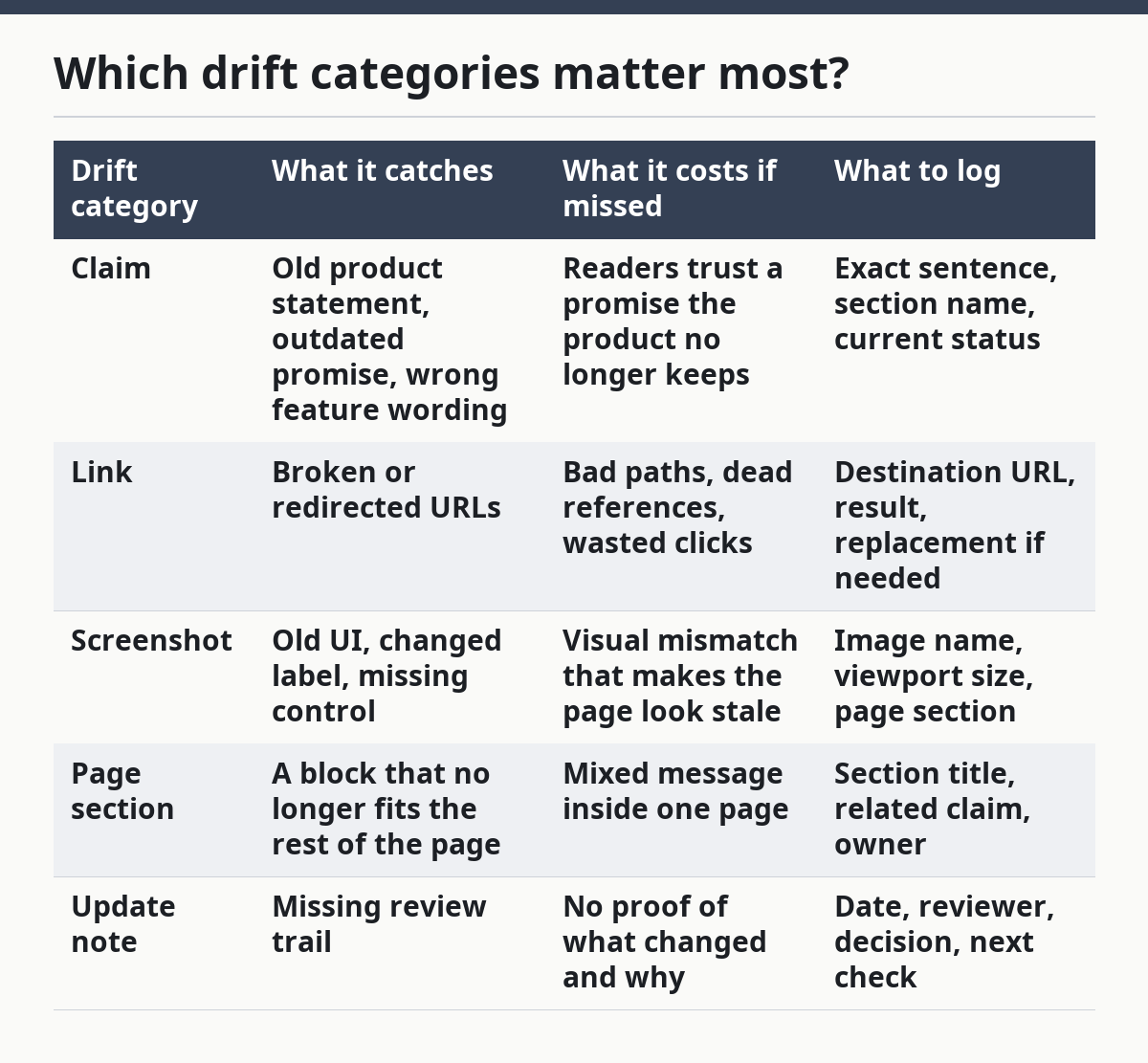
Claims are the most sensitive because they can age fast when a product ships new features or drops old ones. A single outdated sentence can make the rest of the page look less reliable, even if the links still work.
Links are easier to catch but still worth tracking on their own. A link may be live and still wrong if it points to an old anchor or a moved page, so the register should log both the status and the destination.
Screenshots deserve their own category because they decay in a different way from text. A screenshot can stay technically correct in one browser and look wrong in another if the layout shifts, the button label changes, or a panel moves. That is why the register needs a note on viewport or page size, not just the image file name.
Page sections and update notes are the glue. Without them, the register can tell you that something drifted, but not where to fix it or who last touched it. That is the difference between a list and a working register. For teams that are unsure where the line sits between content, SEO, and product accuracy, it can help to review a content governance checklist or compare page refresh workflows before you decide who owns each row.
How do you check links and screenshots without wasting time?
You check links and screenshots by using one pass for the live page and one pass for the saved asset, then recording the result in the same row. That keeps the review under control and avoids three different notes for one problem.
For links, use a tool that can show the destination and the response status, then mark the result as live, redirected, or broken. A redirect is not always a failure; in some cases it is the correct result when content has moved, but it still deserves a note if the page promised a direct destination and now lands somewhere else. The register should store the final URL so the next reviewer does not repeat the same check. If the team is unsure whether a redirect is acceptable, it is safer to consult a technical SEO or content professional and confirm the setup against your site policy. Search Central’s redirect guidance is a useful source for this judgment call: Google Search Central.
For screenshots, compare the live page to the saved image at the same viewport. If the page was captured at desktop width, check it at desktop width again. A 320 px mobile layout and a wider desktop layout can make the same interface look unrelated, so the register needs the capture context.
A good screenshot check looks for changed labels, missing controls, reshuffled sections, and image substitutions. If the product UI changed, note whether the screenshot still tells the truth about the feature. If it does not, the row should stay open until the image is replaced or the surrounding copy is rewritten.
This is where many generic systems go wrong: they treat screenshot drift like a design issue and link drift like a maintenance issue. In practice, both affect trust on the same page. A register that separates them only by rows gives the reviewer a faster path to the fix, but if the team is dealing with a regulated or high-stakes page, it is wise to consult a professional before deciding that a screenshot is “close enough,” especially when the visual state affects claims or pricing. For a broader UX check, Nielsen Norman Group is a useful source on how users read and trust page content.
If the page uses many images, keep filenames descriptive and stable. A name like pricing-dashboard-desktop.png is easier to scan than image1.png. That small habit matters when a register holds dozens of rows and one reviewer needs to check them in a single 15-minute pass. For teams that want a deeper process map, see the page QA workflow and browse the content audit template.
What should the review log prove?
The review log should prove that someone checked the issue, saw the current page state, and made a decision. Without that, the register becomes a pile of stale notes with no audit trail.
A solid review log includes the date, the reviewer, the drift category, the current result, and the next action. If a claim is still correct, say so. If a link now redirects but still works, say that too. If a screenshot is outdated and needs a new asset, note the owner and the follow-up.
This is where update notes matter most. A good note is short and specific: “Claim still matches current pricing block,” or “Screenshot no longer matches new dashboard label.” A vague note like “reviewed” is close to useless because it does not tell the next person what was checked.
The log also helps set a review cadence without turning the register into a calendar. For fast-changing SaaS pages, a 30-day or 90-day review cycle is often more practical than an ad hoc check, but the right interval depends on how often the product changes and how visible the page is. Pages with screenshots and pricing claims usually need more frequent review than evergreen help pages.
The trade-off is simple. More frequent review catches drift sooner, but it costs more time. Less frequent review saves effort, but it lets old claims sit longer. The register works best when it matches the page’s change rate, not a fixed rule copied from another team.
When should you not use this register alone?
You should not use a content drift register alone when the real problem is ranking loss, CTR decline, or a full content rewrite. Those are different jobs, and they need different tracking. This register is for subtle accuracy drift, not for deciding which page deserves the next big update.
It is also the wrong tool if the team needs a full edit history. A drift register can note that a claim changed, but it is not a full revision log with every content swap. If the page owner needs to reconstruct a long editorial trail, that belongs in a separate change log.
The same split applies to prioritization. A drift row can show that a page has a broken link or an old screenshot, but it should not decide whether that page gets fixed first. That decision belongs in the content refresh prioritization system for traffic, business value, and update cost.
Used well, the register stays narrow and useful. It tells the reviewer exactly what drifted, where it lives, and what still needs attention. That makes it a better fit for SaaS content governance than a general notes file or a catchall project board. If you need a wider process, use the content governance checklist alongside a content audit template so the register stays focused.
Key takeaways
- Keep one row per drift issue so claims, links, screenshots, and page sections do not get mixed together.
- Save the exact text or image, not a summary, because a reviewer needs to compare the live page fast.
- Treat redirects, broken links, and outdated screenshots as different problems with different fixes, and if a page is high-stakes, consult a professional before deciding whether a redirect or screenshot change is acceptable.
- Put the review note in the same row as the issue so the next check has a clear trail.
- Use the register for accuracy drift, not for traffic, CTR, or rewrite priority.
What is content drift?
Content drift is the gap between what a published page says or shows and what the product currently does. In SaaS, that gap often appears in claims, links, screenshots, or page sections. A drift register keeps those gaps visible before they spread across the page.
How do you spot content drift?
You spot content drift by comparing the live page with the exact claim, link, screenshot, and section that were published earlier. A link checker, a browser check, and a quick read of the text usually show the mismatch. The register works best when each drift type has its own row and status.
How often should content drift be reviewed?
Content drift should be reviewed on a schedule that matches how fast the page changes. Fast-moving product pages may need a review every 30 days, while slower pages can stretch longer. Screenshots and pricing claims usually deserve a shorter cycle than evergreen help content.
Drafted with AI; not yet reviewed by a person.
