Use 4 rules for a SaaS blog image and media standard for alt text, file names, and compression: describe the image’s purpose, name files with plain words…
Last updated: November 20, 2026
Quick Answer: use 4 rules for a SaaS blog image and media standard for alt text, file names, and compression: describe the image’s purpose, name files with plain words, compress before upload, and credit sources when needed. This guide on How to Build a SaaS Blog Image and Media Standard for Alt Text, File Names, and Compression tells editors, writers, and designers how to name files, write alt text, compress images, and handle screenshots and diagrams the same way every time. The point is not prettier posts; the point is fewer broken uploads, clearer search signals, and less guesswork for anyone publishing a blog post.
Key takeaways
- A media standard works best when it covers one thing: how every blog image, screenshot, diagram, and other media file should be prepared before upload.
- Alt text should describe the image’s purpose in the post, not just what is visible.
- File names should be readable by people and machines, with hyphens and plain words instead of random camera names.
- Compression should cut file weight without making text in screenshots hard to read.
- The standard should say who supplies source files, who approves exceptions, and what happens when a file is too large or too vague to publish.
What should a SaaS blog image standard cover?
A SaaS blog image standard should cover alt text, file names, compression, captions, source attribution, and the types of media you publish most often. That usually means images, screenshots, diagrams, charts, and any file that appears inside a post or social preview.
Therefore, start with the smallest set of rules that still removes uncertainty. A good standard tells someone what to do with a screenshot named IMG_2049.png, what kind of alt text belongs on a chart, and what image size is acceptable before upload. If the answer changes from editor to editor, the standard is too thin.
Keep the scope tight. This page is for media handling in blog posts, not for the content quality checklist, content brief template, content review workflow, content update workflow, or content inventory. Those belong elsewhere in your SaaS blog structure and content governance system, including related guidance on content workflow, blog governance, and content inventory.
A useful standard also names who owns each step. One person can create the image, another can check the file name, and a third can confirm that the caption and attribution are right. The point is to make the path from draft to publish obvious.
For example, think of it as a media style guide with four rules: describe the image, name the file, reduce the file size, and credit the source when needed. That is enough to prevent most publishing mistakes.
How should alt text be written?
Alt text should describe the image’s job in the post, not repeat the post title or list every visual detail. For SaaS blogs, that usually means a short description of the screen, chart, or diagram and the idea it supports.
A good test is simple: if the image disappeared, what would a reader miss? For a product screenshot, alt text should name the product screen and the action shown. For a diagram, it should explain the relationship or flow, not every box on the page.
Use this order when writing it:
- Identify the media type, such as screenshot, diagram, or chart.
- Name the subject, such as dashboard, pricing page, or onboarding flow.
- State the point of the image, such as showing a filter, comparing plans, or mapping a workflow.
- Keep the wording plain and short unless the image carries dense information that needs more detail.
A screenshot of a billing page might need alt text that says it shows monthly and annual plan options with a toggle. A diagram of an approval flow might need alt text that explains that a draft moves from writer to editor to publish. A chart should describe the trend or comparison, not the axis labels alone.
Do not stuff alt text with keywords. That makes it harder to read and less useful to someone using a screen reader. The clean rule is to write for meaning first and search value second.
The W3C’s images guidance is a useful reference point for deciding when an image needs alt text and when the text should be short or more detailed: https://www.w3.org/WAI/tutorials/images/decision-tree/. Google’s image publishing guidance is also worth reading for plain language on image context and discoverability: https://developers.google.com/search/docs/appearance/google-images.
How should screenshots be named for seo?
Screenshots should be named with plain words, hyphens, and the actual subject of the image. A file name like saas-onboarding-dashboard-filter.png is far better than IMG_2049.png or Screenshot 2026-01-01 at 9.14.10 AM.png.
File names help your team, not just search engines. When a writer, designer, or editor sees pricing-table-annual-toggle.png, they can guess what the image is before opening it. That matters when a post has 8 or 12 media files and the draft has to move fast.
Use a repeatable pattern. One practical format is topic-subtopic-media-type-detail, with hyphens between words and no spaces. If the image is a screenshot, say so if it helps the team sort files. If the post title already names the subject clearly, the file name can stay shorter.
Here is the comparison that usually matters most:
| Option | Good for | Weak point |
|---|---|---|
| Plain descriptive file name | Team sorting and reuse | Can get long if the subject is vague |
| Camera-generated name | None, except temporary storage | Useless for search and hard to manage |
| Keyword-stuffed name | Short-term SEO myths | Looks unnatural and helps nobody |
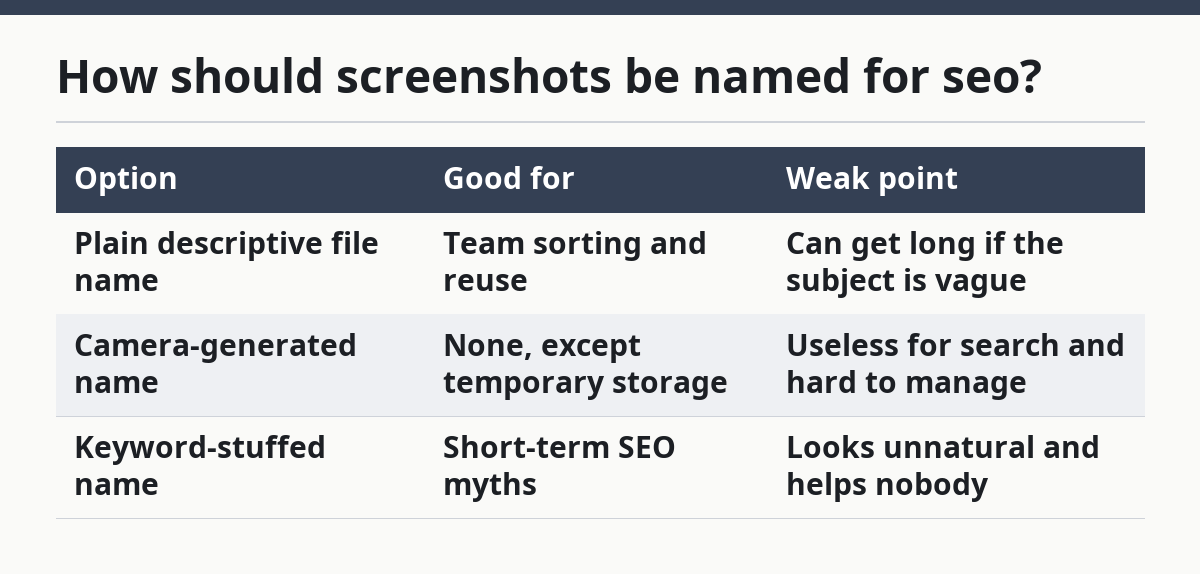
A screenshot name should never be a sentence. It should be clear enough to file, search, and reuse. If the name needs punctuation beyond hyphens, it is probably too busy.
One trade-off matters here: very detailed names are easier to understand, but they can become clumsy. Keep the core subject in the file name and leave the finer context to the alt text or caption.
What compression rule should the standard use?
A compression rule should say that images must be reduced before upload, but not so much that text becomes hard to read. That is especially important for screenshots, diagrams, and charts, where small labels can break first.
Compression is not the same as shrinking every file the same way. A hero image, a product screenshot, and a simple icon do not always need the same treatment, but teams should confirm the rule with a designer or developer because the right approach depends on the layout and export workflow. See the W3C image decision tree and Google’s image guidance for a practical reference: https://www.w3.org/WAI/tutorials/images/decision-tree/ and https://developers.google.com/search/docs/appearance/google-images.
Use a three-part rule. First, export the image in the right format for the job. Second, remove anything that does not help the reader. Third, check the file after compression to make sure the text still reads cleanly. If a screenshot shows a table or UI label, that check matters more than the file size itself.
The honest trade-off is simple: heavier compression usually means faster load times, but it can blur text or make interface details fuzzy. That is a bad trade for SaaS content, where a screenshot often proves how a feature works. A blurry interface image can do more harm than a slightly larger file.
Set one approval rule for exceptions. If a compressed screenshot makes a number or label hard to read, the file should be re-exported rather than forced through. That keeps the page usable and saves editors from arguing over a fuzzy image later.
If your stack uses separate exports for desktop and mobile, the standard should say which version is the source of truth. Without that, people tend to upload whatever was easiest to grab, which is how image quality slips over time.
What should captions and source attribution do?
Captions should explain why the image is there, and source attribution should say where the image came from when it is not original. A caption is not a second alt text field; it gives context the reader can see on the page.
A good caption does one of three things. It labels the step shown in a process, clarifies a comparison, or adds a short note that the image alone cannot carry. For a SaaS blog, that often means explaining a workflow step, a dashboard state, or a chart source.
Source attribution matters when the image is borrowed, licensed, or adapted. If the file came from a vendor, stock library, partner, or public source, the standard should require a clear credit line or a note in the caption area. If the image is original, the standard should still say who created it inside the team, even if that note stays internal.
Do not bury attribution in a random footnote if the image needs it to be understood. Keep the credit close to the media. That lowers the chance that someone republishes a borrowed chart without the right note attached.
The clean rule is this: captions explain meaning, attribution explains origin. Mixing those jobs makes both weaker.
How do you make the standard easy to follow?
You make the standard easy to follow by turning it into a short checklist and a few examples, not a long policy nobody reads. A 1-page standard is easier to use than a 10-page document full of exceptions.
Build the standard around common media cases: screenshot, diagram, chart, and external image. For each one, state the file naming pattern, alt text rule, caption rule, and whether source attribution is needed. When people can compare a new file to an example, they stop guessing.
The most useful examples are the boring ones. Show one good screenshot file name, one weak file name, one short alt text line, and one caption that adds context. A standard without examples gets interpreted five different ways by five different people.
Set a clear exception path. If a file does not fit the rule because the image is too large, too detailed, or too sensitive to describe in a standard way, the standard should say who decides what happens next. That keeps the rulebook from turning into a debate every time a post uses an unusual graphic.
This is also where you define what the standard is not for. It should not decide article quality, topic choice, or internal linking. It only tells the team how to handle media files before they go live.
A good media standard is quiet. Nobody notices it when it works, and that is the point. The reader sees a clear screenshot, a useful caption, and a page that loads without dragging.
What should saas blog image alt text include?
Alt text should include the subject of the image and the reason it is in the post. For a SaaS screenshot, that usually means the screen name, the action shown, and the point of the image in a short line. It should not read like a keyword list or repeat the caption word for word.
How should screenshots be named for seo?
Screenshots should be named with plain, descriptive words separated by hyphens. Use the topic, the screen or feature, and a short detail if needed, such as billing-settings-tax-toggle.png. That format helps people sort files, and it gives search systems a clean signal.
What file formats are best for blog images?
The right format depends on the image type and the job it has on the page. Screenshots and diagrams need sharp text, while simpler graphics may be handled differently. The standard should state the format by use case, not by habit, so the team does not force one file type onto every image.
Drafted with AI; not yet reviewed by a person.