A SaaS compliance page tells you what rules the vendor says its product can support, what that support covers, and where the claim stops. This guide…
Last updated: November 16, 2026
A SaaS compliance page tells you what rules the vendor says its product can support, what that support covers, and where the claim stops. This guide explains How to Read a SaaS Compliance Page for Regulated Use Cases, Scope, and Exceptions: read it for scope first, then exceptions, then proof, or you will overread a HIPAA, GDPR, CCPA, data residency, or DPA claim that only applies to one plan, one region, or one setup.
Quick answer: check 4 things—product, plan, region, and legal role—before you trust a SaaS compliance page for regulated use.
Key takeaways
- A compliance page is a scope document, not a promise that fits every customer.
- The first thing to check is who the claim applies to: product, plan, region, and customer role.
- Exception language matters as much as the headline claim.
- Regulated use cases need both the legal label and the operational limit behind it.
- If the page is vague about a DPA, data residency, or certification boundary, consult counsel or a privacy professional and compare the page with the linked legal documents, including HHS HIPAA guidance and EUR-Lex GDPR text: https://www.hhs.gov/hipaa/for-professionals/privacy/index.html and https://eur-lex.europa.eu/eli/reg/2016/679/oj
What does a SaaS compliance page actually prove?
A SaaS compliance page proves what the vendor is willing to claim in public, not everything the product can do. It usually points to a standard, a law, or a contract term, then narrows that claim with scope notes, exclusions, or plan names.
That distinction matters in regulated work, so consult a privacy or legal professional when the page is being used for procurement or a regulated use case. A page can say “supports HIPAA” or “GDPR-ready” and still leave open who signs the DPA, which data flows are covered, or whether the claim applies only to paid plans. Under HIPAA, for example, the real question is not just whether the product is “compliant,” but whether the vendor will act as a business associate for the data you plan to store. The HHS HIPAA guidance is a good reference point here, and the legal text for GDPR sits in Regulation (EU) 2016/679 on EUR-Lex: https://eur-lex.europa.eu/eli/reg/2016/679/oj
Read the page as a boundary map. If it names HIPAA, GDPR, CCPA, or a DPA, ask what role the vendor is taking, what data is in scope, and what parts of the service are excluded. A page that skips those details is not useless, but it is not enough for a regulated buying decision.
How do I read the scope on a SaaS compliance page?
You read scope by identifying four things in the first pass: product name, plan name, geography, and customer type. If any one of those is missing, the claim may be narrower than it looks.
Use this 4-step check:
- Scan the product name and match it to the exact service named on the page. If the vendor sells more than one product, a compliance claim for one app does not automatically cover the others.
- Check the plan or tier for words like “Enterprise,” “Business,” or “paid plans only.” A compliance statement tied to a single tier often excludes free or trial use.
- Look for region language such as “US data center,” “EU hosting,” or “data residency available on request.” That tells you whether the claim is about the platform as a whole or a specific deployment.
- Find the customer role the page assumes. If the page talks about “customers” but the contract uses “controller,” “processor,” or “covered entity,” the claim may depend on your legal role, not just your company size.
In short, the goal is not a generic green light but a scoped answer for your setup. If the page gives a broad headline and no scope, assume the vendor is speaking about a subset of the service, not the whole thing. That is especially true when the page is trying to cover HIPAA, GDPR, and CCPA on one screen; broad wording often hides narrow coverage.
What do exception lines mean?
Exception lines tell you where the claim stops, and they are often the most useful part of the page. A short line about exclusions can matter more than a bold badge at the top.
Watch for phrases like “not available on all plans,” “subject to contract,” “for eligible customers only,” “except where prohibited,” or “limited to certain regions.” Those are not decoration. They usually mean the vendor is reserving the right to decline the feature, limit it to a specific deployment, or remove it if the customer does not meet a condition.
Because those lines define the boundary, certification language needs the same scrutiny. A certification or report may cover one product environment, one cloud region, or one point in time. If the page does not say that boundary plainly, you should not assume the certification applies to the whole platform or every add-on. The same logic applies to a DPA: if the page says a DPA is available, that does not mean it is automatically in force, signed, or attached to every account.
The honest trade-off is simple. Broad pages are easy to scan, but they are weak for due diligence. Narrow pages are less flashy, but they tell you where the vendor is actually prepared to stand behind the claim. For regulated use cases, the second kind is the one that matters.
Which terms matter most: HIPAA, GDPR, CCPA, data residency, DPA?
These terms matter because they point to different obligations, and a compliance page often uses them loosely. Treat each one as a separate test, not a synonym for “safe to use,” and consult counsel or a privacy professional if the page does not connect the term to a contract or operating boundary.
| Term | What to look for on the page | Common trap |
|---|---|---|
| HIPAA | Whether the vendor will sign a BAA or says it supports covered entities or business associates | Assuming “HIPAA-friendly” means the service is automatically allowed for PHI |
| GDPR | Whether the vendor acts as a processor, supports a DPA, and describes international transfer terms | Confusing privacy language with contract terms |
| CCPA | Whether the page mentions service-provider or contractor language and California consumer data handling | Treating a marketing claim as a legal status |
| Data residency | Which country or region stores the data, backups, and logs | Assuming “EU hosting” covers all copies of data |
| DPA | Whether the DPA is available, where it lives, and when it applies | Believing a downloadable DPA is the same as a signed agreement |
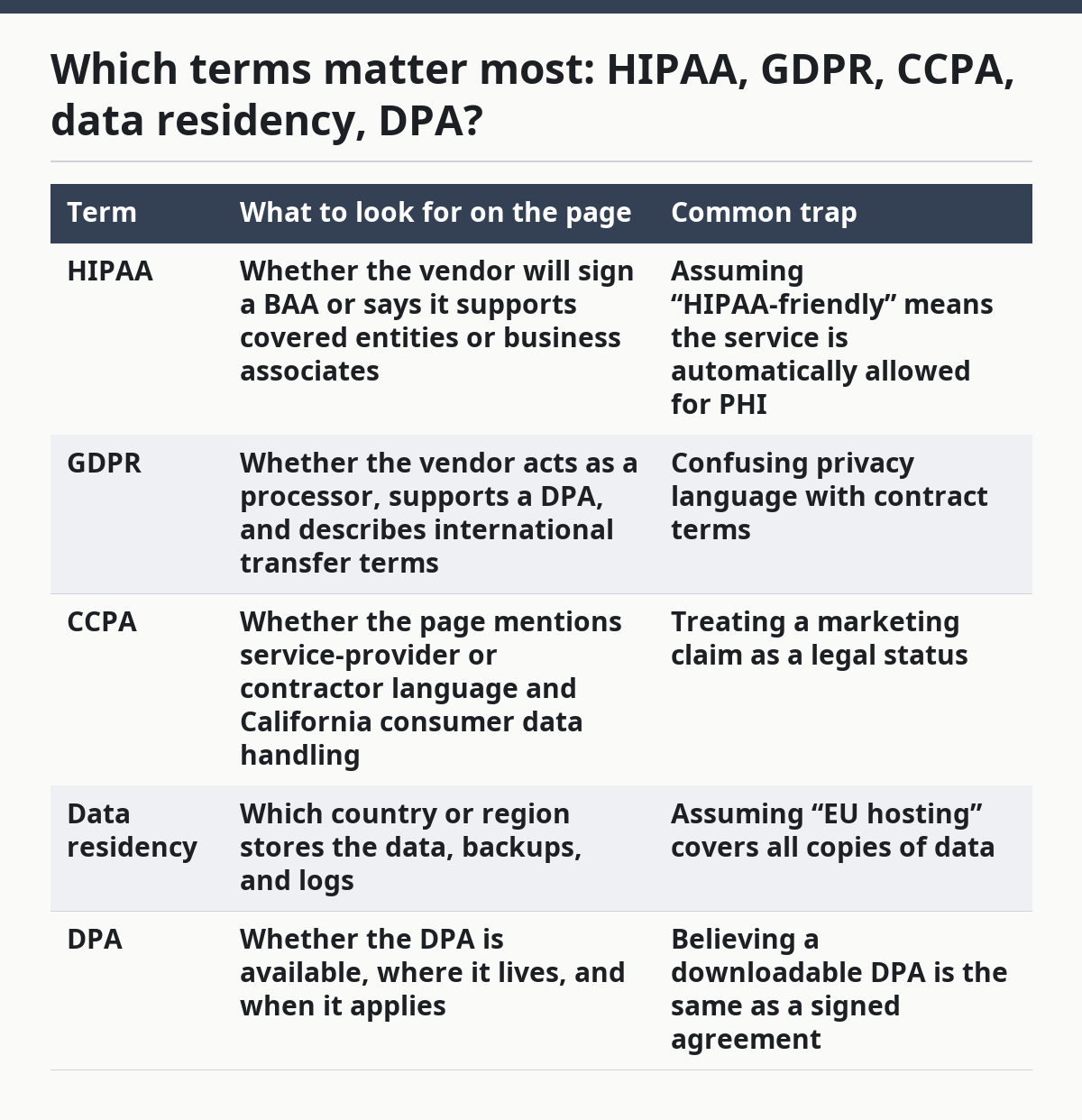
HIPAA and GDPR deserve the most care because they are often used in sales copy without the legal structure behind them. A page can say it has “HIPAA support” and still leave you to confirm the BAA, access controls, and permitted use. A page can say “GDPR compliant” and still not explain whether the customer is controller or processor, or whether cross-border transfers are covered by contract terms.
CCPA is often presented more lightly, but the same discipline applies. If the page does not say whether the vendor acts as a service provider or contractor, the claim is too vague for a regulated workflow. Data residency is the most common source of confusion, because storage location is not the same as transfer control. A DPA can help with GDPR obligations, but only if it is tied to the right entity and the right service.
How do I know if a compliance page applies to my industry?
It applies only if the page matches your industry’s data type, legal role, and deployment model. A hospital, a fintech app, and a consumer SaaS tool may all read the same page very differently.
Start with the data class. If you handle PHI, health records, payment data, or child data, the page must speak in terms that fit that data and the law that governs it. A generic “secure and compliant” sentence does not tell you whether the vendor is prepared for a regulated workflow, so consult a privacy or legal professional before relying on it. For HIPAA use, the key question is whether the service can be used in a business associate arrangement. For GDPR use, the key question is whether the vendor’s DPA and transfer language fit your controller or processor role.
Then check the deployment model. A compliance page may be written for standard SaaS only, while your use case depends on dedicated infrastructure, a private region, or custom retention settings. If the page never mentions those settings, the claim may not reach them. This is where regulated industries often get burned: the headline claim is true for the shared service, but not for the exact configuration they planned to buy.
The page is not for you if your use case depends on a custom legal setup and the vendor offers no public evidence of it. In that case, the page is a lead, not a decision document.
What should I check before I trust the claim?
You should check the claim against the contract, the scope notes, and the exact service name. The page is the start of the review, not the end.
Use this checklist:
- Match the claim to the service named in the page and in the contract.
- Find the scope note that says whether the claim covers all plans, selected plans, or selected regions.
- Look for the supporting document such as a DPA, BAA, or trust center link.
- Read the exception language for exclusions, beta features, or third-party services.
- Check the certification boundary if the page cites a standard or audit report.
- Confirm the data path for storage, processing, backups, and support access.
- Compare the public page to the contract so the marketing language does not outrun the legal text.
If the page passes this check, the claim is stronger. If it fails on even one item, the risk is not always that the vendor is lying; often the risk is that the claim is too broad for your use case, or the page is incomplete. Consult counsel or a privacy professional when the scope is unclear. That distinction matters in procurement because a vague page can still be honest, but it is not enough to support a regulated decision.
What are the most common mistakes?
The most common mistake is treating a headline badge like a full legal review. That can cost time, create false confidence, and send the buyer back to legal after the vendor is already in the pipeline.
Three errors show up again and again. First, readers assume a compliance page covers every product the vendor sells. It often does not. Second, readers miss region limits and think data residency means full local control, when it may only apply to one storage layer. Third, readers confuse a downloadable DPA with a binding contract term. A DPA that exists on a page is not the same as a DPA that is signed, attached, and current.
The fix is to slow down on the words that sound official. “Supports,” “available,” “eligible,” and “may” are not the same as “covered,” “included,” or “guaranteed.” If the page is not explicit, do not fill the gap with your own assumption. For regulated use, the cost of a wrong read is usually a delayed purchase, a failed audit question, or a contract that needs rework.
This is also where the page is not for everyone. If your team needs a definitive legal opinion on HIPAA, GDPR, or CCPA status, the page alone is not enough. At that point, you need contract review from counsel or a privacy professional who can interpret the exact wording for your use case.
Where do I go after the compliance page?
You go to the DPA, the main contract, and any linked trust or legal documents that define the boundary of the claim. The compliance page is a summary; the binding terms live elsewhere.
Start with the linked legal document if the page gives one. Then compare its wording with the public page line by line. If the page says one region and the DPA says another, trust the contract, not the badge. If the page names HIPAA, ask where the BAA lives and which service it covers. If it names GDPR, check the controller-processor language and the transfer terms.
Use the page as a filter, not a final answer. A strong page will make the next step obvious. A weak page will leave you guessing, which is itself a signal. For public SaaS evidence, that gap often matters more than a polished badge.
This guide sits under the broader hub on SaaS trust, proof, and evidence pages, where the point is always the same: read the public claim for what it says, not for what you hope it means. That habit saves time in regulated buying and keeps the scope honest. See also the related guide on SaaS trust center checks, the DPA review checklist, and the HIPAA vendor review guide.
What does a SaaS compliance page prove?
A SaaS compliance page proves what the vendor is claiming in public about scope, support, and limits. It does not prove that every feature, region, or plan is covered unless the page says so. Treat it as a starting point, not a legal conclusion.
How do I know if a compliance page applies to my industry?
A compliance page applies to your industry only if the legal role, data type, and deployment model match your use case. If you handle PHI, EU personal data, or consumer data under CCPA, you need the page to speak plainly about those conditions. If it stays vague, it probably does not answer your question.
What should I check on a compliance page?
Check the exact service name, the plan or region limit, the exception language, and any linked DPA or BAA. Then compare the public claim to the contract and the certification boundary. If those do not line up, the page is not safe to read as a full promise.
Drafted with AI; not yet reviewed by a person.