In most cases, you can map a SaaS launch stakeholder trail from product , marketing , support , sales, and legal clues in 5 steps. This article explains…
Last updated: November 16, 2026
Quick Answer: In most cases, you can map a SaaS launch stakeholder trail from product, marketing, support, sales, and legal clues in 5 steps. This article explains How to Map a SaaS Launch Stakeholder Trail from Product, Marketing, and Support Clues by reading the public trail in layers: product cues, marketing copy, support references, role names, and approval language.
A SaaS launch stakeholder trail is the chain of product, marketing, support, sales, and legal clues that shows who touched a launch before it went public. That trail matters because launch pages rarely say “owned by product marketing” in plain text. Instead, the clues are spread across product release notes, blog credits, support articles, help-center edits, demo pages, and legal footers. A reader who can connect those dots can infer who drove the launch with more confidence than someone who only watches announcement speed.
## Table of contents
Key takeaways
What is a SaaS launch stakeholder trail?
Which clues point to product ownership?
How do marketing clues reveal launch ownership?
What do support references tell you?
How do sales and legal show up in the trail?
How do you turn clues into one stakeholder map?
Which mistakes distort the trail?
When is this trail strong enough to trust?
Key takeaways
- Start with the most visible clue, then work backward through less obvious ones.
- Product wording often points to the feature owner; marketing wording often points to the launch owner.
- Support and help-center updates usually reveal who had to absorb customer questions.
- Sales and legal show up in approval language, footer text, or terms-linked pages.
- A single name is rarely the whole story; launches usually pass through more than one team.
What is a SaaS launch stakeholder trail?
A SaaS launch stakeholder trail is the pattern of public evidence that reveals which internal teams handled a launch. It is not the same as guessing rollout timing or counting teaser posts; it is about ownership, review, and handoff. The useful unit here is a named role or team, not a vague “the company.”
The trail matters because launch pages rarely say “owned by product marketing” in plain text. Instead, the clues are spread across product release notes, blog credits, support articles, help-center edits, demo pages, and legal footers. A reader who can connect those dots can infer who drove the launch with more confidence than someone who only watches announcement speed.
A good map usually includes at least 5 role types: product, marketing, support, sales, and legal. You may not find all five on every launch, but if a launch is serious enough to touch customer-facing pages, it often leaves traces in most of them. The trail is strongest when the same feature name, module name, or campaign name appears in 2 or 3 places.
This page fits the broader SaaS launch intelligence systems hub because it focuses on internal ownership, not hype. That distinction matters: one team can write the launch copy while another team owns the feature, and a third team can approve the wording. If you confuse those layers, you will assign credit to the loudest page instead of the real chain.
A simple frame helps. Ask: who built it, who marketed it, who had to support it, who sold it, and who signed off. Those are the 5 lenses that turn scattered public text into a stakeholder trail.
Which clues point to product ownership?
Product ownership usually shows up in feature names, release notes, and technical phrasing. Look for language that sounds like implementation work rather than promotion: module names, settings labels, beta flags, workflow terms, or “now supports” copy. If the public page uses the same internal-sounding feature name across several places, that is a strong product signal.
The first step is to collect every public artifact tied to the launch: product page, changelog, blog post, help article, demo page, and in-product release note if it is public. Then note the nouns that repeat. A term like “workspace permissions,” “automation rules,” or “ticket routing” often points back to the feature team, not the campaign team.
Here is the core procedure I use for mapping product clues:
- List the launch surfaces you can see in public in a 1-day or 1-week window: homepage banner, blog post, changelog, help center, pricing page, and app store copy if relevant. The result is a small source set, not a guess.
- Extract repeated nouns and verbs from those pages. Words like “build,” “configure,” “sync,” “invite,” or “route” often sit closer to product than marketing.
- Check for direct ownership markers such as “product team,” “engineering,” “PM,” “release,” or a named feature owner in the copy or metadata. The result is a likely internal owner, even if the page never says “owned by.”
- Compare the wording across pages. If the same feature is described with the same phrase in a changelog and a blog post, product probably supplied the core wording.
- Separate feature owner from launch owner. A product manager may own the feature while product marketing owns the launch asset. That split is common and easy to miss.
Because product clues are usually the most accurate for feature ownership, they are often the least explicit about launch orchestration. If you stop at the technical page, you may miss the person who coordinated the rest of the rollout. That is why product clues should be your base layer, not your final answer.
How do marketing clues reveal launch ownership?
Marketing clues reveal who packaged the story, named the campaign, and controlled the public version of the launch. The clearest signs are headlines, bylines, campaign names, landing-page structure, and repeated brand phrases across channels. If the same wording appears on a blog post, a homepage banner, and a social post, marketing likely shaped the launch narrative.
The key is to separate message design from feature ownership. Marketing often writes the first public copy, but the feature may have come from product, while sales and legal reviewed the final language. A launch page with polished phrases and a named author can still be downstream from product decisions made weeks earlier.
Use this comparison to read marketing clues against product clues, and if you are making an employment or ownership judgment, consult a professional and verify with sources such as the Project Management Institute’s RACI guidance and Atlassian’s RACI guide: Project Management Institute and Atlassian.
| Clue type | What it usually signals | What it does not prove |
|---|---|---|
| Blog byline or campaign author | Launch content owner or product marketing owner | Who built the feature |
| Repeated slogan or theme | Central messaging authority | Who approved legal wording |
| Homepage banner or hero text | Company-level promotion priority | Which team wrote the feature |
| Email subject line or promo copy | Demand-gen or lifecycle marketing input | Whether sales drove the launch |
| Same phrase across 2 or 3 assets | Coordinated launch package | That marketing had final sign-off |
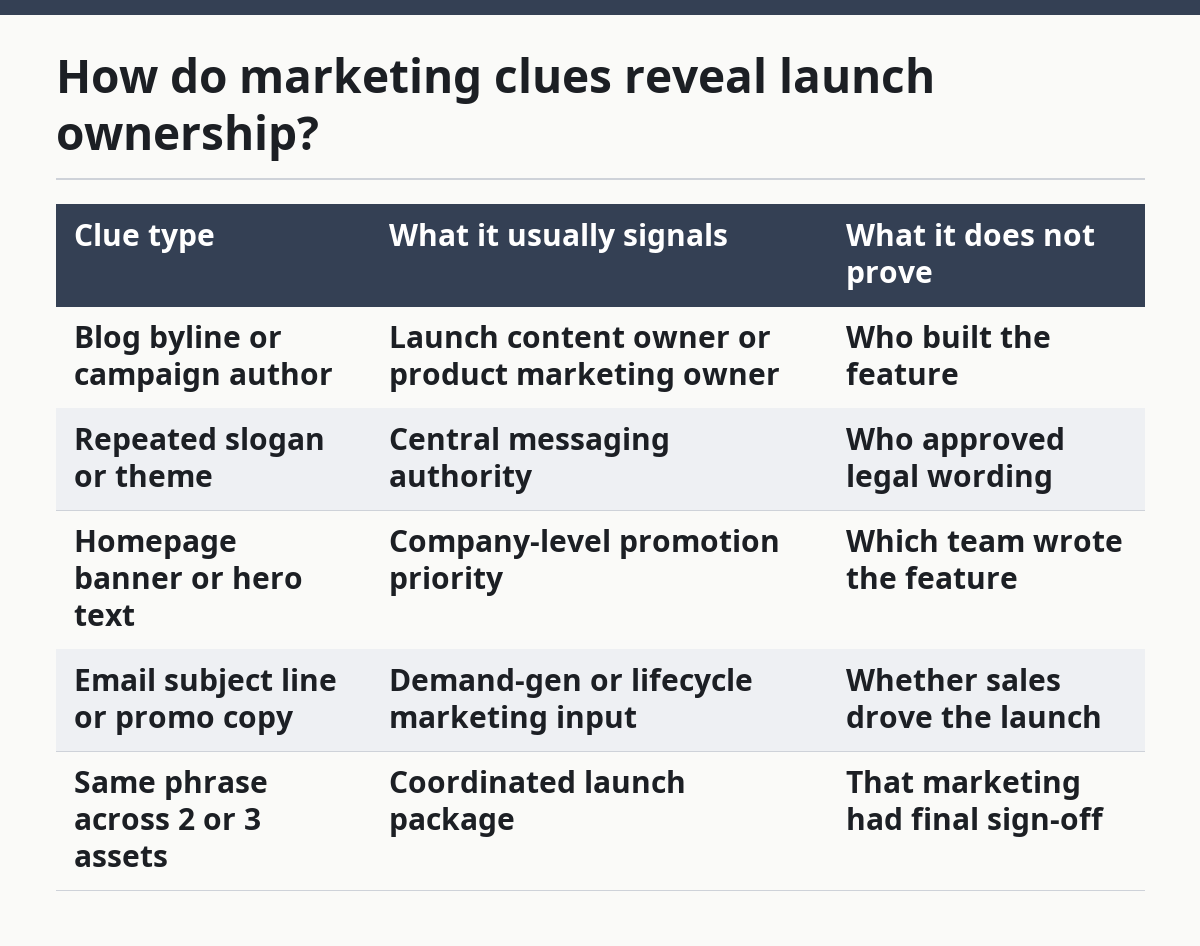
A common mistake is to treat a strong headline as proof of ownership. A marketer can own the copy while product owns the release and legal owns the review. The better question is who controlled the final narrative and who supplied the feature facts.
One practical tell is the presence of product-marketing language: use cases, outcomes, and customer pains. If a page leads with “save time,” “reduce handoffs,” or “work faster,” that is a marketing frame. If it leads with field names, setup steps, or technical limits, product likely contributed the substance.
What do support references tell you?
Support references tell you which team had to absorb customer questions after the launch. These clues often show up in help-center articles, FAQ updates, in-app support prompts, status-page notes, and ticket macros. If support documentation changes at the same time as launch copy, support was probably briefed before the public release.
Support is especially useful when product and marketing look clean but the launch would generate confusion. A new billing setting, permission model, or integration usually triggers help text. That text can reveal who anticipated confusion, who wrote the answer, and whether the launch needed a support-ready handoff.
Look for 4 things: a new help article, edits to an existing article, new screenshots, new glossary terms, and a support contact path. If the support page uses the exact feature name from the product release, that suggests coordination. If it uses a simpler customer-facing term, marketing may have standardized the language for support use.
Support clues also expose cross-functional approval. A help article that mirrors the launch wording, but avoids riskier claims, often means legal reviewed the public version and support received a safer internal explanation. That is not proof on its own, but it is a sign the launch passed through more than one team.
The limitation is that support artifacts can lag behind the launch by hours or days. A missing help page does not mean support was uninvolved. It may mean the team was briefed internally and the public update had not been published yet. Use support as confirmation, not the only source.
How do sales and legal show up in the trail?
Sales and legal show up through approval language, page restrictions, and wording that avoids promises. A launch that affects pricing, contracts, integrations, compliance, or enterprise workflows often leaves traces from both teams. You may not see their names on the page, but you can still see their influence in the way the launch is written.
Sales clues often appear in enterprise-facing copy. Look for references to demos, contact forms, account teams, procurement steps, or “talk to sales” routes. If the launch page starts to speak to buyer objections rather than user tasks, sales likely shaped the positioning. That is common on launches tied to larger deals or multi-seat plans.
Legal clues are subtler. They show up as careful wording around data handling, availability, permissions, or claims that are softened instead of stated flatly. Terms-linked pages, privacy references, and footers can also suggest legal review if the launch touches regulated or contract-sensitive areas. A page that avoids absolute language may have passed through legal even if nobody names that team.
This is where stakeholder mapping gets useful for inference. A launch with strong product detail, polished marketing copy, support updates, and careful legal language usually passed through at least 4 hands. That does not mean 4 separate owners; it means 4 separate checkpoints. Product may own the feature, marketing may own the launch, support may own readiness, sales may own the pitch, and legal may own the risk.
The more teams a launch touches, the richer the trail, but the harder it is to identify a single owner. If you need only the owning team, stop once the evidence is clear. If you need the full chain, keep going until the same names or roles stop changing across pages.
How do you turn clues into one stakeholder map?
You turn clues into one stakeholder map by assigning each clue to a role, then ranking the roles by how directly they touch the public launch. This is a simple evidence map, not a legal record. The goal is to say, “This likely came from product marketing, with product and legal in the loop,” not to pretend the public page is an org chart.
Use a 3-column note for each source: what the page says, which team it points to, and how strong the signal is. Strong signals include bylines, explicit team labels, support article ownership, and repeated phrasing across 2 or more assets. Weak signals include style alone, vague praise language, or a single ambiguous footer.
A practical way to read the trail is this:
- Start with the launch page and mark every named person, role, and team. You want the public-facing owner first.
- Add the product artifact and note where the feature language becomes technical. That usually reveals the build side.
- Add the support artifact and see what customer pain the team expected. That often shows operational readiness.
- Add sales-facing copy and note where the pitch shifts from feature to business value. That often reveals go-to-market influence.
- Add legal-sensitive wording and note what changed from the earlier draft-like language. That shows approval pressure.
- Rank the roles by evidence strength, not by how visible they are. A visible marketer is not always the main owner.
This method works best when you are consistent about the same 5 roles across every launch. It fails when you try to squeeze every clue into one label. A launch can have one feature owner and one launch owner; forcing a single name usually flattens the real trail.
One source worth reading for role clarity is the RACI concept from project management practice, which helps separate who is responsible from who is accountable. See the Project Management Institute’s discussion of role clarity and the RACI model, and Atlassian’s RACI guide for a simple cross-functional framing: Project Management Institute and Atlassian. The value here is not the label itself; it is the habit of separating the feature owner from the launch approver.
Which mistakes distort the trail?
The biggest mistake is treating the loudest public page as the true owner. A polished blog post can make marketing look like the sole driver, even when product supplied the feature and legal tightened the language. That mistake costs accuracy, because it turns one surface into the whole story.
Another common error is reading support silence as support absence. Many launches do not generate a visible help-center update on day one, especially if the change is small or buried in an existing article. If you need certainty, look for the absence of updates plus the presence of related internal language elsewhere before you conclude anything.
A third mistake is mixing rollout clues with ownership clues. A launch can appear fast or slow and still have the same stakeholder trail. Timing tells you when the team acted; the trail tells you who acted. Keep those questions separate or you will end up answering a different query than the one you started with.
The final mistake is overfitting to a single role title. “Product,” “product marketing,” “support,” “sales,” and “legal” are broad buckets. In many SaaS companies, one person may cover more than one bucket, especially on smaller teams. The right move is to map the function first, then decide whether the evidence points to a person, a squad, or a department.
When is this trail strong enough to trust?
This trail is strong enough to trust when 3 or more public clues agree on the same role pattern. If the product page, blog byline, and help article all point toward the same launch owner, the mapping is usually solid enough for research work. If the clues conflict, the launch probably passed through more hands than the public pages make obvious.
Trust goes up when the same feature name appears in at least 2 places, when the language shifts from technical to promotional in a predictable way, and when support copy appears soon after the launch page. Trust goes down when the evidence comes from only one surface, when role names are missing, or when the launch page is mostly generic marketing text.
This method is not for readers who need proof of exact internal ownership. It is for people who need a disciplined inference from public signals. If you need a named source inside the company, public evidence will not give you that. If you need a reliable map of who likely touched the launch, it usually will.
How do you tell which team owns a SaaS launch?
You tell which team owns a SaaS launch by looking for the strongest public role signal, then checking whether product, marketing, or support repeats it. A byline, a help article owner, or a product release note with a named role is stronger than general copy. If the clues split across 2 or 3 teams, the launch likely had shared ownership.
What clues show a launch passed through multiple teams?
A launch passed through multiple teams when the wording changes across product, marketing, and support pages but the feature name stays the same. That usually means one team built it, another wrote the public story, and a third prepared customer support. If sales or legal language also appears, the trail is even more likely to be cross-functional.
How can you infer ownership from public product pages?
You infer ownership from public product pages by reading the page’s nouns, verbs, and role labels, then comparing them with release notes and support pages. Technical terms point toward product, benefit language points toward marketing, and setup or FAQ updates point toward support. When the same phrasing appears in 2 or more places, the ownership trail becomes much clearer.
Drafted with AI; not yet reviewed by a person.