A SaaS launch post archive is easiest to use when it starts with 8 fields and one dated record per version. For How to Build a SaaS Launch Post Archive…
Last updated: November 16, 2026
Build a SaaS Launch Post Archive
Quick Answer: A SaaS launch post archive is easiest to use when it starts with 8 fields and one dated record per version. For How to Build a SaaS Launch Post Archive for Headline, Angle, and CTA Changes, the goal is to track how the headline, angle, and call to action changed across blog posts, announcement pages, social posts, email campaigns, and landing pages so you can compare the message shift, not just keep the final draft.
Key takeaways
- Save each launch asset as a dated record, not as one “final” file.
- Track three change types first: headline, angle, and CTA.
- Use the same fields for blog posts, announcement pages, social posts, email campaigns, and landing pages.
- Keep each version tied to a date and a source URL or file name.
- The archive is useful for message history, not for launch timing or rollout alerts.
What should a SaaS launch post archive hold?
A SaaS launch post archive should hold each version of the launch message, with enough detail to show what changed and when. That means the headline, the angle, the CTA, the date, and the page or post type, not just a screenshot or a saved link.
For How to Build a SaaS Launch Post Archive for Headline, Angle, and CTA Changes, a “post” is broader than a blog post. A launch can appear on an announcement page, a social post, an email campaign, or a landing page, and each one may carry a slightly different promise. If the archive only stores the final live page, it misses the message trail that explains why the wording changed.
A useful archive also records the reason for the change when that reason is known. A headline may shift from feature-led to outcome-led. The angle may move from “new release” to “time saved.” The CTA may change from “Read more” to “Start free.” Those edits matter because they show how the launch was framed at each step.
However, the best version of this archive is plain, searchable, and easy to scan. A spreadsheet or database table is enough if it can hold dated post records, URLs, and short notes. A folder of screenshots alone is weaker because it is hard to sort by version, campaign, or channel. For plain-text records and searchable content, Google Search Central recommends making pages understandable to search systems and users alike, while Nielsen Norman Group notes that clear labels and scannable structure improve findability.
How do you track headline, angle, and CTA changes?
You track headline, angle, and CTA changes by saving each version in the same structure every time. Start with one record per version, then fill in the fields that make the change visible instead of guessable.
Use this core procedure:
-
Capture the source on the same day you find it. Save the URL, publish date, and source type for the blog post, announcement page, social post, email campaign, or landing page. The result is a record that can be checked later without relying on memory.
-
Copy the headline exactly as it appears. Store the full headline, including punctuation and case, so the archive can show the exact wording used on the page or in the subject line. That makes later comparison simple.
-
Write one short note on the angle. Label the angle in plain language, such as feature-led, outcome-led, time-saving, trust-building, or category-creation. The point is not to write a long summary, only to mark the frame the launch used.
-
Record the CTA exactly. Save the button text, link text, subject line, or close that asks the reader to act. “Get started,” “Book a demo,” and “See what’s new” are different signals, even when the rest of the copy stays close.
-
Add a version label and date stamp. Use a date-based label such as
2026-03-14orv2, then keep the newer record next to the older one. This lets you sort the archive by time and compare versions without hunting through files. -
Note what changed, not everything that stayed the same. A change log line like “headline moved from feature-led to outcome-led” is enough. That keeps the archive usable when you have 10 or more versions of the same launch.
The archive works when the record is consistent. If one post uses a screenshot, another uses pasted text, and a third only has a link, the comparison gets noisy fast.
What fields make the archive actually useful?
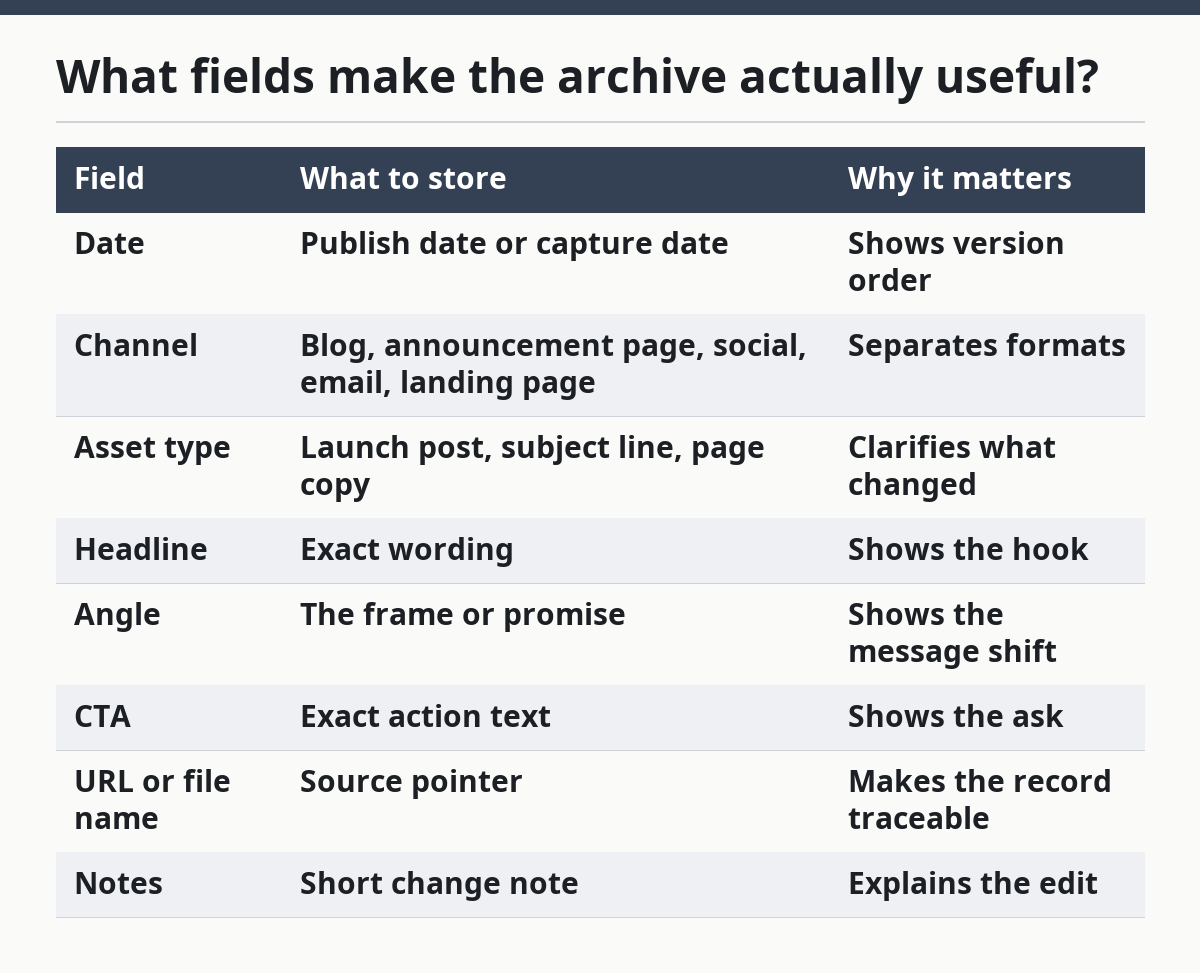
The archive becomes useful when each record includes the same small set of fields. A good minimum set is date, channel, asset type, headline, angle, CTA, URL, and notes. Without that pattern, the archive turns into a pile of clippings.
A simple table structure helps more than a long document. It lets you sort by date, filter by channel, and compare the launch copy across blog posts, announcement pages, social posts, email campaigns, and landing pages. A spreadsheet also makes it easier to see where the messaging changed first and where it stayed stable.
| Field | What to store | Why it matters |
|---|---|---|
| Date | Publish date or capture date | Shows version order |
| Channel | Blog, announcement page, social, email, landing page | Separates formats |
| Asset type | Launch post, subject line, page copy | Clarifies what changed |
| Headline | Exact wording | Shows the hook |
| Angle | The frame or promise | Shows the message shift |
| CTA | Exact action text | Shows the ask |
| URL or file name | Source pointer | Makes the record traceable |
| Notes | Short change note | Explains the edit |
This structure is not ideal for everything. It is not a research vault for quotes, screenshots, or source trails, and it is not a calendar for rollout checks. It is for message evolution across launch copy, which is a narrower job and should stay that way.
How do you compare versions without making the archive messy?
You compare versions by keeping one record per version and one comparison note per change. That prevents the archive from turning into a pile of repeated text with no clear version order.
A useful comparison method is to group versions by asset type first, then by date. For example, put all blog post versions together, then all landing page versions, then all email campaign variants. If the archive mixes every channel in one long list, you lose the path of the message and cannot tell whether the headline shifted because the channel changed or because the offer changed.
A second rule helps: compare like with like. A landing page headline should not be judged against a social post caption as if they were the same object. The format shapes the copy. A landing page can carry a longer promise, while a social post often needs a tighter hook.
The cleanest comparison uses three lines:
- Headline before and after
- Angle before and after
- CTA before and after
That is enough for most launch archives. If you add too many fields, the archive becomes harder to scan and slower to maintain, so detailed notes are better kept elsewhere. For teams that need a fuller source trail, an internal content archive template or launch checklist can hold the extras without crowding the main table.
A clear archive also exposes what did not change. If the CTA changed three times but the angle stayed fixed, that tells a different story than a launch where the headline and angle changed together. The value of the archive is in those patterns.
What are the common mistakes to avoid?
The most common mistake is saving only the final version. That hides the path the launch copy took and makes it impossible to see which headline or CTA won out. If the team later asks why the launch shifted tone, the archive has no answer.
A second mistake is archiving screenshots without text fields. Screenshots are useful, but they are hard to search and compare. A screenshot of a landing page may preserve the design, yet it does not help if you need to compare five headlines across two dates. The fix is to store the image and the text record together.
A third mistake is mixing launch copy archives with source research. A source archive for reusable screens, quotes, and trails serves a different purpose. This page is about the launch post itself, not the evidence behind it. Keeping those jobs separate helps, and a team should consider a review with a content operations professional if the archive is becoming a catch-all folder.
A fourth mistake is treating the CTA as decoration. The CTA is often the clearest signal of the launch’s goal. “Learn more” and “Start free” point to different intent, even when the body copy looks similar. If the team is unsure how to classify CTA changes, a marketing or conversion specialist can help.
A fifth mistake is letting the archive go stale. If records are added weeks later, the exact headline, angle, or CTA can be lost. The archive should be updated as close to publish time as possible, even if the note is brief.
Which tools fit this job best?
A spreadsheet fits this job best when the team wants low friction and quick comparison. A database or doc tool fits better when many people need to edit records, attach screenshots, or filter by channel and date. The right choice depends on how many versions you expect to store and how often you will search the archive.
For a small archive, a spreadsheet with 8 columns is enough. For a larger archive, a database-style system is better because it can keep dated post records consistent across asset types. However, a more complex tool is not automatically better. If a system takes 15 minutes to log one post, people stop using it.
Here is the trade-off in plain terms:
| Option | Best for | Weak spot |
|---|---|---|
| Spreadsheet | Fast setup, simple sorting, quick comparison | Harder to manage screenshots and many users |
| Doc folder | Loose notes and saved drafts | Hard to compare versions at scale |
| Database tool | Many records and shared editing | Slower setup, more structure required |
This page supports the larger SaaS launch intelligence systems hub by narrowing the job to message history. That narrow scope matters. A launch archive should answer “how did the wording change?” not “what happened across the whole rollout?”
How should the archive be kept useful over time?
The archive stays useful when the same person or team uses the same record format every time. Consistency matters more than size. A small archive with 20 clean records is more valuable than a larger one with missing dates, mixed labels, and unlabeled screenshots.
Keep a short naming rule for files and records. A pattern like date_channel_asset_version is enough to stop confusion. For example, the archive can separate a blog post version from an email campaign version without requiring long titles or manual sorting. The naming rule should be written down once and reused.
Review the archive on a regular cadence, such as weekly or after each launch cycle. That check is not about rewriting the records. It is about making sure the headline, angle, and CTA are still easy to scan and that older versions still point to the right source.
When the archive starts to grow, keep older records instead of trimming them too soon. The point of the archive is comparison over time. A record from 3 months ago may explain a current messaging shift better than the latest draft does.
What should a beginner save first?
A beginner should save the first live version, the next major revision, and the final version of each launch asset. That gives enough history to show the message path without making the work too heavy at the start.
Begin with one blog post or landing page, then add the linked announcement page, social post, and email campaign if they exist. Store the headline, angle, CTA, date, and URL for each one. If the launch copy changes only in one place, such as the CTA, note that directly rather than rewriting the whole post.
The archive does not need every draft to be useful. It needs the version history that explains the public message. That is why the focus stays on dated post records and copy changes, not on every internal edit note.
What should you save from a SaaS launch post archive?
Save the headline, the angle, the CTA, the date, and the source link for each version. That set shows how the launch message changed without turning the archive into a full content repository. If screenshots are useful, add them, but do not rely on them alone.
How do you track changes in a launch announcement over time?
Track changes by saving one dated record per version and writing a short note for what changed. Keep headline, angle, and CTA in the same fields each time so the difference is easy to spot. A simple version label and date stamp are enough for most launch archives.
Why archive launch posts instead of only saving the final version?
Because the final version hides the path the message took. A launch post archive shows which headline won, how the angle shifted, and whether the CTA changed from interest to action. That history helps explain the launch copy, while a single final file leaves that story out.
Drafted with AI; not yet reviewed by a person.