How to Build a SaaS Packaging Matrix for Add-Ons, Bundles, and Seat-Based Pricing: A SaaS packaging matrix is the map that shows which features live in…
Last updated: November 16, 2026
A SaaS packaging matrix is the map that shows which features live in the core plan, which are sold as add-ons, which are grouped into bundles, and which are priced per seat or by usage. It is for product, pricing, and sales teams that need one clear way to sell the same product more than one way without creating a pricing mess.
Key takeaways
- A packaging matrix is not a feature checklist. It is a decision tool for what gets bundled, what gets sold separately, and what scales with use.
- Start by grouping products into monetization layers: core plan, add-on, bundle, seat-based line, and usage-based line.
- Put hard rules around what stays in the plan and what can move out. If everything can be an add-on, the base plan loses meaning.
- Seat pricing works best when value grows with more users. It works poorly when one buyer can use the product for a whole team.
- Compare products by packaging shape, not only by feature lists. Two tools with the same feature may still sell in very different ways.
What is a SaaS packaging matrix?
A SaaS packaging matrix is a grid that shows how each product element is sold across plans, add-ons, bundles, seats, and usage. It answers one business question: what is included by default, what is extra, and what scales with the customer?
The matrix is useful because pricing is not only about a number on a page. It is also about where the value sits. A reporting module might belong in the core plan for one customer segment but become an add-on for another. A collaboration feature might be better priced per seat if more users create more value. A high-cost service may fit usage-based pricing if demand rises and falls by activity.
This matters because a flat plan list hides the real structure of a SaaS business. The matrix makes that structure visible before it gets baked into a pricing page, a quote template, or a sales script. It also helps teams avoid the classic mistake of stuffing every useful feature into one plan and then wondering why upgrades stall.
A good matrix is narrow enough to use in a meeting and detailed enough to guide decisions. It should cover the few monetization layers that matter most: core features, add-ons, bundles, seats, and usage. If a row does not affect how customers buy, it does not need to be in the first version.
What should go in the matrix?
The matrix should include the product elements that change price, packaging, or the sales motion. That means core features, modules, add-ons, bundled groups, seat rules, and usage-based meters.
The simplest version is a 5-column sheet:
- Product area or feature
- Default plan inclusion
- Add-on status
- Bundle status
- Pricing driver, such as seat count or usage
That structure is enough to show where each item sits without turning the sheet into a feature catalog. If a feature affects margin, expansion, or sales pressure, it belongs. If it does not change the buying decision, leave it out.
A useful matrix also marks the reason behind each choice. For example, a feature may be in the base plan because it is table stakes. A module may be an add-on because only a narrow segment needs it. A bundle may exist because two modules are used together often enough that the buyer expects one package. A seat-based line may exist because one more user increases account value in a clear way.
That last point matters. Seat-based pricing is not just a billing choice. It is a packaging choice. If the value is tied to people using the product, seats make sense. If value is tied to transactions, data volume, or compute, usage-based pricing may fit better. If the customer needs a tool kit rather than a single feature, bundles often make the offer easier to buy.
How do you build a SaaS packaging matrix?
You build a SaaS packaging matrix by sorting every monetized product element into one of a few pricing roles, then testing whether each role matches the value it creates.
-
List the monetized parts of the product. Start with the features, modules, and services that a buyer can understand in one sitting. Keep the list focused on things that could change price or packaging, not every button in the product.
-
Mark the default plan boundary. Decide what must be included in the base plan for the product to make sense. This creates a floor. If the floor is too low, the plan looks hollow. If it is too high, there is nothing left to upsell.
-
Tag candidates for add-ons. Look for items that are valuable, but not essential for every buyer. Add-ons work best when the demand is uneven and the cost to serve is not trivial. They are the wrong place for basic value that most customers expect.
-
Group related items into bundles. Bundle features that are bought together often enough to reduce decision friction. A bundle should feel like a cleaner way to buy, not a trick to hide price. If the bundle only exists to move revenue around, buyers notice.
-
Assign seat-based or usage-based pricing where the value driver is clear. Use seats when more users create more value or more administrative work. Use usage-based pricing when the service is consumed by volume, events, or activity. Keep the driver obvious enough that sales can explain it in one sentence.
-
Check for overlap and double charging. A feature should not be in the base plan, the bundle, and the add-on list all at once unless the plan design is intentional. Overlap confuses buyers and creates quote disputes.
-
Write the rules beside the row. Add a short note for edge cases, such as “sold only with module A” or “seat-based only after the first user.” This is where the matrix saves time later.
-
Review the matrix with sales and support. Ask where pricing causes confusion, where discounting starts, and where customers push back. A matrix that sales cannot explain in 30 seconds is too complex.
The point of the process is not to make every line perfect. It is to make the choices visible. A visible choice is easier to defend than a vague one.
How do add-ons, bundles, and seats differ?
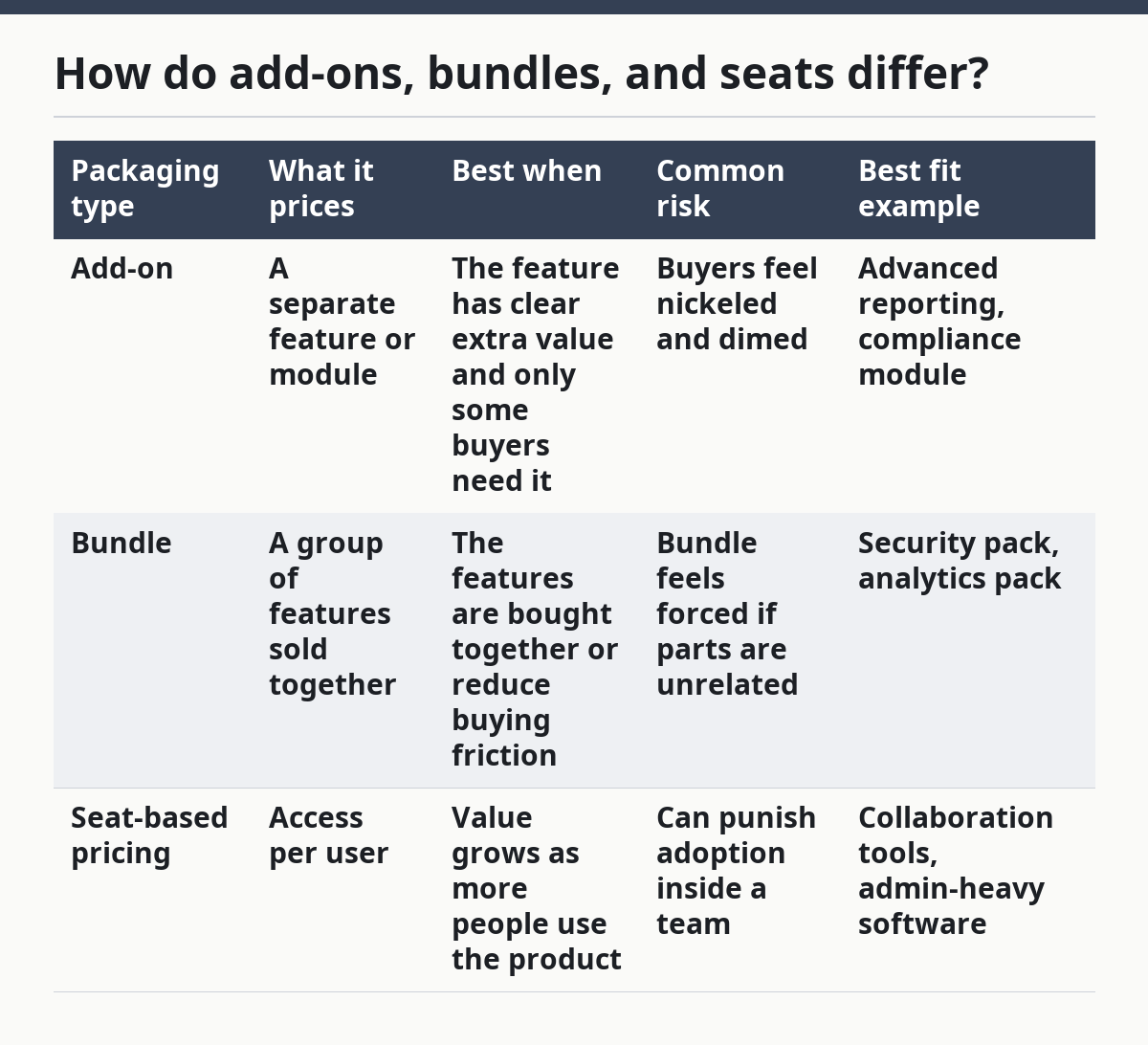
They differ by what is being priced: a feature, a group of features, or access by person. That sounds simple, but the trade-off matters because each model changes how customers perceive value.
| Packaging type | What it prices | Best when | Common risk | Best fit example |
|---|---|---|---|---|
| Add-on | A separate feature or module | The feature has clear extra value and only some buyers need it | Buyers feel nickeled and dimed | Advanced reporting, compliance module |
| Bundle | A group of features sold together | The features are bought together or reduce buying friction | Bundle feels forced if parts are unrelated | Security pack, analytics pack |
| Seat-based pricing | Access per user | Value grows as more people use the product | Can punish adoption inside a team | Collaboration tools, admin-heavy software |
Add-ons are the cleanest way to monetize a feature that is useful but not universal. They keep the base plan simpler. The drawback is that too many add-ons make the product feel fragmented.
Bundles are better when customers want a complete job done, not individual parts. The drawback is that bundles can hide which part the buyer actually values, which makes future packaging changes harder.
Seat-based pricing is easiest to justify when each additional user increases utility. The drawback is obvious: customers may avoid adding users, even when the product works better with more of them. That makes the pricing model a brake on adoption if the fit is wrong.
Usage-based pricing belongs in the matrix too, even when the page is not about meters. It is often the right answer when value follows volume rather than user count. The trade-off is harder forecasting for both buyer and seller.
How do you keep plans and add-ons from blurring together?
You keep plans and add-ons separate by giving each one a single job. The base plan should cover the core use case, while add-ons should cover extra value that is optional, specific, or expensive to serve.
The biggest mistake is letting the base plan become a junk drawer. When too much sits in the plan, add-ons lose meaning. When too little sits in the plan, the product feels stripped down and sales has to explain every upgrade before the buyer can even start.
A simple rule helps: if most buyers need it to get value, it belongs in the plan. If only some buyers need it, or if it creates a clear expansion path, it can be an add-on. If two features are usually bought together, test whether a bundle is clearer than selling them one by one.
This is also where internal consistency matters. A feature that is core in one plan and an add-on in another should have a clear reason. Maybe the lower tier needs it to be usable, while the higher tier gets it as part of a broader package. Without that logic, the matrix turns into a patchwork of exceptions.
A practical check is to read the matrix as if you were a buyer. If the path from “I need this problem solved” to “I know what I should buy” takes more than a few steps, the packaging needs work.
How do you compare packaging across products?
You compare packaging across products by comparing the shape of the offer, not just the feature list. Two SaaS tools can share the same feature names and still sell in very different ways because one hides value in seats, another in modules, and another in usage.
This is where a packaging matrix becomes a research tool. It helps you line up competitors by monetization layer:
- What is in the base plan?
- What is sold as an add-on?
- What is bundled?
- What scales with seats?
- What scales with usage?
That view is more useful than a raw feature grid when you are trying to understand position in the market. One product may look cheaper at first glance, but if the key function sits behind an add-on or a usage meter, the real cost profile changes. Another may look expensive, but if it bundles several needed modules, the buyer may get less friction and fewer surprise charges.
This comparison is also useful for sales enablement and pricing reviews. If a rival uses seat-based pricing and your product uses a bundle, the objection will not sound the same. The buyer is not only comparing price. They are comparing how the price behaves as the account grows.
That is why this page belongs in the broader SaaS pricing and packaging strategy hub: packaging is not a side detail. It is the structure that shapes how the price is understood.
What are the common mistakes?
The most common mistake is treating every feature as its own revenue line. That creates a noisy offer and makes the buyer do the work of assembling the product. It also makes sales harder, because every deal turns into a custom explanation.
Another mistake is putting too much value in add-ons. The short-term upside is obvious, but the long-term cost is plan confusion. If the base product feels incomplete, buyers may never trust the pricing page enough to move forward.
A third mistake is using seat-based pricing when the product’s value is not really per user. That can slow adoption inside the account and create tension when one person wants to invite others. The model only works when extra users clearly add value or workload.
A fourth mistake is bundling features that do not belong together. A bundle should match a buying pattern, not a spreadsheet cleanup exercise. If the buyer cannot see why the package exists, the bundle looks arbitrary.
The last mistake is skipping the notes. A matrix without short rules becomes a memory test. A matrix with plain notes on exceptions, dependencies, and pricing drivers becomes a working document.
FAQ
What belongs in a SaaS packaging matrix?
A SaaS packaging matrix should include the product elements that change how the offer is sold. That usually means core features, add-ons, bundles, seats, and usage-based items. If a row does not affect packaging or pricing decisions, it does not need a place on the first version of the matrix.
How do you separate plans from add-ons?
Plans cover the core use case, while add-ons cover extra value that not every buyer needs. If most customers need a feature to get value, it belongs in the plan. If only some buyers need it, or if it creates a clear expansion path, it is a better add-on.
How do you compare packaging across products?
Compare the monetization shape, not just the feature list. Look at what is included by default, what is sold separately, what is bundled, and what scales with seats or usage. Two products can offer the same feature and still feel very different to buy because the pricing structure changes the real cost.
Drafted with AI; not yet reviewed by a person.