How to Build a SaaS Packaging Variant Map for Regional, Vertical, and Enterprise Plan Differences: Use 3 core layers — region, vertical, and enterprise —…
Last updated: November 17, 2026
Quick Answer: Use 3 core layers — region, vertical, and enterprise — to build a SaaS packaging variant map before comparing any plan changes. A packaging variant map for regional, vertical, and enterprise plan differences gives product, pricing, sales, and legal one shared view of regional plans, vertical editions, and enterprise variations before the same SKU appears with three names and four rules. For related planning, see pricing strategy, product packaging, and feature comparison sheets.
Key takeaways
- A variant map is not a pricing sheet. It tracks where packaging changes, not just what each plan costs.
- Therefore, start with the market segment, then list the plan structure, entitlements, and local limits that change by region or vertical.
- Keep enterprise differences separate from regional edits so sales exceptions do not leak into public plans.
- Use one map to spot conflicts fast: the same feature can be standard in one market and gated in another.
- The map is most useful when it shows the reason for each difference, not just the difference itself.
What does a packaging variant map do?
A packaging variant map shows where your SaaS package changes across regions, verticals, and enterprise deals. It answers one practical question: which differences are intentional, and which are drift from a past exception, a legal rule, or a sales workaround? For teams that need a reference point, SaaS pricing models and packaging strategy are useful companion pages.
This matters because packaging often grows in layers. A market team may add a local plan structure for a country launch, a vertical team may request a compliance edition, and an enterprise team may negotiate custom support or controls. Without a map, those changes sit in different decks, sheets, and Slack threads. That makes it hard to tell whether two plans are truly different or just labeled differently.
Therefore, the map should cover market segments first, then the plan differences inside each segment. A clean version usually compares three things at once: region, vertical edition, and enterprise variation. If you treat all of those as one bucket, you risk missing the reason the package changed, so a product or pricing professional should usually review the split with legal or pricing owners and check a source such as the OpenView SaaS benchmarks or your internal policy library.
This is not the right tool if your only question is whether one feature sits in one tier or another. That belongs on a feature comparison sheet, which is a different job. A packaging variant map is for market-specific packaging, including when a plan must change because of language, regulation, support scope, billing rules, or a sales motion that only exists in one segment. The closest sibling pages in the pricing and packaging strategy hub should stay separate so the map does not turn into a dumping ground.
How do you build the map?
You build the map by listing each market segment, then mapping every plan difference against the same fields in one sheet or database view. The goal is a single structure that can show region, vertical, and enterprise changes side by side.
-
Open your spreadsheet, Airtable, or Notion database and list the market segments first.
Use regions, verticals, and enterprise as the top-level rows or groups so every variant sits under one frame. If you start with plans instead, the same difference can get copied into multiple places. -
Add a column for the base plan structure.
Record the plan name, the packaging family, and whether the variant is public, sales-led, or contract-only. This keeps a regional plan from being confused with an enterprise-only exception. -
Record the exact difference in one field.
Write the change as a plain rule, such as “local billing cycle,” “vertical compliance requirement,” or “enterprise support scope.” Keep the wording short enough to scan in under 30 seconds. -
Tag the reason for the change.
Mark whether the difference comes from regulation, language, payment rails, local buying habits, a sales ask, or a vertical requirement. This is the part many teams skip, and it is why the same variant gets reused in the wrong market. -
Mark the owner and approval path.
Note who approves the variant: product, pricing, legal, sales, or a country lead. A map without ownership is just a list of surprises. -
Set the review cadence in the sheet.
Review the map on a regular cycle, such as monthly or quarterly, so stale variants do not stay in the line-up for a full year. The point is not speed; it is preventing drift. -
Flag anything that should never become a public plan.
Put custom enterprise clauses, one-off contract terms, and temporary migration deals in a separate status. That keeps sales exceptions from turning into standard packaging by accident.
The result should be readable in one pass. If a new hire cannot tell what changes by region, what changes by vertical, and what changes only for enterprise, the map is too loose.
Which fields belong in the map?
The map works best when every row uses the same fields for every market. That makes comparison possible even when the packaging itself is not simple.
| Field | What it should capture | Why it matters |
|---|---|---|
| Market segment | Region, vertical, or enterprise | Keeps the variant grouped correctly |
| Plan structure | Public plan, sales-led plan, contract-only plan | Shows how the package is sold |
| Difference type | Billing, support, compliance, feature scope, language, or contract term | Makes the change easy to classify |
| Trigger | Regulation, local demand, enterprise request, or partner channel | Shows why the change exists |
| Owner | Team or role responsible | Prevents orphaned variants |
| Review status | Active, draft, retired, or exception | Stops stale packaging from lingering |
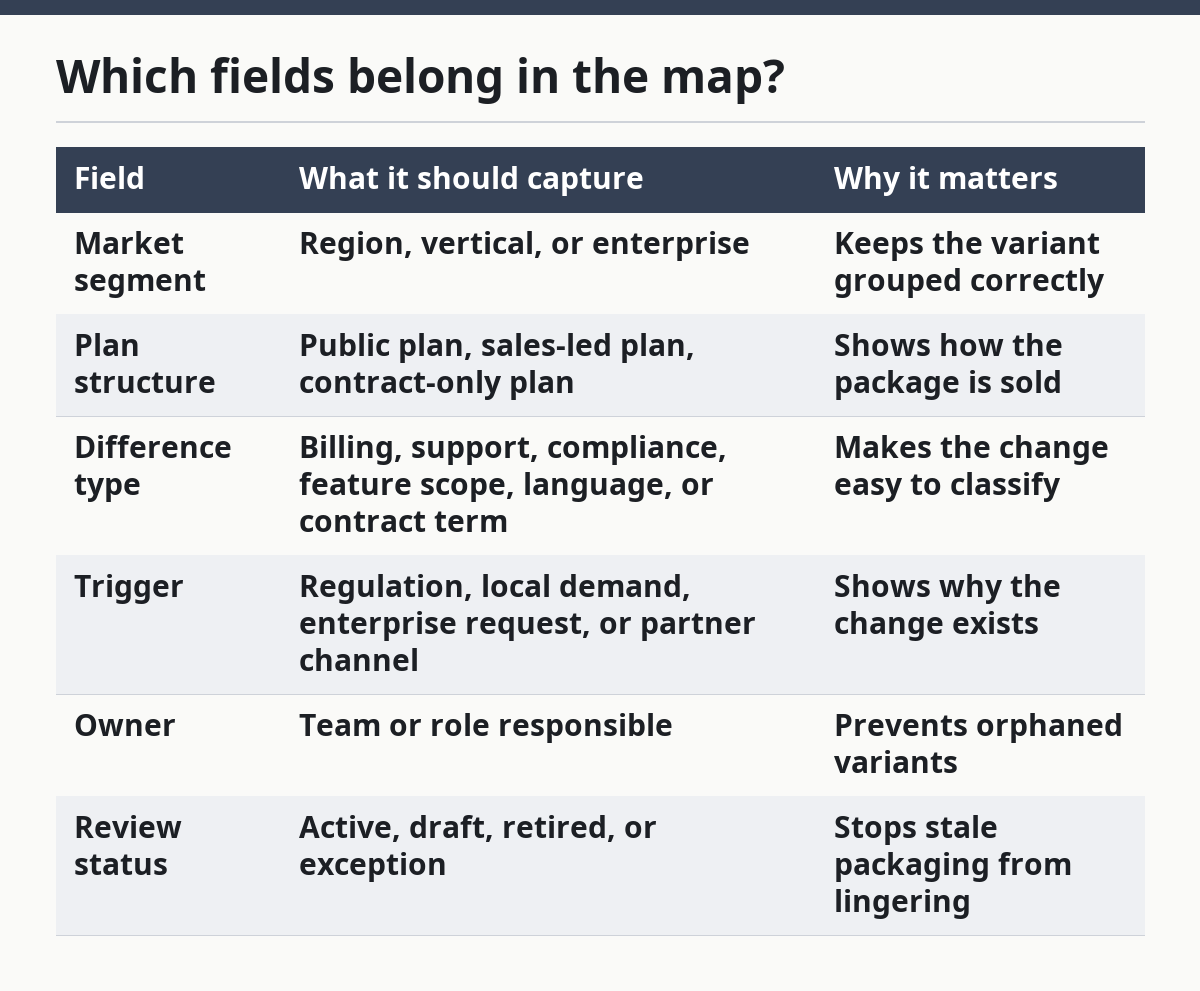
A good map is not just a checklist. It also shows relationships. If one vertical edition changes support scope and a second region changes billing terms, those should not look like the same kind of difference. A single field for “notes” is not enough because notes do not sort, filter, or reveal overlap.
For example, this is also where a generic article often goes wrong. It says to document “features and pricing,” then stops. That is not enough for regional plans and enterprise variations. You need the reason for the variant, the owner, and the status, or the map will not help when the next package review comes around in 90 days. For a practical pricing reference, see Stripe Billing documentation and Chargebee pricing resources.
How do you document plan differences by market?
You document plan differences by market by comparing the same package across regions, verticals, and enterprise routes with one fixed template. That template should capture what changes, what stays the same, and why the package differs.
A practical pattern is to write each row as: market segment, base plan, difference, trigger, and status. For example, a regional plan may keep the same core product but change billing terms and support language. A vertical edition may keep the same plan structure but add compliance wording or a specialized service boundary. An enterprise variation may keep the public package intact while changing contract terms, approval paths, or onboarding scope.
The map should make those differences visible without forcing a reader to guess. If the only visible change is a plan name, the map is incomplete unless the rule appears elsewhere in the same row. If the only visible change is a long note, the map is hard to use. The best version keeps both the label and the rule in view. For a source on why clear terminology matters in pricing and labeling, consult the FTC pricing guidance.
A useful test is whether the map can answer a simple question in under a minute: “What changes for this market, and why?” If it cannot, the sheet is too broad or too vague. A regional launch team needs one answer. A legal reviewer needs another. A sales leader needs to know whether the difference is standard, optional, or not allowed.
The honest trade-off is that this takes more setup time than a one-page summary. That is the cost of having fewer packaging disputes later. For teams with only one market and no vertical editions, the map may be too much process. For teams with three or more regions, one vertical package, and enterprise deals, the map usually pays for itself in clarity alone.
Where does enterprise packaging fit?
Enterprise packaging fits as a separate layer that can override public plans without rewriting the whole map. That separation matters because enterprise deals often carry unique terms that should not spread into regional or vertical packaging.
Enterprise variations usually live in one of three places: contract terms, support scope, or security and compliance requirements. The map should show those as enterprise-only unless the same rule is also public. If a sales team can ask for it in a deal, that does not mean it belongs in the standard plan structure.
This is where many teams make the biggest mistake. They copy an enterprise concession into the public package because it looked harmless in one deal. That creates a hidden price and packaging change that the next region inherits without approval. The result is a plan family that looks stable on paper but behaves differently in every market.
So the cleaner rule is simple: if a difference depends on negotiation, keep it in the enterprise column and mark it as contract-only. If a difference applies to all customers in a region, put it in the regional plan. If a difference applies to one vertical because of product or compliance needs, keep it in the vertical edition. That three-way split gives the map structure without forcing false sameness.
What mistakes break the map?
The map breaks when it mixes plan differences with price, bundles, or one-off sales exceptions. That mistake turns a packaging variant map into a catch-all spreadsheet that nobody trusts.
The first common error is using names instead of rules. A team writes “EU plan” or “enterprise special” and leaves out the actual difference. That costs time later because nobody knows whether the change is billing, compliance, language, or support.
The second error is failing to separate public packaging from contract terms. That can make a deal-only concession look like a standard regional plan. Once that happens, the difference can spread into another market in a matter of days.
The third error is letting the map grow without a retirement rule. Old variants stay active even after the market changes. A retired field or status column solves that problem better than long notes do.
The fourth error is trying to make the map answer every pricing question. It should not. If the team wants to compare flat fee, usage-based, or hybrid billing, that belongs on another page. If the team wants feature-by-feature pricing comparisons, that is also a different document. The packaging variant map should stay focused on market-specific packaging and plan structure. For a deeper pricing framework, use usage-based pricing or tiered pricing instead.
When should you use a variant map instead of a simple plan sheet?
You should use a variant map when the same SaaS product has different packaging rules across regions, verticals, or enterprise deals. A simple plan sheet works only when the package is mostly the same everywhere.
The map becomes necessary when one market has a local plan structure, another market needs a vertical edition, and enterprise deals keep adding contract-only changes. At that point, a plain sheet hides the pattern. A variant map shows whether the differences are isolated or part of a wider packaging strategy.
Use the simpler sheet if the product has one region, one package, and no meaningful market split. Use the variant map if sales, legal, product, and pricing each touch the package in different ways. That is the point where public plans, enterprise variations, and market-specific packaging need one shared view.
The main trade-off is maintenance. A map takes more discipline than a static list, and it needs review. But it saves you from the more expensive problem of a package that changes by accident. For a team building regional plans or vertical editions, that is usually the better trade.
FAQ
What is a packaging variant map?
A packaging variant map is a structured view of how SaaS plans differ by region, vertical, or enterprise deal. It shows the plan structure, the reason for each difference, and who owns the change. That makes it easier to spot when a market-specific package has drifted into standard packaging.
How do you document plan differences by market?
You document plan differences by market with one template that repeats the same fields for every variant. Use market segment, base plan, difference, trigger, owner, and status. That format makes regional plans, vertical editions, and enterprise variations easy to compare without mixing them together.
How do you compare saas packaging across regions?
You compare SaaS packaging across regions by lining up the same plan structure and marking only the differences. Focus on what changes, why it changes, and whether the change is public or contract-only. A side-by-side view works best when every region uses the same labels and review status.
Summary
A packaging variant map gives SaaS teams one place to track regional plans, vertical editions, and enterprise variations without mixing them into one blur. It works best when it shows the rule, the reason, and the owner for each difference. Used well, it keeps market-specific packaging clear enough to review and hard enough to misuse.
Drafted with AI; not yet reviewed by a person.