A workable SaaS content SLA usually runs on 3 clocks : a request trigger , a review window , and an escalation path . This article explains How to Build a…
Last updated: November 17, 2026
Quick answer: A workable SaaS content SLA usually runs on 3 clocks: a request trigger, a review window, and an escalation path. This article explains How to Build a SaaS Content SLA for Update Turnaround, Review Windows, and Escalation Paths for product pages, help docs, and public content, so teams can set predictable turnaround instead of handling every page ad hoc.
A SaaS content SLA sets the clock for content updates: how fast editors respond, how long subject matter experts can hold a review, and when a page gets escalated if no one answers. It suits teams that need predictable turnaround on product pages, help docs, and public content, and it is not for teams that want every page handled ad hoc.
Key takeaways
- A content SLA is a time rule, not a full editorial process.
- The best starting point is usually one owner, one review window, and one escalation path.
- Editors need short, clear response times; subject matter experts need a fixed review window; legal review needs a separate lane.
- The strongest SLA is the one people can follow on a busy week, not the one that looks neat on paper.
- If the SLA does not say what happens after a missed deadline, it is not finished.
What should a content SLA include?

A content SLA should include the update trigger, the turnaround time, the review window, the owner handoff, and the escalation path. Those five parts are enough to turn a vague promise into a working rule. A simple SLA is usually easier to keep than one with 10 exceptions and three approval layers.
Start with the trigger. Say what starts the clock: a product change, a legal change, a customer-facing correction, or a scheduled refresh. Then set the response time for the first owner and the review time for the next reviewer. If a page can wait 7 days but a pricing change cannot, write that down as two classes of content, not one loose rule.
A good SaaS content SLA also names the people involved. Editors should know when their clock starts and ends. Subject matter experts should know whether they have 2 business days or 5 business days to review. Legal review should be called out separately if it applies to regulated claims, pricing language, or terms. Product marketing should know when it owns the final sign-off versus when it only supplies source text.
This is the right place to define the failure mode too. If a reviewer misses the window, does the page move forward, get paused, or go to escalation? Without that line, the SLA becomes a wish list. Microsoft’s guidance on service level agreements and Atlassian’s SLA guidance both reflect the same basic idea: define the target, then define what happens when the target is missed. See Microsoft’s service-level guidance and Atlassian’s SLA overview for the same operational pattern: target, owner, and response path. If legal or compliance risk is involved, consult a qualified professional.
How do you set review deadlines for content updates?
You set review deadlines for content updates by matching the deadline to the risk of the page and the number of people who must touch it. A low-risk blog update can often use a shorter review window than a pricing page or a legal claim. The deadline should be short enough to protect the page and long enough that reviewers can actually hit it.
Use a 2-step split. First, give the editor a turnaround time for triage and draft preparation. Then give the reviewer a separate window for comments or approval. That keeps the clock honest. If one person has to write, edit, and approve, the SLA should say that clearly rather than pretending there are three handoffs.
A useful way to write the deadline is by business days, not vague language like “soon” or “as needed.” Business-day language is easier to follow when teams are spread across time zones. If legal review is involved, add a longer window for that lane and keep it out of the normal editorial clock. Legal review should not be forced into the same deadline as a simple copy edit.
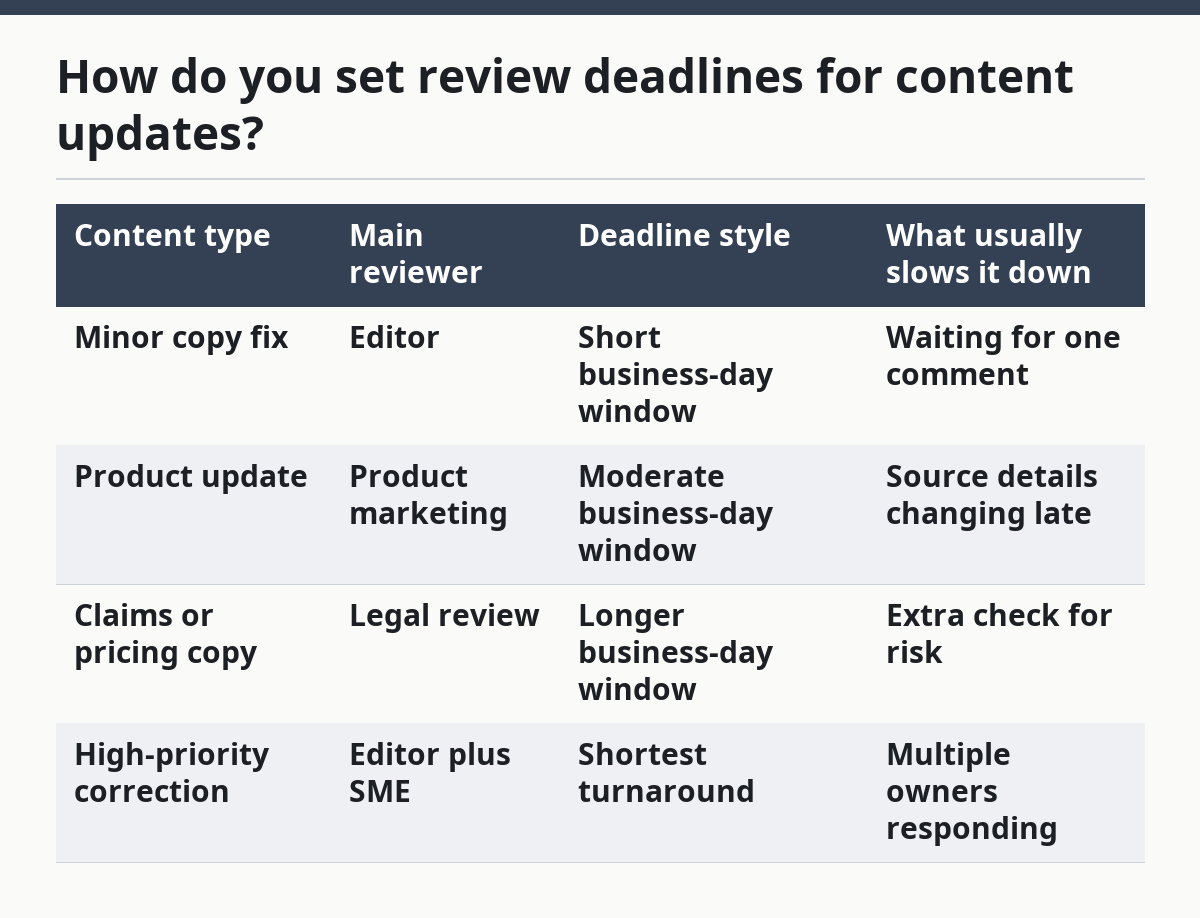
For example, a minor copy fix can fit a short business-day window, while claims or pricing copy usually needs a longer one. If a team needs a process reference, Atlassian’s SLA guidance and Microsoft’s service-level guidance both frame deadlines as defined targets rather than soft expectations.
Here is a practical comparison for setting review deadlines:
| Content type | Main reviewer | Deadline style | What usually slows it down |
|---|---|---|---|
| Minor copy fix | Editor | Short business-day window | Waiting for one comment |
| Product update | Product marketing | Moderate business-day window | Source details changing late |
| Claims or pricing copy | Legal review | Longer business-day window | Extra check for risk |
| High-priority correction | Editor plus SME | Shortest turnaround | Multiple owners responding |
The mistake to avoid is using one deadline for every page. That makes the SLA easy to write and hard to keep. The better move is to group content by risk and by the number of required reviewers.
How do you build the turnaround flow?

You build the turnaround flow by writing one path from intake to publish and limiting each step to a single owner. The flow should show who receives the request, who edits it, who reviews it, and who publishes it. A clean path prevents the “who has this?” problem that slows down every update.
- Define the intake tool and mark the request type there so the editor sees the same label every time.
- Assign the first owner in the tracker so the request has one name attached before any review starts.
- Set the review window in the same tracker so the editor and reviewer see the same deadline.
- Route legal review only for content that needs it, so normal updates do not wait in a legal queue by mistake.
- Record the final handoff in the tracker so product marketing knows when the content is ready to publish.
The tool matters less than the structure. A tracker, spreadsheet, or content system can all work if the same fields exist every time: request date, owner, review window, current status, and next step. If a team uses a shared board, keep the columns narrow and specific. A board with 12 vague statuses creates more delay than it removes.
The cleanest turnaround flow is the one that keeps handoffs visible. Editors should not guess whether a page is with subject matter experts, legal review, or product marketing. If the request sits in one stage for too long, the next step should be obvious from the tracker, not buried in a chat thread. For related planning, see the linked pages on content operations, workflow systems, and content governance.
Who owns escalation when a page is stale?
Escalation should belong to one named owner, usually the content owner or the editor of record, with a clear path to product marketing and legal review when needed. A stale page is not a group problem; it is an ownership problem. If everyone can escalate, no one really does.
The simplest rule is this: the person who owns the page also owns the first escalation. That person chases the reviewer when the review window closes and decides whether the page can wait, move forward, or be paused. If the content touches pricing, claims, or terms, legal review should have its own escalation lane because the risk is different.
Write the escalation path in 3 layers. The first layer is a reminder at the end of the review window. The second layer goes to the reviewer’s manager or a named backup after the next business day. The third layer goes to product marketing, legal, or a senior approver if the page is blocked past the agreed limit. That gives the team a ladder instead of a panic message.
A lot of SLAs fail here because they treat escalation like an emergency only. That costs time and trust. The better practice is to make escalation ordinary and predictable. When people know the page will move after a missed window, they respond faster before it gets there. If the page affects legal or compliance risk, consult a qualified professional and follow the organization’s documented review process. Microsoft and Atlassian both emphasize explicit escalation logic in SLA-style workflows.
How do editors, SMEs, and legal share the clock?
Editors, subject matter experts, and legal share the clock by having different jobs at different points in the same SLA. Editors manage the work, SMEs validate the content, and legal review only the parts that need formal risk review. If all three are treated as equal approvers on every page, turnaround slows down fast.
The editor’s job is to control the first pass and keep the request moving. The SME’s job is to confirm facts, product behavior, or terminology within the stated window. Legal review is narrower: it checks claims, wording, or disclosures where the company needs that extra layer. Product marketing often sits between the editor and the SME because it knows the product story and the launch timing.
A strong SLA defines what each role can change. For example, an editor may fix structure and grammar, an SME may confirm technical accuracy, and legal may only approve or redline certain claims. If those lanes are not clear, reviewers will either duplicate work or wait for someone else to start first. Both slow the page.
This is also where the SLA should say what not to do. Do not send every small correction to legal review. Do not let subject matter experts rewrite the whole page if their role is to verify details. Do not let product marketing sit on a routine correction that an editor can finish in one pass. The point is speed with control, not maximum approval.
What does a workable SLA look like in practice?
A workable SLA looks like a short written rule, a tracker, and a missed-deadline path that people can follow without a meeting. It should fit on one page if possible. The more fields it needs, the more likely it is covering process problems that belong in a workflow document instead.
A practical version might say that editors acknowledge a request within one business day, subject matter experts review within a fixed review window, legal review applies only to defined claims, and overdue items escalate to a named owner. That is enough structure for most SaaS content teams. It keeps the SLA focused on timing, not on every editing decision.
The trade-off is real. A tighter SLA gives faster turnaround, but it also raises the risk that reviewers feel rushed. A looser SLA gives more breathing room, but stale pages stay live longer. The right balance depends on the page type, the compliance risk, and how many people must approve it. If a page changes often, keep the windows short. If it carries legal exposure, make the review window longer and the escalation path clearer.
This page pairs with the wider SaaS content operations and workflow systems hub, which covers the larger system around content work. On this page, the point is narrower: define the clock, define the reviewers, and define what happens when the clock runs out. For teams building the broader system, see the content operations hub and the workflow systems guide.
What should a content SLA include?
A content SLA should include the request trigger, the owner, the review window, the turnaround time, and the escalation path. Those parts tell people when work starts, who handles it, how long each handoff gets, and what happens if the page stalls.
The mistake to avoid is making the SLA sound like a policy memo. Keep it operational. If the rules cannot fit into a tracker or a shared doc, they are probably too wide for daily use. The same logic appears in Microsoft’s SLA guidance and Atlassian’s SLA documentation, which both focus on clear owner-and-response rules.
How do you set review deadlines for content updates?
You set review deadlines for content updates by using business days and by separating normal review from legal review. Short, routine updates need shorter windows, while claims, pricing, and regulated copy need more time.
The first deadline should belong to the person who can move the page forward fastest. If the reviewer cannot meet that deadline, the SLA should say who gets the next nudge and when escalation starts. For a quick reference, see the editorial workflow page and the content governance page.
Who should own escalation when a page is stale?
The editor of record or the content owner should own escalation when a page is stale. That person has the clearest view of the deadline, the reviewer, and the next step.
If legal review is involved, legal should have a separate escalation lane for blocked claims or disclosures. That keeps the process moving without making every stale page a full-team fire drill.
Drafted with AI; not yet reviewed by a person.