SaaS trust, proof, and evidence pages — The Complete Guide: a SaaS trust, proof, and evidence page usually works best when it organizes about 6 proof…
Last updated: November 16, 2026
Quick Answer: a SaaS trust, proof, and evidence page usually works best when it organizes about 6 proof areas in one place and gives buyers a fast path to deeper source pages. A SaaS trust, proof, and evidence page works when buyers can verify claims in minutes, not after a sales call. It is the page that turns “say-so” into signals: security standards, uptime evidence, product proof, compliance details, and plain-language answers to the questions buyers ask before they book a demo.
Key takeaways
- Trust pages are not marketing fluff; they are proof pages for buyers who want facts before contact.
- The best version often bundles security, legal, product, and operational evidence in one place, then links out to deeper pages.
- A weak page hides behind badges, vague promises, and stock phrases. A strong page names standards, shows sources, and admits limits.
- The page is not for every SaaS company. If there is no public evidence to show, the page will feel thin fast.
- The goal is not to “sound safe.” The goal is to make verification easy.
What is a SaaS trust page?
A SaaS trust page is a public page that shows the evidence behind a software company’s claims. It collects the facts a buyer needs to judge risk: security controls, privacy terms, compliance status, service reliability, data handling, and product truth.
That sounds simple, but the job is precise. A homepage sells interest. A trust page reduces doubt. A pricing page explains cost. A trust page explains why a buyer can believe the company with their data, budget, and internal approval process.
For a B2B SaaS buyer, that matters at more than one stage. A founder may care about speed first, but procurement, IT, security, legal, and finance all show up later; if the stakes are high, consult the relevant professional or advisor. Each group looks for a different signal. Security wants controls and standards. Legal wants terms and data processing language. Finance wants billing clarity. Product leaders want evidence that the product actually does what the site says it does. For a practical reference point on data protection expectations, see the FTC’s business guidance on privacy and security: https://www.ftc.gov/business-guidance/privacy-security.
A strong trust page gives those people one place to start. It does not have to answer every detail on the page itself, but it should point to the source of truth for each topic. That usually means links to a security page, privacy policy, terms, status page, compliance documents, and public product documentation. See also the security page, privacy policy, terms, status page, and trust center.
The trade-off is clear. A trust page takes more work than a badge-heavy landing page, and it can expose weak spots. A company with no SOC 2, no published status history, and thin policy pages will have less to show. That is exactly why the page matters. It forces the company to replace vague claims with real evidence.
What counts as proof on a SaaS site?
Proof on a SaaS site is any verifiable signal that reduces uncertainty. It includes standards, documents, public records, process descriptions, and product artifacts that a buyer can check without relying on a salesperson.
The strongest proof is specific. “We are secure” is not proof; if the claim matters to a deal, consult a qualified security professional. “We use role-based access control, audit logs, and single sign-on, and the details live in the security page” is closer. “We are compliant” is still too vague unless the page names the framework, audit, or control set. Buyers do not trust adjectives. They trust named evidence.
Common proof types fit into a few buckets; if a buyer needs help interpreting them for a specific deal, consult legal, security, or procurement counsel:
| Proof type | What it tells a buyer | Best use |
|---|---|---|
| Security controls | How access, logs, and data are protected | Enterprise and regulated deals |
| Compliance references | Which standards or audits the company follows | Procurement reviews |
| Privacy policy | How data is collected, used, and shared | Legal review |
| Status page | Whether incidents and uptime are public | Reliability checks |
| Product docs | Whether the product works as described | Product and operations teams |
| Customer logos or quotes | Who has already trusted the product | Early-stage credibility |
| Case studies | What the product did in a real use case | High-consideration buying |
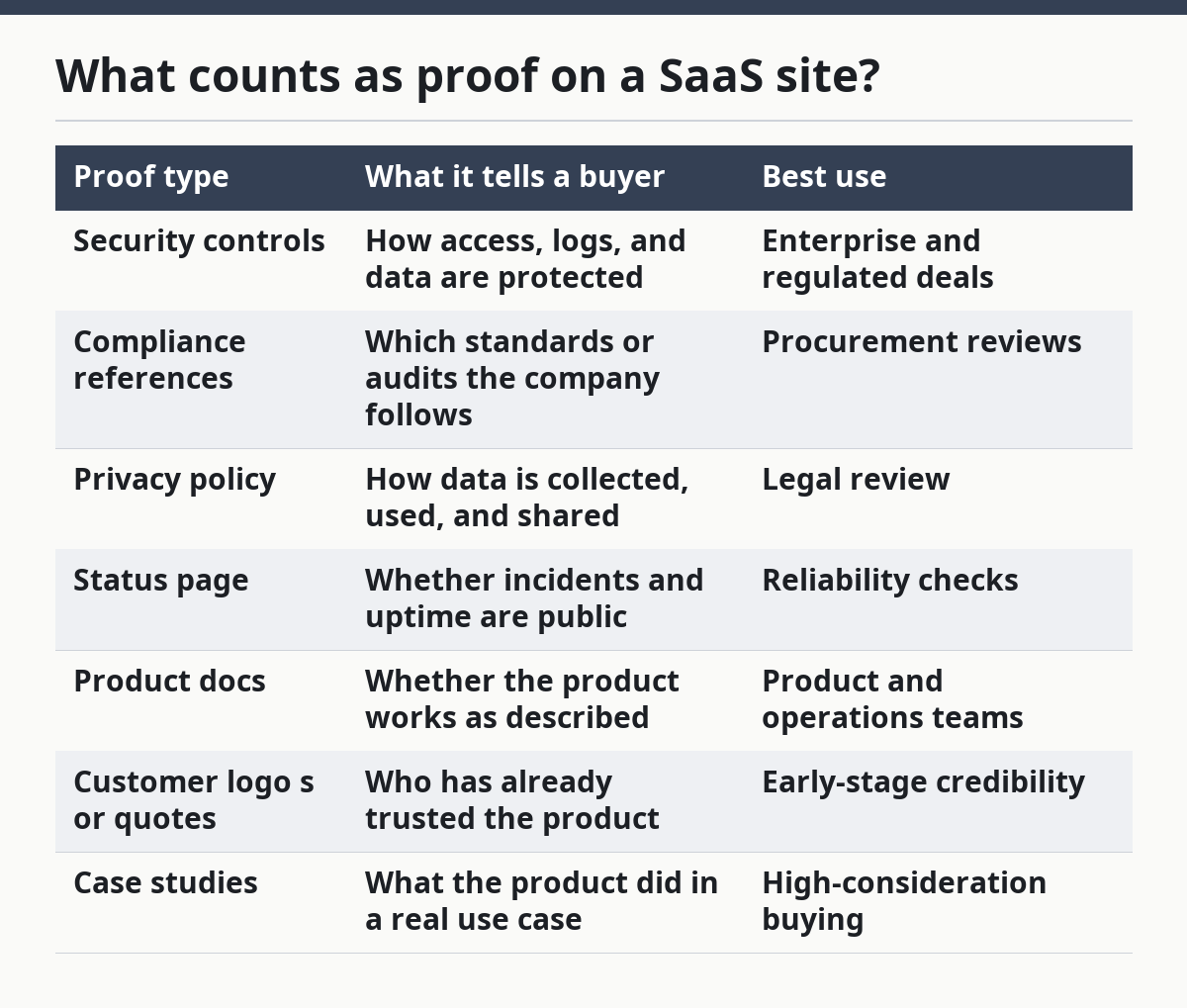
Not all proof belongs on the trust page itself. A good page acts like a map. It should surface the main signals and send buyers to the deeper source when needed. That is better than stuffing every policy into one long scroll. See the product documentation and status page for deeper detail.
The honest limit is that proof is not the same thing as persuasion. A trust page cannot turn a weak product into a strong one. It can only make the truth easier to see. That is why it is wrong for companies that are still hiding major gaps in product quality, compliance, or operations.
What belongs on a trust, proof, and evidence page?
A trust, proof, and evidence page should contain the core signals that a skeptical buyer needs in one visit. The most useful version covers security, privacy, reliability, product truth, company identity, and contact paths.
The page usually starts with a short statement of purpose, then moves into evidence blocks. Each block should answer one question. How is data protected? What standards apply? What happens during incidents? Where are the policies? How does the buyer verify the product claims? Who is behind the company?
A practical structure looks like this:
-
Security overview
State the core controls and link to the deeper security page. Name the access model, encryption approach, logging, and identity controls if they are public. -
Compliance and standards
Name the relevant standard or review process. For SaaS, that may include SOC 2, ISO 27001, GDPR-related data handling, or internal control descriptions. Do not imply certification unless it exists. -
Privacy and data handling
Explain what data is collected, where it is stored if public, how processors are handled, and where the privacy policy lives. -
Reliability and incident handling
Link to the status page if one exists. Explain how incidents are reported and how buyers can check current service health. -
Product evidence
Show screenshots, docs, workflows, release notes, or demo videos. Buyers should be able to confirm that the product is real and current. -
Company evidence
Include the legal entity name, contact route, and any public address or corporate identity details the company wants to share. -
Decision support
Add FAQs, procurement answers, or a comparison matrix if the audience needs help deciding. If the buying committee is large, consult the right internal or external specialist before publishing the final version.
The right amount of detail depends on the buyer. A startup selling to small teams can keep the page light. A company selling into enterprise accounts needs much more depth. The mistake many generic articles make is pretending every SaaS company needs the same trust page. That is false. A payroll tool, a developer API, and a design app face different questions, different risk bars, and different proof expectations.
How is this different from a security page or legal page?
A trust page is the front door; a security page and legal pages are the rooms behind it. The trust page gathers the signals, while the specialized pages provide the detail buyers need for review.
That difference matters because teams often confuse “trust page” with “security page.” A security page usually talks about encryption, access control, authentication, data handling, and controls. A legal page covers terms, privacy, subprocessors, and jurisdiction issues. A trust page can include both, but it should not duplicate them line by line.
The job of the trust page is to make the buying path shorter. It should tell the visitor where to go next. If a security reviewer wants more detail, the page should link to the security policy or trust center. If a buyer wants contract language, the page should link to the terms and privacy policy. If an operations lead wants uptime, the page should link to the status page. See also the procurement FAQ and security policy.
Here is the simplest way to think about the split:
| Page type | Main job | Best audience | What not to force onto it |
|---|---|---|---|
| Trust page | Collect proof and guide review | Mixed buyers | Deep legal text |
| Security page | Explain controls and safeguards | Security and IT teams | Marketing copy |
| Privacy policy | State data collection and use | Legal and compliance | Product selling |
| Terms page | Set legal rules for use | Legal and procurement | Feature claims |
| Status page | Show current and past service health | Technical buyers | Brand messaging |
The trade-off is page bloat. If the trust page tries to do every job, it becomes a wall of text. If it does too little, it becomes a doorway with no room behind it. The right answer depends on the sales motion. Product-led SaaS needs fast scanning. Enterprise SaaS needs deeper evidence.
What do buyers actually look for on SaaS trust pages?
Buyers look for risk reduction first and feature confirmation second. A trust page that does not speak to risk usually fails, even if the product copy is polished.
Different roles read the page in different ways. Security reviewers look for controls they can map to internal policy. Legal reviewers look for data use, subprocessors, and contract language. Finance wants to know whether the company is real, stable, and easy to pay. Product leaders want to know if the tool matches the claim on the homepage. End users want to know if the product looks usable and current.
That is why the page should answer a few direct questions in plain language:
- Is the company real?
- Is the product live?
- How is buyer data protected?
- What happens if something goes wrong?
- Can the buyer verify claims without talking to sales?
- Where can legal or security teams find the source documents?
A trust page does not need to answer every version of every question, but it should remove the obvious blockers. If a buyer cannot find the company name, the policy links, the product proof, or the support path, the page has failed.
The strongest pages also acknowledge limits. If a company does not publish raw uptime history, say so and point to the status page. If a feature is in beta, label it. If a security review is in progress, do not hint that it is done. Buyers trust pages that avoid puffery. They distrust pages that sound too polished to be true. For a practical benchmark on careful security language, the NIST Cybersecurity Framework is a useful reference: https://www.nist.gov/cyberframework.
What makes a trust page credible?
A trust page is credible when it is specific, current, and easy to verify. Those three traits matter more than design polish.
Specificity means the page names concrete things. A named standard is stronger than a vague promise. A document link is stronger than a screenshot of a badge. A product screenshot with labels is stronger than a stock image. The page should use terms the buyer can recognize and check.
Current means the page reflects the live product and current policies. A stale “last updated” trail is often enough to make a reviewer pause. A trust page that still describes a feature removed months ago will lose confidence fast. If the company changes processors, policies, or hosting arrangements, the page should change too.
Verifiability means the evidence points somewhere real. A claim about security is more credible when the page links to the policy, the status page, or the standard itself. A claim about the product is more credible when the page shows actual screens, docs, or release notes. A claim about company identity is more credible when the legal name and contact method are visible.
There is also a negative rule. A page becomes less credible when it uses too many badges, seals, or logos without context. A badge can help, but a badge by itself often feels like decoration. Buyers have learned the difference between proof and theatre.
This is where many generic articles go wrong: they treat trust as a design pattern. It is not. It is an evidence system. A clean layout helps, but layout cannot replace facts.
What should a SaaS trust page not do?
A SaaS trust page should not promise more than the company can support. That is the fastest way to lose trust.
It should not stuff in every marketing claim from the homepage. It should not repeat the privacy policy in full. It should not hide behind vague words like “enterprise-grade” or “best-in-class” without naming what that means. It should not imply certifications, audits, or guarantees that do not exist. It should not bury the actual documents behind a form unless there is a strong reason.
It should also not try to serve every audience equally. If the page reads like it was written to impress investors, it usually fails buyers. If it reads like it was written only for lawyers, most visitors will leave. The right version is plain, layered, and selective.
A bad trust page often has one of four problems:
- Too shallow: only badges and slogans, no source documents.
- Too dense: legal copy dumped into one page with no structure.
- Too promotional: every fact is wrapped in sales language.
- Too stale: old screenshots, dead links, and outdated policies.
There is one more problem that matters in SaaS: privacy theater. If the page talks about security but hides the actual data flow, buyer confidence drops. If the page mentions compliance but avoids naming the standard, the claim feels thin. If the page shows buyer logos but no product evidence, the page can look rented rather than earned.
The trade-off is real. The more evidence a company shows, the more it reveals. That can feel risky. It is still better than a polished page that leaves the buyer guessing.
How do you build one without overcomplicating it?
You build one by starting with the questions buyers already ask, then mapping each question to one proof item and one source page. That approach keeps the page focused and prevents needless clutter.
A practical build order looks like this:
-
List the buyer questions
Start with the top 10 questions from sales calls, onboarding calls, procurement emails, and support tickets. Group them by security, legal, product, and operations. -
Collect the source pages
Gather the security page, privacy policy, terms, status page, documentation, and any published compliance material. If a source page does not exist, decide whether it should be created first. -
Choose the evidence that can be shown publicly
Not every internal control can go on a public page. Pick the items that are both useful and safe to share. -
Write short answer blocks
Each block should answer one question in a few sentences, then link to the deeper source. -
Add visual proof carefully
Use screenshots, diagrams, or document snippets only when they clarify. Do not add visuals just to make the page look fuller. -
Check for stale facts
Review product names, policy dates, support paths, and compliance wording before publishing.
This is where cost shows up in practice. A trust page is not free to maintain. It needs review whenever policy language, hosting, authentication, data handling, or product claims change. The more public evidence the page uses, the more often it needs a refresh. That is a real operational cost, and it is one reason smaller teams delay the page until a buyer asks for it.
What should you compare before deciding on the format?
You should compare the level of proof you can support with the level of buyer scrutiny you face. That decision usually determines whether the page stays simple or becomes a full trust center.
A simple trust page works when the buying cycle is short and the risk surface is small. A full trust center makes sense when buyers ask for security, legal, procurement, and compliance proof in the same deal. The page format should match the actual sales motion, not a trend. See the trust center and evidence hub if you need a broader format.
| Format | Best for | Strength | Weakness |
|---|---|---|---|
| Single trust page | Small to mid-market SaaS | Fast to scan | Limited depth |
| Trust center | Enterprise SaaS | Better for deep review | More work to maintain |
| Security page only | Technical buyers | Clear focus | Misses legal and product proof |
| Evidence hub | Content-heavy SaaS | Strong documentation trail | Can feel complex |
| FAQ-led proof page | PLG or self-serve SaaS | Good for quick questions | Less room for deep evidence |
The honest trade-off is between speed and depth. A single page is easier to keep current, but it may not satisfy a large buyer committee. A trust center is more convincing for enterprise sales, but it demands more upkeep and more source material.
That is why “best” is the wrong word here. The right structure depends on buyer risk, contract size, and the number of stakeholders involved. A startup selling a low-risk collaboration tool does not need the same evidence stack as a SaaS company processing sensitive buyer data.
Which standards and organizations matter most?
The most useful standards and organizations are the ones buyers already recognize and trust. In SaaS, that often means security, privacy, and data-handling authorities rather than generic marketing badges.
Two useful sources are the FTC business guidance on privacy and security and the NIST Cybersecurity Framework. The FTC’s business guidance gives a practical public reference for data protection and consumer-facing trust concerns, while NIST gives buyers and security teams a common language for controls and risk management. Those are not substitutes for your own policies, but they help anchor the page in recognizable frameworks.
Useful external references:
- FTC business guidance on privacy and security: https://www.ftc.gov/business-guidance/privacy-security
- NIST Cybersecurity Framework: https://www.nist.gov/cyberframework
- European Commission GDPR overview: https://commission.europa.eu/law/law-topic/data-protection/data-protection-eu_en
The page should not pretend that every standard applies to every company. A small SaaS business does not need to stuff its page with every acronym it has heard. The better move is to name only the frameworks, certifications, or principles that truly fit the product and the buyer.
The strongest proof pages usually do two things at once. They point to a recognized framework and they explain, in plain English, what that framework means for the buyer. That combination reduces both technical doubt and legal doubt. A naked acronym does neither.
What is the best final shape for a SaaS evidence page?
The best final shape is a short top section, a set of clear proof blocks, and a path to deeper source pages. That format keeps the page readable while still satisfying serious reviewers.
A useful final structure is:
- Top summary: one paragraph on what the page proves
- Evidence blocks: security, privacy, compliance, reliability, product, company
- Source links: deeper policy and documentation pages
- Decision help: FAQ, procurement notes, or contact route
The page should open with the simplest possible statement of purpose. Then it should move quickly into proof. Each block should use concrete nouns and avoid brand language that does not help the buyer judge risk. If a block cannot be tied to a source, the block should not be on the page.
The best page is also honest about what it is not. It is not a sales page. It is not a legal memo. It is not a replacement for due diligence. It is a public proof layer that makes due diligence easier.
The worst page tries to do the opposite. It hides weak spots, repeats marketing claims, and expects trust to appear because the design looks polished. Buyers see through that very quickly.
FAQ
What is the difference between a trust page and a trust center?
A trust page is usually one page with the main proof points and links to deeper sources. A trust center is a broader hub with more documents, policies, and review paths for enterprise buyers. If the company gets repeated security and legal questions, the trust center is usually the better fit.
Do small SaaS companies need a trust page?
Yes, if buyers ask about security, privacy, uptime, or product proof before they buy. A small company does not need a giant evidence hub, but it does need a clear place where buyers can verify the basics. If there is no public proof to show, the page will feel thin and should stay small.
What proof should appear first on the page?
Security, privacy, and product evidence usually belong near the top because buyers look for them first. After that, company identity and reliability details help round out the picture. The right order depends on the audience, but the first screen should answer the biggest risk question.
Is it a problem if the company has no certification yet?
No, but the page should not imply one. It is better to state what controls, policies, or reviews do exist than to suggest a certification that is not there. Buyers usually forgive a lack of certification more easily than they forgive a vague or misleading claim.
Should the page include buyer logos and testimonials?
Only if they help prove the product is real and current. Logos and quotes can support trust, but they should not replace source documents, policies, or product evidence. If the page leans too heavily on social proof, it can start to feel thin in front of security or legal reviewers.
Drafted with AI; not yet reviewed by a person.