SaaS support, help, and documentation analysis — The Complete Guide: SaaS support, help, and documentation analysis is the job of checking whether a…
Last updated: November 16, 2026
SaaS support, help, and documentation analysis is the job of checking whether a software company can answer questions before they turn into churn, tickets, and bad launches. I read public help centers, status pages, API docs, and support policies to judge whether the product is easy to adopt, easy to fix, and honest about its limits.
Key takeaways
- Good support is not one thing. It is the mix of self-serve docs, ticket response, product updates, and how clearly the company explains failure cases.
- A polished help center can still hide weak support if it skips edge cases, permissions, billing, or migration steps.
- Documentation quality shows up fast in search results, step order, screenshots, API examples, and whether old articles are still accurate after a release.
- The best choice depends on the customer’s job: a solo user, an admin team, and a developer do not need the same support model.
- The worst choice is a SaaS vendor with glossy marketing and thin help content, because that usually means slow answers when the product breaks.
What does SaaS support, help, and documentation analysis actually mean?

SaaS support, help, and documentation analysis means reading the public signals a software company exposes and using them to judge how well the product will treat a real customer after signup. That includes help articles, onboarding guides, API docs, release notes, community forums, in-app help, status pages, and support terms.
This is not a vanity check. It tells you whether the vendor has built a system that can absorb confusion at scale. A product with strong docs can deflect simple tickets, reduce setup time, and make admins less dependent on one internal “expert.” A product with weak docs usually pushes basic questions into support, where delays become visible only after payment.
The subject is broader than “is the help center nice?” A useful analysis asks four things at once: can a beginner start, can an admin manage risk, can a developer integrate, and can a team recover when something goes wrong. Those are different jobs, and good SaaS companies usually show that in the structure of their support material.
I treat this as a public-signal discipline, not a private test. I am looking at what the company chooses to publish, how current it looks, and how much friction a customer would face if the product failed at 5 p.m. on a Friday.
What should I look at first?
I look at four places first: the help center, the docs search, the status page, and the support policy. Those four surfaces usually tell you more than a product tour or a homepage claim.
The help center shows what the company thinks users ask most often. If the first page is full of basic setup, password, permission, and billing articles, that is a sign the product expects non-technical users and frequent hand-holding. If the first page is mostly advanced workflows and integration notes, that points to a more experienced audience or a product with a steeper setup curve.
The docs search matters because search is how most users actually work. A good support library should make the answer easy to find with the words a customer would type, not the words the product team prefers. If search returns only marketing copy, stale articles, or broad category pages, the documentation is not doing its job.
The status page and support policy matter because they show how the company behaves when things fail. A status page can make outages visible without making the customer open a ticket. A support policy can show whether help is gated by plan level, channel, or business hours. Those limits are not automatically bad, but they should be obvious before a customer commits time.
A useful shortcut is to scan for the three most common support themes: login, permissions, and billing. If the company handles those cleanly, it usually treats the rest of the user journey with more care. If it obscures those basics, expect more trouble later.
Is documentation more important than human support?

Documentation is more important than human support for most day-to-day SaaS use, but human support matters more when the problem is account-level, time-sensitive, or tied to money. That trade-off is the center of the whole analysis.
Self-serve docs win because they work at 2 a.m., scale without queue times, and let users fix simple problems without waiting. The best documentation also lowers the burden on the support team itself. Every clear article is one fewer repetitive ticket about import steps, browser settings, or role permissions.
Human support wins when the user cannot diagnose the problem alone. That includes access issues, payment disputes, data loss fears, failed integrations, and setup problems that depend on a customer’s own environment. In those cases, a ticket channel with a real response path matters more than a huge article library.
Here is the practical comparison:
| Criteria | Documentation-first model | Human-support-first model | Winner for this condition |
|---|---|---|---|
| Simple “how do I…” questions | Fast answer if search is good | Slower unless live chat is immediate | Documentation-first |
| Account and billing problems | Often incomplete | Better if support can inspect the account | Human-support-first |
| Onboarding for a self-serve product | Strong if the guide is well ordered | Can feel unnecessary | Documentation-first |
| Complex setup with edge cases | Can break down on exceptions | Better when an agent can ask follow-up questions | Human-support-first |
| API and integration work | Strong when examples are current | Support helps, but docs are still essential | Documentation-first |
| Outage or incident handling | Status page plus docs | Support can confirm impact, but not fix the root cause | Tie |
| New user confidence | Strong if screenshots and flow are current | Strong only if response times are fast | Documentation-first |
| Enterprise procurement | Weaker if policy details are vague | Better if there is a clear support path | Human-support-first |
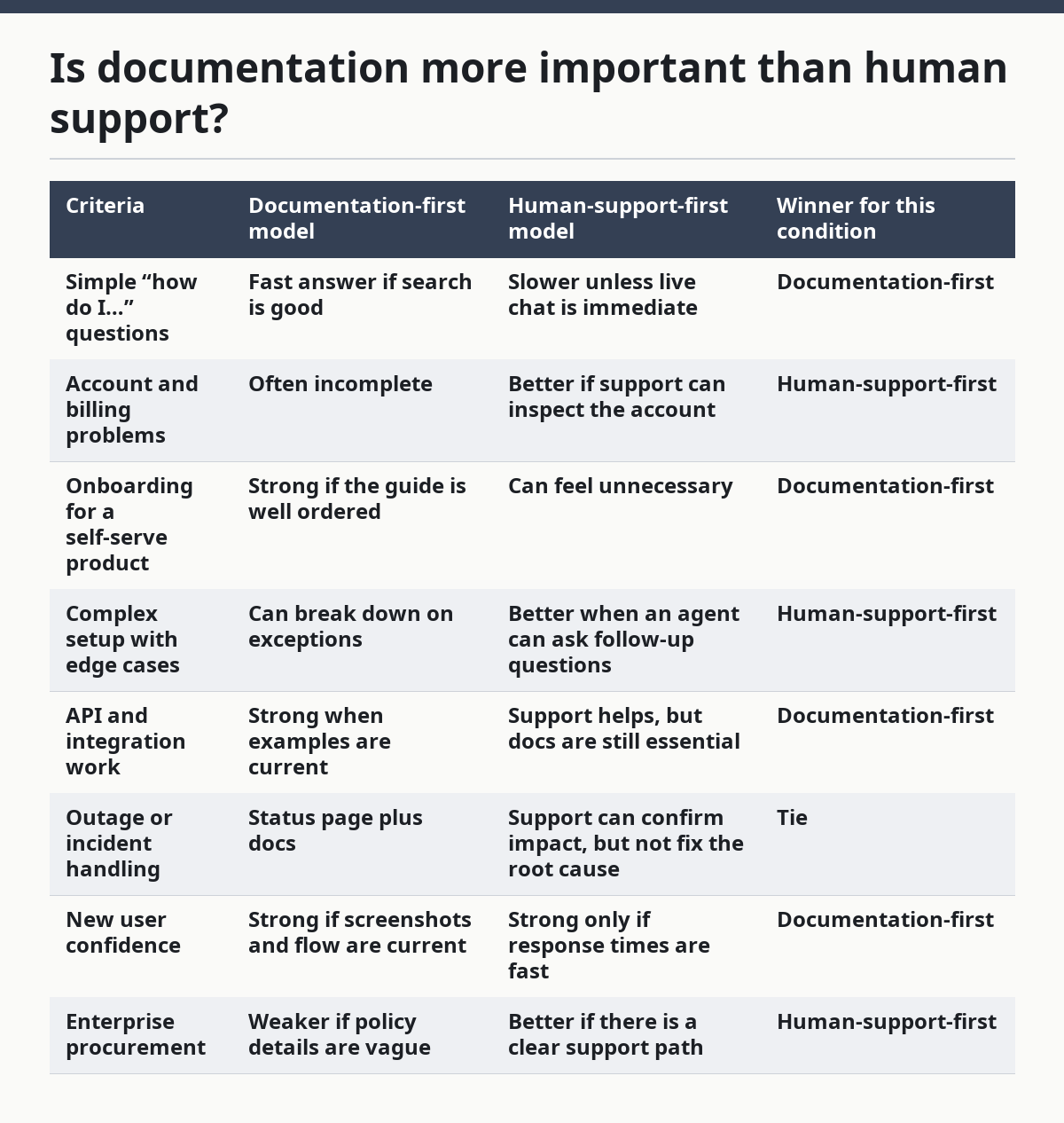
The point is not that one model is universally better. The point is that the wrong model makes the wrong customer suffer. A solo operator using a lightweight tool wants fast articles and a good search box. A company rolling out a CRM or finance tool wants a named support path, escalation rules, and documentation that matches real admin work.
The honest trade-off is this: documentation scales better, but support closes more of the awkward gaps. A SaaS vendor that invests only in one of them is usually leaving money or trust on the table.
How do I tell if the docs are good or just polished?
Good docs answer the exact question a user is about to ask, while polished docs only look clean from a distance. That difference shows up in structure, not in design.
A real help article starts with the task, not the product’s philosophy. It tells the reader where to click, what to expect, and what happens if the result is different from the ideal case. If an article spends 300 words explaining why a feature matters and only 3 lines on the actual steps, the page is written for marketing, not support.
I look for five signs of quality. First, the article title should match a user’s words, not the internal feature name only. Second, the first paragraph should answer the question directly. Third, the steps should be numbered and linear, with no missing dependency hidden in the middle. Fourth, screenshots or code examples should match the current interface, not an older release. Fifth, the page should include related cases, such as permissions, failed imports, or disabled features.
Good docs also show restraint. They do not pretend every issue is solved by a restart. They name the boundary conditions: supported browsers, required permissions, plan restrictions, and known limitations. That honesty matters because the user who hits the boundary is the one most likely to lose trust.
Two sources are worth keeping in view when judging documentation quality. The W3C’s Web Content Accessibility Guidelines explain how content should be perceivable and operable, which matters for help pages that use screenshots, headings, and navigation structure. The Nielsen Norman Group has long written about usability patterns that make content easier to scan and understand, which is exactly what support docs need. If a help center fights the reader at the level of headings and labels, it is already losing.
What are the warning signs of weak SaaS support?
Weak SaaS support usually shows up before the first ticket is sent. The warning signs are missing dates, vague answers, dead links, and a support path that hides the real cost of help.
A common red flag is a help center that looks large but answers nothing in depth. Many articles may exist, but if they all repeat the same short paragraph, the system is padded rather than useful. Another red flag is “coming soon” language in support docs months after launch. That suggests the company shipped the product before building the support layer around it.
Watch for article dates too. If the docs show no visible update signal, the reader cannot tell whether the page matches the current UI. In SaaS, that is not a cosmetic issue. One feature rename or menu move can make a current article unreadable.
Weak support also hides behind ticket gates. If the only visible path is a form with no response expectations, the customer has no way to judge urgency. That is a real cost. A tool with a $0 or low-friction entry point can still be expensive to use if every question turns into a delayed ticket.
Another warning sign is silence around failure. Good docs explain what to do when a sync fails, an import stalls, a webhook drops, or a user lacks access. Weak docs stop at the happy path. That is a clue that the vendor expects support to do the hard work or that the product team has not mapped the real error states yet.
If I had to reduce the whole check to one rule, it would be this: the more the product depends on permissions, data movement, or integrations, the less forgiving weak support becomes.
How should a beginner read support docs without wasting time?
A beginner should read support docs in the same order they will need them: setup, permissions, common errors, and recovery. That order saves time because it matches the real risk pattern of a first-time implementation.
Start with the onboarding article and look for the 3 things most users need early: account setup, role assignment, and first success. If the first success is buried behind five side topics, the product is asking too much of a new user. A good beginner guide makes the first task obvious in under a few minutes of reading.
Then move to the permissions model. Many SaaS tools fail not because the feature is broken, but because the user does not have the right role. If the docs do not explain what each role can and cannot do, the support burden will fall on the customer’s admin. That is where confusion grows.
After that, check the error articles. A good support library should include the most common failure paths, not just ideal setups. Search for terms like “failed,” “not syncing,” “error,” “permission denied,” and “missing.” If those terms return clear articles, the docs are built for real use.
Last, scan the recovery path. Can the user undo a step, restore data, retry a sync, or contact support with the right context? Recovery is where a product proves whether it respects the customer’s time. A guide that explains only what to do when everything works is not enough for software that handles real work.
A beginner who follows that sequence will learn more in 15 minutes than someone who clicks around randomly for an hour. The goal is not to read everything. The goal is to find the first point where the product is likely to fail and see whether the company has already documented it.
Who is this analysis for, and who should skip it?
This analysis is for buyers, admins, and product teams who need to know whether a SaaS company is prepared for real users. It is especially useful when the software is hard to evaluate from demos alone.
Admins need this because they own rollout risk. If the docs are thin, admins become the support layer inside their own company. That means more internal tickets, more retraining, and more time spent translating vendor jargon into daily workflow.
Buyers need it because support quality changes total cost of ownership. A feature list can look impressive while the operating burden is terrible. One product with strong docs and clear support paths can be easier to run than a cheaper one with a chaotic help center.
Product teams need it because support content reveals what users are actually stuck on. If the same topics dominate the help center, the product likely has friction in onboarding, permissions, or integration. That is useful competitive intelligence, not just customer service trivia.
This analysis is not for someone who only wants a logo checklist. If the only question is “Does the vendor exist?” then a help-center review is too much work. It is also not for someone who needs private support performance data the company never publishes. Public signals can show a lot, but they cannot prove response time in every case.
The practical limit is simple: public documentation can tell you a great deal about support maturity, but it cannot replace a reference call, a pilot, or a contract review when the stakes are high. That is especially true for enterprise software where data access and escalation terms matter.
When does the verdict flip?
The verdict flips when the customer’s risk is tied to a live deadline, a regulated workflow, or an integration that cannot fail quietly. In those cases, human support beats documentation-first service even if the docs are excellent.
The first flip case is a mission-critical rollout. If a team is moving payroll, billing, or customer records, a support ticket path with escalation matters more than a great article library. A clean help center is useful, but it does not replace a human who can inspect the account and act quickly.
The second flip case is a product with complex permissions. If the software has multiple roles, org structures, or access layers, the user will eventually hit a state that the docs cannot fully predict. A strong admin guide helps, but support needs to be available when the org chart gets messy.
The third flip case is an API-heavy workflow. Here, documentation is still central, but the quality of support for edge cases becomes decisive. A developer can read examples, yet still need help when a webhook fails, a payload changes, or an integration needs account-specific diagnosis.
The fourth flip case is a buyer evaluating a mature tool against a lighter one. If one product has broad documentation but poor response routes and the other has narrower docs but a clear support path, the second can win for a team that cannot afford downtime. That is a rational choice, not a contradiction.
The flip is not random. It depends on whether the customer’s pain is solvable by reading or only solvable by intervention. That is the line that should decide the purchase.
What does a strong SaaS support stack look like in practice?
A strong SaaS support stack combines searchable docs, a visible status page, plain-language onboarding, and a support path that does not hide behind vague forms. That stack works because each part covers a different kind of user problem.
The documentation layer should answer the “how do I” questions. The support layer should handle the “this is broken” and “this depends on my account” questions. The status page should answer “is it just me?” before the user opens a ticket. Release notes should explain what changed so the docs do not become stale by accident.
The best version of this stack is consistent. Terms should match across the app, the docs, and the ticket form. If the UI says “workspace” but the help center says “project,” the user has to translate before they can solve the problem. That small mismatch creates needless work.
The stack also needs maintenance. Documentation ages faster than most product teams admit, especially after UI changes or plan changes. A page that was right six months ago can become misleading after one menu move. That is why visible dates, changelog links, and updated screenshots matter.
For a beginner, this stack feels calm. For an admin, it feels controllable. For a developer, it feels like the company expected integration work from the start. That is the real sign of maturity: not a large help center, but a support system that fits the shape of the product.
A useful public benchmark for this kind of content is WCAG from the W3C, because accessible structure helps people scan support pages faster. Another is the Nielsen Norman Group’s usability guidance, because support docs succeed only if the reader can find the answer under pressure. Those standards do not guarantee good support, but they give a clear yardstick.
The honest verdict: which one should you trust more?
Choose documentation-first SaaS if the product is self-serve, the setup is simple, and the main problems are “how do I” questions. Choose human-support-first SaaS if the product touches billing, access control, migration, or other account-specific work. Neither if the vendor hides both its docs and its support terms behind vague marketing pages.
That is the cleanest call. A self-serve tool should prove itself through clear docs, not call volume. A complex tool should prove itself through both docs and a real support path, because one without the other is incomplete.
The wrong choice is assuming all support is equal. It is not. A beautiful help center with no recovery path can still leave a customer stranded. A fast chat team with no written docs can still leave every new user confused by week two.
If the goal is to understand a SaaS company from public signals, the question is not “Do they have support?” The better question is “Can this product absorb confusion without wasting the customer’s time?” That is the real measure of support maturity.
What should I do with the findings?
Use the findings to predict friction before you buy, roll out, or renew. A support review should change the shape of the decision, not just the mood.
If the docs are strong, you can expect a smoother first 30 days and fewer repetitive tickets. If the docs are weak but the support path is strong, you can still move forward, but you should budget for more hand-holding. If both are weak, the product is expensive in hidden ways, even if the sticker price looks fine.
Turn the review into a short decision memo with three columns: setup risk, recovery risk, and support visibility. That format keeps the analysis practical. It also stops the conversation from drifting into vague praise about design or brand polish.
A final check is whether the company makes it easy to find the right answer the first time. If you have to jump across four pages, guess the right search term, and then open a ticket anyway, the support system is not working. The company may still be a fit, but only if the business can tolerate that overhead.
FAQ
How do I know if a SaaS help center is good enough?
A good enough help center answers the top user tasks without forcing a ticket for routine questions. It should cover setup, permissions, common errors, and recovery in plain steps, with terms that match the product interface. If the reader has to guess what the article means, the help center is not ready.
Is live chat better than documentation?
Live chat is better for urgent, account-specific, or failure-related issues, but documentation is better for repeat questions and after-hours help. The strongest SaaS companies use both, because chat can solve exceptions while docs reduce the number of exceptions in the first place. If a vendor only offers chat and weak articles, the support model is fragile.
What is the biggest red flag in SaaS documentation?
The biggest red flag is a help center that only covers the happy path. If the docs explain the ideal setup but skip permissions, errors, and recovery, the product will be hard to run in real life. A second red flag is stale content with no clear update signal.
Do I need to read release notes too?
Yes, because release notes explain when docs may already be outdated. A product that changes often without clear release notes can leave users following old steps. For a SaaS tool with frequent UI changes, release notes are one of the best clues that the support system is being maintained.
Can public support pages tell me enough on their own?
Public support pages tell you a lot, but not everything. They can show support maturity, search quality, and how the company thinks about users, yet they cannot prove every response time or every escalation path. For high-stakes software, public analysis should lead into a pilot, reference check, or contract review.
Drafted with AI; not yet reviewed by a person.