How to Build a SaaS Proof Library for Screenshots, Quotes, and Release Notes: A useful SaaS proof library starts with 6 core fields, and it keeps…
Last updated: November 15, 2026
Quick Answer: A useful SaaS proof library starts with 6 core fields, and it keeps screenshots, quotes, release notes, help docs, and product pages in one place so each claim has a trail back to its source. The right setup is a tagged, dated, searchable library with source notes on every item. The sections below show how to build a SaaS proof library that stays useful after 50 files, not just after 5.
Key Takeaways
- A SaaS proof library stores the evidence behind a claim, not only the claim itself.
- One searchable system with tags, timestamps, and source links keeps proof out of scattered folders.
- Build the proof record when you capture the item, before memory fades.
- Tag by claim, not by mood.
What a SaaS proof library needs to hold

A SaaS proof library needs to hold the evidence behind a claim, not just the claim itself. That means the screenshot, the quote, the release note, the help doc, the product page, the capture date, and the source path in one record.
Because of that, when you open a file six weeks later and try to remember why a line about pricing, workflow, or a feature sounded true, the library should answer fast. If the proof library is thin, you get a dead image with no context. If it is built well, you get a dated record, a source trail, and a clear reason the item belongs.
Use four buckets from the start:
- Screenshots: UI states, settings, onboarding steps, pricing pages, dashboards.
- Quotes: exact wording from product pages, docs, blogs, and release notes.
- Release notes: product changes, feature launches, deprecations, and fixes.
- Support material: help docs and product pages that explain how the product works.
Don’t mix this with a general bookmark folder. A bookmark says “go look here.” A proof library says “here is the exact thing, the date I captured it, and why it matters.”
The best part for most teams is that the same item can be reused in product research, fact checks, competitive notes, and content review without hunting the web again. That is the point.
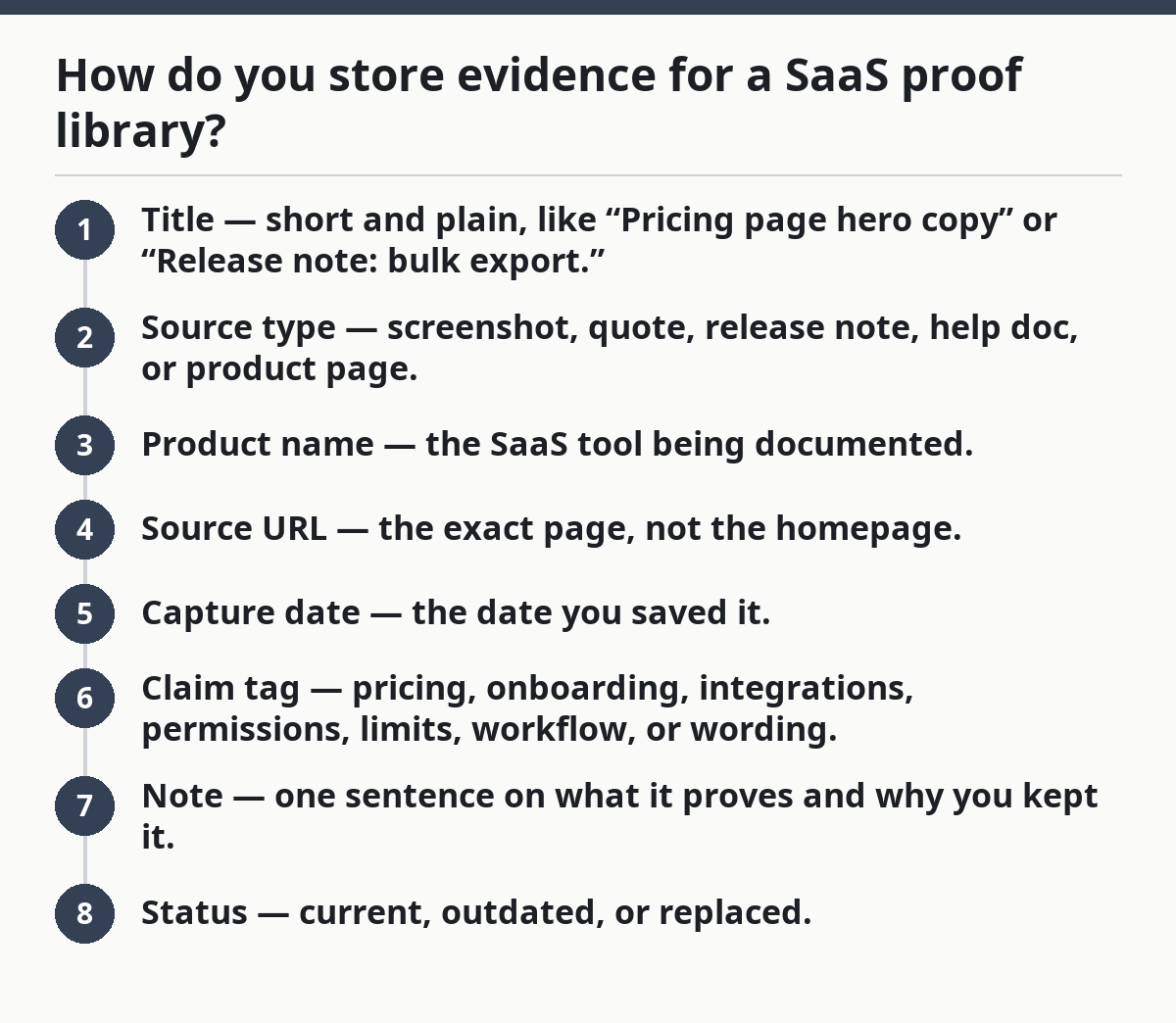
How do you store evidence for a SaaS proof library?
You store it in one system that supports search, tags, timestamps, and source links, not in scattered desktop folders. A proof library works best when each item has a standard record with the same fields every time.
Because the structure matters more than the tool, you can start with a spreadsheet, a note database, a document tool, or a DAM-style system. The point is not the app. The point is whether you can sort by tag, search by keyword, and see the source trail fast.
Use a simple record for every item:
- Title — short and plain, like “Pricing page hero copy” or “Release note: bulk export.”
- Source type — screenshot, quote, release note, help doc, or product page.
- Product name — the SaaS tool being documented.
- Source URL — the exact page, not the homepage.
- Capture date — the date you saved it.
- Claim tag — pricing, onboarding, integrations, permissions, limits, workflow, or wording.
- Note — one sentence on what it proves and why you kept it.
- Status — current, outdated, or replaced.
Keep the storage method boring. A spreadsheet can work for a small library, and a note database can work too. If your team already uses document tools with revision history, that history can help when you need to trace when a source changed; Google Docs help and Microsoft Support both document version history and previous file versions, which is useful for proof trails. The question is not whether the app is flashy. The question is whether the record is searchable and consistent.
Here’s the catch: file names alone fail once the library gets bigger than a few dozen items. “Screenshot 7” is useless in a month. “2026-03-14_acme-pricing-page_free-plan_limits.png” is useful because it carries date, product, and topic in the file name itself.
Build the proof record before you save the file

A proof record should be built at the moment you capture the item, not later when memory has already faded. That keeps the library clean and stops you from saving beautiful garbage.
Because the context is freshest at capture time, a tiny record fixes the most common mistake in under a minute. Grab a release note from a changelog page, and if you do not note which claim it supports, the quote may still be there later but its meaning will be gone.
Use this capture routine every time:
- Open the source page and copy the exact URL into the record.
- Capture the screenshot, quote, or note with the date in the file name.
- Add one tag for the topic and one tag for the source type.
- Write one line on what the item proves.
- Mark whether the item is current or already superseded.
The note should answer one question: “What does this prove?” If the answer is vague, the item is too vague. A screenshot of a dashboard does not prove adoption unless the caption says what field, page, or status matters.
Use one naming rule across the whole library. A practical pattern is YYYY-MM-DD_product_topic_source. That format is plain, sortable, and easy to scan. Clean naming matters more than clever naming, and this is where many generic guides go wrong: they treat the library like a scrapbook. A scrapbook is for memory. A proof library is for retrieval. Retrieval wins.
The trade-off is obvious: more structure means a few extra seconds per save. That cost is usually worth it because it prevents later cleanup, though teams should adjust the process to their workflow and consult a professional if they need governance for regulated records. A library that is hard to maintain dies fast. A library that takes 30 seconds to file survives.
How to tag screenshots, quotes, and release notes
You tag by claim, not by mood. A good tag helps you find proof for a specific line later; a bad tag only describes the file in general terms.
Because the tag has to lead back to a specific claim, a broad label can fail fast. For example, if you need a screenshot that supports a claim about team permissions, but the only tag is “dashboard,” that tag is too broad to help. With a claim-based tag, you can pull up every item tied to access control in one search.
Use a tag set with a maximum of 3 layers:
- Topic tag: pricing, onboarding, permissions, integrations, limits, billing, workflow.
- Source tag: screenshot, quote, release note, help doc, product page.
- State tag: current, old, changed, unclear, pending review.
That gives you enough structure without turning the library into a tax form. Keep the tag list short. If two tags mean nearly the same thing, merge them. “Plans” and “pricing” often overlap; pick one and stick with it.
For screenshots, add a detail tag when the image shows a specific UI state: modal, dropdown, empty state, settings page, or error state. For quotes, tag the exact feature or promise. For release notes, tag the feature area and the date range if your library spans a long product timeline.
The truth is, release notes are the easiest items to bury and the hardest to reconstruct later. A note from a 2024 changelog can matter in 2026 if it explains a product change that changed the wording of a page. Without a date tag, the trail breaks.
If a screenshot or quote can support more than one claim, tag it for the main claim first. Do not turn every item into a giant keyword soup. Search gets worse, not better, when every record carries ten tags.
How to make reference trails that hold up later
A reference trail is the path from your note back to the source page, the capture date, and the exact place the item came from. It is what keeps a proof library from becoming a folder full of orphaned images.
Because the trail is what makes the evidence defensible later, a quote from a help doc should never sit alone. If someone asks where it came from and whether it was still live last month, the record needs URL, title, date, and page section.
A strong trail includes:
- Original URL
- Page title
- Capture date
- Page section or heading
- File name
- Related claim or project note
For screenshots, save the page URL in the metadata or note field and name the image after the page plus the state it shows. For quotes, store the exact wording and a link back to the source. For release notes, keep the product version, date, and changelog page title if the site uses one.
Use source trails to separate “I saw this” from “this still exists.” That distinction matters. A proof library is not a promise that the source is unchanged forever; it is a record of what was visible at a point in time.
Two sources are worth having in the room when you set up this part of the system: the Google Docs help on version history and the Microsoft Support page for previous file versions. Both reinforce the same idea — versioned records beat memory. If your team already uses document tools with revision history, that history should be part of the proof trail, not ignored.
What should go in a proof library?
A proof library should hold the items you need to verify product claims, explain product behavior, and support future fact checks. That includes screenshots, direct quotes, release notes, help docs, and product pages.
Because the library is meant for verification, each item should help answer whether a feature exists, whether a page wording changed, or whether a release note backs up a claim. If the library only contains screenshots, you miss the written source. If it only contains quotes, you miss the UI state. The best library mixes both.
Put these in the library:
- Product pages for claims about features, plans, and positioning.
- Help docs for workflows, limits, and setup steps.
- Release notes for change history.
- Screenshots for visible UI proof.
- Quotes for exact wording that may be reused or checked later.
Leave out casual notes that have no source. Leave out copied text without a date. Leave out screenshots with no label. Leave out anything you would not trust six months later.
One useful habit is to store the smallest useful slice, not the whole web page every time. If a pricing page has one section that matters, capture that section and record the page title. If a release note mentions three changes, tag the one that matches the claim and note the rest separately if needed.
This is where many generic guides go wrong: they treat the library like a scrapbook. A scrapbook is for memory. A proof library is for retrieval. Retrieval wins.
Keep the library current without letting it rot
A proof library stays useful when old items are marked, not deleted, and when fresh captures replace stale ones on a fixed rhythm. A monthly review is enough for many teams; a weekly review makes sense if the product changes fast.
Because the goal is to avoid accidental confusion, a screenshot from January can sit next to a release note from July only if the older item is marked outdated. If both look current, the library lies by accident. If the old item is marked outdated, the lie disappears.
Set three review rules:
- Mark any item outdated when the page changes.
- Keep the old version, but move it to an archive state.
- Add the new capture beside it with a fresh date.
This gives you history without confusion. It also helps when a claim changes over time. A pricing page from Q1 may explain why a post was written one way, while the Q3 version explains why it should be updated.
Do not delete old evidence unless you have a very clear reason. Removal breaks the trail. Archive instead. A library with history is stronger than a library that only shows the latest page.
One more practical limit: if a record cannot be explained in one sentence, it is probably doing too much. Split it. A clean library beats a clever one.
Final build order for a proof library
A proof library should start with one structure, one tag set, and one capture rule, then grow only when the first version is already easy to use. That is the fastest path to a library people actually keep open.
Because scale gets messy fast, the first 20 items should be enough to prove the system works before the library grows to 200. If you define the record, tags, and trail now, the library scales. If you wait, you will spend hours cleaning up file names and missing URLs.
Use this build order:
- Choose one storage place.
- Define the record fields.
- Pick 6 to 10 tags.
- Set one file-name pattern.
- Add date, source, and claim to every new item.
- Review and archive on a schedule.
That is enough to start. You do not need a fancy tool to begin. You need a repeatable record and the discipline to use it the same way every time.
The best proof library is not the biggest one. It is the one that answers, quickly and cleanly, “Where did this come from, what does it show, and is it still current?” That is the standard worth building toward.
What is a proof library?
A proof library is a stored set of screenshots, quotes, release notes, help docs, and product pages that back up claims. It gives each item a source, a date, and a tag so you can find it later.
For SaaS work, that matters because product wording changes, UI changes, and release notes get buried. A proof library keeps the trail intact. Without that trail, the same claim becomes hard to verify twice.
How do you store evidence for SaaS proof library research?
You store it in one searchable system with a fixed record for each item. The record should include the source URL, capture date, source type, claim tag, and a short note on what it proves.
A spreadsheet can work at first, but only if you can sort and search it cleanly. If the library grows, move to a tool that handles tags and version history without extra friction.
What should go in a proof library?
Put in anything that helps verify a product claim or explain product behavior. That usually means screenshots, quotes, release notes, help docs, and product pages.
Do not store orphaned images or pasted text with no source trail. If the item cannot be tied back to a page, date, and claim, it will not help much later.
Drafted with AI; not yet reviewed by a person.