
How to Build a SaaS Source Attribution System for Quotes, Screens, and Reference Trails: A source attribution system for SaaS content is the easiest way…
Last updated: November 15, 2026
A source attribution system for SaaS content is the easiest way to keep every quote, screenshot, and claim tied to the exact file that supports it. It works best when each asset gets a source label, a citation format, a file name, and a trail back to research notes and archive folders.
Key takeaways
- A source attribution system is not just a list of links; it is a repeatable way to connect each published claim to one exact source.
- The system should cover four things at once: quotes, screenshots, source links, and archive folders.
- The cleanest setup gives each asset one label, one file name, one citation style, and one storage path.
- This is for content teams that publish often and need evidence fast; it is not for one-off posts that will never be updated.
- The biggest risk is ambiguity. If a quote or screen can point to more than one source, the trail is already weak.
What is a source attribution system?

A source attribution system is a standard for naming, storing, and citing the proof behind a piece of SaaS content. It gives every quote, screen, and reference trail a fixed place in the workflow, so a writer does not have to rely on memory or a messy browser history.
The point is simple: if a reader asks where a claim came from, the answer should live in the content file, the research note, and the archive folder, not in somebody’s head. In editorial terms, this is less about style and more about traceability. The NISO guidance on citation practices is useful here because it treats citation as a structure, not decoration, and the W3C WCAG 2.2 page is a good reminder that screenshots and other visual evidence should also be handled in a way that supports clarity and reuse: NISO and W3C WCAG 2.2.
This system is for teams that publish SaaS articles, product pages, comparison pages, or research-led content on a steady schedule. It is not a fit for casual note-taking. If the content never leaves the draft folder, a full source attribution system is probably too much process for the job.
What should the system include?
A useful source attribution system includes source labels, citation format, asset naming, reference trails, and evidence storage. Those five pieces do different jobs, and none of them is enough on its own.
Source labels tell you what kind of proof a file holds: quote, screenshot, help doc, pricing page, release note, or internal note. Citation format tells you how the source appears in the draft, such as title, publisher, date, and URL. Asset naming keeps the file itself searchable. Reference trails link the draft to the evidence. Evidence storage keeps the raw material in a place that does not disappear when tabs close or pages change.
The mistake to avoid is building only one layer. A link inside a doc is not a trail if the screen grab is saved as “image_final_3.png.” A tidy folder is not enough if the draft still says “according to the product page” with no page title. The system has to work at the file level and the sentence level.
For SaaS work, the practical unit is not the article; it is the claim. One claim should point to one best source, even if the research step collected five. That rule keeps the system usable when the content team returns to the piece 90 days later and needs to refresh a screen or quote.
How do you build the workflow?
You build the workflow by forcing every source to pass through the same four steps: capture, label, store, and cite. The sequence matters because the source trail breaks when people jump straight from browsing to writing.
- Capture the source in the smallest useful form. Save the exact quote, screen, or page title, not a vague note like “pricing page.” A screenshot should show the relevant section, not the whole browser window, unless the wider page context is part of the proof.
- Assign a source label immediately. Use a short code such as Q for quote, S for screenshot, L for live source link, and A for archive copy. The label should appear in the note, the file name, and the draft reference.
- Store the file in a fixed folder path. Keep a separate folder for raw evidence and another for published assets. A clean split helps when a screen needs to be replaced but the original source still has to stay untouched.
- Write the citation in the draft before the section is final. A citation should show the source title, where it came from, and the date accessed or captured, if your editorial style uses that field. The draft should never be the first place the source appears.
- Check the trail against the claim. Read the claim, then check whether the attached source actually supports that exact wording. If the source only supports part of the sentence, trim the sentence until the match is honest.
This is not the kind of process that rewards speed on day one. It saves time on day 20, when the same claim gets reused, disputed, or updated. The cost of skipping the workflow is usually hidden until a source goes stale or a screenshot no longer matches the product.
How should quotes, screenshots, and links be labeled?
Quotes, screenshots, and source links should each get a label that tells you what kind of evidence you are looking at and where it belongs in the draft. The label should be short enough to type fast, but specific enough to separate one asset from another.
A simple pattern is to combine the asset type, the source family, and a date or sequence marker. For example, a quote note might use Q-help-01, a screenshot might use S-pricing-02, and a source link might use L-release-03. The point is not the exact letters; the point is that the label answers three questions at a glance: what is it, where did it come from, and which version is it?
For screenshots, the label should match the content of the image, not the page where it was taken. A screen of a plan table should not be filed under “homepage” just because the homepage linked to it. That kind of mismatch creates broken trails later, especially when the screenshot gets reused in another article.
For quotes, keep the quoted text separate from the paraphrase. A quote with no source label is risky because the words are easy to reuse and hard to verify. If the quote came from a page that may change, pair the label with an archive copy as well as the live URL.
For links, make the source link readable. A naked URL is not enough if the draft passes through several editors. Add the page title and the reason it matters, such as “pricing table,” “product feature note,” or “help doc on seat limits.” That small habit keeps the reference trail usable after the first round of edits.
What is the best citation format for SaaS content?
The best citation format for SaaS content is the one your team can apply the same way every time. Consistency matters more than ornate detail, because the goal is fast verification, not academic display.
A practical format usually contains the source title, publisher or product name, page type, date captured or accessed, and the live or archived URL. If the asset is a screenshot, add a file name that matches the citation entry. If the asset is a quote, record the exact wording and the page section it came from. That makes the citation useful even when the page layout changes.
Here is the decision rule that keeps the format sane: use enough detail for another editor to find the same source in under a minute, but no more. A 14-field note nobody reads is worse than a 5-field note that everyone uses. For most SaaS content teams, the format needs to be compact because citations travel with screenshots, internal notes, and source links at the same time.
A plain structure can look like this:
| Asset | Label | What to record | Why it matters |
|---|---|---|---|
| Quote | Q-help-01 | Exact words, page title, section name | Lets an editor check the wording quickly |
| Screenshot | S-pricing-02 | File name, page title, capture date, source link | Connects the image to the page it came from |
| Source link | L-release-03 | URL, page title, access date | Supports the written claim |
| Archive copy | A-home-04 | Archive path or saved file name | Protects against later page changes |
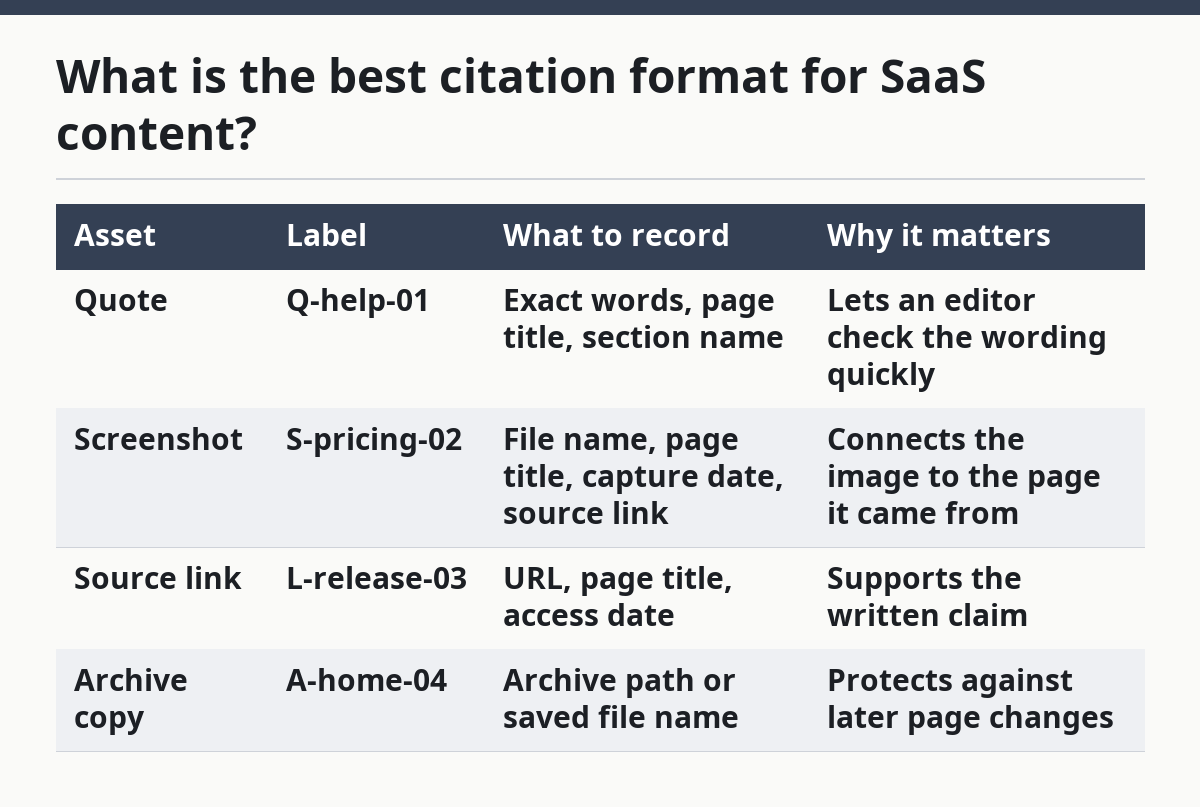
That table is the heart of the system because it turns a pile of evidence into a record. Without it, the draft may still look polished, but the proof behind it will be hard to recover.
How do reference trails work across folders?
Reference trails work by giving each claim one path from draft to research note to stored evidence. The trail should be visible in the document and in the folder structure, so a person can move in either direction without guessing.
Start with one research note per article or content brief. Inside that note, list each claim, its source label, and the folder path for the evidence. Then mirror that structure in the archive folders, using the same labels in the file names. When the draft is ready, the claim text should point back to the note, and the note should point back to the raw source.
The biggest benefit of this setup is that it survives handoffs. A writer can leave, an editor can trim a paragraph, and the evidence still stays linked by label and path. The biggest drawback is maintenance. If the folder names drift, the trail becomes hard to trust. If the labels are inconsistent, the system looks organized while hiding gaps.
A strong reference trail also helps when a SaaS page changes after publication. If a screen or quote must be updated, the trail shows what was used first, what changed, and which archive copy matched the original claim. That matters in SaaS work because product pages, pricing pages, and help docs change often enough that memory is not a safe backup plan.
What goes wrong if you skip the system?
If you skip the system, the cost is usually rework, not instant failure. The draft may ship, but the source trail will be weak, and weak trails become expensive the first time someone asks for proof.
The most common mistake is one source supporting many claims without clear labels. That saves a few minutes during drafting and costs much more during review. Another mistake is saving screenshots with generic names like “screen1” or “final2.” That costs search time later and makes the archive nearly useless. A third mistake is using live links only, which leaves the content exposed when pages move, refresh, or disappear.
The fix is not more complexity. It is stricter naming and simpler structure. One label, one claim, one folder path, one citation entry. When a team keeps that rule for 30 days, the system starts to pay for itself in less backtracking and fewer source disputes.
This is also where the honest trade-off appears. A source attribution system adds setup time before it saves time. It is not the right move for a team that publishes rarely or treats source material as disposable. It is the right move for a SaaS content operation that expects to reuse quotes, screens, and reference trails over and over.
How does this fit a SaaS content operation?
This system fits a SaaS content operation by making evidence reusable without making it loose. It gives the team a shared method for quotes, screenshots, source links, research notes, and archive folders, which is exactly what repeat publishing needs.
It also supports the broader SaaS content operation systems hub because it sits between research and production. The hub can handle the larger workflow, while this page covers the proof layer that keeps content honest after publication. A team that treats attribution as a side task usually ends up with messy drafts and weak references; a team that makes it part of the workflow gets cleaner edits and faster updates.
The best use case is a content team that publishes comparison posts, product explainers, or claim-heavy research pieces. The worst use case is a team that wants a giant archive but has no consistent citation habit. The archive alone does not create trust. The trail does.
How do you attribute sources in SaaS content?
You attribute sources in SaaS content by pairing each claim with a specific source label, a readable citation, and a stored evidence file. The source should be easy to trace from the sentence in the draft to the note and then to the original page or archived copy. If that path takes too many clicks or too much guesswork, the attribution is too weak.
How do you keep a source trail for research?
You keep a source trail for research by giving every source a label, saving the raw evidence in named folders, and recording the claim it supports in the same note. The trail should include live links and archive copies when a page may change. A good trail is short, repeatable, and searchable, not a long dump of bookmarks.
What is source attribution in editorial work?
Source attribution in editorial work is the practice of showing exactly where a quote, screen, or factual claim came from. It matters because it lets editors verify the line, update it later, and defend it if the source changes. In SaaS content, attribution is the difference between a claim that can be checked and one that only sounds true.
Drafted with AI; not yet reviewed by a person.