A SaaS plan entitlement matrix is usually built in 1 grid that separates features, limits, and access rules across 3 plans. In this article on how to…
Last updated: November 17, 2026
Quick answer: a SaaS plan entitlement matrix is usually built in 1 grid that separates features, limits, and access rules across 3 plans. In this article on how to build a SaaS plan entitlement matrix for features, limits, and access rules, the goal is to make plan tiers readable, testable, and hard to mis-sell. Build it as one grid that maps each feature, limit, and access rule to your starter plan, pro plan, and enterprise plan, then use it to decide who gets what, when a feature flag should override a plan, and where a user seat limit still applies.
Key takeaways
- Start with one sheet that lists every entitlement in one place, not three separate documents.
- Separate feature access, usage limits, and permission rules so no one confuses “can see” with “can use.”
- Treat feature flags as temporary control points, not a replacement for plan logic. If you are unsure how this interacts with access control or release management, consult a product, engineering, or legal professional; NIST’s access control guidance and Microsoft’s feature management guidance are useful references. NIST Microsoft
- Write down exception rules, such as admin-only access or enterprise overrides, before someone sells against them.
- Keep the matrix tied to the pricing page and product settings so it stays current when plans change.
What is a plan entitlement matrix?
A plan entitlement matrix is a table that shows which plan gets which capability, limit, or rule. It is the shared reference for product, billing, sales, support, and engineering when they need to answer a simple question like, “Does the pro plan include this feature, and if not, what happens?”
Therefore, the matrix usually has plans across the top and entitlements down the side. A row might say export, user seat limit, API access, admin permission, or SSO, while each plan column says yes, no, a capped amount, or conditional access. That structure matters because a “yes” for one team can mean something different for another.
The strongest version of the matrix keeps the language close to the product. If your app uses user seats, say user seat instead of seats in one place and licenses in another. If a feature is controlled by a feature flag, mark that separately so the plan rule and the release rule do not blur together.
This is not the same as a pricing model map. A pricing model map explains how money is charged; an entitlement matrix explains what the buyer can do after paying. That split matters because the wrong plan table can still be useful for sales, but the wrong entitlement matrix can create billing bugs, access bugs, and support tickets in the same week.
How do you map plan entitlements?
You map plan entitlements by listing every feature, limit, and rule once, then assigning one clear outcome to each plan. The job is to turn scattered product decisions into a single 3-column or 4-column view that people can read in under a minute.
- List the plans in your product sheet as starter plan, pro plan, and enterprise plan, then keep the names exact everywhere else.
- Inventory the entitlements in your product sheet as features, limits, and rules, such as export, 5 user seats, or admin-only access.
- Classify each item in the matrix as yes/no, capped, or conditional so each row has one clear rule.
- Mark any feature flag in the matrix so the release switch is separate from the pricing rule.
- Assign the enterprise exception in the matrix when a sales deal or contract changes the default rule.
- Review the matrix with product, billing, and support in one pass so the same row means the same thing to all three teams.
The easiest way to avoid confusion is to keep one row per entitlement and one meaning per cell. A cell that says “yes” should not also hide “but only for admins” unless that rule is part of the entitlement itself. If the rule is conditional, write the condition in the cell or in a notes column, not in someone’s memory.
For access control language, NIST defines access control as limiting access to resources and actions, which is a useful lens for plan rules. NIST The matrix should make that limit visible before a customer hits it. Microsoft’s feature management guidance also shows why feature flags belong beside, not inside, pricing rules: a flag can hide a feature while the plan still owns the right to use it. (Source: Microsoft)
What should the matrix include?
The matrix should include every entitlement that can change what a customer can see, use, or exceed. That means three groups: feature access, usage limits, and permission rules.
Specifically, feature access covers things like export, integrations, API access, or reports. Usage limits cover things like 5 user seats, 10 projects, or 1 workspace. Permission rules cover who can do what inside the product, such as admin-only settings or enterprise-only approval flows.
A clean matrix also names the control mechanism. If a feature is behind a feature flag, say so. If the limit is enforced in billing, say so. If a rule depends on account role rather than plan, say that too. That matters because a limit can be the same on paper and different in code.
Here is a simple comparison for the three plan types:
| Plan type | Typical entitlement shape | Common rule style | Common risk |
|---|---|---|---|
| Starter plan | Narrow feature set and tight limits | Mostly yes/no | Too much ambiguity about what “basic” means |
| Pro plan | Broader feature access with higher limits | Mix of yes and capped | Overlapping rules from starter and enterprise |
| Enterprise plan | Wider access plus exceptions | Conditional and contract-based | Sales promises that outrun the matrix |
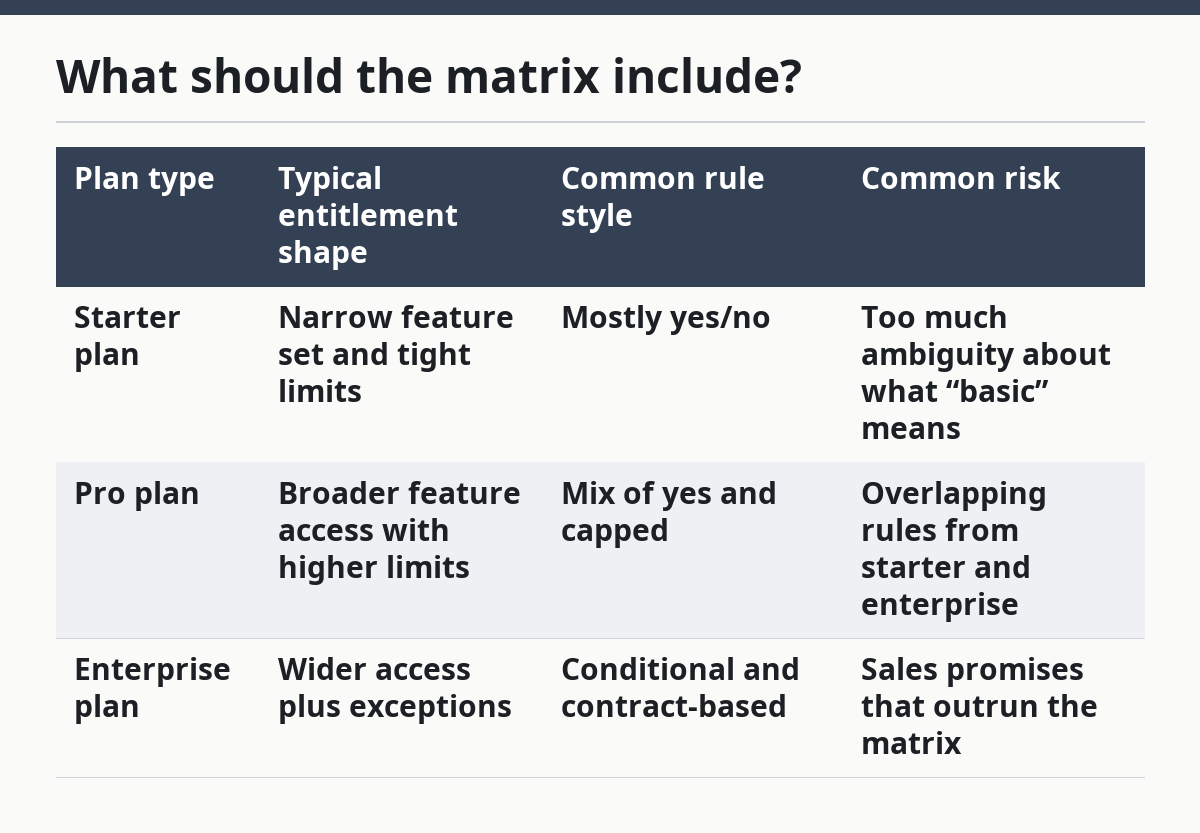
The table is useful because it shows that the matrix is not just a feature checklist. The plan type changes the kind of rule you write. Starter plan rows should be simple. Enterprise plan rows often need notes, because contract terms and role-based access can change the default answer.
Where do feature flags fit?
Feature flags fit as release controls, not as the source of truth for pricing entitlement. The plan says who is entitled; the feature flag says whether the product team has turned the feature on for that account or user.
Since the matrix has 2 different clocks, the commercial clock and the release clock both need a place in the sheet. A customer can pay for a feature before the code is ready, or the code can exist before the plan includes it. If the matrix does not separate those clocks, teams will confuse “not shipped” with “not entitled.”
A good matrix has one column for the entitlement rule and another for the flag state. For example, a row may say “pro plan gets advanced export,” while the notes column says “feature flag on for beta accounts only.” That keeps the product rollout honest without rewriting the pricing logic every time a launch changes.
Do not use feature flags to hide a weak plan decision. If a feature is not part of starter plan, say no. If it is part of pro plan but still behind a rollout gate, say yes and flag it as conditional. That avoids a common support problem: a rep promises access because the feature exists in the app, while the matrix says the plan never included it.
How do you handle limits and seats?
You handle limits and seats by writing the limit as a rule, not as marketing copy. A limit needs a unit, a scope, and an enforcement point, or the matrix will drift the first time a customer grows.
For example, a user seat is a good example. If starter plan includes 3 user seats and pro plan includes more, the matrix should say who can assign them, what happens at the cap, and whether the account owner can buy more or must upgrade. If the enterprise plan uses contract terms instead of a fixed seat count, the matrix should say that clearly.
The same rule applies to usage limits like reports, projects, API calls, or storage. Write the measurement unit next to the item, then keep the limit in the same row for each plan. A row that says “API access” but never says how the access is limited will cause trouble later, because product, sales, and support will each fill the gap differently.
The hard trade-off is simplicity versus precision. A simple matrix is easier to sell and easier to explain. A precise matrix is easier to enforce and easier to audit. If the product has only a few controlled limits, precision should win. If the matrix tries to model every edge case in the main grid, it becomes unreadable, so push rare exceptions into notes and keep the row itself short.
What goes wrong if the matrix is vague?
A vague matrix causes mis-selling, inconsistent support answers, and product rules that drift from the pricing page. The cost shows up in tickets, manual overrides, and customers who think they bought one thing and received another.
The most common mistake is mixing access with limit. A feature can be visible but capped, or hidden but entitled later by a feature flag. If the matrix says only “yes,” no one knows whether that means full access, limited access, or access after a release switch is flipped.
The second mistake is writing exceptions as side comments. An enterprise-only override in a note is easy to miss and hard to enforce. Put the exception in the row itself or add a dedicated rule field so it cannot vanish when someone copies the sheet.
The third mistake is treating the matrix as a one-time launch artifact. Plans change, features move, and limits expand. If you are unsure whether to treat the matrix as part of ongoing governance rather than a launch-only file, consult the same product, billing, or legal guidance used for pricing and access control, because a matrix that is not reviewed when the starter plan changes or the pro plan gains a new rule is already stale, even if it still looks neat in a spreadsheet. NIST and Microsoft both frame access and feature controls as ongoing policy decisions, not one-off setup tasks. NIST Microsoft
A practical guardrail is to review the matrix whenever a plan changes, a feature flag changes state, or a limit changes in the product. That creates a 3-point check that catches the most common drift without turning the sheet into a release calendar.
How do you keep it useful across teams?
You keep it useful by making one matrix the source of truth and giving each team the fields it needs. Product needs the rule. Sales needs the plain-language summary. Support needs the exception path. Engineering needs the enforcement detail.
Therefore, the matrix should be readable in one screen and detailed enough to settle a dispute. That usually means short labels, consistent plan names, and a notes column for edge cases. It also means no duplicate copies with different answers. If one team keeps a private version, the matrix stops being a matrix and becomes a guessing game.
A better test is simple: can someone point to one row and answer three questions in 30 seconds — who gets it, how is it limited, and what rule can override it? If the answer takes longer, the row is too vague or too crowded.
A strong habit is to pair the matrix with the pricing page and the product settings page. The pricing page shows the promise. The matrix shows the rule. The product settings page shows the actual enforcement. Those three views should agree, or the customer will spot the gap before the team does.
If this page sits inside a wider pricing system, it supports the hub on how to build a SaaS pricing surface map without repeating that work here. The matrix is the access logic layer inside that larger map.
How do you map plan entitlements?
Since the same entitlement logic appears above, you map plan entitlements by listing each feature, limit, and rule in one table and assigning one answer per plan. Start with starter plan, pro plan, and enterprise plan, then mark each row as yes, no, capped, or conditional. The matrix stays usable when every cell means one thing.
What is an entitlement matrix for saas pricing?
An entitlement matrix for SaaS pricing is a table that shows which plan includes which feature, limit, or access rule. It is the operational version of the promise made on the pricing page. The matrix helps product, sales, support, and engineering answer the same question the same way.
How do you show feature access by plan?
For example, you show feature access by plan with one row per feature and one column per plan. Use plain outcomes like yes, no, or conditional, and add a notes field for feature flags or enterprise overrides. That keeps the plan comparison easy to read and the access rule easy to enforce.
Drafted with AI; not yet reviewed by a person.