How to Build a SaaS Launch Signal Coverage Checklist for Missing Pages, Quiet Updates, and Untracked Channels: a SaaS Launch Signal Coverage Checklist can…
Last updated: November 17, 2026
Quick answer: a SaaS Launch Signal Coverage Checklist can start with 5 source types and 1 review cadence, then expand only where gaps appear. A launch signal coverage checklist is a practical way to catch missing pages, quiet updates, and untracked channels before they distort launch monitoring. It suits teams that already track a few sources but keep finding blind spots in the blog, status page, customer community, app store listing, or social profiles. It is not for someone who only wants a simple source list; this checklist is for coverage gaps. If customer communications, legal review, or other high-stakes decisions depend on it, consult a professional and follow your internal policy. For background on change monitoring and source handling, see Google Search Central and Apple App Store Connect documentation before you rely on any single channel.
Key takeaways
- A good checklist names the places signals hide, not just the places that are easy to scrape.
- Missing pages hurt when one update lives in a place no one marked as monitored.
- Quiet updates matter because they often change the meaning of a launch without looking like a launch post.
- Untracked channels are usually the ones that do not feel like “launch sources” at first glance.
- A short review cycle beats a long source list that no one rechecks.
What should a launch signal coverage checklist cover?

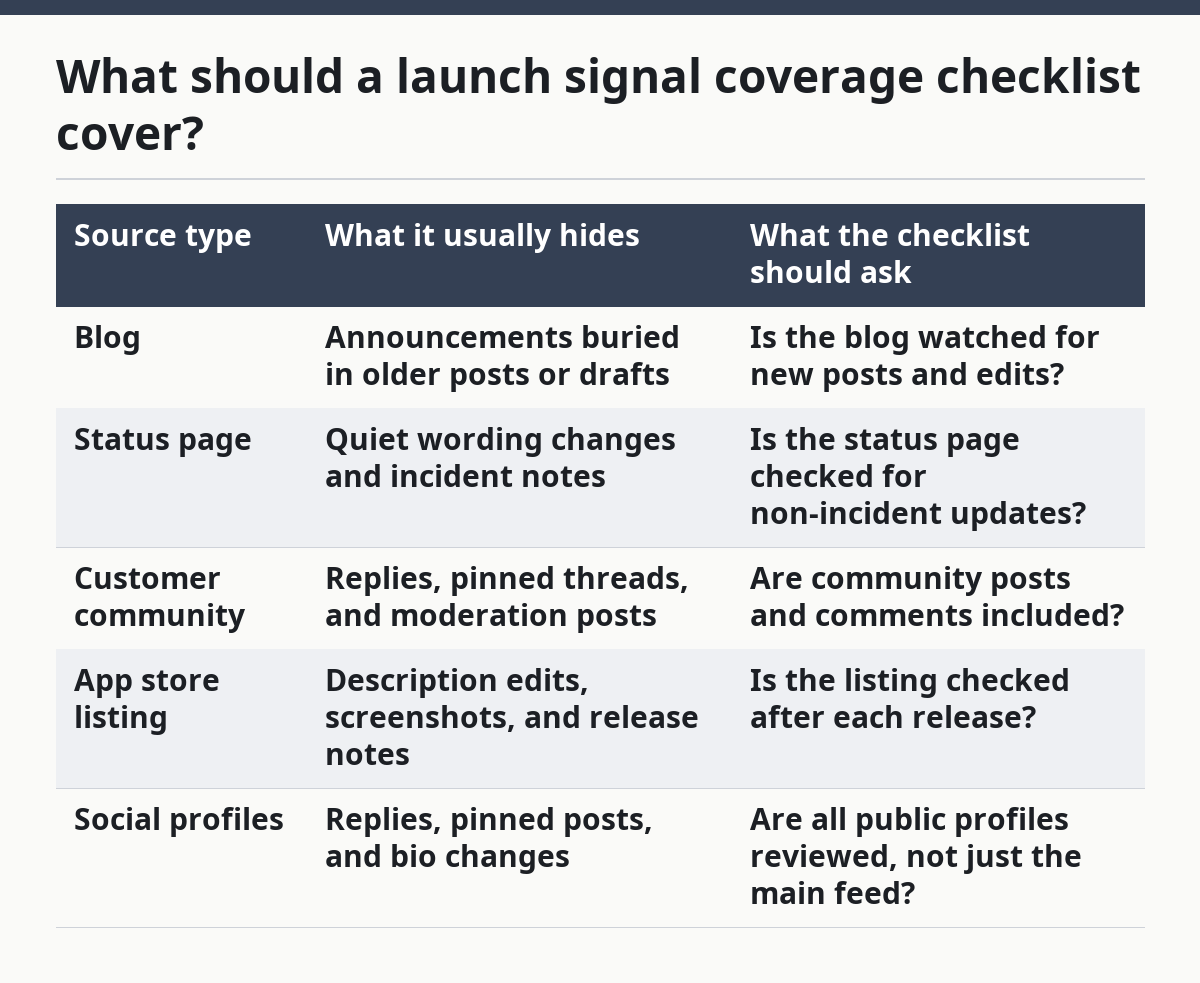
A launch signal coverage checklist should cover every place a launch can appear, then mark what is watched, what is not, and what changed since the last review. The point is not to build a giant source catalog; the point is to expose blind spots before they become missed launches. For teams building the related framework, see how to build a SaaS launch source coverage map and launch monitoring for product updates.
Start with the channels a reader would expect, then add the ones that often hide signal. That means the company blog, status page, customer community, app store listing, and social profiles are all on the list, along with product pages, help docs, and release notes if those belong to the wider monitoring system. If the team already has a source map for owned, earned, and in-product signals, this checklist sits underneath it and checks for gaps, not strategy.
A useful checklist has four columns: source name, signal type, owner, and last review date. A fifth column for “blind spot risk” helps because not every source fails in the same way. A blog post can be obvious but delayed, while a status page can be fast but too vague for launch detail.
The checklist should also note what counts as coverage. A page is not covered just because it exists in a browser bookmark. A page is covered only when someone has a way to notice changes in it, check it on a schedule, or confirm it through a tool.
| Source type | What it usually hides | What the checklist should ask |
|---|---|---|
| Blog | Announcements buried in older posts or drafts | Is the blog watched for new posts and edits? |
| Status page | Quiet wording changes and incident notes | Is the status page checked for non-incident updates? |
| Customer community | Replies, pinned threads, and moderation posts | Are community posts and comments included? |
| App store listing | Description edits, screenshots, and release notes | Is the listing checked after each release? |
| Social profiles | Replies, pinned posts, and bio changes | Are all public profiles reviewed, not just the main feed? |
This checklist is wrong for teams that only want to know “where do launches get announced?” It is better for teams that need to know “what did we fail to watch last time?”
How do you build the checklist step by step?
You build the checklist by listing the sources, labeling the blind spots, and assigning a review rhythm in one pass. The work is simple, but it has to be deliberate or the same gaps keep returning.
-
Open a spreadsheet and list the known sources. Put one source per row for the blog, status page, customer community, app store listing, and social profiles, then add any other public channel the product team uses.
-
Mark each source as covered or uncovered. Use a simple yes/no field so the team can see the gap without reading notes; the result should be a clean view of what is already watched and what is still invisible.
-
Label the signal type for each source. Tag each row as a launch post, edit-only update, incident note, release note, profile change, or community post so quiet updates do not get lumped together with loud announcements.
-
Add the owner and the review cadence. Put a person or role next to each row and assign a review rhythm of weekly, monthly, or after release so the checklist does not rely on memory.
-
Flag the blind spot reason. Note why the source is easy to miss, such as “hidden in comments,” “edits do not trigger alerts,” or “not treated as a launch channel,” and if the source affects customer-impact decisions, consult a professional before relying on the label alone. See Google Search Central’s monitoring guidance and Apple’s App Store Connect help for related channel-change basics.
-
Compare the checklist against recent launches. Pull the last few launches and mark which signals were caught and which were not, then update the checklist where the misses repeat.
-
Store the checklist where the team already works. Keep it in the same place the monitoring team reviews, edits, and assigns work so it is not buried in a separate folder that nobody opens.
The trade-off is clear: a fuller checklist takes longer to maintain than a short source list. The gain is that it catches quiet changes that a narrow tracker would miss.
Which pages go missing most often?

The pages that go missing most often are the ones that look operational, not promotional. A team usually remembers the home page and the main announcement blog, then forgets pages that look like support, maintenance, or product housekeeping.
The blog is a common miss because teams watch it for new posts and ignore old posts that are edited after publish. A status page is another gap because it is often treated as an uptime tool, not a launch signal source, even though wording changes there can hint at rollout timing or product scope changes. Customer community pages get missed for the same reason: they feel like support spaces, but they can carry launch detail in pinned threads, moderator replies, or long comment chains.
App store listings deserve their own line because they change in ways that are easy to skip. The title, description, screenshots, and release notes can all shift without a classic “announcement post.” Social profiles are equally easy to undercount, especially when the meaningful signal is in a bio edit, a pinned post, or a reply rather than the main feed.
A useful way to catch these gaps is to ask one question for every page: “Would I notice this if it changed without a new post?” If the answer is no, the page belongs on the checklist as a blind spot, even if the team already knows the URL.
The cost of missing pages is not just missed launches. It is bad confidence. When a team thinks coverage is broad but only watches the loudest source, it starts trusting a partial picture.
What counts as a quiet update?
A quiet update counts as a launch signal when the meaning changes even though the page does not look like a classic announcement. The update may be small in wording, but it can still be the only clue that a launch has started, shifted, or expanded.
Examples include a status page note that changes tone, a blog post edit that adds a feature callout, an app store release note that shifts from maintenance language to product language, or a social profile bio that adds a new offer. The customer community can do this too. A moderator reply, a pinned thread update, or a new FAQ answer can signal launch activity long before a broader announcement appears.
Quiet updates are hard because they may not trigger the same monitoring logic as a fresh post. That is why the checklist should include “edit monitoring” and “profile monitoring” as separate lines from “new content monitoring.” Those are not the same job.
| Quiet update type | Easy mistake | Better checklist rule |
|---|---|---|
| Blog edit | Only watching publish dates | Check for post edits, not just new posts |
| Status page wording change | Treating it as uptime only | Review copy changes on a schedule |
| App store release note edit | Watching only the app title | Include release notes and screenshots |
| Social bio or pinned post change | Watching only feed posts | Review profile fields and pinned content |
| Community moderator reply | Watching only top-level posts | Scan comments and replies too |
The honest downside is that quiet-update coverage takes more manual review than a feed of obvious announcements. That is the price of catching signal that does not announce itself.
Which channels are easiest to forget in launch tracking?
The easiest channels to forget are the ones that do not look like launch channels on the surface. A team tends to remember the obvious public feed and forget the places where launch detail hides in plain sight.
The customer community is one of the biggest misses because it often sits between support and product. That makes it easy to ignore in a launch checklist, even though it can surface questions, pinned guidance, and moderator notes that matter to launch tracking. The status page gets forgotten for the same reason: it sounds operational, but it may carry wording changes tied to rollout or product availability.
Social profiles are another blind spot, especially when the team watches only one account. Public profiles can include bios, headers, pinned posts, and replies that change the public story without a full announcement. App store listings are easy to miss because the changes are fragmented across the listing, release notes, and screenshots.
The table below shows the practical difference between these channels.
| Channel | Why it gets forgotten | Best way to cover it |
|---|---|---|
| Blog | Feels like the only “real” announcement channel | Watch edits and backfill posts |
| Status page | Seen as a support tool, not a launch source | Review copy changes and incident text |
| Customer community | Mixed with support traffic | Track pinned threads, replies, and moderator posts |
| App store listing | Broken into several editable fields | Check listing text, screenshots, and release notes |
| Social profiles | Assumed to mean only a feed post | Include bio changes, pinned posts, and replies |
If a channel is easy to forget, it belongs in the checklist twice: once as a source, and once as a blind spot the team is trying to close. That sounds repetitive, but it helps during reviews because the forgotten channel is often the one that gets dropped first.
How often should coverage be reviewed?
Coverage should be reviewed on a regular cadence that matches how often the product ships and how often public pages change. A team with frequent releases needs tighter review than a team with rare updates, but the checklist still needs a fixed rhythm or it drifts.
A monthly review is a practical floor for many teams because it catches source changes, owner changes, and new blind spots before they pile up. A weekly check makes sense when the blog, app store listing, or community moves often. After a launch is another good trigger, because that is when the team learns which channels were missed and which signals were noisy.
The review should answer four questions in under 10 minutes: what sources were added, what sources were removed, which quiet updates were missed, and which channels were never actually watched. If those answers are not written down, the checklist becomes a stale spreadsheet instead of a living coverage tool.
One honest limit matters here. This checklist is not a substitute for a wider source coverage map. It works best when the larger structure already exists and this page is used to expose blind spots inside it. The hub on how to build a SaaS launch source coverage map should sit above this checklist, not below it.
Common mistakes that break coverage
The most common mistake is treating the checklist like a source list instead of a blind-spot tool. That usually leaves the blog and social profiles covered while the status page, customer community, and app store listing go unreviewed.
A second mistake is tracking only new posts. That misses quiet updates, which are often the whole point of this exercise. A third mistake is leaving out ownership, because a source with no owner will still be missed when the next launch comes around.
Another mistake is mixing monitoring goals. A launch coverage checklist is not the same thing as a watchlist for product pages, help docs, and social posts, and it is not the same thing as a heatmap for teasers, waitlists, and quiet rollouts. If those jobs are fused together, the checklist becomes too broad to maintain and too vague to trust.
The fix is small but strict. Keep one row per source, one owner per row, one cadence per row, and one blind spot note per row. That structure is plain, but it works because it forces the team to name what is being missed instead of assuming someone else sees it.
How do you find missing launch signals?
You find missing launch signals by comparing recent launches against the sources the team claimed to watch. Look for pages that changed without being marked, updates that showed up in comments or profile fields, and signals that were only visible after the fact. The easiest misses are usually the blog, status page, customer community, app store listing, and social profiles.
What channels are easiest to forget in launch tracking?
The easiest channels to forget are the ones that do not look promotional at first glance. Customer community pages, status pages, app store listings, and social profile fields are all easy to skip because they feel operational or secondary. Those channels should be checked for edits, pinned content, replies, and release notes, not just obvious posts.
How often should launch coverage be reviewed?
Launch coverage should be reviewed on a fixed schedule, then checked again after each launch. A monthly review is a workable baseline, while weekly review fits teams with frequent public changes. The key is to make review a routine task, because blind spots grow fast when the checklist only gets opened after something goes missing.
Drafted with AI; not yet reviewed by a person.