How to Build a SaaS Launch Source Audit Trail for Capture Date, Retrieval Path, and Versioned Evidence: A launch source audit trail records where each…
Last updated: November 18, 2026
A launch source audit trail records where each launch signal came from, when it was captured, and how to get back to the exact version you saw. Build it when you need launch research that another person can reproduce later from the same public signal, not just trust your note.
Key takeaways
- Capture the source, the timestamp, and the path back to it in the same record.
- Save the version you saw, not only the live page that may change in a day.
- Use one retrieval path for each source type, such as a live URL, a Wayback Machine snapshot, or a stored screen capture.
- Tag each item so you can tell a press release from a social post or a public doc at a glance.
- This trail helps with repeatable research; it is not the same thing as source attribution or confidence scoring.
What does a launch source audit trail record?

A launch source audit trail records the capture date, the retrieval path, and the versioned evidence for each public launch signal. It should tell a future reader what was seen, where it came from, and how to reach the same artifact again.
For this job, the source can be a public doc, a social post, a press release, a screen capture, or a copy in the Wayback Machine. The point is not to judge whether the source is important. The point is to make the path from finding to proof visible in 1 place.
A good trail also separates the signal from the wrapper around it. A press release may point to a product page, and a social post may point to a changelog. If you only save the claim, you lose the route back to the claim. If you only save the route, you lose the exact version that mattered.
This is different from a quote library or a confidence score. Those answer a different question. This page is about reproducibility: can someone else find the same launch evidence, on the same date, and see the same version you saw?
How do you build a SaaS launch source audit trail?
You build a SaaS launch source audit trail by collecting each launch source in the same order every time: capture date, retrieval path, source version, and evidence tag. The cleanest way is to keep one record per source item, even when several items belong to the same launch.
-
Open the source and capture the date in your note or database record as soon as you see it, using the full date and time if the source shows one. A capture date of
2026-11-18or2026-11-18 14:32 UTCmakes later checks easier than a loose month tag. -
Copy the retrieval path exactly as you found it, including the live URL, the Wayback Machine URL, or the file path for a screen capture. This gives you a direct return route when the live page moves or the post is edited.
-
Save the versioned evidence as a screen capture, archived page, or exported file, depending on the source type. If the source is a public doc or release note, save the version you saw; if it is a social post, save the post view as shown at capture time.
-
Tag the evidence with one source type, one launch event, and one source ID. A tag such as
press_release,social_post, orpublic_dockeeps mixed signals from blurring together later. -
Link the source record to the launch event in the same database row, sheet row, or note. The launch item should point to the evidence, and the evidence should point back to the launch item.
-
Check the trail a second time after the source changes, disappears, or gets rewritten. That second check tells you whether the record still leads to the same versioned evidence or only to a live page that now says something different.
The best trail is boring on purpose. It uses the same fields every time, so the next person does not need to guess whether a saved item is a press release, a screen capture, or a copy from public docs.
What fields should the trail include?

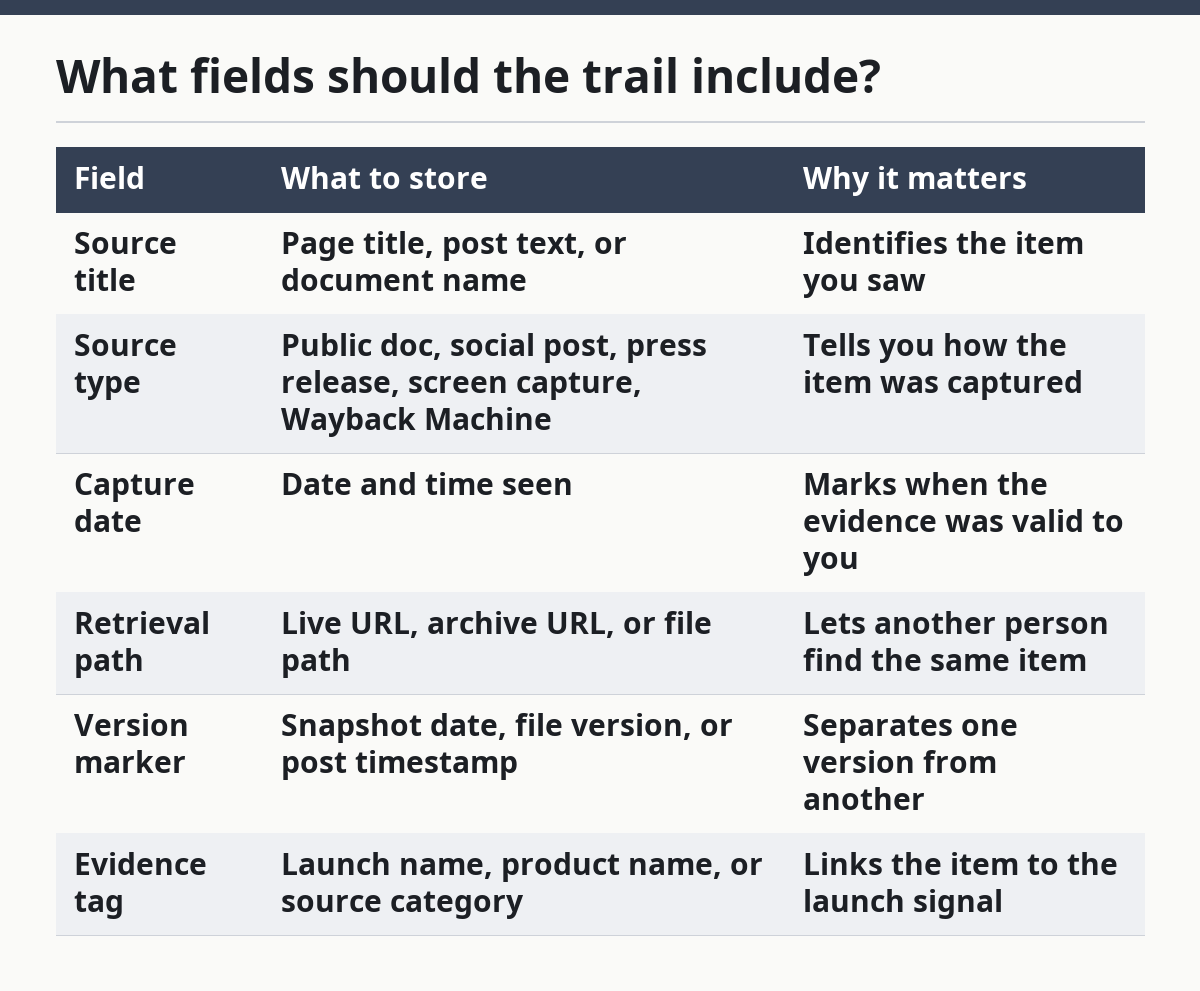
The trail should include at least six fields: source title, source type, capture date, retrieval path, version marker, and evidence tag. Those fields are enough to reconstruct the source path without guessing, which is the whole point of the trail.
A simple record can look like this:
| Field | What to store | Why it matters |
|---|---|---|
| Source title | Page title, post text, or document name | Identifies the item you saw |
| Source type | Public doc, social post, press release, screen capture, Wayback Machine | Tells you how the item was captured |
| Capture date | Date and time seen | Marks when the evidence was valid to you |
| Retrieval path | Live URL, archive URL, or file path | Lets another person find the same item |
| Version marker | Snapshot date, file version, or post timestamp | Separates one version from another |
| Evidence tag | Launch name, product name, or source category | Links the item to the launch signal |
A 7th field is useful if your team needs it: notes on edits or missing pieces. That is where you write that the live page changed after capture, or that the archive snapshot is incomplete. Do not hide that in a free-form paragraph where it will be missed.
Keep the fields plain. A trail with 12 labels and 4 nested folders looks busy, but it slows the only thing that matters: finding the exact source again in under 1 minute.
How do you preserve source versions?
You preserve source versions by saving the exact state you observed, not only the live source that may change later. For public pages, that usually means a screen capture plus an archive copy, or a direct link to the Wayback Machine when that exists.
The Wayback Machine is useful because it gives you a dated archive path that can survive after a page changes or vanishes. Its value here is simple: it gives you a second route to the same source version. The Internet Archive’s Wayback Machine is the most familiar example of this kind of retrieval path, and W3C PROV-DM is a useful model for thinking about provenance as a record of how an item came to be.
https://web.archive.org/
https://www.w3.org/TR/prov-dm/
Use screen captures for visual proof when layout matters, such as a homepage banner, a changelog block, or a social post rendered in context. Use archived copies for text-heavy pages when the wording matters more than the design. Public docs and press releases often need both, because a page can be edited while the file name stays the same.
The trade-off is storage and upkeep. More copies mean more things to manage, and a capture library can get messy fast. That is why the version marker matters: without it, a folder full of screen captures becomes a pile of unnamed images, and a pile of images is not a trail.
If the source changes often, capture both the live path and the snapshot path at the same time. That dual record reduces the chance that a later reader lands on a current page and mistakes it for the original version.
What usually breaks the audit trail?
The audit trail usually breaks when people store the signal but not the path, or the path but not the version. A note that says “announced on X” is not enough if the post is edited, deleted, or buried under later posts.
The most common failure is copying a claim into a spreadsheet without the retrieval path. The second failure is saving the URL without the capture date, which makes it hard to tell whether the page was seen before or after an edit. The third failure is using one tag for everything, so a press release and a public doc end up looking the same.
Another weak spot is relying on a single live URL. That works only while the page stays public and unchanged. Once the source moves, the trail loses its return path unless you also stored an archive link or screen capture.
A simple rule helps: if the source can change in under 1 day, record the version you saw on the same day. That is not about speed for its own sake; it is about avoiding a record that points to the right page and the wrong version.
When is this trail worth the effort?
This trail is worth the effort when launch research needs to be repeatable across time, people, or tools. It fits teams that track product launches from public signals and need to answer, later, “Where did this come from?” without opening half a dozen tabs.
It is less useful if the only goal is a quick internal note with no need to revisit the evidence. In that case, a plain link may be enough. The trail adds value when the source may disappear, be edited, or be misunderstood in 30 days.
It is also not the same as source attribution for quotes or a confidence score for source quality. Those are different systems with different outputs. If you need provenance, version history, and retrieval path, this trail is the right tool; if you need ranking or trust scoring, it is the wrong one.
For launch research, that distinction matters. A clean audit trail helps you prove what you saw. It does not tell you whether the source was important, reliable, or enough on its own.
FAQ
How do you document where a launch signal came from?
You document where a launch signal came from by pairing the source type with the retrieval path and the capture date. That lets a future reader move from the launch note to the exact public doc, social post, press release, screen capture, or Wayback Machine snapshot you used.
What fields should a launch evidence trail include?
A launch evidence trail should include source title, source type, capture date, retrieval path, version marker, and evidence tag. Those 6 fields are enough to find the same item again and tell one version from another without guessing.
How do you preserve source versions for launch research?
You preserve source versions by saving the exact state you observed, not just the live page. Use screen captures for visual proof, archived links for older page states, and file copies for public docs or releases that may later change.
Drafted with AI; not yet reviewed by a person.