A SaaS launch discrepancy log usually needs 6 fields, and for a small launch 10 to 20 rows may be enough. In the article below, “How to Build a SaaS…
Last updated: November 17, 2026
Quick answer: A SaaS launch discrepancy log usually needs 6 fields, and for a small launch 10 to 20 rows may be enough. In the article below, “How to Build a SaaS Launch Discrepancy Log for Conflicting Claims Across Pages and Posts” means a dated record of conflicting claims across homepage copy, pricing pages, blog posts, social posts, and release notes.
A launch discrepancy log is a practical way to catch when homepage copy, pricing pages, blog posts, social posts, and release notes say different things about the same SaaS launch. Build it as a dated record of each claim, where it appears, what version it belongs to, and which line is winning when the pages disagree.
Key takeaways
- A discrepancy log is not a source archive; it is a mismatch tracker.
- Record one claim at a time so you can compare wording without mixing themes.
- Treat version differences as data, not noise, because launch pages can change in the same day; if the discrepancy affects pricing, legal, or regulatory claims, consult a qualified product, legal, or compliance professional and keep the timestamp format consistent with RFC 3339 for machine-readable dates.
- Pick one “current” claim only after you note the conflict and the older wording.
- This log helps most when a launch message spreads across homepage copy, pricing pages, blog posts, social posts, and release notes.
What is a launch discrepancy log?

A launch discrepancy log is a simple table that records conflicting claims across launch materials so you can reconcile them later. It is built for page mismatch and post mismatch, not for tracking every source in a launch trail.
The cleanest version uses 6 fields: source, page type, claim text, date or timestamp, version label, and resolution status. That is enough to show whether a pricing page says “free trial” while a blog post says “demo only,” or whether a release note names a feature that the homepage still leaves out. I would keep each row to one claim, not one page, because a single page can carry 2 different statements.
This is not the same as a claims audit or a stakeholder map. Those are broader. A discrepancy log is narrower and more practical: it asks, “What conflicts, where, and which wording should I trust right now?” If the launch is small, 10 to 20 rows may be enough. If the launch spans multiple pages and posts over several days, the log can grow fast.
Therefore, the log is most useful when you expect version differences. A homepage can change at 9 a.m., a social post can stay fixed for 24 hours, and release notes can lag behind both. Without a log, the old wording disappears before you can compare it.
How do I build a launch discrepancy log?
You build a launch discrepancy log by collecting the launch claims, standardizing each one, and then recording the conflict in a shared sheet or tracker. Use a spreadsheet first; a ticketing tool can come later if the launch gets noisy.
- Create a sheet in Google Sheets, Excel, or Airtable with 6 columns: source, page type, claim text, timestamp, version, and status.
- Capture the exact wording from homepage copy, pricing pages, blog posts, social posts, and release notes before you rewrite anything.
- Tag each row with one claim and one version, such as “homepage v1” or “release note v2,” so later edits do not blur the record.
- Compare the claim text line by line and mark a mismatch when the meaning changes, not just when the phrasing changes.
- Classify the conflict as page mismatch, post mismatch, or version difference so the pattern stays visible.
- Resolve the row by choosing the current claim, then add a note that explains why that version won.
- Review the log after each launch update so new claims do not sit beside old ones for more than one edit cycle.
A plain spreadsheet works because it is searchable and easy to sort by date. Google Sheets help and Microsoft Excel support both describe table-like sorting and filtering workflows that suit this kind of record. If you try to manage the log in a chat thread, you lose the history the moment the conversation scrolls. If you try to manage it in a doc without columns, you lose the ability to compare sources side by side.
The goal is not to make the log fancy. The goal is to make the conflict visible in under 30 seconds.
Which fields should each row have?

Each row should hold enough detail to answer “what changed?” without making the log hard to scan. Rows often work best with 7 parts: source name, source type, URL or post reference, exact claim, date or timestamp, version label, and reconciliation note.
A source type label keeps the page groupings clear. “Homepage copy,” “pricing pages,” “blog posts,” “social posts,” and “release notes” should each have their own tag so you can filter by channel. That matters because a mismatch between a pricing page and a social post does not mean the same thing as a mismatch inside two release notes.
A version label is also worth keeping even if the page does not show one on the screen. Use the internal version you observed, such as first capture, second capture, or same-day edit. If you can record the timestamp, use it. RFC 3339 is a useful standard for machine-readable timestamps, and it avoids the confusion that comes from vague date formats. For the versioning side, Semantic Versioning is a useful reference when release labels are part of the launch story.
I would also add one short “impact” field if the launch has pricing or feature claims that affect customers. For example, a row can be marked “customer-facing” when the wording could change what a buyer expects. That field should stay brief. A log that turns into a note dump becomes hard to use within 1 week.
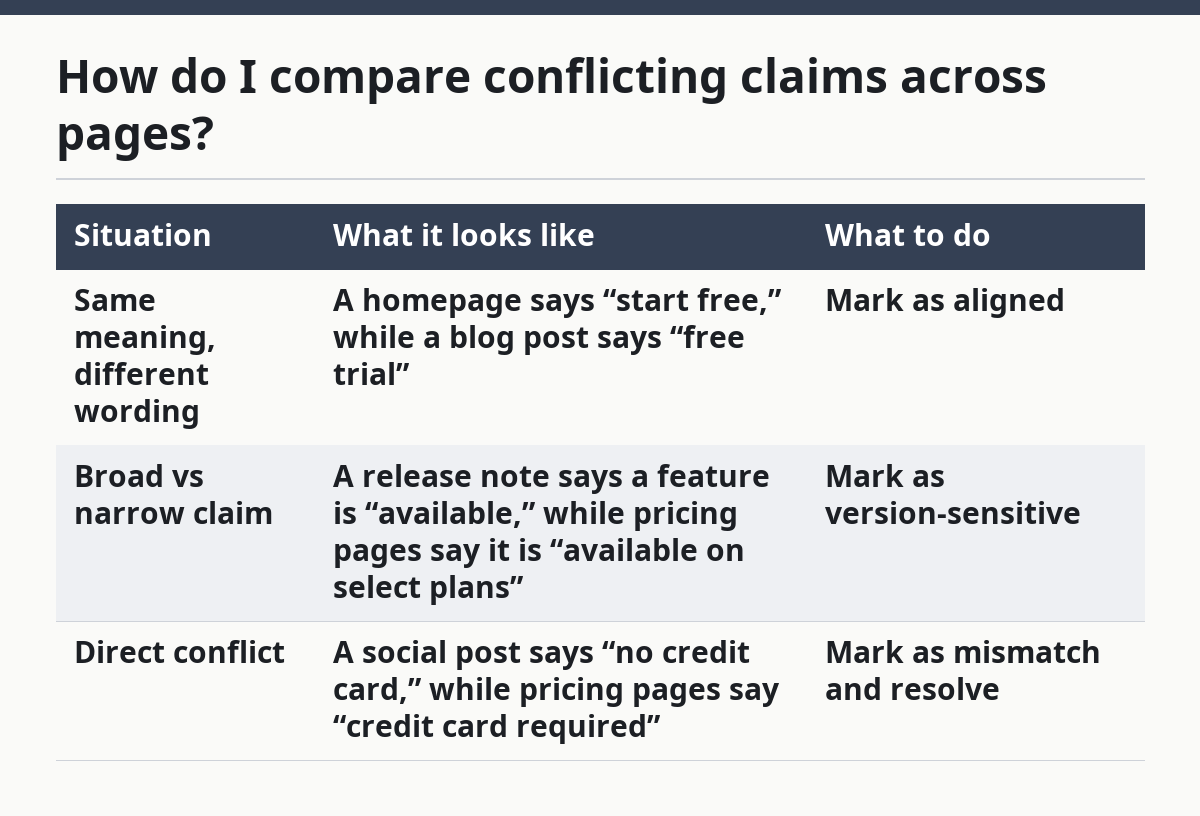
How do I compare conflicting claims across pages?
You compare conflicting claims by lining up the exact sentence, the page type, and the version, then deciding whether the conflict is real or only stylistic. That means you compare meaning first and wording second.
A good comparison usually falls into one of 3 buckets. First, the same claim appears in two places with the same meaning, which is not a discrepancy. Second, one page says something broader while another page says something narrower, which may need a note but not a correction. Third, the pages flatly disagree, which needs reconciliation.
| Situation | What it looks like | What to do |
|---|---|---|
| Same meaning, different wording | A homepage says “start free,” while a blog post says “free trial” | Mark as aligned |
| Broad vs narrow claim | A release note says a feature is “available,” while pricing pages say it is “available on select plans” | Mark as version-sensitive |
| Direct conflict | A social post says “no credit card,” while pricing pages say “credit card required” | Mark as mismatch and resolve |
Since SemVer, or Semantic Versioning, can help if product release labels are part of the launch story, a version number gives you a clean anchor for changes, even when the marketing page does not show the same label. The point is not to force every claim into software-version language. The point is to stop guessing which wording came first.
The practical trade-off is speed versus certainty in how much detail you capture. If you want a quick log, you can accept a narrower set of fields. If you want a log that survives a messy launch, you need the extra version notes and exact wording. A 5-minute record is easy to build; a useful record takes more care.
What mistakes make the log less useful?
The biggest mistake is grouping claims by topic instead of by conflict, because it hides the mismatch you are trying to find. A log full of “pricing,” “features,” and “announcements” looks organized, but it does not tell you which sentence contradicts which other sentence.
Another mistake is writing summaries instead of exact claim text. A summary can flatten the difference between “free trial” and “demo request,” and that difference is the whole point. Keep the original wording in quotation marks or in a dedicated text field.
A third mistake is skipping version differences. Launch pages often change quickly, and a claim that was true at 10 a.m. can be outdated by lunch. If you do not keep the earlier wording, you cannot tell whether the conflict came from a real change or from your own incomplete capture.
A fourth mistake is logging every small wording shift as a problem. Not every edit is a contradiction. If one page says “fast setup” and another says “quick setup,” the meaning may be the same. Mark only the changes that could alter what a reader believes about the launch.
One more trap is keeping the log in a place no one checks. A useful discrepancy log should have one owner and a review rhythm, even if that rhythm is just once per update cycle. Without that, the sheet becomes a graveyard of old rows after the first 2 or 3 edits.
How should I settle a conflict once I find it?
You should settle a conflict by choosing the most current approved claim and recording why that version wins. The log should show both the conflict and the decision, not just the final answer.
Start with the source that appears to be the current public message, then compare it with the older page or post. If the homepage copy changed after the blog post, the homepage may be the better reflection of the launch message. If release notes are newer than both, they may carry the clearest product state. The key is to record the reason, not just the result.
A good resolution note is short: “Homepage updated on later timestamp; pricing page left unchanged.” That kind of note keeps the log useful in 30 seconds or less. You do not need a paragraph unless the conflict affects multiple pages or the wording is still being updated.
Because the updated note already names the resolution timestamp, this is also the point where you decide whether the issue belongs in the launch discrepancy log or in a broader review. If the mismatch shows up across several claims, it may point to a launch messaging problem, not just a single typo. If it is only one line, the log can end there.
For broader launch intelligence, this log fits well inside the site’s larger SaaS product launch and rollout intelligence workflow. It is the narrow tool for conflicting claims; the larger system can handle source tracking and rollout patterns.
When is this log worth the effort?
This log is worth the effort when a launch message is spread across at least 3 public surfaces and the wording can change after publication. If the launch only has one page and one post, a full discrepancy log may be more than you need.
It is especially useful when homepage copy, pricing pages, blog posts, social posts, and release notes do not move together. That happens often enough that a 1-page record can save real confusion later. It is less useful when you only need a snapshot of one source or when you are still deciding whether a launch happened at all.
The maintenance cost matters. A log that takes 20 minutes to update after every change can be worth it for a high-visibility launch. It is probably not worth it for a tiny update that touches one page and one post. The right threshold depends on how many claims can drift and how costly a mismatch would be if someone read the wrong version.
A simple rule helps: if a contradiction could change what a buyer thinks is included, priced, or available, log it. If the difference is only style, skip it. That keeps the sheet focused on claim reconciliation instead of page trivia.
What is a launch discrepancy log?
A launch discrepancy log is a record of conflicting launch claims across pages and posts. It tracks the exact wording, the source, the version, and the decision you made about which claim stands.
The log is useful because launch messages often change faster than readers notice. A single sheet can show whether a homepage, pricing page, blog post, social post, or release note is out of step.
How do I handle conflicting launch claims?
Handle conflicting launch claims by capturing the exact wording, marking the source type, and comparing the meaning line by line. Then note which version is current and why that version wins.
Do not collapse the conflict into a summary too early. The original wording is the evidence, and it is the part that lets you reconcile the mismatch later.
Which source should I trust when launch messages differ?
Trust the source that is most current and clearly approved, then record why you chose it. If a homepage update is newer than a blog post, the homepage may carry the current message.
If the conflict is between a social post and release notes, the answer can depend on which one was updated last. The log should keep both claims visible until the decision is clear.
Drafted with AI; not yet reviewed by a person.