






How to Build a SaaS Pricing Consistency Audit for Pages, Quotes, and Renewals: A pricing consistency audit checks that the price on the pricing page, the…
Last updated: November 20, 2026
A pricing consistency audit checks that the price on the pricing page, the sales quote, and the renewal notice all match the same plan detail, discount rule, and term. It is the fastest way to catch quote drift, broken discount overrides, and plan-level mismatches before they turn into billing disputes.
Key takeaways
- A good audit compares the same offer across three places: page, quote, and renewal.
- The goal is not perfect wording. It is the same price, term, and plan detail in each channel.
- The biggest failures usually come from discounts, add-ons, and old plan names.
- A short checklist beats a long policy if it is used after every pricing edit.
- Fixes need an owner, a timestamp, and a rollback path, or the same mismatch comes back.
What is a pricing consistency audit?
A pricing consistency audit is a cross-channel check that looks for price drift across public and private surfaces. It compares the pricing page, the sales quote, and the renewal notice against the same source of truth for plan detail, discount override, and term length.
The audit exists because these surfaces are edited by different people at different times. A page can show one annual rate, a quote can carry an old discount, and a renewal notice can still point to a retired plan name. If the customer sees three versions of the same offer, trust drops fast.
This is not the same as an audit trail or a change log. Those answer who changed what and when. This audit answers a narrower question: do the customer-facing numbers and labels match right now? That makes it useful for SaaS teams that already have pages and quotes live, and need a repeatable check after edits.
A useful audit also needs a clear scope. Start with the 3 surfaces that create the most customer friction: the pricing page, the sales quote, and the renewal notice. Then add plan detail lines such as billing period, seat count, currency, and any discount override that changes the final price.
If the product has many bundles or region-based prices, this work gets harder. In that case the audit is still worth doing, but only if one person owns the review and the checklist stays short enough to finish in one pass.
Which surfaces should match?
The pricing page, the sales quote, and the renewal notice should match on the offer a buyer can actually accept. The point is not to force identical wording; the point is to keep the commercial terms aligned.
Here is the clean way to think about the match:
| Surface | What must stay consistent | Common mismatch |
|---|---|---|
| Pricing page | Plan name, base price, billing period, included plan detail | Old annual price or stale feature list |
| Sales quote | Final price, discount override, term, currency | Hidden manual discount or outdated seat count |
| Renewal notice | Renewal amount, plan name, term, discount carryover | Auto-renewed old rate or wrong renewal date |
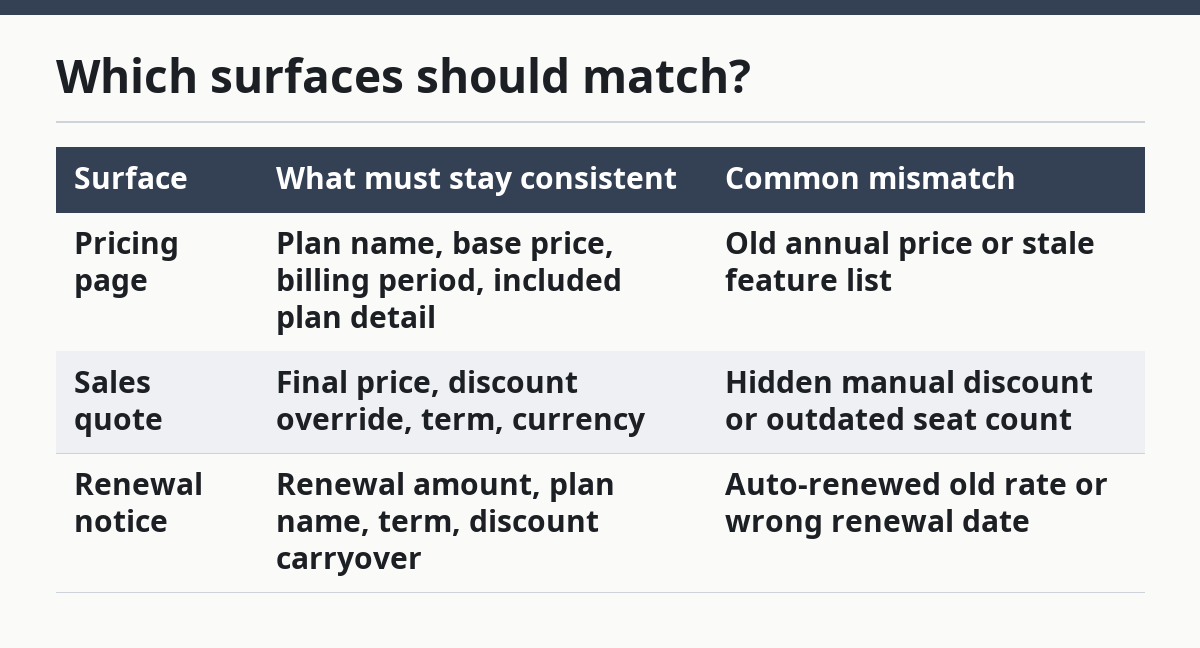
Use the pricing page as the customer’s first reference point. Use the sales quote as the approved commercial record. Use the renewal notice as the final check before money changes hands again. If one of those surfaces is allowed to drift, the whole pricing story breaks.
This is also where teams make a bad assumption: they treat the quote as “sales only” and the renewal notice as “billing only.” That split fails in practice because the customer reads all three as one promise. A price that changes by even one line item can look like a broken contract, even when the backend system is technically correct.
The audit should flag any mismatch that changes what the buyer thinks they will pay. It should not chase harmless wording differences unless they change the meaning of the plan detail.
How do you audit pricing consistency?
You audit pricing consistency by comparing one pricing record against each customer-facing surface, then marking every mismatch by type, owner, and fix path. The process works best as a short 5-step review that takes the same route every time.
-
Export the pricing page, sales quote, and renewal notice into one review sheet, with one row per plan detail and one column per surface.
The result is a single view where price, term, currency, and discount override can be compared side by side. -
Map each offer to the same plan name, billing period, and seat count before looking at amounts.
This prevents false alarms caused by names that differ only slightly, such as a retired plan label or an old bundle code. -
Compare base price, discount override, taxes, and renewal amount line by line.
The result should show which field diverges, not just that “the price is off.” -
Flag any mismatch that changes the customer’s final pay amount or the length of the commitment.
This step catches the problems that matter most, while leaving harmless copy edits for a lighter review. -
Assign each flagged item to the owner of the surface that is wrong, then record the correction workflow and the date the fix should go live.
This keeps the audit from turning into a static spreadsheet that nobody closes.
A good review sheet does not need complex tooling. A simple 3-column comparison is often enough if the team keeps the fields tight. The audit is doing two jobs at once: spotting mismatch detection and forcing a clean correction handoff.
What should the review checklist include?
The review checklist should include only the fields that change what a buyer pays or renews for. That usually means plan name, plan detail, billing period, unit price, seat count, discount override, renewal amount, and currency.
The checklist should also include a version comparison note. That note shows whether the quote and renewal are still tied to the same plan version as the pricing page. If the plan was renamed or repackaged, the review should show both the old and new labels so the mismatch is obvious.
A practical checklist also asks one yes-or-no question for each surface: does this surface show the same commercial truth? That phrase sounds plain because it is. If the answer is no, the audit should not try to explain the mismatch away. It should classify the issue and move it into correction workflow.
One useful habit is to separate “must-fix” mismatches from “watch” items. A typo in a feature bullet is not the same as a wrong annual rate. A manual discount that changes the final amount is a must-fix. A renamed plan title may only need a controlled update if the price is still aligned.
This is also where many audits get bloated. A 40-item checklist looks thorough, but it slows the review and hides the real issue. A short checklist that is used every week beats a big checklist that nobody finishes.
Where do mismatches usually come from?
Most mismatches come from manual edits, old templates, and discount rules that live in more than one place. The pricing page changes first, the quote template changes later, and the renewal notice keeps the old value until someone remembers to update it.
The most common failure is a discount override that was approved once and then copied forward. That creates a lower quote than the public page or a renewal amount that no longer matches the live plan detail. Another common failure is a plan rename that updates the page but not the quote generator. The buyer sees one brand name on the page and a different one in the paperwork.
Timing is another source of drift. A page may be updated on Monday, while the renewal notice is generated on Friday from a snapshot taken earlier in the week. If the audit does not compare versions, the mismatch can look like a bug in billing when it is really a stale reference.
The trade-off is simple: the more flexible the sales team is with custom quotes, the more often the audit will find exceptions. That is not a reason to stop quoting. It is a reason to set a tighter review path for any quote that uses a manual discount or changes the standard term.
How do you fix and prevent the same mismatch?
You fix and prevent the same mismatch by closing the audit with one owner, one correction, and one follow-up check. The correction workflow should not stop at “updated.” It should show which surface changed, which version was wrong, and when the corrected value was rechecked.
Start with the highest-impact surface. If the pricing page is wrong, update it first so every downstream quote and renewal points to the right value. If the quote template is wrong but the page is right, correct the template and then re-run a sample quote. If the renewal notice is wrong, update the renewal logic and confirm the next notice pulls the right plan detail.
After the fix, record the mismatch type in the review sheet. Over time that makes the recurring problems visible. If the same error keeps appearing in discount overrides or plan names, the issue is not the audit. It is the process that creates the quote or renewal in the first place.
This page sits under the broader SaaS pricing and packaging operations hub, so the audit should fit into that system instead of standing alone. The right goal is not more paperwork. The right goal is fewer surprises for the buyer and fewer manual corrections for the team.
What should you do when the audit finds a mismatch?
When the audit finds a mismatch, you should classify it by customer impact, fix the source surface, and recheck the other two surfaces. The first job is to decide whether the mismatch changes the amount owed, the term, or the plan detail that the buyer is accepting.
A harmless wording difference can wait for the next content pass. A wrong renewal amount cannot. A discount override that drops the final quote below the listed price needs immediate correction, because it creates a gap between what was advertised and what was offered.
If the mismatch affects a live renewal notice, keep the fix narrow. Change the one field that is wrong, then confirm the notice renders the same plan name and amount on the next run. If the mismatch affects the pricing page, verify that the quote and renewal follow the new value before the change is considered closed.
A good audit ends with a short list of repeat offenders. If the same issue shows up in 2 or 3 cycles, that is a signal to change the process, not just the document.
How do you audit pricing consistency?
You audit pricing consistency by comparing the same plan detail across the pricing page, the sales quote, and the renewal notice, then marking any difference that changes the buyer’s cost or term. The check should include base price, discount override, currency, and billing period. If one surface is stale, the audit should assign a fix and a recheck.
What channels should match on pricing?
The pricing page, the sales quote, and the renewal notice should match on the commercial terms a buyer can accept. They do not need identical copy, but they do need the same plan name, amount, term, and discount logic. If those drift, the customer sees three versions of one offer.
How do you find pricing mismatches?
You find pricing mismatches by putting the three surfaces in one review sheet and comparing field by field. Start with plan name, price, discount override, and renewal amount, then check version comparison notes for stale copy or retired plan detail. The easiest mismatches to miss are manual discounts and old template values.
Drafted with AI; not yet reviewed by a person.
