How to Build a SaaS Canonicalization Checklist for Duplicate, Near-Duplicate, and Consolidated Pages: Build the checklist around one decision: which URL…
Last updated: November 18, 2026
Build the checklist around one decision: which URL gets the canonical tag, which pages stay indexable, and which duplicates get folded into one version. For SaaS sites with duplicate pages, near-duplicates, and consolidated pages, the checklist should make that decision repeatable in under 10 minutes per page set, not guessed page by page.
Key takeaways
- A good canonicalization checklist decides one thing first: the preferred URL.
- Duplicate pages, near-duplicate pages, and consolidated pages need different treatment, even when they look similar.
- Canonical tags are a signal, not a magic fix, so the checklist has to include indexing and consolidation rules.
- The best checklist names the exact checks, the fallback action, and the search engine outcome for each page type.
- If the checklist cannot tell the difference between copy cleanup and page merger, it is too vague to use.
What should the checklist decide?

A canonicalization checklist should decide 3 things for every overlapping page set: the preferred URL, the indexing state, and the consolidation path. That sounds simple, but it is where most SaaS sites blur duplicate pages with near-duplicates and then pick the wrong fix.
The checklist needs to separate three cases. A duplicate page is a page with the same or almost the same main content as another URL. A near-duplicate is close enough to confuse search engines but still has enough differences to matter. A consolidated page is the final page that absorbs older, narrower, or merged content.
The reason this matters is the output is not always the same. A duplicate may only need a rel=”canonical” tag. A near-duplicate may need a canonical tag plus a content decision about whether the page deserves to stay live. A consolidated page may need a canonical tag, internal link cleanup, and an indexing decision that keeps the final page visible while the older URL stops competing.
A useful checklist keeps the decision tree short. If the answer is “same intent, same audience, same primary content,” the page set usually belongs under one canonical URL. If the answer is “same topic, different use case, different intent,” the checklist should pause before forcing them together. That is the main trade-off: too much canonicalization can erase useful pages, while too little leaves search engines sorting out duplicates on their own.
For SaaS teams, that trade-off shows up in product pages, comparison pages, feature variants, and exported pages with filters or parameters. The checklist should treat those as separate groups before it tries to choose a winner.
How do you build the canonicalization checklist?
You build the canonicalization checklist by turning the decision into a 5-step rule set that can be applied the same way every time.
- Inventory the URLs in a spreadsheet or crawler export and group pages that share 80% or more of the same main topic, template, or body copy. This gives the checklist a page set instead of a single URL.
- Compare the URL set against the visible content, title, headings, and intent so the difference between duplicate and near-duplicate is clear before any tag changes.
- Choose one preferred URL using a fixed rule, such as the strongest match to search intent, the cleanest URL, or the page that should hold the search value.
- Assign the rel=”canonical” tag to the preferred URL and record whether the non-preferred pages stay indexable, get folded into a consolidated page, or remain as supporting variants.
- Verify the result in search engine tools and the page source so the canonical tag, index decision, and internal links all point to the same version.
That checklist is useful because it keeps the work mechanical. A page set either passes each step or it does not. There is no room for a vague “looks better” decision unless the checklist has already defined what better means.
The best version of this process also names the fallback. If two URLs are equally strong, the checklist should say which factor breaks the tie. Common tie-breakers are the cleaner URL path, the page with the strongest internal links, or the page that most closely matches the current product naming standard. Without a tie-breaker, the same page set can get a different answer from different people.
For SaaS sites, this step is also where content clusters help. A cluster gives the checklist a parent topic and a set of related pages. That makes it easier to see when a page is a true duplicate and when it is a sibling page that should stay separate.
How do you choose the canonical version of similar pages?

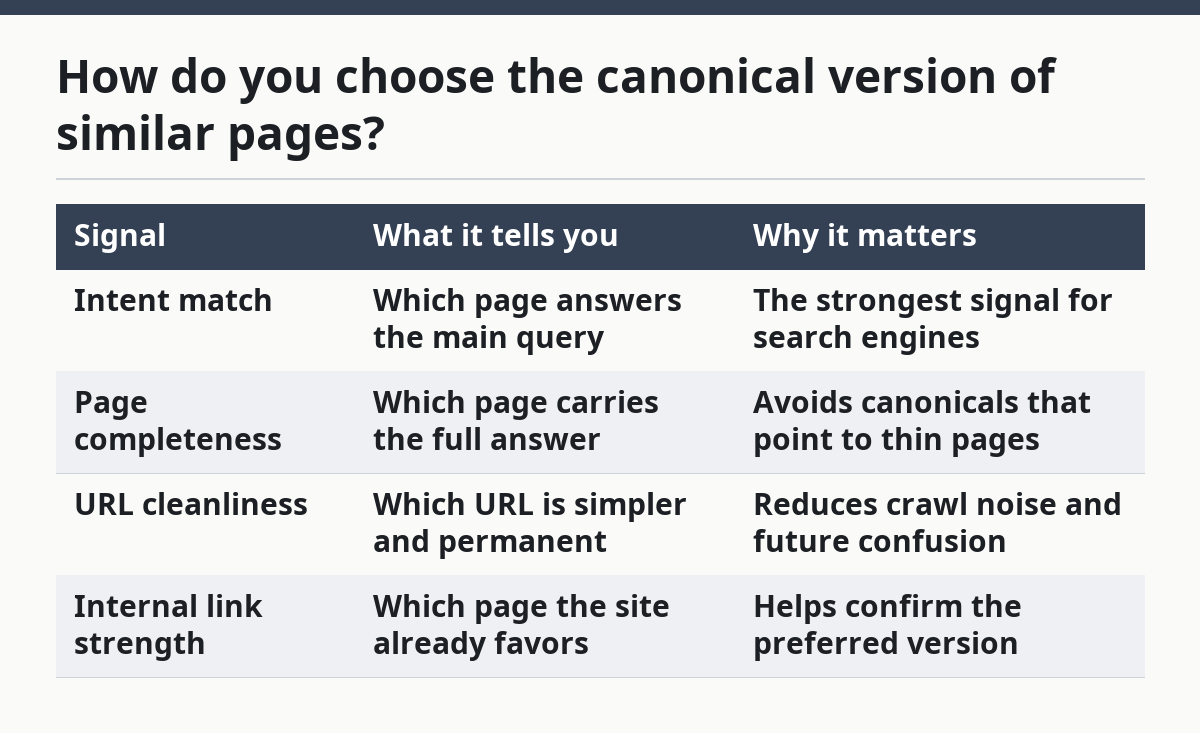
You choose the canonical version of similar pages by ranking 4 signals in the same order every time: intent match, page completeness, URL cleanliness, and internal link strength. The first signal should do most of the work; the others break ties.
A page that matches the main search intent should usually win over a thinner variant. If two pages cover the same feature, the one that answers the main query more directly should become canonical. If one page exists for a campaign and another for evergreen search, the evergreen page is usually the safer canonical target because it is less likely to become stale.
URL structure matters, but only after intent. A shorter, cleaner URL often makes a better canonical target than a parameter-heavy version, especially when one URL is clearly the permanent page and the other is generated from filters, UTM tags, or product variants. That said, a cleaner URL is not enough on its own if it does not match the content the searcher expects.
The checklist should also ask one blunt question: does the chosen page deserve to represent the cluster for 6 months or longer? If the answer is no, the page may not be the right canonical target. A canonical page should be stable, not a placeholder that will be replaced next sprint.
Here is a simple comparison you can use inside the checklist:
| Signal | What it tells you | Why it matters |
|---|---|---|
| Intent match | Which page answers the main query | The strongest signal for search engines |
| Page completeness | Which page carries the full answer | Avoids canonicals that point to thin pages |
| URL cleanliness | Which URL is simpler and permanent | Reduces crawl noise and future confusion |
| Internal link strength | Which page the site already favors | Helps confirm the preferred version |
The honest limitation is that similar pages are not always duplicates. Two pages can share a topic and still serve different jobs. If the checklist cannot name the job difference in one sentence, the page set needs a human review before the canonical tag goes live.
How do you handle near-duplicates?
You handle near-duplicates by deciding whether the page should stay as a separate result or be treated as a support page for one main URL. Near-duplicates are the tricky middle ground because they are not identical enough to merge automatically, but they are close enough to split signals.
The checklist should ask 3 questions here. First, does the page change the search intent, or only the wording? Second, does the page add unique value that a canonical page would lose? Third, is the difference large enough to justify separate indexing? If the answer to all 3 is no, the page belongs under the main canonical URL.
This is where content clusters matter again. A cluster lets a near-duplicate act as a supporting page instead of a second page fighting the main one. For example, a SaaS feature page and a use-case page may share 70% of the same explanation but still deserve different roles if one targets the feature and the other targets the use case. In that case, the checklist should keep them separate and avoid forcing a single canonical too early.
Near-duplicate handling also needs a fallback rule for repeated template pages. Some SaaS sites create many pages that differ only by city, industry, plan name, or product variant. If the only changes are a few nouns and a location string, the checklist should flag the set for consolidation review rather than treating each page as its own search asset.
The cost of getting this wrong is easy to miss. A near-duplicate with the wrong canonical can lose its chance to rank, while a page that should have been consolidated can keep splitting crawl attention and backlinks across several URLs. The checklist should therefore include one line that says whether the page is a “keep separate” case or a “fold into main page” case before the SEO tag is set.
What should the checklist say about consolidated pages?
The checklist should say that consolidated pages inherit the search job of the older pages and must be treated as the new source of truth. That means the checklist is not just about tags; it also has to record the final page’s role in the cluster.
A consolidated page usually exists because 2 or more overlapping pages were reduced into one stronger page. The checklist should confirm that the final page covers the combined intent, keeps the strongest parts of the removed pages, and uses the canonical tag on itself. If the old pages still live, the checklist must state whether they are meant to remain indexable, point elsewhere, or be retired under a separate process.
This is where the distinction between canonicalization and consolidation becomes real. Canonicalization tells search engines which URL to prefer. Consolidation changes the content structure so there is one better page to prefer in the first place. A checklist that treats them as the same action will miss the work that happens after the tag is set.
The practical rule is simple: if 3 pages were merged into 1, the checklist needs to track the new page title, the retained sections, and the source pages that fed the consolidation. That prevents the old URLs from lingering as half-draft duplicates and keeps the final page from drifting away from its original purpose.
Consolidated pages are wrong for sites that still need each page to rank for a distinct query. If the merged page cannot answer the full search intent without sounding cramped or diluted, the checklist should stop and send the pages back to separate treatment. A larger page is not automatically a better page.
What should the checklist tell search engines?
The checklist should tell search engines one clean story: this is the preferred page, these pages are supporting or duplicate versions, and this is how indexation should work. Search engines do better when the canonical signal, the page content, and the internal links all point in the same direction.
For that reason, the checklist should include the page source check for rel=”canonical”, the indexable or noindex decision, and the internal link target. If the canonical tag points to one URL but the navigation links still push a different version, the signal becomes muddy. The same goes for sitemaps that keep listing old variants as if they were primary pages.
This is also where authoritative references help. Google Search Central’s guidance on consolidating duplicate URLs and its rel=”canonical” documentation are useful benchmarks, and Bing Webmaster guidance on canonicalization gives another search-engine view of the same problem. Those pages are worth keeping open while the checklist is being built:
- Google Search Central: rel=canonical documentation
- Google Search Central: consolidating duplicate URLs
- Bing Webmaster Guidelines: canonicalization guidance
The checklist does not need to quote those sources line by line. It just needs to respect the same idea: canonical tags are a signal, not a command, so the rest of the page structure has to support them.
A strong checklist also records the expected outcome for search engines in one phrase, such as “prefer this URL, keep the others out of the main index decision, and preserve one cluster signal.” That keeps the team from mixing up a technical tag change with a broader content decision.
What mistakes break the process?
The biggest mistake is using one rule for duplicates, near-duplicates, and consolidated pages. That usually causes the wrong page to win, or it hides the fact that a page should have been merged instead of canonicalized. The cost is wasted crawl attention and a messy search result set.
A second mistake is choosing the canonical version only by URL length. A shorter URL helps, but it does not replace intent, completeness, or internal link strength. A third mistake is forgetting that canonical tags do not clean up weak page structure on their own. If two pages are both live, both linked, and both aimed at the same query, the tag alone may not settle the issue.
Another common failure is skipping the tie-breaker. When 2 pages look equally good, teams often stall or choose by opinion. The checklist should name the tie-breaker before the debate starts, or the same question will come up every time a new duplicate appears.
This is also where the checklist should say who it is not for. If a page family is still being shaped, or if the content strategy has not settled on a primary URL pattern, canonicalization should wait. A checklist cannot fix a site structure that has not been decided yet.
The simplest safeguard is to add a final line for each page set: “one preferred URL, one reason, one fallback.” That turns a fuzzy SEO task into a repeatable decision with less room for drift.
FAQ
when should a page be canonicalized?
A page should be canonicalized when it overlaps heavily with another URL and does not need to compete on its own. The clearest case is a duplicate or a near-duplicate that adds little unique value. If the page serves a separate intent, though, canonicalization may remove something useful from search.
how do you choose the canonical version of similar pages?
Choose the version that best matches the main intent, holds the fuller answer, and has the cleanest permanent URL. If the pages are still tied after that, use internal link strength as the tie-breaker. The wrong choice usually comes from picking the shortest URL before checking what the page actually does.
what is the difference between consolidation and canonicalization?
Canonicalization tells search engines which URL should be preferred, while consolidation changes the page set so one page carries the combined value. In practice, canonicalization is a signal and consolidation is a content decision. A page can be canonicalized without being consolidated, but a consolidated page usually needs a canonical tag too.
Drafted with AI; not yet reviewed by a person.