How to Build a SaaS Pricing Page Evidence Shelf for Screenshots, Terms, and Version Notes: A SaaS pricing page evidence shelf should keep 4 things…
Last updated: November 18, 2026
Quick Answer: A SaaS pricing page evidence shelf should keep 4 things together per record—screenshot, terms text, source URL, and version note—so pricing proof stays easy to find and compare. A SaaS Pricing Page Evidence Shelf for Screenshots, Terms, and Version Notes is a single place to store screenshots, terms and conditions, and version notes so pricing proof stays easy to find and hard to argue with. Build the SaaS Pricing Page Evidence Shelf for the people who need to check a public pricing page later, not for design reviews. The shelf works best when every item has a date, a source URL, and a short note about what changed.
Key takeaways
- A pricing page evidence shelf is a proof cabinet, not a change tracker.
- Save the screenshot, the terms text, and the version note together so one record tells the whole story.
- Put dates in a standard format, such as RFC 3339 or the W3C date and time pattern (RFC 3339, W3C), so records sort cleanly.
- Tag each item with the plan name, billing term, and page type, or the shelf will turn into a dump.
- This setup is useful for public pricing pages and terms pages, but it is not a substitute for a legal review.
What goes in a pricing page evidence shelf?
A pricing page evidence shelf holds the public proof you need to show what a SaaS pricing page said on a given day. The shelf should include a screenshot of the page, the matching terms and conditions, and a version note that explains what was captured.
Keep the shelf focused on the public surface only. A screenshot from a pricing page, a copy of the pricing-related terms, and a short note about the capture date do more useful work than a long memo about the product. If the page has a free plan, annual billing, or a usage cap, those details belong in the record too.
For many teams, the shelf is not the place for private sales quotes, discount approvals, or procurement sign-off; those usually belong in a separate system, and legal or procurement professionals should guide that boundary when needed. This page sits under the larger hub on SaaS pricing and packaging evidence systems. Mixing public pricing with private deal records can make the shelf harder to trust and harder to search.
A useful shelf also carries a source URL for each item. That lets a reader jump back to the live page if it still exists. If the live page changes later, the screenshot and terms copy still show what was published at the time.
How do you store screenshots and terms for pricing proof?
Store screenshots and terms together in one record, with the screenshot first and the text copy second. That pairing makes it easier to compare what a visitor saw with the words that governed the offer.
Start with a file naming rule that includes the product name, page type, and capture date in a standard format such as RFC 3339 or the W3C date and time pattern, for example 2026-11-18 (RFC 3339, W3C). Standard dates matter because they sort consistently across folders and tools. Use the same format every time so a folder does not turn into a date puzzle.
A simple evidence record can look like this:
- Capture the pricing page screenshot in PNG or PDF, using the full visible page area if the plan cards, billing toggle, or footnotes extend below the fold.
- Save the matching terms and conditions as text, PDF, or a copied excerpt in the same record so the pricing claim and the legal wording stay together.
- Label the record with the page URL, product name, plan name, and capture date so search works later.
- Store the files in one evidence repository path, such as a product folder with a subfolder for the month or quarter.
- Check that the screenshot shows the date-sensitive parts of the page, such as the billing period, plan labels, or trial language.
The trade-off is clear: a single folder is fast, but a flat folder becomes messy once the number of screenshots rises. A nested path takes a little more setup, yet it keeps pricing proof usable after the first dozen captures. This is why the shelf should be designed for later search, not just for the day the capture is made.
How should version notes work?
Version notes should explain what changed, what stayed the same, and why the capture matters. A version note is not a diary entry; it is a short factual tag that helps another person understand the record in 10 seconds.
Each note should cover four things: the page type, the date, the visible change, and the source of the change. A line such as “pricing page, 2026-11-18, annual billing toggle added, live page URL” is enough when the screenshot already shows the page. If the terms changed on a separate page, the note should say that too.
Version notes need one rule more than anything else: keep them consistent. If one record says “plans,” another says “tiers,” and a third says “packages,” search becomes unreliable. Pick one term and use it across the shelf.
Here is the trade-off that gets missed most often: very short notes are easy to write, but they are hard to audit later. Very long notes are safer for a single review, but they slow down every future lookup. The middle path is best for a shelf built for repeated checks. Four fields are usually enough, and anything beyond that belongs in a separate review log.
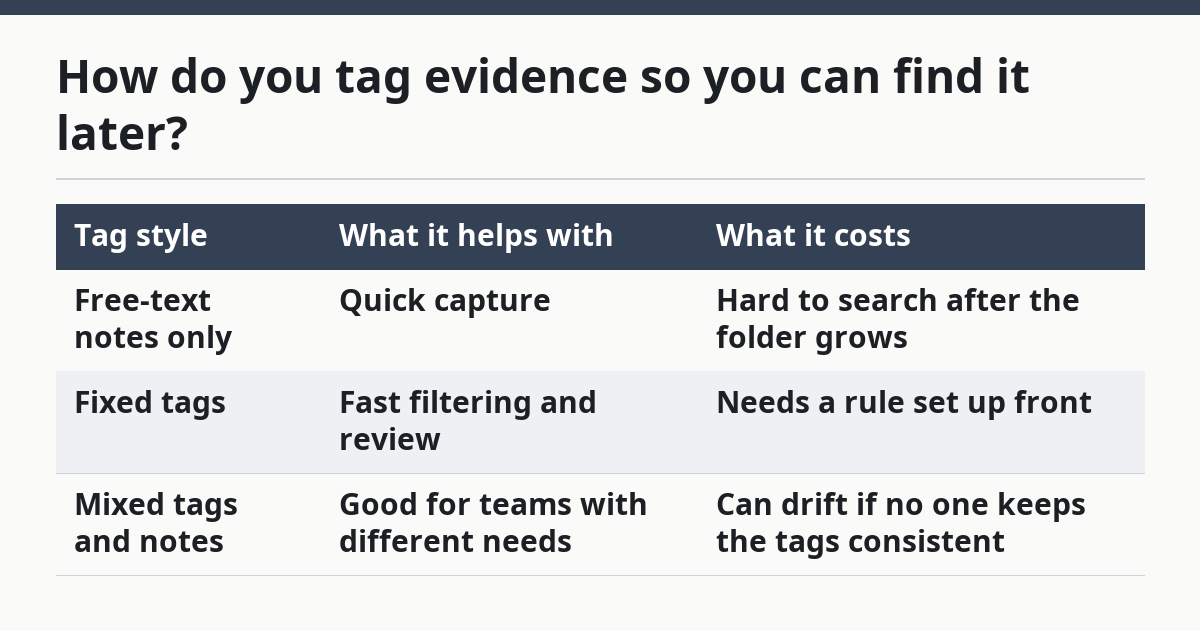
How do you tag evidence so you can find it later?
Tag evidence by product, page type, plan name, billing term, and status so every record can be filtered without reading the whole file. A tag set of five to seven fields is usually enough for a pricing shelf.
Use tags that match the questions a reader will ask later. For example, a tag for pricing-page, terms, annual, free-plan, or checkout-visible is more useful than a vague tag like important. The shelf should answer “what page was this?” before it answers “what did I think about it?”
A simple comparison helps show what works and what fails:
| Tag style | What it helps with | What it costs |
|---|---|---|
| Free-text notes only | Quick capture | Hard to search after the folder grows |
| Fixed tags | Fast filtering and review | Needs a rule set up front |
| Mixed tags and notes | Good for teams with different needs | Can drift if no one keeps the tags consistent |
Tagging also supports review history. If a page was captured on three dates, the same tags let you group the versions and compare only the parts that changed. Without tags, each screenshot becomes a one-off file that must be re-read from scratch.
This is the place where many generic guides go wrong. They tell people to “organize by date” and stop there. Date alone does not tell you whether a capture is a monthly plan, an annual plan, or a terms update. The shelf needs both date and context, or the record will not answer the next question.
What should review history show?
Review history should show who captured the evidence, when it was reviewed, and whether the record still matches the live page. That is the difference between storage and a usable evidence shelf.
Keep review history short and factual. A record can include the capture date, the last review date, the reviewer name or role, and a status such as current, superseded, or unclear. If the screenshot is from a page that now redirects or no longer exists, the note should say so. A stale record without a status can mislead someone who assumes it is still current.
Review history should also show whether the terms and the screenshot still line up. If the screenshot says monthly billing and the terms now describe annual renewal, the record needs a flag. That does not mean the evidence is bad; it means the shelf has done its job by showing the mismatch.
Do not turn review history into a spreadsheet of opinions. A sentence like “pricing page updated; terms page unchanged” is useful. A paragraph about why the product team may have changed the plan name is not. The shelf is strongest when it records facts that another person can verify against the source page.
What mistakes break a pricing evidence shelf?
A pricing evidence shelf breaks when records are incomplete, inconsistent, or impossible to search. The most common mistake is saving a screenshot without the matching terms text, which leaves the proof half-finished.
Another mistake is using inconsistent dates or labels. If one record uses 11/18/26 and another uses 2026-11-18, sorting can become unreliable in some tools, so a standard date format is safer for browsing and filtering. A third mistake is storing every capture in one flat folder with no tags. That works for 3 files and falls apart quickly once the count rises.
Here are the failures that cost the most time later:
- Screenshot only: fast to save, weak as proof because the legal wording is missing.
- Terms only: useful text, but the visible page context is gone.
- No version note: a later reader cannot tell what changed or why the file exists.
- Loose file names: the record may be present, but it is buried.
- Mixed scopes: public pricing, sales quotes, and procurement notes are often better kept separate so they do not compete with each other; consult legal or procurement professionals if the boundary is unclear.
The better move is to keep the shelf narrow. Use it for public pricing pages, screenshots, terms and conditions, version notes, evidence tagging, and review history. Do not stretch it into a catch-all archive. A shelf with a clear job is easier to maintain than a folder that tries to hold every pricing-related document in the business.
When is a pricing page evidence shelf the right tool?
A pricing page evidence shelf is the right tool when the main job is to preserve public pricing proof in a way that can be checked later. It fits product intelligence work, pricing monitoring, and any team that needs to show what a public page said on a given date.
It is not the right tool for every pricing question. If the question is about sales quotes, hidden discounts, or approval chains, a different evidence system should handle that. The shelf works best when the source is visible to everyone and the record needs to be simple, dated, and searchable.
A good shelf also depends on shared discipline. If one person names files carefully and another person saves screenshots with random titles, the system degrades fast. The tool can be simple, but the naming and tagging rules need to be stable. That is the real cost of keeping evidence usable.
For teams that need one clear place to keep public pricing proof, the shelf is the cleanest option. It gives you screenshots, terms, version notes, and review history in one place, without dragging in separate approval workflows.
What is a pricing page evidence shelf?
A pricing page evidence shelf is a stored set of screenshots, terms, and notes that documents what a SaaS pricing page showed at a point in time. It is built for later proof, not for design critique or sales operations. The shelf should make one record easy to understand without opening five different files.
How do you store screenshots and terms for pricing proof?
Store the screenshot and the matching terms in the same evidence record, then add the source URL and capture date. Use one naming format for every file, such as an RFC 3339 date like 2026-11-18, so the records stay sortable. Keep the files in an evidence repository with a stable folder structure.
What should be versioned in pricing evidence?
Version the visible page, the terms text, the capture date, and the review status. Those four items show what changed and whether the record still matches the source. If the pricing page or terms page changes later, the version note should say what the shelf captured and when.
Drafted with AI; not yet reviewed by a person.