
A SaaS editorial decision log usually works best with 7 core fields and one shared home. This article explains how to build a SaaS Editorial Decision Log…
Last updated: November 15, 2026
Quick answer: a SaaS editorial decision log usually works best with 7 core fields and one shared home. This article explains how to build a SaaS Editorial Decision Log for Rejected Angles, Scope Changes, and Corrections so editors, content leads, and writers can record why an idea was rejected, why a scope changed, and why a correction was made.
A SaaS editorial decision log is a simple record of why an idea was rejected, why a scope changed, and why a correction was made. It suits editors, content leads, and writers who need to stop repeating the same dead ends; it is not for teams that want a pile of notes with no owner, date, or final call.
Key takeaways
- The log should capture the reason behind each editorial call, not just the final outcome.
- Treat rejected angles, scope changes, and corrections as separate entries, because each one answers a different future question; if you are unsure how to classify a call, consult a senior editor or content lead and document the rationale, as Google Search Central’s guidance on helpful content emphasizes clear purpose and audience focus.
- Use one shared format so writers can scan decisions in under a minute.
- Put the log beside the editorial calendar, assignment notes, edit history, publisher comments, and correction log, not inside one person’s inbox.
- Keep it light enough to update in 5 minutes, or people will stop using it.
What is a SaaS editorial decision log?

A SaaS editorial decision log is a dated record of editorial choices that affect an article’s direction, shape, or accuracy. It works best as a companion to the editorial calendar, assignment notes, edit history, publisher comments, and correction log, because those tools show what happened while the decision log explains why it happened.
The point is not to store every chat message. The point is to preserve the reasoning that future writers need when they face the same fork in the road. If an angle gets dropped because it duplicates another article, that note can help the next writer avoid pitching the same idea again 3 weeks later.
A good log is narrow. It should answer four questions in plain language: what changed, who decided, when it changed, and why it changed. If the log cannot answer those four questions in about 30 seconds, it has turned into a junk drawer.
For a SaaS content team, the log is especially useful because product pages, pricing changes, feature releases, and competitor coverage can shift fast. A correction that looked small on Tuesday can affect three related articles by Friday. A decision log keeps those calls visible instead of burying them in comment threads.
This is a fit for teams that publish often and reuse topics. It is a poor fit for one-off blogging with no editorial review, because the overhead is higher than the payoff.
What should go in each entry?
Each entry should hold the smallest set of facts that explains the decision without forcing anyone to read a full email thread. The most useful entries are usually short, dated, and tagged to one article or one content idea.
Use these fields for every record:
- Date of the decision
- Article title or working title
- Topic or content ID
- Decision type: rejected angle, scope change, or correction
- The decision itself
- Reason for the decision
- Who made or approved it
- Where the note came from: assignment notes, edit history, publisher comments, or correction log
- Status of the article after the call
A useful entry can fit in 4 to 8 lines. If the reason needs a long memo, the log should point to the memo, not replace it. That keeps the log easy to scan and stops it from becoming a second document archive.
Keep the language blunt. “Rejected because it repeats the comparison in the December article” is better than “not the right direction.” The first note tells the next writer what to avoid; the second forces them to ask again.
One practical rule helps: every entry should contain one specific noun that a future editor can search for, such as a feature name, a competitor, a metric, or a section title. Searchable nouns make the log useful when someone is trying to trace a chain of calls across 10 articles.
How do you build it?

You build it by choosing one place for entries, one format for each note, and one rule for when a decision gets logged. That keeps the log from turning into scattered comments in docs, chat, and email.
- Pick the home for the log. Use a shared sheet, database, or doc that the team can open in under 10 seconds. The result should be one master record, not three copies with different versions.
- Choose 5 to 8 fields only. Start with date, article, decision type, reason, owner, source note, and status. The result is a log that can be filled out in 2 minutes instead of 20.
- Set the trigger for logging. Log a rejected angle as soon as the editor says no, log a scope change when the article outline changes, and log a correction when the fix is approved. The result is that the reason is fresh, not reconstructed a week later.
- Use one sentence for the decision and one sentence for the reason. Keep the wording concrete, such as “Cut the pricing comparison because the brief already has a pricing section.” The result is a record that is short enough to read during assignment review.
- Link or point back to the source note. Tie the entry to edit history, publisher comments, or the correction log. The result is traceability without stuffing the log with copied text.
- Review the log on a fixed rhythm. A 15-minute weekly check is enough for many teams to catch duplicates, repeated rejections, and unresolved corrections. The result is that the log keeps shape instead of gathering dust.
If the team already uses Google Docs, version history can cover part of this work, but it should not be the only record. Version history shows changes; it does not explain editorial judgment in a way that is easy to reuse later. A separate log is better for pattern spotting across articles, and Google’s own Docs version history help pages make the change trail clear even when the reason still needs a separate note.
If the team uses Notion, Airtable, or a spreadsheet, keep the same fields across all rows so the log can be filtered by decision type. A column for “scope change” is far more useful than a freeform note hidden in one long paragraph. For implementation details, Notion’s database views and Airtable’s filtered tables both support this kind of structured tracking.
How do you record rejected angles?
You record rejected angles by noting the idea, the reason it was refused, and the better path that replaced it. That can help prevent the next writer from circling back to the same dead end under a new headline.
A rejected angle entry should name the angle in plain English. For example, “Angle: list of pricing myths” is more useful than “too vague.” Then record the reason in one of a few clear buckets: too close to another article, too shallow for the audience, weak evidence, wrong funnel stage, or off-topic for the brief.
The mistake to avoid is writing only “no.” A bare refusal gives no future value and often creates rework. A short reason saves time the next time someone pitches the same angle, which is common in SaaS teams with recurring themes like pricing, onboarding, churn, or comparison content.
Use the same rule for every rejected pitch: one line for the angle, one line for the reason, one line for the next best option. That can look like this:
- Angle: “Roundup of support chat tools”
- Reason: “Too broad for a post meant to explain one process”
- Next step: “Narrow to support chat logs for onboarding or retention”
That tiny structure turns rejection into guidance. It also makes the log more humane, because the writer can see what to do next instead of only seeing what not to do.
This is where a log earns its keep against email. Email archives a refusal; a decision log explains the standard behind it. If the same standard comes up five times, the team can see the pattern and stop re-litigating it.
How do you log scope changes and corrections?
Because scope changes and corrections answer different questions and carry different risk, you log them separately. A scope change reshapes the article before publication; a correction fixes a mistake after the content is already live.
Scope changes should include the original scope, the new scope, the reason for the change, and the date it happened. If an article that was meant to cover one comparison expands to cover two, the log should say why the second comparison was added and what was cut to make room. That protects the editorial record when someone asks why the outline no longer matches the first brief.
Corrections need a sharper note. Record the error, the corrected fact, the source of the fix, and the place where the correction appears. If the correction touches a product name, feature name, or date, the log should say exactly what changed so later updates do not drift back to the wrong version.
A clean way to split the two is this:
| Decision type | What it tracks | Why it matters |
|---|---|---|
| Rejected angle | Idea that did not make the cut | Stops repeat pitches |
| Scope change | Article direction or section changes | Keeps the brief and final draft aligned |
| Correction | Error fixed after review or publication | Preserves accuracy and audit trail |
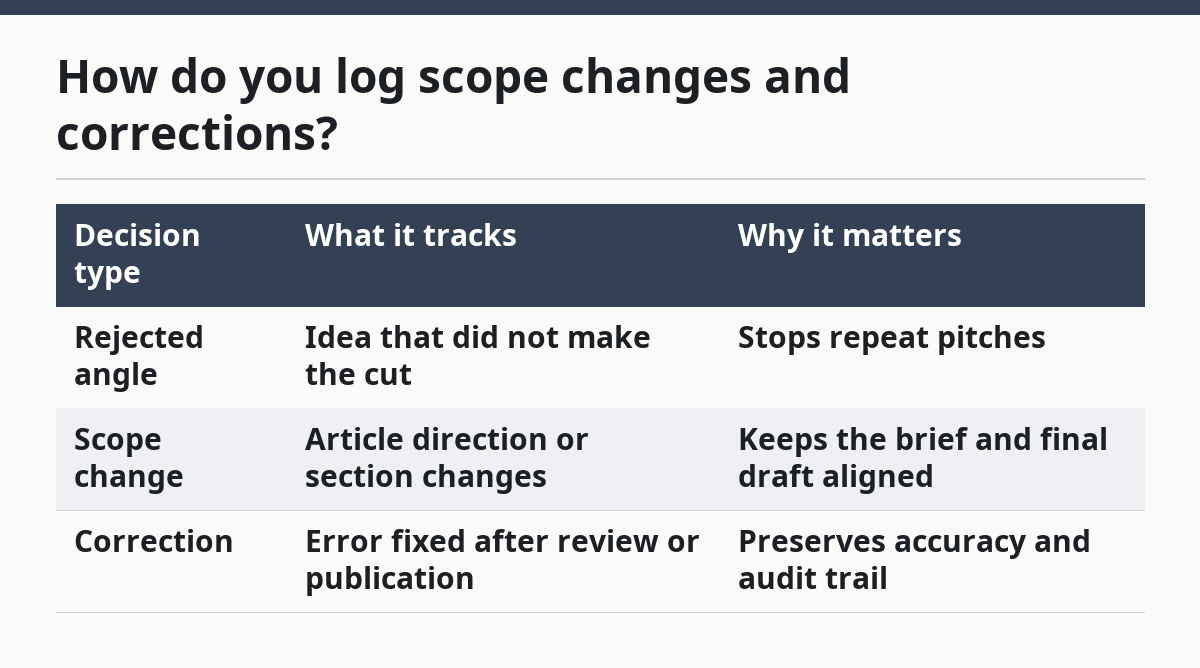
The trade-off is speed. If the team logs too much detail, updates slow down. If the team logs too little, the record becomes useless during a follow-up edit. The middle path is enough detail to explain the call and nothing more.
For corrections, the log should sit beside the correction log rather than replace it. The correction log often needs more operational detail, while the decision log keeps the editorial reason visible for future articles. That split matters when the same error has to be checked against related articles.
Who should use the log, and who should not?
The log should be used by teams that publish at a steady pace, revise articles often, and want fewer repeated mistakes. It fits editors, managing editors, content strategists, and writers who need a shared record of why decisions were made.
It is not a good fit for teams that never revisit old content or never collaborate. If one person writes and publishes without review, a decision log adds overhead without much return. It is also a poor fit when the team wants the log to carry final approvals, legal sign-off, and style rules all in one place; that turns a simple record into a process map.
A practical limit helps here. If adding an entry takes more than 5 minutes, adoption drops fast. The log should be quick enough that the editor can update it between tasks without delaying the draft.
The strongest use case is a content operation that wants traceability. When a writer asks why an angle was rejected last quarter, the answer should be in the log, not buried in someone’s inbox. That makes the log part of the content system, not a side document.
For teams that already use an editorial calendar, the decision log should sit next to it and be cross-referenced by title or content ID. That keeps planning and reasoning linked without making the calendar itself too crowded.
How do you keep it useful over time?
You keep it useful by pruning weak entries, keeping the format fixed, and checking for repeated decisions each week or month. A log that changes shape every time a new editor joins will stop being searchable.
Set one person to own the standard, even if many people add entries. That owner does not need to write every note; the job is to keep the fields, labels, and tags consistent. A log with the same 7 fields for 7 months is more valuable than one with 12 shifting fields that nobody trusts.
Do a short review on a set rhythm, such as every Friday or at the end of each editorial cycle. Look for repeated rejected angles, repeated scope creep, and repeated correction patterns. Those trends tell the team where briefs, notes, or review steps are weak.
Keep the log close to the places where decisions happen. If publisher comments live in one tool, assignment notes in another, and edit history in a third, the log still works as long as the final decision gets copied into the same record. The main job is consistency, not tool purity.
A SaaS editorial decision log is worth building when it helps the team stop arguing about the same thing twice. It is not a trophy document. It is a memory aid for a publishing system that has to make fast choices and remember why those choices were made.
For a broader view of how this fits into the rest of the publishing stack, the hub on SaaS content operation systems is the right next stop.
Why keep an editorial decision log?
It keeps the reason behind a call visible after the original thread is gone. That matters when a rejected angle comes back a month later or when a correction affects a related post. A good log saves time because it turns a past decision into a reusable note instead of a buried comment.
What should go in an editorial decision log?
It should include the date, article, decision type, decision itself, reason, owner, source note, and status. Those fields are enough to show what changed and why without turning the log into a long memo. If a detail will help a future editor find the same issue, it belongs in the entry.
How do you track changes to an article idea?
Record the original idea, the new version, the reason for the change, and the date it changed. Add a link or pointer to the assignment notes or edit history so the path stays traceable. If the change affects the angle, scope, or correction status, label it clearly in the log.
Drafted with AI; not yet reviewed by a person.