A launch rollout map for how to build a SaaS launch rollout map for beta, general availability, and feature flags is the plan that says who gets a SaaS…
Last updated: November 17, 2026
A launch rollout map for how to build a SaaS launch rollout map for beta, general availability, and feature flags is the plan that says who gets a SaaS release, when they get it, and which gates control the move from beta to general availability. Quick answer: it usually needs 5 core fields per phase — audience, access level, feature-flag state, support level, and exit rule. Build it by laying out release phases, access levels, and feature flags in one sequence, then tying each step to a clear owner and a clear exit rule.
Key takeaways
- A launch rollout map is not a marketing calendar; it is a release control plan.
- Beta, early access, and general availability need different access rules, or the rollout turns vague fast.
- Feature flags help you separate code release from user release, which is the whole point of a staged launch; see feature flag guidance from LaunchDarkly and Atlassian’s release management overview.
- The map should show who can see the feature, what changes at each phase, and what must happen before the next phase starts.
- The rollout map is most useful when it is specific enough that support, product, and engineering can use the same sheet.
What should a launch rollout map show?
A launch rollout map should show the release phase, the audience, the access rule, the flag state, and the exit condition for each step. That is the minimum useful set for beta, early access, general availability, and any rollback point.
A generic launch note often says only “beta next week” or “GA soon.” That is too thin to run a launch. A real rollout map answers five questions in the same place: who sees it, how many users see it, whether the feature is hidden behind a flag, what changes at the next phase, and who approves the shift.
Use a simple structure with one row per phase. Keep the labels stable so people do not argue about wording instead of release control. A good map does not need a long paragraph for each phase; it needs clear fields that can be checked in 30 seconds.
| Field | Beta | Early access | General availability |
|---|---|---|---|
| Audience | Small group of users | Larger invited group | All eligible users |
| Access level | Limited | Controlled | Open within product rules |
| Feature flags | On for the group | On for a wider group | Usually on by default |
| Support load | Manual handling expected | Partial coverage | Normal operating process |
| Exit rule | Feedback or defect threshold met | Stability and adoption look good | No launch gate left open |
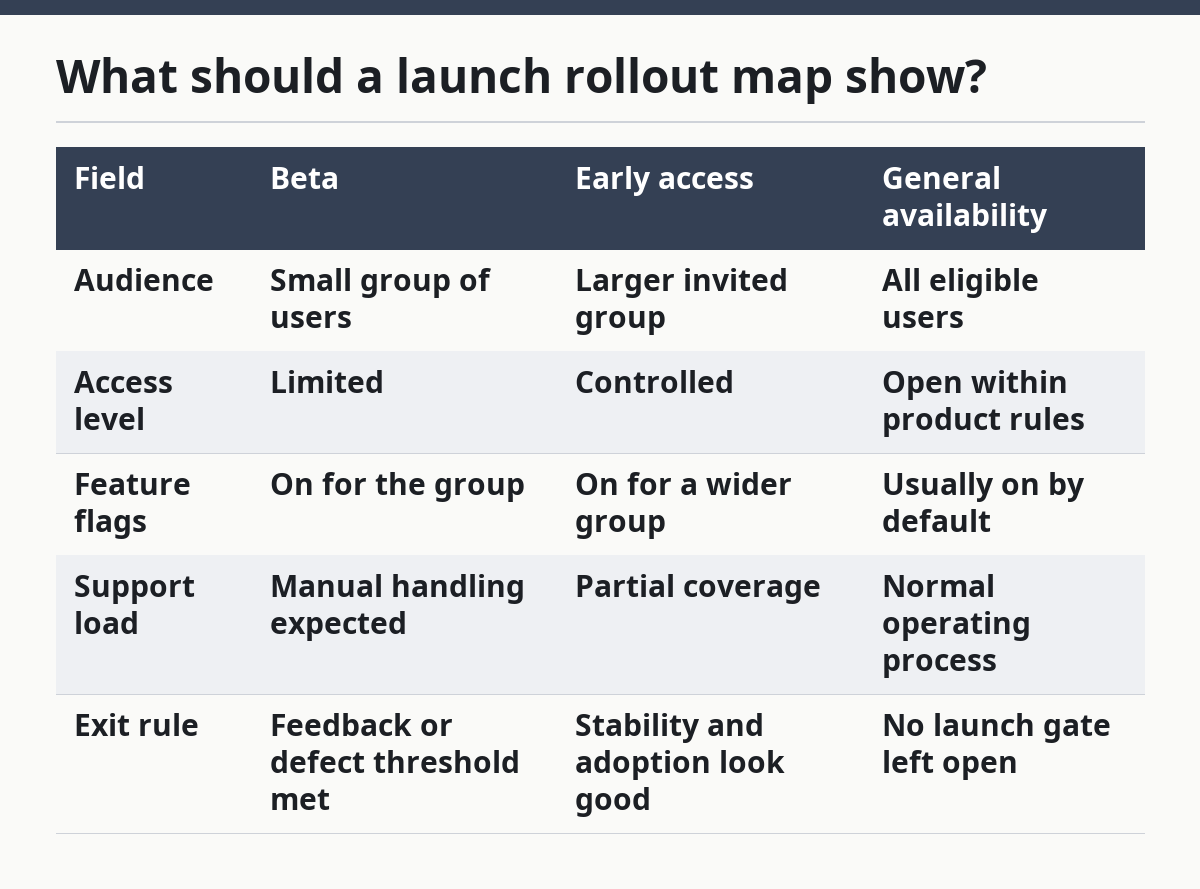
This table is useful because it separates phases that sound similar. Beta and early access are not the same thing, and general availability is not just “beta but bigger.” If the map blurs those lines, sales, support, and engineering will all use the wrong language later.
This page fits the hub on SaaS product launch and rollout intelligence, but it stays on the rollout map itself instead of teaser tracking or announcement reading.
How do you map a staged rollout?
You map a staged rollout by listing the phases in order, assigning an audience to each one, and attaching one exit rule to each phase. Start with the smallest real group you can defend, then widen only when the prior phase proves stable.
-
Use a spreadsheet to list the phases. Put beta, early access, and general availability in separate rows, plus any internal dogfood stage if it exists. One row per phase keeps the map from collapsing into a paragraph.
-
Use product analytics to define the audience. Name the exact access group for each phase, such as invited users, a customer segment, or all users in a plan. If the audience is vague, the launch is already vague.
-
Use the feature flag system to set exposure. Mark each phase as flag on, partial flag, or flag off by default. That lets the team release code without exposing the feature too soon.
-
Use support notes to set the service level. Write what support is expected to handle in each phase, even if it is only manual triage. That keeps beta from being mistaken for full support coverage.
-
Use the release checklist to name the exit rule. Tie each phase to one condition for moving forward, such as no critical defects open or enough feedback gathered to proceed. A phase without an exit rule will linger.
-
Use the launch owner sheet to assign sign-off. Put one owner on each handoff, not a committee of names. The handoff point should be visible the same day the map is made.
-
Use the rollout calendar to line up the dates. Place the phases in sequence, not all on one date. A staged rollout needs spacing, even if the dates are only approximate at first.
The point of the map is control, not prediction. It tells the team how the launch moves, not how the press will react.
Where do beta and general availability differ?
Beta is usually a limited release with a narrower audience, while general availability is the point where the feature is treated as ready for normal use; if the release is high risk or regulated, consult a professional and follow your organization’s release policy. The difference is access, support, and risk, not just a label.
Beta usually means the team still expects change. The feature may be incomplete, rough at the edges, or subject to bug fixes that alter behavior. General availability means the product team expects the feature to be stable enough for routine use and standard support; for release-stage definitions, see Google’s release stage guidance and Atlassian’s guidance on release management.
The biggest mistake is using “beta” as a soft launch word when the team really means “almost ready.” That creates confusion about support promises and customer expectations. Another common mistake is calling something GA before the access and support plan are actually in place.
Use this split when you write the rollout map:
- Beta for a controlled test with a small audience and active feedback.
- Early access for invited users who are allowed in before full release, but with tighter control than GA.
- General availability for the broad release state where the feature is meant to operate under normal product rules.
The trade-off is simple. Beta reduces risk because the audience is small, but it also limits feedback volume. GA increases reach, but it raises the cost of a mistake because more users depend on the feature at once. If the feature still needs manual intervention every day, it is usually too early for GA.
How do feature flags affect launch tracking?
Feature flags affect launch tracking by separating deployment from exposure, which gives you a cleaner rollout map and a cleaner rollback path. A code deploy can happen without a user-facing release if the flag stays off.
That separation matters because the map should track two things at once: what code exists and who can see it. Without feature flags, a launch often becomes a single switch. With flags, the rollout can move in stages, such as internal users first, then beta users, then a wider audience, and finally all eligible users at GA.
A flag also changes how you record status. A feature can be deployed, enabled for 10 users, still in beta, and not yet general availability. If the map does not show those states separately, the release tracker will mix engineering progress with user access.
The honest drawback is overhead. Flags add another layer to manage, and that means someone has to track cleanup later. Old flags that never get removed make the map harder to read and the product harder to maintain.
Use the map to record flag status in plain terms:
- Off: no user exposure.
- On for internal users: only staff can see it.
- On for beta users: controlled external access.
- On for all eligible users: feature is effectively live for the defined audience.
That framing keeps the map useful for product, support, and release management. It also stops people from treating “the code is merged” as the same thing as “the feature is launched”; for flag-driven releases, see LaunchDarkly’s documentation and Atlassian’s release management guide.
What belongs in the rollout map, and what does not?
A rollout map should contain release control details, not teaser notes, press timing, or a long product story. The map exists to manage access and sequence, so anything that does not change who gets the feature or when they get it can stay out.
Keep these items in the map:
- phase name
- target audience
- access level
- feature flag state
- support expectations
- exit rule
- owner
- next step
Leave these items out unless they affect rollout control:
- marketing copy
- announcement phrasing
- design polish notes with no release impact
- broad product roadmap text
- internal debate about naming
The reason is practical. A rollout map gets used in a meeting, in a support handoff, and in a release review. A bloated document is slower to scan, and a slow map gets ignored.
This is also where many generic guides go wrong. They often treat the launch map as a planning doc for the whole company, but that can blur release control; keep it narrow enough that product, support, and engineering can use the same sheet. The map should be narrow enough to answer one release question: who sees what, and when does that change?
If you want a simple rule, use this one: if a line does not affect release sequence or access level, it probably does not belong in the map.
How do you keep the map useful after launch day?
You keep the map useful after launch day by updating the phase status, flag state, and owner notes each time the release changes. A rollout map that is not maintained turns into dead paperwork within a week.
Mark the date when beta starts, the date when the audience expands, and the date when general availability begins. If the feature stays in one phase for a while, note why. That could be because of support load, a bug fix, or a change in scope.
The map should also show what gets retired. Old flags, old access lists, and old beta notes should be cleared when they are no longer relevant. If the map keeps every old decision forever, no one can tell what is current.
A useful habit is to review the map at each phase change instead of waiting for the end. Because the rollout dates are already on the calendar, that keeps the release sequence visible and prevents teams from drifting into unofficial access rules. The map is doing its job when support, product, and engineering all point to the same version on the same day.
What mistakes break a rollout map?
A rollout map breaks when access, sequence, and flag state are mixed together or left undefined. The most common mistakes are small, but they create large confusion during beta and GA.
The first mistake is calling every controlled release “beta.” That blurs the difference between a test group and a near-final release. The cost is bad expectations: users think they are getting one kind of access while the team is managing another.
The second mistake is leaving feature flags out of the map. If a release is controlled by flags, the map needs to say so. Without that note, people will assume the feature is either live or not live, when the truth may be a partial rollout.
The third mistake is skipping the exit rule. A phase without a gate becomes a parking spot. The team keeps saying “soon” and the launch never moves to the next stage.
The fourth mistake is making the map too detailed for its purpose. A page full of design notes, support scripts, and announcement drafts is hard to use in the moment. The fix is not to write more; it is to keep the map focused on release control.
A good rollout map is short enough to scan and specific enough to act on. If it cannot tell a new team member what happens in beta, early access, and general availability, it needs another pass.
How do you map a staged rollout?
A staged rollout is mapped by assigning each phase a user group, a flag state, and a move-forward rule. The map should show the order of release, not just the final state. If the phases are not explicit, the launch is only a hope.
What’s the difference between beta and general availability?
Beta is a limited release for testing and feedback, while general availability is the point where the feature is ready for normal use. Beta usually has narrower access and more change risk. GA usually means the feature is treated as stable for the intended audience, and if that audience is regulated or safety-sensitive, consult a professional before launch.
How do feature flags affect launch tracking?
Feature flags let the team track deployment separately from exposure, so the map can show code release and user release as different steps. A feature may be deployed but still hidden, or shown only to beta users. That makes the rollout clearer, but it also adds cleanup work when the flag is no longer needed.
Drafted with AI; not yet reviewed by a person.