How to Build a SaaS Beta Feedback Loop for User Reports, Bug Triage, and Release Decisions: A SaaS beta feedback loop turns user reports into release…
Last updated: November 18, 2026
A SaaS beta feedback loop turns user reports into release decisions by collecting feedback in one place, sorting it fast, and sending clear fixes back to the beta cohort. It works best when a product manager, a feedback form, and a bug tracker share the same labels from day one.
Key takeaways
- A beta feedback loop is not just a form; it is a repeatable path from report to decision.
- Keep user reports, bug triage, and release calls in one shared process, or the beta cohort will flood the team with duplicate notes.
- Separate product requests from bugs early, because they move at different speeds and belong to different owners.
- Use a simple release rule: fix the issues that block use, then decide what the next beta round still needs to prove.
- The loop breaks when nobody closes the circle back to beta users with a status update.
What is a beta feedback loop?
A beta feedback loop is the process that captures beta user reports, sorts them, assigns them, and uses them to decide what ships next. In a SaaS beta, the goal is not to collect every opinion; it is to turn a messy stream of comments into a release decision the product team can defend.
The loop has four parts: intake, triage, action, and response. Intake is the feedback form or channel where a beta user reports a bug, a missing feature, or a confusing flow. Triage is the first pass in the bug tracker, where a product manager or support lead decides what kind of item it is. Action is the fix, note, or scope change. Response is the message back to the beta cohort so they know their report mattered.
This matters because a beta launch is full of noise. One user may report a bug, another may describe the same bug with different words, and a third may ask for a feature that belongs in a later release. If those three items land in different tools with different labels, release decisions become guesswork. If they share one path, the team can see what keeps breaking, what only one user wants, and what blocks general release.
The honest limit is that a beta feedback loop does not create better product judgment by itself. It only makes judgment visible. If the team has no clear owner, no release criteria, or no habit of replying to beta users, the loop becomes a pile of tickets with no decision behind them.
For a wider view of launch work, this also fits the site’s SaaS product launch operations hub, where beta feedback sits alongside other release signals.
How do you collect beta feedback for SaaS?
You collect beta feedback by giving beta users one primary path, one backup path, and a fixed set of fields that make triage possible. A feedback form is the main intake point because it can ask for the same details every time: what happened, where it happened, what the user expected, and how urgent it felt.
Start with a form that forces structure. Ask for the user’s account, the screen or feature name, the steps they took, the result they saw, and whether the report is a bug, request, or question. If the beta program includes screenshots or logs, make those fields optional but visible. That keeps the form short enough for a phone and rich enough for triage.
Then give users a second path for urgent cases. A direct email alias or support channel works for reports that are too long for a form, but those items still need to be copied into the same bug tracker. If reports stay in email, the product manager ends up hunting through threads instead of sorting one queue.
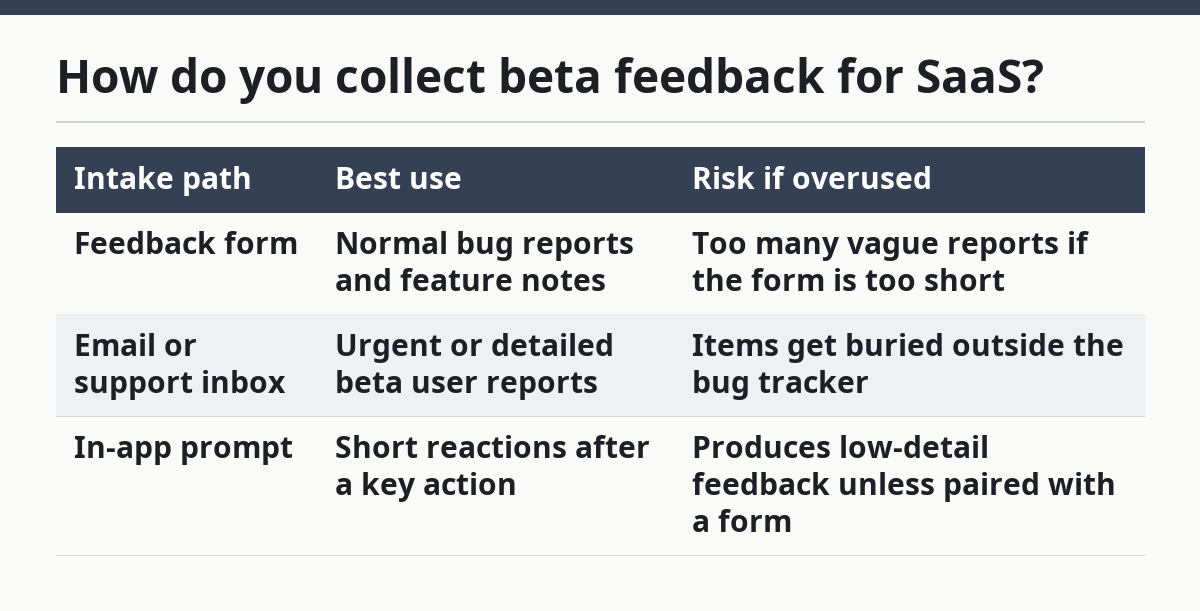
A clean intake setup usually looks like this:
| Intake path | Best use | Risk if overused |
|---|---|---|
| Feedback form | Normal bug reports and feature notes | Too many vague reports if the form is too short |
| Email or support inbox | Urgent or detailed beta user reports | Items get buried outside the bug tracker |
| In-app prompt | Short reactions after a key action | Produces low-detail feedback unless paired with a form |
A form is useful only if the team checks it on a fixed rhythm. Daily review works well in an active beta; every few days may be enough for a small cohort. The point is not speed for its own sake. It is to keep reports from aging long enough that beta users stop reporting them.
If the form is the intake, the bug tracker is the ledger. Each report should become one record with a clear title, a category, and an owner. That is the smallest unit that can feed a release decision.
What should bug triage do first?
Bug triage should first decide whether a report is a bug, a product request, or a usage problem. That first split saves time, because each type needs a different response and a different owner.
Triage begins with one person, usually a product manager or release owner, reading the report and normalizing the language. The report may say “the export is broken,” but the triage note should say what actually failed, on what screen, and for which user segment. The aim is not to rewrite the user’s voice; it is to turn it into a trackable item.
A practical triage flow looks like this:
- Read the report once and restate it in plain terms. The result should be a title that fits in one bug tracker line.
- Classify it as bug, request, question, or duplicate. The result should be one label that routes the item to the right queue.
- Check the beta cohort to see whether the same issue already exists. The result should be fewer duplicate tickets.
- Set severity or priority based on user impact, not loudness. The result should reflect blocked work, broken flows, or cosmetic issues.
- Assign an owner and a next action. The result should be a clear handoff, not a shared hope.
The biggest mistake here is to let every beta report become a “high priority” item. That sounds responsive, but it makes the queue useless. If everything is urgent, nothing is. A better rule is to reserve the highest priority for issues that stop a user from completing the core job, damage data, or make the beta impossible to trust.
Triage also needs a short close-the-loop step. If a report is a duplicate, reply with the existing ticket. If it is a feature request, tag it for product review. If it is a real bug, say where it sits in the queue. That small reply keeps beta users from sending the same report twice.
For teams that want a shared bug language, Atlassian’s bug triage guidance and GitHub’s issue template docs are both useful references for structure and intake discipline.
How do you turn reports into release decisions?
You turn reports into release decisions by grouping them, checking the beta cohort pattern, and asking what must be true before release. A release decision should not depend on the last loud message in the bug tracker; it should depend on the shape of the reports across the beta group.
The right question is simple: does this issue block the release, delay the release, or just shape the next release? That question forces the team to separate stop-ship bugs from annoyances and from future product work. It also keeps the product manager from turning every beta note into scope creep.
The decision usually comes from three signals. First, how many beta users hit the issue. Second, whether the issue sits in a core path or a side path. Third, whether there is a safe workaround. A bug in onboarding with no workaround weighs more than a bug in an edge setting that only a few users touch.
Here is the practical trade-off against the obvious alternative. A loose beta process gives more feedback, but it also gives more noise and slower release decisions. A strict process gives fewer reports, but the team can act on them faster. The right balance depends on whether the release is testing basic product fit or polishing a known workflow.
A release decision can land in one of four buckets:
- Ship now, because the issue is outside the release scope.
- Fix before release, because the bug blocks the main path.
- Keep in beta, because the team needs more evidence from the cohort.
- Defer to a later release, because the item is real but not urgent.
That last bucket matters more than teams admit. Without a defer path, every beta issue becomes a fight between engineering time and user disappointment. With a defer path, the product manager can record the issue, explain the choice, and move on.
The cleanest release decision is written down in one sentence the whole team can repeat. For example: “Ship when onboarding, export, and account settings are stable, and keep non-blocking report cleanup in the next cycle.” The exact words can change, but the rule should be short enough to survive a meeting.
What does a good beta feedback loop look like day to day?
A good beta feedback loop looks like a short, repeatable cycle that closes within the same day or the next work block. It does not depend on a giant process doc. It depends on the same 3 or 4 people doing the same steps in the same order.
The daily rhythm is simple. New reports arrive through the feedback form, the product manager scans them, the triage owner tags them in the bug tracker, and release notes get updated with what changed. Beta users then get a reply that says either the issue is fixed, the issue is known, or the issue is part of a later release decision.
That daily rhythm needs three visible artifacts. One is the intake form. One is the bug tracker board. One is the release decision note. If any of those lives only in one person’s head, the loop breaks the first time that person is out.
A good loop also uses feedback categorization with a small number of labels. Too many labels make the queue hard to read. Too few labels mix product requests with bug reports and make release decisions fuzzy. The middle ground is usually enough: bug, request, duplicate, question, and blocked.
The common mistakes are easy to spot. The first is collecting feedback in five places and triaging in one. That creates lost reports. The second is leaving duplicates open, which makes the beta cohort think the team is not listening. The third is skipping the response step after fixing something, which wastes the trust the loop was meant to build.
A simple rule helps: every report gets an outcome, even if that outcome is “not this release.” That one line keeps the beta program honest. It also gives the product manager a record of what the team chose and why.
What breaks the loop?
The loop breaks when the team treats feedback as data but not as decisions. A bug tracker full of tickets is not a loop unless the team changes the release plan, fixes the bug, or sends a clear reply back to beta users.
The most common failure is unclear ownership. If no product manager owns triage, reports drift between support, engineering, and product. Another failure is vague intake. A report that says “it’s broken” with no screen, no step, and no account detail forces the team to spend 10 extra minutes just figuring out what happened. That slows the whole beta.
A second failure is mixing release decision work with complaint handling. Complaints need acknowledgment. Release decisions need a rule. When those two get tangled, the team either overreacts or ignores useful reports. Separate the emotional part from the decision part.
A final failure is forgetting the beta cohort itself. Beta users are not just a source of bugs; they are the only group that can confirm whether the fix changed the real workflow. If the team never closes the loop with them, the beta turns into a one-way inbox. The product may still ship, but the launch team loses the chance to learn before general release.
How does this support launch operations?
This feedback loop supports launch operations by turning beta reports into release criteria, triage notes, and a record of what changed before launch. It belongs near other SaaS launch operations work because it connects user signals to the go or no-go choice.
The practical value is control. Product managers get a clearer queue. Engineers get fewer duplicate reports. Beta users get replies that make the program feel real. And release decisions stop depending on memory, Slack chatter, or the last report that came in before the meeting.
That is why this loop is not a side process. It is the part of beta that decides whether the release team is learning or just collecting noise.
How do you collect beta feedback for SaaS?
You collect beta feedback through one main intake path, usually a feedback form, and one backup path for urgent reports. The form should ask for the issue, the screen, the expected result, and the user’s account or segment. That structure makes later triage faster and cuts down on duplicate follow-up.
What should you do with beta bug reports?
You should move beta bug reports into the bug tracker, classify them, and assign an owner. The first triage pass should decide whether each report is a bug, request, duplicate, or question. After that, the team should set priority, note the workaround if there is one, and reply to the beta user.
How do beta findings affect release decisions?
Beta findings affect release decisions by showing which issues block the main workflow, which ones can wait, and which ones need more evidence. A release decision should weigh user impact, core-path damage, and the presence or absence of a workaround. That is what lets a product manager say ship, fix first, keep in beta, or defer.
Drafted with AI; not yet reviewed by a person.