For most SaaS launches, a 2-page runbook, one named owner, and a 24-hour freeze window are enough to prevent avoidable launch-day confusion. This guide on…
Last updated: November 18, 2026
Quick answer: for most SaaS launches, a 2-page runbook, one named owner, and a 24-hour freeze window are enough to prevent avoidable launch-day confusion. This guide on SaaS product launch operations — The Complete Guide explains the people, systems, messages, checks, and rollback steps that turn a finished release into a controlled public launch. It suits teams that need less chaos on launch day and more confidence that billing, support, analytics, and product access will work as planned. For a broader release-management framework, see release management and incident response.
Key takeaways
- Launch operations is not the same as product strategy. It is the runbook, approvals, timing, and checks that keep a release from breaking customer trust.
- The most common failure is not the feature itself. It is a gap between product, engineering, marketing, support, and billing.
- A good launch plan names one owner, one cutover path, one rollback path, and one source of truth for status.
- The right process depends on release risk. A tiny UI tweak needs less ceremony than a billing change, data migration, or new plan structure.
- The trade-off is speed versus control: more checks slow the launch, but fewer checks raise the odds of a support spike or a bad rollout.
What does SaaS product launch operations actually cover?
SaaS product launch operations covers the full release path from final approval to post-launch review. It includes launch scope, launch calendar, task ownership, customer communication, support readiness, analytics checks, billing or entitlement changes, and a rollback plan.
A generic launch checklist misses the point if it treats launch as a marketing event only. In SaaS, the launch also touches provisioning, permissions, usage tracking, help docs, app store notes if relevant, incident response, and the support queue. If one of those pieces is missing, the launch may still “go live,” but the customer experience will be uneven. If the release is high-risk, consult a qualified launch or release-management professional and use a source-backed runbook such as Google’s Site Reliability Engineering guidance.
Think of launch operations as the control layer around the release. Product decides what ships. Operations decides how it ships, who watches it, what gets paused, and what happens if the release fails. That matters because a SaaS launch can fail in ways that are not obvious in the first 10 minutes: a plan upgrade does not apply, a feature flag is mis-set, or support macros still describe the old workflow.
The launch ops process should be boring enough that people do not notice it until something goes wrong. It should name a single owner, a launch date, a go/no-go checkpoint, and a fallback route. It should also make room for the dull but costly details that teams skip under pressure, such as entitlement mapping, training links, and post-launch monitoring windows. For a practical planning template, see launch runbooks.
Why do SaaS launches go wrong?
SaaS launches go wrong when the team treats them as a single department’s job instead of a cross-functional handoff. The most common breakpoints are unclear ownership, last-minute scope changes, missing QA on customer-facing flows, and poor coordination between release timing and support coverage. When the release is customer-facing, teams should consult a qualified release manager or operations lead and use a source-backed process such as NIST’s incident handling guidance.
The hard part is not shipping the code. The hard part is making sure the code, the product page, the pricing page, the help center, the sales notes, and the support scripts all say the same thing on the same day. A launch that reaches customers before those pieces line up creates avoidable friction.
A second failure mode is overconfidence in “just flip the flag.” Feature flags help, but they do not solve dependency risk. A new feature can depend on permissions, billing logic, data backfills, or email templates. If any one of those lags behind, the launch is incomplete even if the code deploys cleanly.
A third failure mode is weak rollback planning. Teams often know how to ship forward, but not how to reverse course. For SaaS, rollback may mean disabling a feature flag, pausing a rollout by segment, reverting a pricing page, or turning off customer access to a new entitlement.
One practical standard helps here: every launch should have a named go/no-go owner and a written rollback trigger. That does not need to be complicated, but it does need to exist before the release window opens. The fewer people who know how to stop a launch, the more likely the launch will continue past the point of safety.
What should be in the launch plan?
The launch plan should include scope, owner, timeline, dependencies, customer impact, communication, QA, rollback, and post-launch review. If one of those is missing, the plan is not complete enough for a real SaaS release. For adjacent planning examples, see product launch checklists and release readiness.
A useful launch plan is not a slide deck that everyone nods at. It is a working document that answers nine plain questions: What is shipping? Who owns each task? When does each step happen? What can block the launch? Who approves the final go? What do customers see? What do support and sales need to know? How do we revert? What gets checked after launch?
The plan should also define launch type. A public feature launch, a billing change, a migration, and a phased beta do not need the same process. A billing change usually needs tighter checks because it can affect revenue and customer trust immediately. A beta may need clearer access rules and feedback capture. A migration needs a stronger backout plan than a simple UI refresh.
The launch plan works best when it is short enough to use under pressure. A 2-page runbook can be more effective than a 20-page deck if it names the owner, the decision points, the schedule, and the rollback criteria. The goal is not documentation volume. The goal is decision clarity.
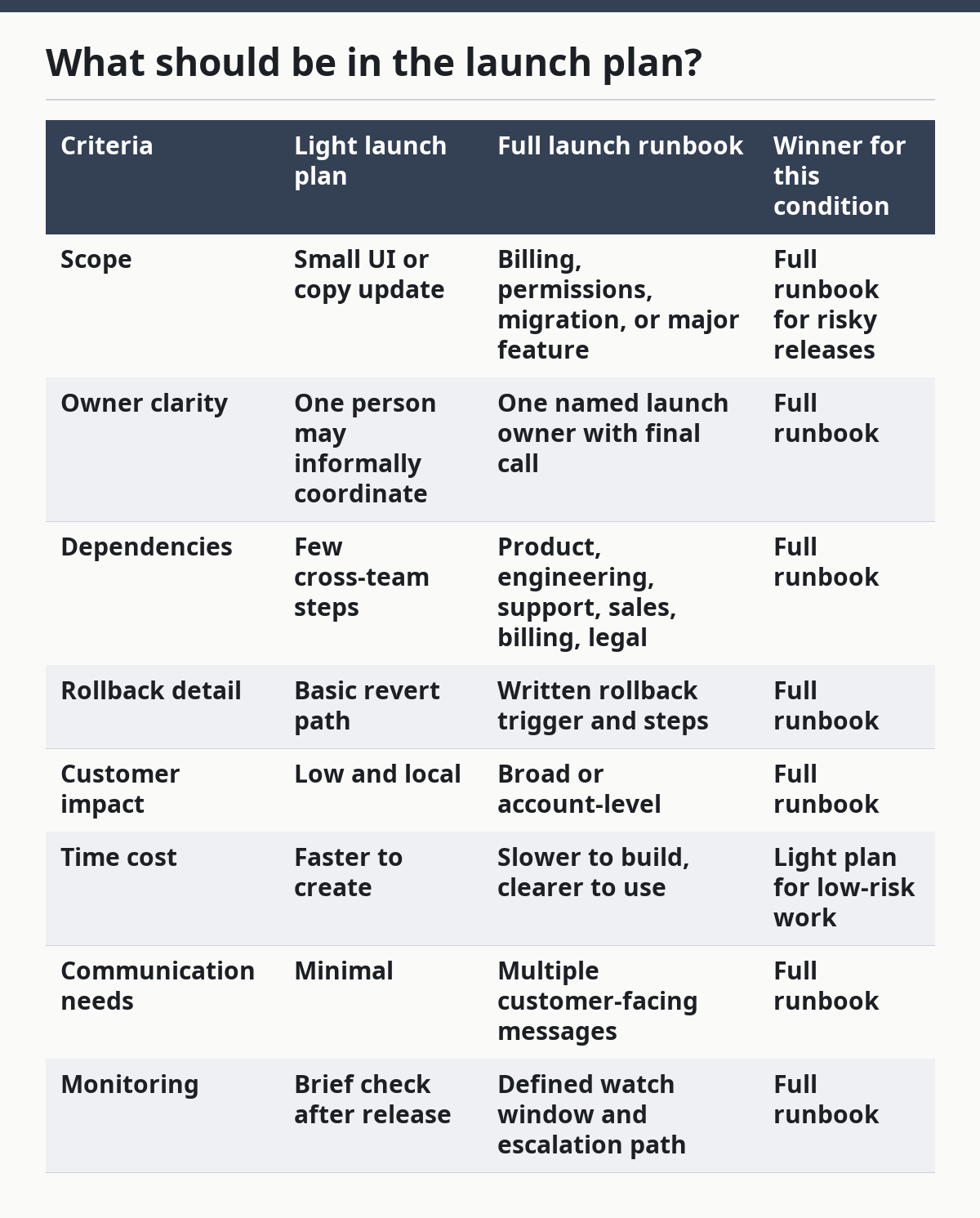
A simple comparison helps separate useful launch planning from busywork:
| Criteria | Light launch plan | Full launch runbook | Winner for this condition |
|---|---|---|---|
| Scope | Small UI or copy update | Billing, permissions, migration, or major feature | Full runbook for risky releases |
| Owner clarity | One person may informally coordinate | One named launch owner with final call | Full runbook |
| Dependencies | Few cross-team steps | Product, engineering, support, sales, billing, legal | Full runbook |
| Rollback detail | Basic revert path | Written rollback trigger and steps | Full runbook |
| Customer impact | Low and local | Broad or account-level | Full runbook |
| Time cost | Faster to create | Slower to build, clearer to use | Light plan for low-risk work |
| Communication needs | Minimal | Multiple customer-facing messages | Full runbook |
| Monitoring | Brief check after release | Defined watch window and escalation path | Full runbook |
Who needs to own launch operations?
Launch operations should have one named owner with authority to call the launch, and that person should not be buried in the middle of the handoff chain. The owner can be product operations, release management, program management, or another role, but the job needs a single decision-maker.
This is where many teams get fuzzy. Product managers often know the feature best, but they may not have the bandwidth to coordinate support scripts, billing checks, and release timing. Engineers can run the deployment, but they may not own customer messaging or sales enablement. Marketing can coordinate external communication, but they should not be the only team watching operational readiness. In release ownership models, the point is to make accountability visible, not to add ceremony.
The cleanest setup is simple: one launch owner, one technical owner, one support owner, and one executive approver for high-risk releases. The launch owner tracks the runbook. The technical owner handles deployment and rollback. The support owner prepares internal notes, macros, and escalation paths. The approver signs off on the go/no-go decision when the release carries real customer risk.
That structure is not bureaucracy for its own sake. It reduces “someone thought someone else had it” problems. A launch fails in small ways when ownership is diffuse. A new pricing page goes live, but the help article still reflects the old tiers. A feature is released, but support was never told which accounts should see it. Those misses are avoidable if ownership is visible.
Who should skip a heavy ownership model? Very small teams shipping low-risk changes every day may not need a formal committee for each release. But even then, one person still needs the final say. Without that, the team is not being nimble; it is being vague.
How do you build the launch calendar?
A launch calendar works when it sets dates backward from the customer-facing event, not forward from code completion. Start with the launch date, then place the approval gate, internal review, QA window, support briefing, and final deployment slot before it.
The most useful calendars include not only dates but also freeze windows. A freeze window is the period when the release scope should stop changing unless a named approver accepts the risk. Even a short freeze, such as 24 hours or 48 hours before launch, can prevent last-minute edits from slipping past QA and comms.
A practical calendar should show at least these milestones: scope lock, final QA, support training, customer message approval, deployment, monitoring window, and review. If the launch is large, add a pre-launch dry run. If the launch is billing-related or affects access, add an extra checkpoint for entitlement validation.
The calendar also needs room for cross-team lag. Sales may need a day to update talk tracks. Support may need time to load macros into the ticket system. Legal or compliance may need to review claims in customer-facing copy. If the launch calendar assumes instant approvals from every side, it will slip.
The trade-off is simple. A tighter calendar gets features out faster, but it leaves less room for correction. A wider calendar lowers launch stress, but it can slow delivery and create more chances for scope drift. For a small cosmetic update, that extra buffer may be wasteful. For a pricing or access change, it is usually cheap insurance. For calendar planning help, see launch timelines.
What needs to happen before launch day?
Before launch day, every customer-facing and system-facing dependency should be checked, approved, and ready to reverse if needed. That means QA, analytics, support, comms, billing, permissions, and rollback checks all happen before the release window opens.
The pre-launch checklist should start with the product itself: does the feature behave as intended, does it appear only to the right users, and does it fail safely? Then it should move to the operational layer: are event names correct, are dashboards set up, are alerts routed, and do support staff know where to send escalations?
For launches that touch revenue or accounts, the pre-launch step should also include entitlement review. A common SaaS failure is not a broken feature but a broken access rule. A customer may buy the plan, but the account does not open the new capability. That kind of bug creates billing confusion and support tickets fast.
Documentation is part of pre-launch work too. Help content, release notes, sales decks, onboarding emails, and internal FAQs should all match the launch scope. If the public page says one thing and the help center says another, the team creates its own support issue.
One useful practice is to write the rollback criteria before launch, not after. “We will revert if billing errors appear,” is too vague. “We will disable the rollout if account provisioning fails for any test account,” is clearer and easier to act on. That level of precision is what keeps a launch from turning into a debate in the middle of the incident.
How should support and sales get involved?
Support and sales should get involved before launch, not after the first ticket arrives. Their job is to recognize what changed, explain it correctly, and route edge cases without making customers repeat the same story three times.
Support needs three things: what shipped, who it affects, and what to do when it fails. A short internal briefing is better than a long memo. It should cover common questions, known limitations, new screenshots if the UI changed, and the exact wording for any temporary workarounds. If the launch changes pricing, access, or billing, support needs the clearest possible explanation of the customer journey.
Sales needs different material. Sales does not need every technical detail. Sales needs the business value, the customer fit, the new limits, the migration path if any, and the “do not promise this” list. That last part matters more than teams admit. A launch often creates confusion because sales says the feature exists everywhere when it is only available on certain plans, regions, or account states.
A clean handoff also protects renewals and expansions. If the launch alters what the account can do, account teams need to know whether the new capability is included, gated, or still in beta. Otherwise, the launch creates mismatched expectations and follow-up cleanup work.
The best launch operations teams do not wait for support and sales to ask questions. They send the answer before the launch window opens, then check that the answer was read. That can feel fussy, but it is much cheaper than recovering from a week of inconsistent customer conversations.
What should happen after launch?
After launch, the team should watch behavior, not just celebrate the deploy. Post-launch work means monitoring the right metrics, reviewing support volume, checking account access, confirming analytics events, and capturing lessons for the next release. For monitoring patterns, see post-launch monitoring.
A launch is not done when the code is live. It is done when the team has enough signal to know whether the release worked in the wild. That signal should include product usage, error rates, ticket patterns, conversion or adoption if relevant, and any customer complaints tied to the change.
The first monitoring window should be defined before launch. Some teams watch for the first hour; others for the first day or longer, depending on risk. The point is not the exact number. The point is that someone is responsible for looking during the period when problems are most likely to appear.
Post-launch review should be short, specific, and honest. What went well? What delayed the launch? What was missing? What should be added to the runbook next time? A good review changes the process. A bad review becomes a document no one reopens.
This is also the stage where teams often confuse absence of complaints with success. No tickets is not always proof that everything worked. If analytics events were misconfigured, the feature may have launched but not been measured. If support coverage was thin, customers may have been frustrated without filing tickets. Good launch operations looks for both silence and signal.
When should you use a heavy launch process?
A heavy launch process is worth it when the release affects revenue, access, data, legal exposure, or a large user base. It is usually too much for a minor copy edit, a small UI change, or a low-risk internal tweak.
The simplest way to decide is to ask how painful a failure would be. If the answer includes billing errors, permission issues, migration loss, or public confusion, the launch deserves more structure. If the answer is mostly cosmetic, the team can keep the process lighter.
Here is the honest trade-off against the obvious alternative: a light process moves faster, but it assumes the blast radius is small. A heavy process protects the business, but it costs coordination time and slows the release. That makes heavy launch ops wrong for tiny changes and necessary for risky ones.
The launch operations team does not need the same process for every release. It can use tiers. A tier-one launch might need a full runbook, exec signoff, and a watch window. A tier-two launch may need cross-functional review but not executive approval. A tier-three release may only need a short checklist and a single owner. That tiering keeps the team from over-processing everything.
If the organization lacks this kind of release discipline, the first step is not a new tool. It is a shared standard for what counts as low, medium, and high risk. Once that language exists, the launch process becomes easier to repeat. For a deeper framework, see risk-based release tiers.
Exception scenarios: when does the verdict flip?
The overall recommendation flips when the launch has either very low risk or very high dependency on external approvals. In those cases, the same process that protects the launch can slow it down too much.
One exception is a tiny, reversible change with no customer-facing risk, such as a copy update or a harmless layout adjustment. A full launch runbook may be excessive here, and a short checklist with one owner is enough. The risk is low, so the cost of heavy coordination does not buy much.
Another exception is a release blocked by legal, compliance, or procurement review. Here, launch ops alone cannot solve the delay. The right move is not a tighter runbook but an earlier approval process, because the launch cannot move until the outside gate opens.
A third exception is a phased release to a small beta group. In that case, the “launch” is really an experiment with narrower exposure. The operations still matter, but the communication and rollback posture should match the limited audience. A beta should not inherit the ceremony of a full public launch unless the risk is high.
A fourth exception is a company that ships many small changes each week with mature automation. If the team has strong deployment discipline, clear flags, and reliable monitoring, some of the manual launch work can shrink. Even then, the launch owner and rollback path should remain explicit.
What is the honest recommendation?
Choose a full launch runbook if the release changes billing, permissions, migrations, pricing, or customer-facing access. Choose a lighter checklist if the change is small, reversible, and low risk. Neither if the team cannot name one owner, one rollback path, and one source of truth for the release.
That is the clearest line. SaaS launch operations are not about ceremony. They are about preventing avoidable damage when many parts of the business have to move together at once.
The strongest process is the one the team will actually follow under pressure. For most SaaS companies, that means a tiered model: light process for low-risk changes, full runbook for high-risk releases, and a named owner for every launch either way. The mistake is not being too careful. The mistake is being careful in the wrong places. For a related framework, see change management.
FAQ
What is the difference between product launch and launch operations?
Product launch is the event customers see, while launch operations is the machinery behind it. Product launch focuses on what is released; launch operations focuses on how the release is coordinated, approved, communicated, and monitored.
Do small SaaS teams need launch operations?
Yes, but not a heavy version of it. A small team still needs one owner, a short checklist, and a rollback plan, especially if the change affects billing, access, or support volume. The process can stay light when the risk is low.
How long should a launch process take?
There is no fixed duration that fits every SaaS release. A minor change may need only a short prep window, while a billing or migration launch may need days of coordination and a freeze period. The right length depends on risk, dependencies, and how much can break.
What is the biggest launch mistake to avoid?
The biggest mistake is treating launch day as the finish line. If support, analytics, access controls, and rollback steps are not ready before the release, the team is not launching a product — it is starting a fire drill.
Should launch operations live in product, engineering, or marketing?
It should live where cross-functional coordination is strongest, not where a single department is strongest. The owner can sit in product operations, program management, or release management, but the role needs enough authority to coordinate engineering, support, sales, and customer communication.
Drafted with AI; not yet reviewed by a person.