A useful How to Build a SaaS Launch Postmortem for Missed Dates, Message Drift, and Channel Gaps usually fits on 1 page, covers the planned date and the…
Last updated: November 18, 2026
Quick answer: A useful How to Build a SaaS Launch Postmortem for Missed Dates, Message Drift, and Channel Gaps usually fits on 1 page, covers the planned date and the actual timeline, and ends with 1 owner per fix. It suits teams that need to learn from a launch plan after the launch date passed, especially when missed dates, message drift, and channel gaps all showed up at once. For structure and blameless review practices, see Atlassian’s postmortem guide and Google’s Site Reliability Engineering book.
Key takeaways
- Use one postmortem to connect timing, messaging, and channel coverage instead of treating them as separate problems, and if the review needs legal, compliance, or operational judgment, consult the right professional or owner before finalizing actions.
- Start with the launch plan, the launch date, and the actual sequence of public posts, emails, and updates.
- Track drift in plain language: what the team said before launch, what changed on launch day, and what stayed unsaid.
- Turn the review into next actions with an owner, a due date, and one visible change per gap.
- This process is not for rehashing blame or writing a polished recap with no follow-up.
What goes in a SaaS launch postmortem?

A SaaS launch postmortem should include the launch plan, the launch date, the actual timeline, the message that was promised, the message that shipped, and the channels that were supposed to carry it. That gives the team one record of what happened, not three half-finished notes in different docs. For a shared template, see launch plan template and launch checklist.
Start with the facts that can be checked in 15 minutes: the planned date, the moved date if there was one, the first public post, the first customer-facing message, and the last update tied to launch. Then add the plan for messaging and distribution, because missed dates often hide behind vague language like “we’ll announce when it’s ready.”
A useful postmortem has four parts:
- What was planned.
- What actually happened.
- Why it happened.
- What changes next time.
That shape keeps the review from turning into a long recap. It also keeps the launch date at the center, which matters because a schedule miss can mask a bigger problem in the message or the channel plan.
The best place to stop is when the next action becomes clear. If the note says “launch was late,” that is not enough. If it says “launch moved by 2 days because sign-off landed after the email draft was already locked,” that points to a workflow problem and a fix.
A launch postmortem is not the same as a product retrospective. A product retro can range across a quarter. A launch postmortem should stay close to the launch window, usually from the planning date through the first 7 days after release. For a related process view, see SaaS product launch operations.
How do you review a failed launch?
You review a failed launch by rebuilding the sequence in order, then comparing the plan against the public record. The goal is to find where the launch plan broke, not to argue about memory after the fact. For a broader launch workflow, see product launch checklist.
Use this sequence as the core procedure:
-
Collect the launch plan in one place. Pull the launch date, the key message, the channel plan, and the owner list into a single doc. The result should be one page that shows what was supposed to happen on day 0 and in the next 7 days.
-
List the actual events by timestamp. Write down when the product was ready, when approvals landed, when posts went live, and when customers first saw the change. A simple 24-hour timeline is enough. The result is a clean comparison between planned timing and real timing.
-
Mark every date miss. Use one line per miss, and keep the reason factual. The result is a pattern, not a pile of excuses.
-
Compare promise versus release language. Put the planned message beside the live message and highlight any changed claim, softened benefit, or missing feature. The result is a view of message drift.
-
Check each launch channel. Review email, blog, in-app, social, sales enablement, and support handoff. Mark which channel carried the launch, which one lagged, and which one never got the update. The result is a channel gap list.
-
Write root cause and next actions. Name the main cause for each failure and attach one fix with an owner and date. The result is a review that leads somewhere.
This works best when the reviewer keeps the language plain. “We missed the launch date because approval waited until Friday” is better than “the process lacked alignment.” One sentence tells the team what failed and where to look.
A failed launch can mean the product was weak, but it can also mean the launch system was not ready. That trade-off matters because the fix is different: a product issue needs product work, while a launch system issue needs better sequencing, clearer sign-off, or fewer handoffs.
How do you spot message drift?

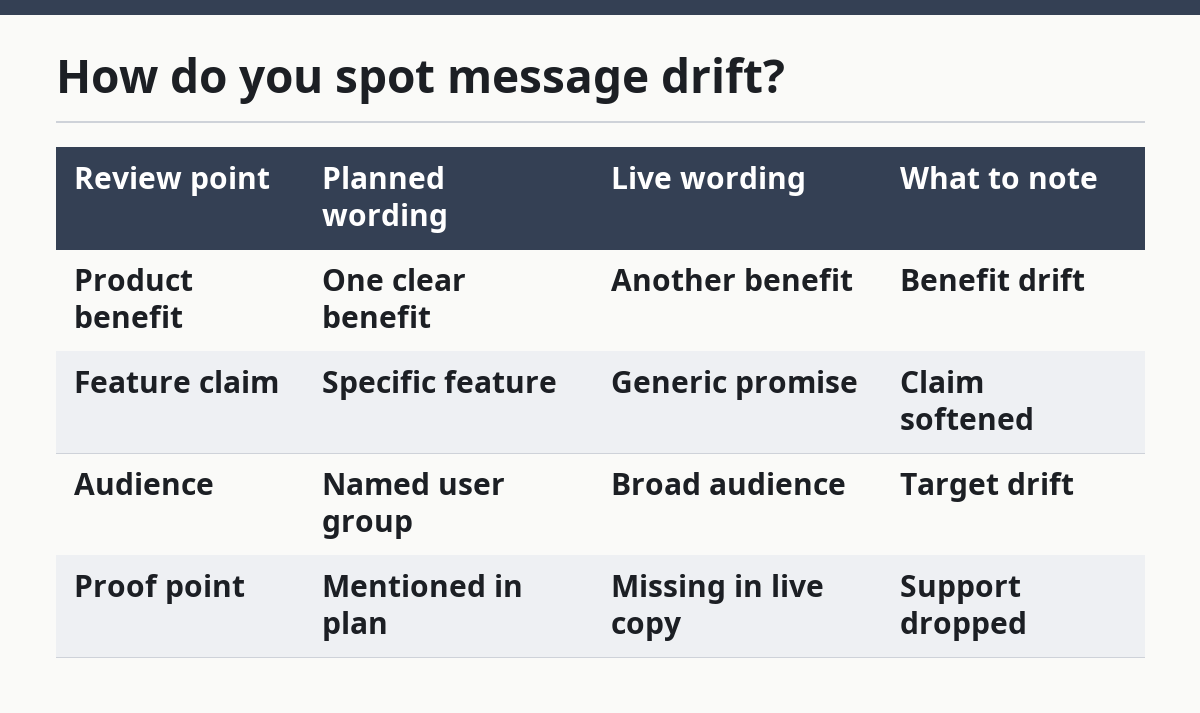
You spot message drift by comparing the promise in the launch plan with the words that actually reached the market. Drift shows up when the team starts with one claim and ends with another, often after 2 or 3 approval rounds.
The easiest place to catch drift is the headline, the subhead, and the first customer email. If those three lines no longer match the launch plan, the message has already bent. Look for three kinds of change: a feature that disappeared, a benefit that got inflated, or a target user that changed from one segment to another.
A simple comparison table helps:
| Review point | Planned wording | Live wording | What to note |
|---|---|---|---|
| Product benefit | One clear benefit | Another benefit | Benefit drift |
| Feature claim | Specific feature | Generic promise | Claim softened |
| Audience | Named user group | Broad audience | Target drift |
| Proof point | Mentioned in plan | Missing in live copy | Support dropped |
Message drift often starts with good intent. A reviewer wants to make the launch sound safer, broader, or more polished, so the copy changes in small steps. By the time the message ships, the launch no longer matches the plan.
That matters because drift makes the rest of the review harder. If the launch was late and the message changed, the team may blame timing when the deeper issue was poor message control. A postmortem should name the drift directly and link it to the person or step that changed the copy, even if the change was made in a 10-minute edit.
The honest limitation here is that not every wording change is bad. A launch message can improve during review. The problem is untracked change, not change itself. If the final copy is better, the postmortem should still show what moved and why. For message governance, see messaging framework.
Where do channel gaps show up?
Channel gaps show up when one part of the launch reaches the market and another part stays silent. The launch may go live on the blog, for example, while sales, support, and in-app surfaces still show the old message 2 days later. For related coordination, see launch communications plan.
Review the channel plan channel by channel: blog, email, in-app notice, social post, sales deck, support note, and help center. Then ask one question for each: did this channel carry the launch, support it, or miss it entirely? That takes the review out of general talk and into visible coverage.
A channel gap can be a missing post, but it can also be bad timing. If the email goes out before the product is live, the launch date becomes confusing for customers. If support learns about the launch after customers ask about it, the team pays for the gap in manual replies.
Here is the trade-off against a single-channel launch:
- One channel is faster to produce and easier to control.
- Multiple channels give wider coverage but create more places for drift and delay.
That trade-off depends on the launch type. A small feature with a narrow audience may need only 2 or 3 channels. A larger release usually needs more, because the message has to reach users, internal teams, and downstream support at the same time.
The postmortem should separate “not planned” from “planned but missed.” Those are different failures. If a channel was never in the channel plan, that is a planning gap. If it was in the plan and never shipped, that is an execution gap. Mixing them hides the real root cause.
One useful habit is to review channels against a 24-hour window around launch. Anything that lands outside that window should be marked with a reason. That keeps the review tight and makes late updates easier to spot.
How do you turn findings into next actions?
You turn findings into next actions by assigning one fix to each root cause, with a clear owner and a date. If a review ends with only a summary, it is not finished.
Start by grouping the findings into 3 buckets: missed dates, message drift, and channel gaps. Then ask what must change before the next launch. Common fixes include earlier sign-off, a locked message doc, a channel checklist, or a single owner for release timing.
Keep the next actions small enough to finish. “Improve approvals” is too vague. “Move final message sign-off 48 hours earlier” is specific enough to track. “Fix distribution” is too broad. “Add support and sales review to the launch checklist” gives the team a concrete change.
A good next-action line has four parts:
- problem
- owner
- due date
- evidence of completion
That last part matters. If the fix is “channel plan updated,” say what proof shows it happened, such as a revised launch doc or an updated release checklist. Without evidence, the next launch will repeat the same argument.
This is also where the postmortem proves its value to the broader launch program. A launch review that surfaces one bad handoff can improve the next launch date, sharpen the messaging, and close the missing channel in one pass. That is the kind of change a SaaS product launch operations team can actually use; it also fits the hub on SaaS product launch operations without repeating the same review in another format.
The limitation is simple: a postmortem cannot fix a launch that never had a plan. If the team skipped the launch plan, the review will still be useful, but only as a record of what was missing. In that case, the next action is not a deeper analysis. It is creating the plan first.
What should a good template include?
A good template should include the launch plan, the launch date, a timeline, the message comparison, the channel list, root cause, and next actions. That gives the team a single page to fill in, instead of a blank doc that turns into a write-up nobody finishes.
Use sections in this order:
- Planned date and actual date
- Launch message before and after
- Channel plan and channel coverage
- What slipped and why
- What changes next time
That order matches how people read during a live review. They want the timing first, then the words, then the channels, then the fix. If the template starts with a long summary, the useful details get buried.
Keep the template short enough to complete in one sitting. A 30-minute review works better than a 2-hour meeting if the team already has the launch artifacts in hand. The goal is not to write a polished report. It is to make the next launch cleaner than the last one.
For people who want a more complete launch-ops view, the postmortem should sit next to the launch plan, not replace it. The plan tells the team what to do before launch. The postmortem tells the team what broke after launch. Together, they make the next date, message, and channel plan easier to trust.
What should a SaaS launch postmortem include?
A SaaS launch postmortem should include the planned launch date, the actual date, the final message, the channel plan, the root cause, and the next actions. It should also show where the plan changed and who approved those changes. That makes the review useful instead of decorative.
How do you review a failed launch?
You review a failed launch by comparing the launch plan to the actual timeline, then listing what changed in timing, messaging, and channel coverage. The review works best when it ends with named root causes and one owner per fix. A 24-hour timeline is usually enough to expose the main break.
What causes launch message drift?
Launch message drift usually comes from late edits, unclear ownership, or too many approval layers. The wording changes little by little until the live message no longer matches the launch plan. A clean way to catch it is to compare the planned headline, the email, and the final live copy side by side.
Drafted with AI; not yet reviewed by a person.