SaaS pricing page operations — The Complete Guide: Most SaaS pricing page operations teams should review the page at least once a month, and weekly if the…
Last updated: November 18, 2026
Quick Answer: Most SaaS pricing page operations teams should review the page at least once a month, and weekly if the offer changes fast. SaaS pricing page operations means treating the pricing page like a live revenue asset, not a one-time web page. It should be run with clear ownership, a change process, and ongoing checks for accuracy, accessibility, and conversion risk. For specific operating-model decisions, consult a pricing strategist, revenue operations lead, or legal professional, because the right setup depends on the business and risk profile. A pricing page that drifts for even one release cycle can confuse buyers, hurt trust, and create support work that never shows up in the mockup.
This guide on SaaS pricing page operations: The Complete Guide is for the person who has to keep the page current after the launch meeting is over. It draws on SaaS product signals, pricing-pattern review, and basic web standards like WCAG 2.2 and GDPR, because a pricing page is both a sales surface and a compliance surface.
Key takeaways
- A pricing page is an operating system, not a static brochure.
- The biggest risk is not a weak headline; it is stale pricing, wrong plan labels, and broken handoff logic.
- The right owner depends on whether price changes more often than copy changes.
- Good pricing page ops need a change log, approval path, analytics, and a rollback plan.
- Marketing can own the words, but finance, product, and support still need a seat at the table.
What does pricing page operations mean?
Pricing page operations means the day-to-day system that keeps the pricing page accurate, readable, and aligned with how the company sells. It includes plan names, feature gates, billing terms, add-ons, trial language, upgrade paths, legal copy, and the tracking that tells you what buyers do next.
A lot of teams think the job ends when the page goes live in Webflow or on a CMS. That is the wrong model. A pricing page changes every time the business changes a plan, retires a feature, updates a billing term, or shifts from self-serve to sales-assist. If the page still says “annual savings” after the billing model changed, the problem is no longer design — it is operations.
The cleanest way to think about it is as a small control room with 4 jobs: publish, verify, monitor, and correct. Publish means the page reflects the current offer. Verify means someone checks the pricing logic, links, and mobile layout before release. Monitor means watching click patterns, scroll depth, and sales handoff behavior. Correct means fixing broken copy, stale screenshots, mismatched feature lists, and any legal line that no longer matches the checkout flow.
A pricing page also sits under real standards, not just taste. WCAG 2.2 matters because the page has to be readable and usable on a phone, with keyboard access and clear contrast. GDPR matters if the page collects personal data through forms, trial signups, or cookies tied to behavior. The page should also match the facts in the product itself, because buyers notice mismatches faster on pricing than anywhere else.
That is why pricing page ops is different from general web publishing. A pricing page cannot age quietly. It influences revenue, support volume, and trust in one place, and that makes it closer to a billing system than a landing page.
Should marketing own the pricing page?
Marketing should own the writing, but not the whole pricing page operation, unless the offer changes rarely. Marketing is the right owner for headline tests, layout, tone, and positioning because those are copy decisions, and copy teams can move fast without waiting on product sprints.
The strength of marketing ownership is speed. If the page needs a new proof point, a reordered feature list, or a cleaner CTA, marketing can usually move in a 1-day or 2-day cycle instead of waiting for a release train. That matters when the page is part of paid acquisition, because even small wording changes can change the way traffic qualifies itself before it hits sales.
The weakness is that marketing often sees the page as a campaign surface, not a system of record. That becomes expensive when the plan matrix changes, the billing logic changes, or the sales team introduces a custom annual flow that the page does not mention. A marketing-owned page can also drift into “pretty but shallow,” where the copy sounds sharp but the pricing logic behind it is unclear.
This model fits a company with a stable offer, one main self-serve path, and a low rate of pricing changes. It also fits a team that has a strong CMS workflow and a legal review step for subscription language. It does not fit a business with frequent packaging changes, multiple billing currencies, or a product that sells both self-serve and enterprise.
The honest trade-off is simple: marketing-led pricing page ops is faster, but it is more fragile. That fragility shows up when someone changes a plan name in the billing tool and forgets the page, or when a coupon or trial rule changes and the page still describes the old path. If the company has to ask, “Who approved this price?” every month, marketing alone is the wrong owner.
Should product or revenue own the pricing page?
Product or revenue should own the pricing rules, but only revenue-led ownership works well when the page is tied to a real sales motion. This model can be a strong fit when the pricing page is part of an active packaging strategy; for specific org design, consult a pricing or revenue operations professional. For broader pricing governance context, see Paddle’s pricing resources and Stripe’s billing documentation, which both emphasize the operational side of recurring pricing.
The main strength here is consistency. Revenue teams are usually closer to discount policy, contract terms, annual billing, add-ons, and what sales can actually close without custom work. Product teams are closer to feature gating, plan logic, and release timing. Either group is better equipped than marketing alone to catch a mismatch between what the page promises and what the product can deliver.
The weakness is overhead. Revenue-led ownership can turn a simple page into a committee object, where every button label needs sign-off and every change takes too long. Product-led ownership can drift the other way and optimize for plan architecture while ignoring the buyer’s plain-English question: “What do I get, and what does it cost to try?”
This model fits companies with tiered packaging, usage-based pricing, annual contracts, or sales-assisted upgrades. It also fits teams that already run pricing through a monetization lead, a finance partner, and a lifecycle team. It does not fit a startup with one plan and a landing page that changes weekly, because the process load will outweigh the benefit.
The trade-off is speed versus control. Product or revenue ownership reduces pricing drift, but it can slow down the page if approvals are not tight. If the page has to be updated every time a feature flag moves, this model is the right one. If the page changes only when a headline is rewritten, it is probably too heavy.
What is the right operating model?
The right operating model is shared ownership with one clear decider, not a free-for-all. Marketing should own page presentation, product or revenue should own pricing logic, and finance or legal should approve the parts that can create billing or compliance risk.
A simple 3-layer split works well. Layer 1 is the buyer-facing page: headlines, cards, FAQ copy, CTA labels, and layout. Layer 2 is the commercial logic: plan names, feature entitlements, monthly versus annual terms, and any usage limits. Layer 3 is governance: who approves a change, who checks the live page, and who can roll it back.
A strong version of this model often has a named owner, a change log, and a release checklist. The named owner is the person who can say yes or no on the final draft. The change log records what changed, when it changed, and why. The checklist catches the boring things that break trust: wrong price labels, dead buttons, inconsistent taxes language, broken mobile spacing, and copy that no longer matches the checkout flow.
Here is the part generic advice leaves out: pricing page operations fail most often in the handoff, not in the design. The designer may finish the cards, the copywriter may finish the copy, and the product team may finish the package. If no one owns the final check, the live page can still be wrong.
Use this comparison to decide where the center of gravity should sit:
| Criteria | Marketing-led ops | Product/revenue-led ops | Winner for this condition |
|---|---|---|---|
| Speed of copy changes | Faster for headlines and layout | Slower if approvals are strict | Marketing-led when offers are stable |
| Accuracy of plan logic | Easier to miss edge cases | Better at feature gates and terms | Product/revenue-led when packaging is complex |
| Legal and billing alignment | Needs strong review | Usually closer to the source | Product/revenue-led when contracts matter |
| Campaign testing | Better for frequent message tests | Can get heavy | Marketing-led for acquisition-heavy pages |
| Support load control | Can drift if facts lag | Better at matching what agents say | Product/revenue-led when tickets spike after changes |
| Handoff to checkout | Often weaker | Usually better | Product/revenue-led for self-serve funnels |
| Page freshness | Good if update rhythm is tight | Good if monetization owns the source of truth | Tie when a single owner exists |
| Workflow cost | Lower overhead | Higher coordination cost | Marketing-led for simple offers |
| Risk of stale claims | Higher | Lower | Product/revenue-led when pricing changes often |
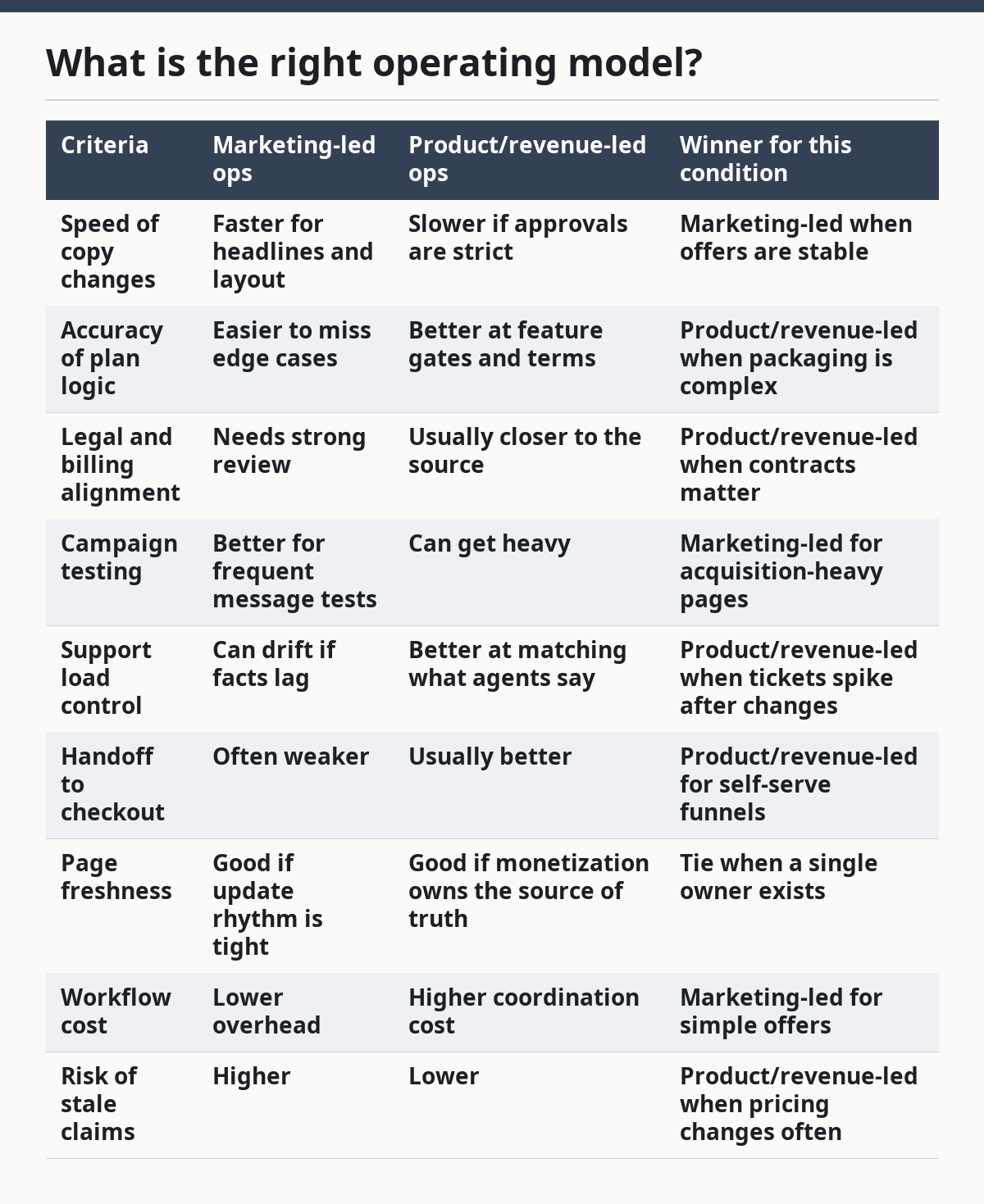
The table shows the real split: marketing wins on speed, product or revenue wins on control. The strongest setup is not one department “taking over” but one department owning the truth and another owning the page.
What should a pricing page operations workflow include?
A pricing page operations workflow should include intake, approval, publishing, verification, and review within a 7-day or shorter cycle if the business changes fast. Anything longer invites drift. A pricing page that sits untouched for a quarter is usually not a system; it is a risk.
Start with intake. Every change request should say what is changing, why it is changing, who requested it, and which systems must match it. That includes the CMS, billing platform, CRM, support macros, and any in-product upgrade modal that points to the same offer.
Next comes approval. Pricing changes should not move through Slack alone. The page needs at least one named approver for copy, one for commercial logic, and one for legal or compliance when the language touches taxes, auto-renewal, data collection, or promotional terms. For accessibility, the page should also be checked against WCAG 2.2 basics before release, especially color contrast, keyboard access, and focus order.
Publishing is only the middle step. Verification is where most teams save themselves pain. Someone has to check the live page on desktop and mobile, click every CTA, confirm the plans match the billing tool, and make sure the page does not advertise a feature that is behind a separate add-on. If the page uses localized pricing or currency symbols, that check matters even more.
The final step is review. A 24-hour or 72-hour post-launch check catches the things that slipped through: tracking tags, broken links, missing schema, and any message that the support team immediately has to explain. If the company runs experiments, the review should also record which change happened, what hypothesis it tested, and whether the page was rolled back.
This workflow sounds heavy, but the cost of skipping it is heavier. Stale pricing pages create trust loss, support tickets, and awkward sales calls. A clean workflow makes the page easier to change, not harder, because no one has to guess who owns the next fix.
What metrics should you watch?
The right pricing page metrics are the ones that show whether buyers understand the offer, not just whether they clicked. Click-through rate matters, but it is not enough on its own, because a pricing page can get clicks and still fail to qualify buyers correctly.
Start with 5 signals: page views, CTA clicks, scroll depth, plan comparisons viewed, and downstream conversion to trial, signup, or sales contact. Those signals show whether the page is doing its job as a filter and a guide. If buyers drop after the plan cards but before checkout, the problem may be pricing clarity, not traffic quality.
Tie the page to support data too. If the support inbox fills up with the same question after a pricing update, that is an operations signal, not just a support problem. It means the page, checkout, and help center disagree on what the buyer sees.
Many teams also watch variant history. A/B test results are useful only if the page owner knows what changed, why it changed, and how long the test ran. A test that wins on clicks but causes more refunds or more confused handoffs is not a real win. That is why the page owner should review the full path, not just the first click.
This is where a lot of generic articles go wrong: they treat the pricing page as a conversion-only asset. It is also a trust page, a support page, and a legal page. If those three functions are ignored, the metrics can look fine while the business absorbs the damage elsewhere.
When should the whole page be rebuilt?
The whole page should be rebuilt when the offer itself has changed, not just the copy around it. If the company moves from flat tiers to usage-based billing, adds a sales-led enterprise plan, or changes what is included in the core package, a simple text edit is usually not enough.
A rebuild also makes sense when the page has accumulated too many exceptions. If half the content exists to explain why one plan does not behave like the others, the structure is no longer helping. At that point, the layout is hiding complexity instead of clarifying it.
Another rebuild trigger is compliance pressure. If the page now needs more legal text, stronger consent handling, clearer tax language, or a revised privacy disclosure under GDPR, the old layout may no longer support the copy cleanly. The same is true if the page fails basic accessibility expectations under WCAG 2.2 and the fix would be a patchwork of small edits.
The honest downside of a rebuild is cost and time. Rebuilding creates more review rounds, more QA, and more chances for the page to drift during launch. That is why the page should only be rebuilt for structural change, not because someone wants a fresher look before a board meeting.
A good rule is this: if the answer to “What are we selling?” has changed, rebuild. If only “How are we saying it?” has changed, edit. That one decision keeps teams from spending a full sprint on a problem that needed a copy update.
The honest verdict: which model should you choose?
Choose marketing-led pricing page ops if the offer is simple, the page changes often, and the business mainly needs fast copy updates. Choose product or revenue-led pricing page ops if the pricing logic is complex, the page has to match billing and sales rules, or the company changes plans often. Neither if the company still treats pricing as an afterthought and has no named owner, no change log, and no review step.
The right call here is that the two models solve different problems. Marketing-led ops is the better fit for speed and message testing. Product or revenue-led ops is the better fit for accuracy, billing alignment, and fewer surprises after launch.
The strongest recommendation is shared ownership with a single decision maker. Marketing should control the page face, product or revenue should control the commercial truth, and finance or legal should review the parts that create risk. If the business cannot support that split, the page will drift no matter how polished it looks.
The wrong choice is trying to make the pricing page “belong to everyone.” That usually means it belongs to no one, and the buyer pays the price in confusion.
What are the exception scenarios?
The verdict flips in a few specific cases, and those cases matter more than generic best practices. If the company is in a heavy sales-assist motion with annual contracts and custom quotes, revenue-led ownership should dominate because the pricing page is only one part of a larger deal process.
If the company runs frequent experiments on message, layout, and plan framing, marketing-led ownership can win for a while because speed matters more than governance. That works only as long as the plan logic is stable and the pricing source of truth lives somewhere else.
If the company is regulated, the page may need a stricter approval path than either model likes. In that case, legal and compliance can become the gatekeepers for specific lines, especially around auto-renewal, data collection, or claims about savings. The page can still move quickly, but not without a stricter checklist.
If the business has no meaningful pricing changes for 6 to 12 months, a lighter model may be enough. In that scenario, a marketing-led page with a quarterly review can be enough, provided the support team, checkout flow, and billing system all point to the same offer.
How do you keep the page from drifting?
Keep the page from drifting by making it impossible to change one system without checking the others. The pricing page, checkout, CRM, support docs, and billing platform should all point to the same current offer, or the page is already out of date.
A monthly review is enough for a stable offer, but a weekly check is safer when the product changes fast. The review should look for plan mismatch, broken links, compliance copy that no longer matches the flow, and mobile issues that hide key text below the fold.
The most useful habit is a visible change log. A small log with the date, change owner, reason for change, and rollout status prevents the “who changed this?” problem that slows teams down later. It also gives support and sales a shared record when customers ask about a discrepancy.
A rollback path matters too. If a new page version causes confusion, the team should be able to restore the last approved version without waiting for a long release cycle. That is not overengineering; it is insurance against a page that drives revenue.
FAQ
What is the main job of a SaaS pricing page?
The main job is to help a buyer pick the right plan without confusion. It should show the offer, reduce friction, and route the buyer to the right next step, whether that is signup, checkout, or sales contact.
A pricing page also has to stay true to the billing logic behind it. If the page says one thing and the product or invoice says another, trust drops fast.
Who should own pricing page operations?
One person should own the final decision, but the work should not live in one department alone. Marketing usually owns presentation, product or revenue owns the pricing truth, and finance or legal reviews risky language.
That split works because no single team sees the whole path. The page touches copy, billing, support, and compliance at the same time.
How often should a pricing page be reviewed?
A pricing page should be reviewed whenever the offer changes, and at least once per month for a stable setup. Fast-changing SaaS products may need a weekly check.
The review does not have to be long. It just has to catch the drift between the page, the checkout flow, and the current package.
What usually breaks on a pricing page?
The most common break is mismatch: old plan names, wrong feature lists, broken CTAs, or legal text that no longer matches the billing flow. Mobile layout issues and accessibility problems under WCAG 2.2 also show up often.
These issues matter because they create confusion at the exact point where the buyer is deciding. A small mismatch here can produce a support ticket, a lost signup, or a sales follow-up that should never have been needed.
Is a pricing page mainly a marketing page or a product page?
It is both, but neither team should treat it like a private asset. Marketing owns the message and layout, while product or revenue owns the commercial truth behind the message.
That is why the best setup is shared ownership with one final decider. The page works only when the words and the pricing logic move together.
Drafted with AI; not yet reviewed by a person.