A SaaS launch readiness checklist should use 7 core checks: product readiness, support prep, sales prep , help docs, release notes, bug triage, and one…
Last updated: November 18, 2026
Quick answer: a SaaS launch readiness checklist should use 7 core checks: product readiness, support prep, sales prep, help docs, release notes, bug triage, and one final go/no-go review. How to Build a SaaS Launch Readiness Checklist for Product, Support, and Sales Teams is about making those 7 checks visible to product, support, and sales before launch day. Build it as a short, shared checklist with named owners, a clear go/no-go step, and proof that help docs, release notes, support prep, and sales prep are all done before launch day.
Key takeaways
- A launch checklist works best when it covers one launch date, one owner per task, and one final approval step.
- Product readiness is not just code shipping; it also includes bug triage, release notes, and rollback notes.
- Support needs the same level of prep as product, or the team ends up answering the same question 20 times on day one.
- Sales needs a small, approved set of talking points, not a long slide deck full of guesses.
- The checklist should stop a launch if a critical doc, bug fix, or handoff is still open.
What should a SaaS launch readiness checklist cover?

A SaaS launch readiness checklist should cover the work that has to be true before customers see the change. That means product readiness, support prep, sales prep, help docs, release notes, and bug triage, all tied to one launch date.
A generic task list is not enough because the teams fail in different ways. Product can ship code that is not ready for customer questions. Support can be ready to answer calls but not ready to explain the new flow. Sales can keep selling the old promise if nobody gives them the latest message.
This is why the checklist should live at the launch level, not the team level. Each line should name one owner, one due date, and one outcome. A line like “support trained” is too vague. A line like “support team has the updated help doc and the top 5 customer questions by 3 p.m. the day before launch” is usable.
The checklist also needs a stop rule. If a bug is still open, a release note is missing, or the sales team has not seen the final offer language, the launch should not pass review. That rule matters more than the format. Google Sheets, Notion, Jira, or a shared doc can all work if the same names and dates are visible to every team.
This approach fits the broader SaaS product launch operations process because it turns launch prep into a cross-functional gate, not a last-minute scramble. For a related planning frame, see the product launch checklist.
What should product team readiness include?
Product team readiness should include the code, the bug triage plan, the release notes, and the rollback path. If any one of those is missing, the launch is not really ready, even if the feature is built.
Start with the bug triage list. Tag each open issue as blocker, major, or minor. Put the owner next to each item and set a cutoff for what must be fixed before launch versus what can wait for the next patch. A launch checklist that does not name bug priority can easily turn into a debate on launch day.
Then check release notes. They need to say what changed, who it affects, and what users should do next. Keep the language plain. If the change affects a workflow, list the old step and the new step so support can match the same wording. If you want a professional standard for wording and structure, consult a technical writer or product marketer; Atlassian’s documentation guidance is a useful reference point for scan-friendly structure: https://support.atlassian.com/atlassian-knowledge-base/kb/documentation-best-practices/ .
A product readiness section should also ask for internal sign-off from the people who will take the first wave of questions. That usually includes product, support, and sales review, even if only one person on each team signs off. The point is not ceremony. The point is to catch mismatched language before it reaches customers.
A simple product section can use a 3-part format:
- What changed — feature name, screen, or workflow.
- What can break — known bugs, edge cases, or limits.
- What happens if it fails — rollback, disablement, or delay.
That format keeps the checklist short and makes it easy to compare across launches. It also helps when the feature is small but customer-facing, because small launches still create support volume.
One honest limit: this section is not a substitute for a full QA plan. If the launch has major technical risk, a checklist alone is too thin. It should sit on top of QA, not replace it.
How do you prepare support for a launch?

Support is prepared for a launch when it has the answer, the source, and the handoff path before day one. That means updated help docs, release notes in plain language, and a clear route for escalations.
The most useful support prep starts with the top customer questions, not the feature spec. What will users ask when they hit a new button, lose access, or see a changed flow? Put those questions into the checklist and answer them in the help docs. If the answer needs a screenshot, add it. If it needs a warning, add that too. See the help center checklist for a tighter doc workflow.
Then give support the same words that product will use publicly. If the release note says “new workspace permissions,” the help doc and support macro should not call it “team access” or “admin rights” unless those terms are already standard in the product. Mixed wording is a common cause of repeat tickets.
Support readiness should also include escalation rules. A launch checklist should say who owns urgent bugs, who handles billing questions, and who decides whether an issue needs a product pause. Without that path, support ends up guessing who should take the next step.
One useful way to build the support section is to check for these items:
- Help docs updated and published
- Support macros refreshed
- Known issues list shared
- Escalation owner named
- First-day staffing plan set
- Expected ticket types listed
The staffing plan does not need fancy modeling to be useful. Even a simple note about coverage during the first day can help the team avoid dropped tickets. The point is to make the first 24 hours predictable.
This section is also where many launches fail if the checklist is too product-heavy. A launch can be technically fine and still feel broken if support lacks the words and routes to help users quickly.
What does sales need before launch day?
Sales needs the approved story, the boundaries, and the answers to the first objections before launch day. If sales is not prepared, the team will fill the gap with old claims, vague promises, or guesses that the product team then has to clean up.
Sales prep begins with one short launch brief. It should say what the feature does, who it is for, what problem it solves, and what it does not do. That last part matters. Sales teams need to know the limits as clearly as the benefits, or they will pitch outside the product’s real scope.
A strong checklist also includes the exact release note language or a sales-safe version of it. The goal is to stop drift between marketing, sales, and product. If the launch changes a feature gate, pricing rule, or workflow limit, sales needs to know before the first customer call after launch.
The checklist should also include objection handling. Not a giant battle card, just the 3 or 4 questions most likely to come up. For example: “Can this replace the old flow?” “Does it work for current accounts?” “What happens if a customer is not on the new path yet?” Clear answers reduce pressure on the launch team.
A simple sales readiness table helps compare what each team needs.
| Team | Needs before launch | What happens if it is missing |
|---|---|---|
| Product | Final scope, bug list, release notes | Unclear sign-off and rushed fixes |
| Support | Help docs, macros, escalation path | Repeat tickets and slow answers |
| Sales | Approved story, limits, objections | Wrong promises and customer confusion |
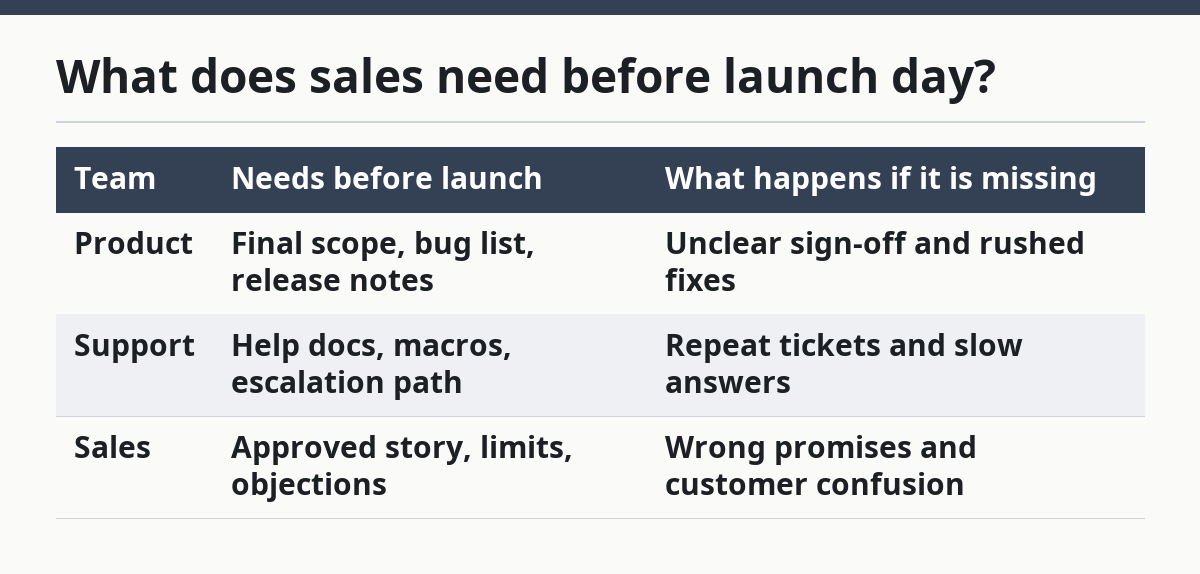
Sales prep is not about giving every rep the same giant file. It is about giving the team the minimum approved material that they can use on day one without improvising. That is the trade-off: less room for creative pitch language, but far less risk of the launch going off-message.
How do you build the checklist step by step?
You build the checklist step by step by mapping the launch date backward, assigning one owner per item, and blocking the launch until the highest-risk items are closed. That gives each team a shared path instead of three separate to-do lists.
Use this core procedure:
- Set the launch date and freeze the scope. Write the date at the top of the checklist and name the feature or change in one sentence. The result should be one launch target, not a moving guess.
- List the required sections. Include product readiness, support prep, sales prep, help docs, release notes, and bug triage. This creates the full frame before anyone starts filling in tasks.
- Assign one owner per line. Use a name, not a team label, for each task. The result should be one person who can answer yes or no.
- Add due dates that sit before launch day. Keep the final review at least 1 day before launch if the team needs time to fix gaps. That gives room for correction instead of last-second approval.
- Mark the go/no-go items. Flag anything that should stop the launch, such as open blocker bugs or missing docs. The result is a checklist that can actually protect the launch.
- Hold a short review with all three teams. Keep it tight and focused on open items. A 15-minute review can catch mismatched wording that a longer doc review may miss.
- Close the loop after launch. Add a section for post-launch issues, ticket spikes, and missing docs so the next checklist gets better. That turns one launch into a repeatable process.
A checklist like this works best when it stays short enough to read in one pass. If it turns into a document nobody opens, it has stopped being a checklist.
What mistakes break a launch checklist?
A launch checklist breaks when it gets too vague, too big, or too product-only. Those mistakes make the launch feel organized while still leaving support and sales unready.
The first mistake is writing tasks that do not have an owner. “Update docs” sounds fine until nobody knows who is doing it. The cost is delay, because the task can sit open for days. The fix is to name one person and one due date.
The second mistake is treating release notes as an afterthought. Release notes are not just a product log; they are the source that support and sales will use to explain the change. If they are late, the other teams fill in the blanks themselves. If you want a formal standard for who should own that content, consult a technical writer or product marketing lead.
The third mistake is skipping bug triage. That sounds harmless when the issue count is small, but it usually means the launch team has no shared view of what is safe. The cost is a live debate on launch day. The fix is to classify each open bug before the launch review.
The fourth mistake is overloading the checklist with detail. A 40-line list with no priorities often gets ignored. A 12-item list with named owners and clear stop rules is usually better than a huge one that looks thorough but does nothing.
The fifth mistake is writing for the wrong audience. If the checklist only makes sense to product, support and sales will still need separate explanations. That creates extra meetings and extra risk. The better approach is one shared checklist plus short team-specific notes.
A checklist is not a policy manual. It is a launch gate. If it cannot tell the team what must be true before launch, it is too soft to do its job.
Which sources should shape the checklist?
The checklist should be shaped by your own release notes, help docs, and internal launch history first, then by reliable documentation standards from known organizations. That keeps the checklist tied to the product while still borrowing useful structure from outside.
For documentation structure, Atlassian’s documentation guidance is a useful reference point because it treats docs as something users must be able to scan quickly, not study in a long block. See Atlassian’s documentation guidance here: https://support.atlassian.com/atlassian-knowledge-base/kb/documentation-best-practices/ . For support operations and help-center structure, Zendesk’s help center resources are another useful reference: https://support.zendesk.com/hc/en-us . For release-note style and launch communication, a review of your own release notes should come first, then a technical writing review if the content will go public.
Use outside sources for shape, not for copy. A public guide can help with structure, but it cannot tell you which bugs matter, which terms your users know, or what your sales team needs on day one. That part has to come from the launch itself.
The honest trade-off is simple. A polished checklist made from generic templates is easier to start with, but it will miss the product’s real failure points. A checklist built from your own launch history is slower to create, but it is much more likely to catch the issues that actually hurt customers.
What should be ready before a SaaS launch?
A SaaS launch should have product readiness, support prep, sales prep, help docs, release notes, and bug triage finished before it goes live. It also needs one owner for each open item and one final review that can stop the launch if something critical is missing. If those pieces are not ready, the launch is not ready.
How do you prepare support for a launch?
Support is prepared when it has the updated help docs, the release note summary, the likely customer questions, and the escalation path before launch day. A short list of approved answers matters more than a long internal memo. Without that, support spends the first day translating the launch instead of helping users.
What does sales need before launch day?
Sales needs the approved launch story, the product limits, the common objections, and the release note language before launch day. That keeps the team from making promises the product cannot keep. A short, clear brief is better than a full deck if the goal is consistent messaging across every call.
Drafted with AI; not yet reviewed by a person.