
A SaaS API documentation page tells you whether a product will be easy to ship against, hard to maintain, or both. This guide, How to Read a SaaS API…
Last updated: November 16, 2026
A SaaS API documentation page tells you whether a product will be easy to ship against, hard to maintain, or both. This guide, How to Read a SaaS API Documentation Page for Developer Fit, Complexity, and Maintenance Signals, shows what to check first so you can judge fit, complexity, and upkeep before you commit. A strong API docs page usually shows clean auth, clear endpoints, stable versions, and code examples a developer can use without guessing.
Key takeaways
- Look for proof that the API is built for real work, not just marketing copy.
- Authentication, versioning, and endpoint depth tell you most of what you need about future maintenance.
- Code samples and error details show how much time the first integration will take.
- A polished docs page can still hide weak uptime habits, so read for missing details too.
- The right question is not “does it have an API?” but “how expensive will this API be to keep alive?”
How do I start reading the page?

Start with the top of the SaaS API documentation page and ask three questions: what is exposed, how do I authenticate, and how do I begin in under 10 minutes. The answer should be visible in the first screen, not buried behind four menus.
Read the page in this order:
- Scan the overview for the product’s main API surface, such as endpoints, SDK, webhooks, or a REST or GraphQL label. If the page cannot name the basic model in 1 paragraph, expect a rougher integration.
- Find authentication first and check whether it uses an authentication token, OAuth, or another standard. The OAuth 2.0 standard at RFC 6749 is a good sign because it usually means the vendor has thought through scoped access and token handling.
- Look for the first request example and see if it includes a full path, headers, and a sample response. A usable example should feel like a copy-paste start, not a puzzle.
- Check the errors section for status codes, field-level messages, and rate limit notes. If the page never explains failure, the integration will cost more time later.
- Find versioning rules and see whether the vendor names versions clearly, such as
/v1/or dated releases. A visible version plan matters more than a long feature list. - Read the quickstart length and judge onboarding effort. A page that gets you to a test call in a few minutes is usually stronger than one that only describes concepts.
A useful docs page lets a developer answer “what do I call, with what token, and what comes back?” in one pass. If that answer takes more than 3 clicks, the product may still be solid, but the docs are doing too little of the work. For a wider model of readable API design, compare the structure with the Google API design guide.
What does authentication tell me?
Authentication tells you how much friction and policy the API will bring into production. A plain token, OAuth flow, or signed request scheme each points to a different maintenance load.
The trade-off is simple. A single authentication token can be easier to start with, but it may give less control over scopes and rotation. OAuth usually takes more setup, yet it often signals better support for multiple users, permissions, and revocation. If the docs never explain token lifetime, refresh steps, or header format, the first deploy may work while the 6-month maintenance story gets messy.
Watch for these details:
- Where the token lives: header, query string, or body.
- How it expires: fixed lifetime, refresh flow, or manual rotation.
- How scopes work: account-wide access or narrow permissions.
- How errors appear: 401, 403, or a custom message with no standard code.
A plain auth section that shows the exact header name, the right base URL, and a working request example is usually easier to trust than vague wording. The worst sign is a login story that reads like a product tour and never explains one actual request.
A page that uses OAuth or another common standard is usually easier to staff and hand off later than one with a custom token scheme and no rotation guidance. That is not a law, just a strong clue. For implementation details, the OAuth flow in RFC 6749 is a useful reference point.
Which endpoint signals matter most?

The strongest endpoint signals are depth, consistency, and whether the docs show enough of the object model to support real work. A page with 2 or 3 shallow examples can look friendly while hiding a weak API shape.
Endpoint depth matters because it shows how much of the product is exposed. A single “create item” example is not the same as a set of endpoints for list, retrieve, update, delete, search, and webhooks. If the page only shows one happy path, expect more guesswork when the edge cases appear.
Consistency matters too. Paths should follow one style, field names should stay stable, and verbs should make sense. If one section uses customer_id and another uses customerId with no explanation, the product may still be usable, but the docs already show a maintenance tax.
Here is a quick way to compare what you see:
| Signal | What it suggests | What to watch for |
|---|---|---|
| 1 endpoint with 1 example | Thin exposure | More custom work outside the docs |
| Several resource endpoints | Better product coverage | Inconsistent naming across pages |
| Webhooks plus polling | Better event handling | Missing retry or signature rules |
| Clear versioned paths | Lower change risk | Old versions left undocumented |
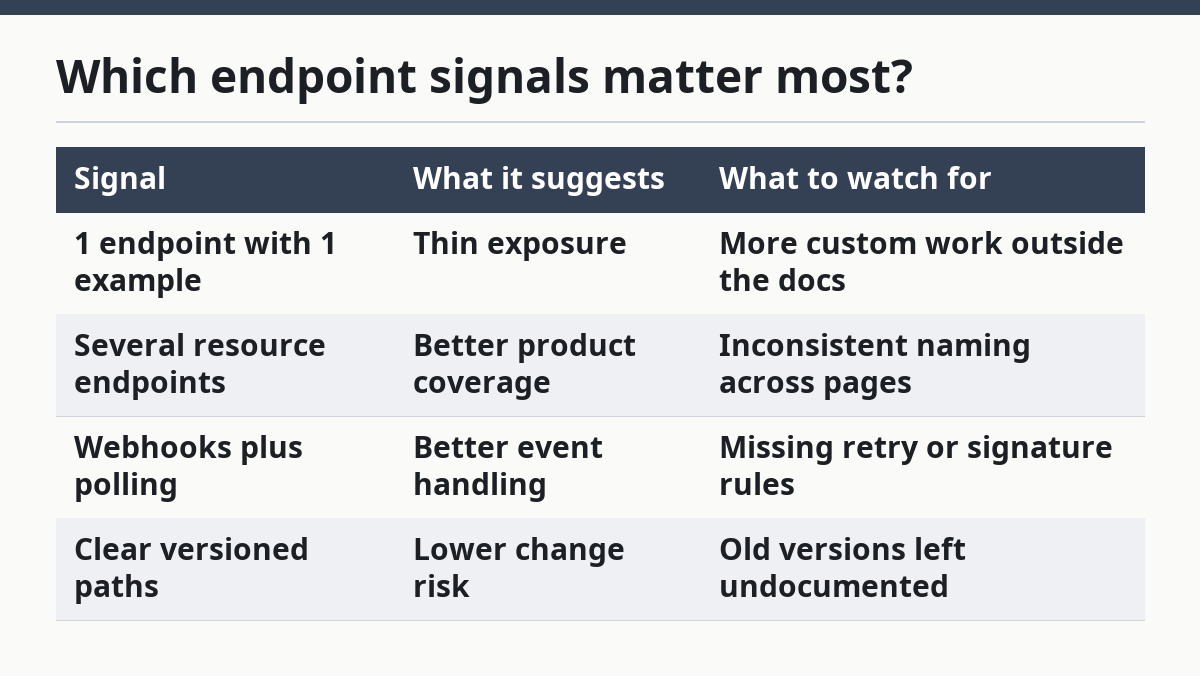
A mature page usually names webhooks where they matter, not as a side note. If the product expects event delivery, the docs should say how retries work, how signatures are checked, and what happens when a webhook fails. Missing that detail often means the maintenance burden will show up in your code, not in the docs.
How do code examples reveal complexity?
Code examples reveal complexity by showing how many moving parts a developer must manage before the first successful call. A good example should use the right base URL, auth header, request body, and a realistic response in one block.
Look for 4 things in every sample. First, the code should match the language or style your team actually uses. Second, it should include all required fields, not just the cheerful ones. Third, it should show errors or edge fields when the endpoint is tricky. Fourth, it should stay close to the docs text instead of drifting into a toy snippet.
A single clean example can hide hard parts, so compare at least 2 samples if the page offers them. One create call and one read call tell you more than 10 marketing bullets. If the code example skips authentication and still works, that is a red flag, because the real app will not.
Common warning signs include:
- Pseudocode instead of real code
- Missing headers
- Silent defaults
- No response body
- No retry guidance
A docs page that gives polished code but no notes on pagination, retries, or idempotency will feel easy on day 1 and costly later. That is the maintenance clue hidden inside the sample.
How do versioning and change notes affect maintenance?
Versioning and change notes tell you whether the API is built to survive change without breaking your app every quarter. A clear version label is often one of the strongest maintenance signals on the whole page.
Read the versioning section for 3 things: how versions are named, how long old versions stay supported, and how changes are announced. If the docs use /v1/ or a dated version and explain deprecation, the vendor is at least trying to manage change. If there is no versioning story at all, your code may be standing on a moving floor.
Change notes matter because API work is not finished when the first request succeeds. Fields get renamed, defaults shift, and endpoints get retired. A docs page that keeps a visible changelog, migration note, or deprecation warning gives you a better shot at planning a small update instead of a rushed rewrite.
The cleanest pages usually answer these questions plainly:
- Is this the current version?
- When will old calls stop working?
- Are changes additive or breaking?
- Are webhooks versioned too?
Because endpoints can change over time, versioning and change notes should be read together. A product can have strong endpoints and still be a bad long-term fit if versioning is vague. For a practical change-management model, compare the docs against the deprecation guidance in Microsoft REST API Guidelines.
What does the onboarding path say?
The onboarding path says how much setup work the vendor expects before a developer gets value. A strong page gets from sign-up to a working call in a short chain of steps, not a maze.
Look for the shape of the first-run path. Does it require one token, or does it need a project, app registration, callback URL, and scoped approval? Does it explain the order clearly? Does the page include a sandbox, test mode, or sample app? Those details are not extras; they are the difference between a 1-hour proof and a 3-day stall.
The best onboarding paths include:
- a clear base URL,
- one auth method,
- one example request,
- one example response,
- and one next step after that.
Because the first request is the easiest place to lose a developer, onboarding should make the setup chain obvious. If the docs bury the first call under setup text, onboarding is harder than it should be. If they split the basics across 5 pages with no path between them, expect handoff trouble when the original developer leaves. A good API docs page makes the first 2 tasks obvious and leaves the edge cases for later.
This is also where SDK support matters. An SDK can reduce boilerplate, but only if it matches the docs and still points to the same endpoints and auth rules. A stale SDK with fresh docs is a maintenance trap.
When is this API docs page a bad fit?
This API docs page is a bad fit when the docs are shallow, the auth story is vague, or the change story is missing. A product can look complete on the surface and still cost too much to keep stable.
It is probably the wrong choice if you see 3 or more of these at once: no versioning, no webhook detail, no error codes, only one code sample, and auth explained in broad language instead of exact headers. That mix usually means the vendor expects your team to fill in the blanks.
The docs are also a poor fit when your team needs predictable handoff. If the page does not make onboarding, endpoint structure, and versioning easy to read in under 10 minutes, the product may still work, but the support load lands on your engineers. That is fine for a tiny internal proof, and risky for a production dependency.
This is not about perfect docs. It is about honest ones. A rough page with clear limits can be easier to trust than a slick page that hides the hard parts.
What do api docs reveal about a saas product?
API docs reveal how much a SaaS product expects developers to do, how stable the interface may be, and how hard it will be to maintain later. A page that shows auth, endpoints, examples, and versioning in plain language usually points to a product that is meant for repeat use, not a one-off test.
They also show what the vendor thinks matters. If the docs spend 2 paragraphs on marketing and 1 line on errors, the balance is off. If they explain webhooks, pagination, and token handling with the same care as the happy path, that is a better sign.
How do i judge developer fit from api docs?
Judge developer fit by matching the docs to your team’s actual workflow, language, and tolerance for setup. If your team needs fast shipping, look for short onboarding, standard auth, and examples that map to your stack. If your team needs long-term control, weigh versioning, webhook detail, and error handling more heavily.
The key question is not whether the docs are readable. It is whether they reduce the number of unknowns by the first 1 or 2 requests. A docs page that answers those questions cleanly is a better fit than one that only looks polished.
What should i check in api documentation?
Check authentication, endpoint depth, code examples, versioning, errors, and onboarding path. Those 6 items tell you most of what you need about fit and maintenance.
If you only have 5 minutes, start with the auth section, one endpoint, one response example, and any note on version changes. That small pass will expose most hidden complexity before a developer writes a line of code.
For a broader public-signal workflow, this guide sits within the site’s hub on SaaS support, help, and documentation analysis.
Drafted with AI; not yet reviewed by a person.