A SaaS launch signal normalization sheet works best with 8 to 12 columns and one normalized UTC timestamp per row. This guide to How to Build a SaaS…
Last updated: November 18, 2026
Quick answer: a SaaS launch signal normalization sheet works best with 8 to 12 columns and one normalized UTC timestamp per row. This guide to How to Build a SaaS Launch Signal Normalization Sheet for Dates, Time Zones, and Announcement Formats shows how to standardize launch signals from blog timestamps, email send times, social post timestamps, and release dates without losing the original record.
A SaaS launch signal normalization sheet is a single spreadsheet that turns mixed dates, time zones, and announcement formats into one clean record so launch signals can be compared later. It suits people tracking public SaaS signals from blog timestamps, email send times, social post timestamps, and release dates. It is not for building the launch timeline itself; it is the cleanup step before that work.
Key takeaways
- Put every source into one date and time rule before you compare anything else.
- Store the original timestamp and the normalized timestamp side by side.
- Use UTC as the working clock, but keep the source time zone when it exists.
- Consult a time-zone reference or professional guidance when a launch mention appears in more than one place, because repeated pages can still represent one event.
- Label the announcement type early so blog posts, emails, and social posts do not blur together.
What should the sheet contain?
The sheet should contain one row per launch signal and a small set of fields that make dates and formats comparable. At minimum, include source name, source URL, announcement type, original timestamp, source time zone, normalized UTC timestamp, date only, event label, and duplicate status. A clean sheet often starts with 8 to 12 columns, not 30.
The point is to keep the sheet useful on day 1 and still stable when the source mix changes. If you add columns for every edge case, the sheet becomes hard to scan and harder to trust. If you leave out the original timestamp, you lose the proof of how the value was found.
Keep one column for the raw text as published. That matters when a blog page says “June 5,” an email shows “Tue, 5 Jun 2025 14:00 GMT,” and a social post shows only a local clock time. The raw field lets you check the parse later without opening every page again.
A simple layout usually works better than a nested one. One tab can hold the raw ingest, and one tab can hold the normalized view. That split keeps date cleanup separate from later timeline work, which belongs in a different sheet on this site’s launch-source coverage map.
How do you standardize launch dates across sources?
You standardize launch dates across sources by choosing one canonical date rule, then converting every source into that rule before you compare rows. A practical default is a UTC timestamp plus a date-only field derived from it, although teams can choose a different standard if their workflow requires it. UTC is defined by international time standards, and the IANA time zone database is the usual reference for named zones such as America/New_York or Europe/London.
Start by recording the source exactly as published. A blog timestamp might be a full datetime, an email send time may include a zone offset, and a social post might show only a local date. Do not strip anything on ingest. Store the original text in one column, then parse into a separate normalized column.
Use the same date format in every row. ISO 8601 is a practical choice because it sorts well and reduces ambiguity. A value like 2025-06-05 is easier to scan than 06/05/25, which can mean different things in different places. If the source gives only a date, leave the time blank and mark the precision as date-only.
This is also where you decide what counts as the launch date. Some sources publish a teaser before the real announcement, but that belongs in a different sheet. Here, the row should represent the signal you are recording, not the larger launch story. That keeps the sheet focused on data cleaning instead of interpretation.
For reference, the IANA Time Zone Database is the standard source for time-zone identifiers, and RFC 3339 is the commonly used profile for date-time text that maps cleanly to ISO 8601-style timestamps. Those references help keep the sheet consistent when several regions are involved.
How do you handle time zones in a launch sheet?
You handle time zones in a launch sheet by storing the source time zone, converting to UTC, and never overwriting the original value. If a source shows GMT, PST, or a named zone from the IANA database, keep that in one column and convert the normalized timestamp into UTC in another.
This matters because two launch signals can look like the same day and still fall on different calendar days after conversion. A post at 11:30 PM local time and a blog update at 12:15 AM local time may land on different UTC dates. If you sort without conversion, you can place them in the wrong order.
Use a fixed rule for missing zones. If a source does not show a zone, label it as unknown rather than guessing. Guessing a time zone creates false order, and false order is harder to spot than a blank cell. A blank is honest and can be revisited later if the source page adds metadata.
If you work with sources from several regions, add a source locale column too. That helps when a site publishes in one country’s format but timestamps its pages in another. The goal is not to infer more than the source gives you. The goal is to make every timestamp comparable without hiding the original context. For practical reference, the IANA database documents zone names and offsets, while browser and spreadsheet tools often rely on that same mapping.
Which announcement formats go in the same sheet?
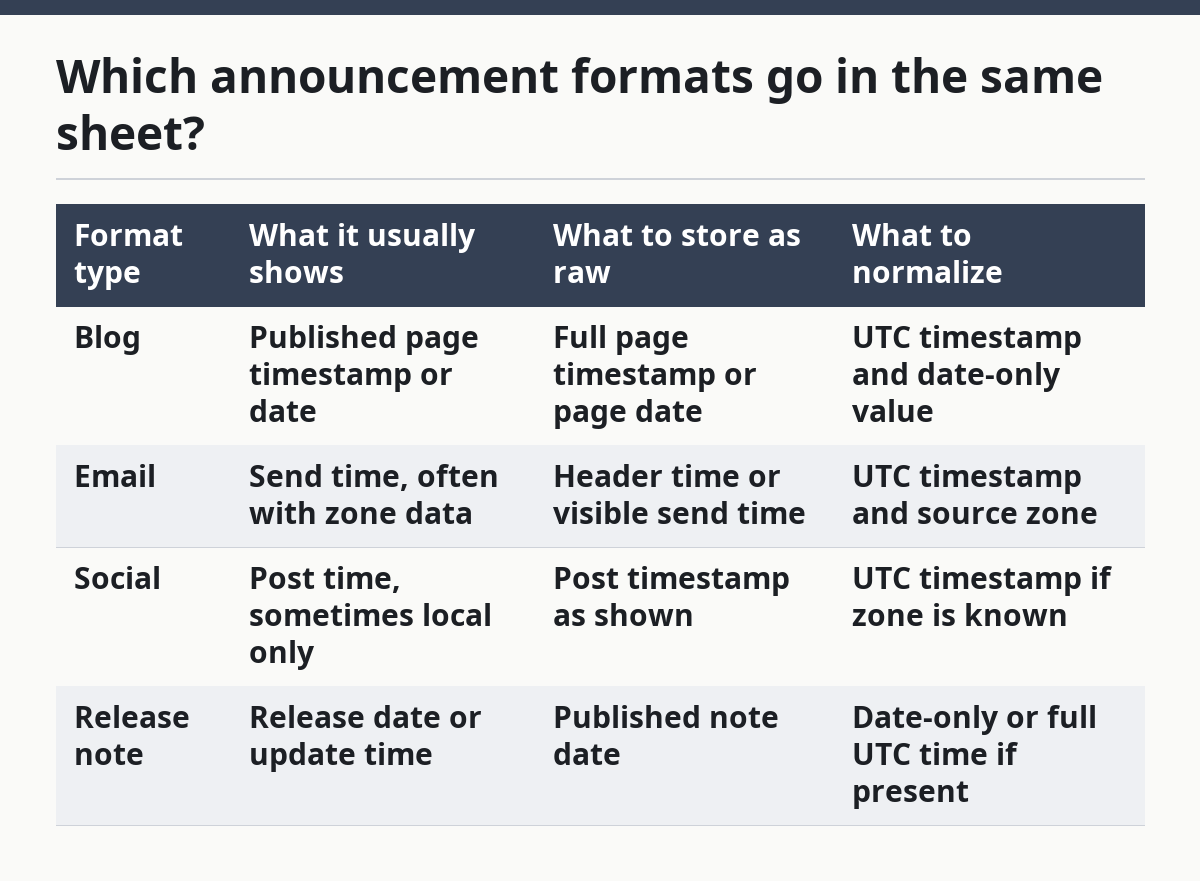
The same sheet should accept blog timestamps, email send times, social post timestamps, and release dates, but each one needs a format label. Without that label, a release note and a newsletter can look identical once they are reduced to date-only fields.
Use a short format taxonomy. For example: blog, email, social, release note, and press page. The label should describe the container, not the content style. A blog post that announces a launch is still a blog signal, even if it reads like a release note.
| Format type | What it usually shows | What to store as raw | What to normalize |
|---|---|---|---|
| Blog | Published page timestamp or date | Full page timestamp or page date | UTC timestamp and date-only value |
| Send time, often with zone data | Header time or visible send time | UTC timestamp and source zone | |
| Social | Post time, sometimes local only | Post timestamp as shown | UTC timestamp if zone is known |
| Release note | Release date or update time | Published note date | Date-only or full UTC time if present |
The trade-off is simple. More format labels make the sheet more precise, but too many labels slow down entry and create near-duplicates such as “blog post” and “news post.” Keep the list short unless the source mix truly demands more. A 4- to 6-label set is usually easier to maintain than a long custom list.
How do you remove duplicates without losing signals?
You remove duplicates by matching the same launch mention across source URL, normalized date, and event label, then keeping the clearest record as the primary row. Duplicate removal in this sheet is not about deleting evidence. It is about preventing the same launch from appearing twice because two pages reported it.
A practical rule is to keep one master row and add a duplicate flag to the rest. If a blog post and a social post point to the same announcement, both can stay in the sheet, but only one should be the canonical event row. That way, later analysis does not count one launch twice.
Use a short duplicate logic column with values such as “primary,” “duplicate,” and “needs review.” A row with the same normalized UTC timestamp and the same event label is a strong candidate for duplication, but not every match is exact. Pages can publish minutes apart, so the source URL and announcement format still matter.
Do not try to solve duplicate removal only with date matching. Two unrelated launches can happen on the same day. A date-only match is too weak, especially when the source does not include a time zone. Keep the raw timestamp visible so the review step can compare the actual wording before a row is marked duplicate.
How do you label events so the sheet stays usable?
You label events by assigning one consistent event name to each launch signal and using that label everywhere in the sheet. Event labeling is what keeps blog timestamps, email send times, social post timestamps, and release dates from turning into a pile of unrelated rows.
Keep the label short and stable. Use a controlled list rather than free text if possible. For example, “launch announcement,” “product update,” and “release note” are easier to filter than a dozen versions of the same phrase. A label that changes from row to row breaks sorting and makes duplicate checks unreliable.
Add a second field for label confidence if needed. Some sources are obvious, while others are vague and need review. A simple high, medium, low scale works for most sheets. That helps separate cleanly parsed rows from rows that still need a human check.
This is also where you keep the sheet from drifting into timeline analysis. A label should say what the row is, not when it sits in a launch sequence. That later question belongs to the timeline sheet, not the normalization sheet. The cleaner the labels are here, the easier that next step becomes.
What is the fastest way to build the sheet?
A fast way to build the sheet is to set the columns first, then enter one source at a time with the same parsing rule. Start with a blank sheet, add the raw and normalized fields, and test the format on 5 to 10 rows before you load the full set.
- Create the spreadsheet in Excel or Google Sheets with columns for source URL, source name, source type, raw timestamp, source time zone, normalized UTC timestamp, date only, event label, and duplicate status.
- Paste the source timestamp exactly as published in the raw timestamp column, including any visible zone marker such as UTC or GMT.
- Convert the timestamp into UTC in the normalized column, using the same rule for every row.
- Assign the announcement format label, such as blog, email, social, or release note, so each row can be filtered later.
- Mark possible duplicates with a short status and keep the best canonical row as the primary entry.
- Review the first 5 to 10 rows for ambiguous dates, missing zones, and conflicting labels before adding the rest.
- Export or copy the cleaned rows into the next analysis step once the sheet sorts correctly by UTC and date-only fields.
The result you want is boring on purpose: rows sort in a clean order, the raw evidence is still there, and the same launch does not appear three times under three date styles. If the sheet still needs explanation after a quick scan, the structure is too loose.
What should you avoid?
You should avoid guessing time zones, mixing date-only and datetime rows without a precision flag, and using free-text labels for every source. Those mistakes usually cost time later because they hide the difference between what was published and what was inferred.
A second mistake is stripping the original timestamp after normalization. That makes the sheet look neat but removes the proof trail. If a row looks wrong later, there is nothing to compare against. Keep both values side by side.
The third mistake is trying to make this sheet do timeline work. It is tempting to compare teaser, announcement, and rollout gaps in the same file, but that belongs in another page and another structure. This sheet should only solve the cleanup problem: dates, time zones, announcement formats, duplicate removal, and event labeling.
A final mistake is building a custom field for every source. That creates a sheet that is hard to maintain and harder to hand off. A small, consistent schema beats a clever one that only one person understands.
How do you standardize launch dates across sources?
Use one canonical date rule, usually UTC plus a date-only field, and store the original timestamp beside it. That keeps blog timestamps, email send times, social post timestamps, and release dates comparable without hiding what was published.
What time zone should launch tracking use?
Use UTC for the normalized working field and keep the source time zone in its own column. UTC gives you one sorting rule across regions, while the source zone preserves the original context when a row needs review.
How do you prevent duplicate launch entries?
Use the source URL, normalized timestamp, and event label together, then mark one row as primary and the rest as duplicates or review items. Date matching alone is not enough, because two different launches can happen on the same day.
Should I keep raw timestamps after normalization?
Yes, because the raw value is the audit trail for the normalized value. If a source later changes its page, or if a parse looks odd, the original text shows what was actually published before the conversion.
Drafted with AI; not yet reviewed by a person.