How to Build a SaaS Content Update Standard for Freshness, Accuracy, and Deprecated Sections: build this SaaS content update standard in 5 parts—update…
Last updated: November 20, 2026
Quick answer: build this SaaS content update standard in 5 parts—update triggers, freshness rules, accuracy checks, deprecated-section rules, and revision notes. A SaaS content update standard is a written rulebook for when to refresh existing articles, how to check accuracy, and how to mark sections that are no longer current. It suits teams that publish product-led content, compare tools, or explain workflows that change often. It is not for one-off blog posts that can age without causing confusion.
Key takeaways
- A content update standard keeps old articles usable without turning every edit into a rewrite.
- The standard should define clear update triggers, a freshness rule, an accuracy check, and a way to mark deprecated sections.
- Revision notes matter because they show what changed, why it changed, and which publish date is still the current one.
- Not every old paragraph needs to disappear; some sections should be labeled as outdated instead of deleted.
- The standard works best when it is simple enough that a writer can use it in under 10 minutes.
What is a content update standard?
A content update standard is a short set of rules that tells a team how to maintain existing articles. It answers four questions: when to review, what to check, what to change, and how to record the change. For a SaaS site, that usually means the article still matches current product behavior, current terms, and current guidance.
The point is consistency. One writer may update a pricing mention when a product changes, while another may leave the old line in place for 6 months because the article still ranks. A standard removes that guesswork. It gives every editor the same threshold for freshness, accuracy, and deprecated sections.
This is different from a content retirement framework or a change log. A retirement framework decides when an article should disappear. A change log records every edit in detail. A content update standard sits earlier in the chain and says how to keep an article alive without pretending it is timeless.
The simplest version can fit on one page. It can name a review window, such as “check any article that mentions product features, screenshots, or process steps every 90 days,” then define what counts as current. That kind of rule is easier to follow than a vague instruction like “keep things fresh.”
What should the standard include?
The standard should include five pieces: update triggers, freshness rules, accuracy checks, deprecated section rules, and revision notes. If one of those is missing, people will improvise, and improvisation is how old claims stay live for a year.
A good standard starts with scope. It should say which article types are covered, such as existing articles that mention product behavior, integrations, pricing models, or feature names. It should also say what is out of scope, such as evergreen opinion pieces that do not depend on product state.
It should also name the proof points an editor must check. That can include published date, product naming, UI labels, screenshots, links to current docs, and any statement that sounds like a promise. If an article says “works in X,” the standard should force a re-check of X before publication.
A useful standard also defines the update outcome. Not every edit needs a full rewrite. Some articles need a line-level correction, some need a new section, and some need a visible note that part of the article is now deprecated. The standard should make that choice before the editor starts typing.
How do you set update triggers?
You set update triggers by tying edits to changes that make the article less accurate, less useful, or less current. The trigger can be a product release, a changed interface, a new term, an outdated date, or a support workflow that no longer matches the article.
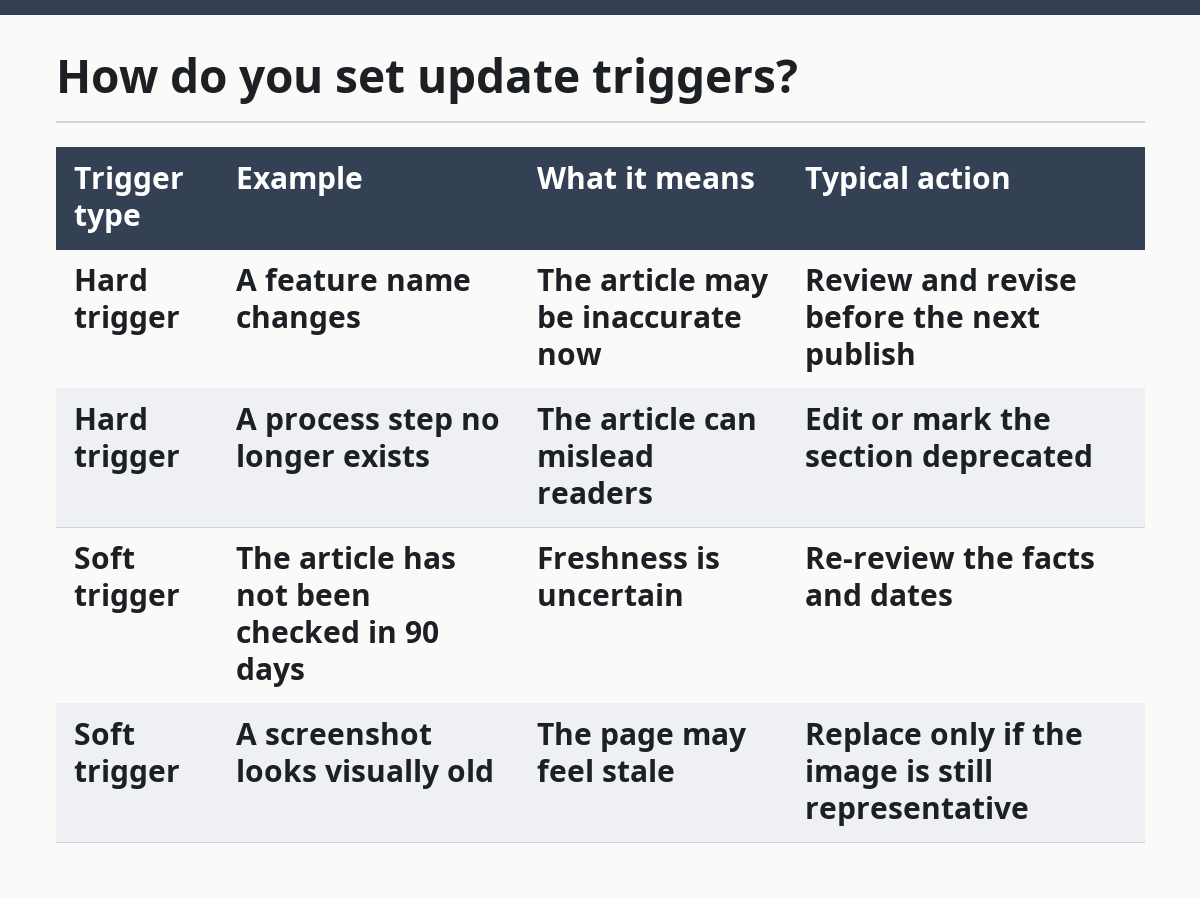
A clean way to write triggers is to separate hard triggers from soft triggers. Hard triggers mean the article must be reviewed before it stays live. Soft triggers mean it should be queued for review, but it is not broken yet.
| Trigger type | Example | What it means | Typical action |
|---|---|---|---|
| Hard trigger | A feature name changes | The article may be inaccurate now | Review and revise before the next publish |
| Hard trigger | A process step no longer exists | The article can mislead readers | Edit or mark the section deprecated |
| Soft trigger | The article has not been checked in 90 days | Freshness is uncertain | Re-review the facts and dates |
| Soft trigger | A screenshot looks visually old | The page may feel stale | Replace only if the image is still representative |
The trigger list should be short enough to remember. Ten triggers are usually enough for a small team. If the list grows too long, people stop using it and start guessing.
For SaaS content, the most useful triggers usually come from change in the product itself, not from a calendar alone. A 30-day review cycle can help, but a fixed date does not catch a renamed menu or a changed workflow. The standard works best when it uses both: time-based review plus change-based review.
How do you update an article step by step?
You update an article by checking the current state of the product, deciding what still holds, marking what no longer does, and then recording the result in revision notes. This keeps the article current without forcing a full rewrite every time.
-
Open the live article and the current source of truth. Use the current product docs, release notes, or internal product page as the reference point, then compare the article line by line. The result should be a clear list of claims that still match and claims that do not.
-
Scan for dated signals first. Look for publish dates, screenshots, menu labels, feature names, and process steps. These are the places where a 6-month-old article can drift fastest, because they change without warning in the body text.
-
Classify each issue. Decide whether the line needs a simple correction, a fuller rewrite, or a deprecated label. This step matters because not every mismatch is equally serious; a wrong button name is not the same as a wrong workflow.
-
Edit the body with the smallest accurate change. Replace only the broken parts when possible. If the article is still useful, do not strip it down to a blank shell just because one section is old.
-
Update the publish date only when the article earns it. A publish date should reflect a meaningful content update, not a typo fix. If the change is minor, keep the date stable and use revision notes instead.
-
Add revision notes that explain the change in plain language. Note what changed, which section changed, and why. A short line like “Updated feature names and removed obsolete setup step” is enough for most articles.
-
Check the reader path once more. Make sure the article still makes sense from top to bottom after the edit. A corrected sentence can still leave a broken example or an orphaned paragraph behind.
This procedure is not for content that needs a full retirement decision. If the article no longer serves any current use, a retirement framework belongs elsewhere. The update standard is for keeping live pages accurate, not for deciding when to remove them.
How do you mark deprecated sections?
You mark deprecated sections by labeling them clearly, keeping them visible when needed, and making it obvious that they should not be treated as current guidance. When in doubt, consult the current product docs or a qualified reviewer; Google Search Central recommends keeping pages helpful and accurate, and current sources matter here: https://developers.google.com/search/docs/fundamentals/creating-helpful-content. A deprecated section should not quietly sit in the middle of the page looking normal.
The cleanest pattern is a direct label above the section or paragraph. The label should use plain words such as “Deprecated” or “No longer current,” not vague language that sounds polite but hides the problem. If a section still helps historical readers, keep it, but do not let it masquerade as active guidance.
A deprecated section should also explain what replaced it, if anything. That can be one sentence: the old process no longer applies, and readers should use the current workflow or current doc instead. If there is no replacement, say that the old method is no longer recommended and remove the actionable steps.
This is where many teams make a costly mistake. They delete outdated lines without a trace, which leaves the article feeling cleaner but makes it harder to understand the change. The better move is to mark the section, especially when the old version still matters for users comparing versions or checking history.
A practical standard can define three levels: active, deprecated, and removed. Active means current guidance. Deprecated means visible but not current. Removed means the content should no longer appear on the page at all. That 3-part split gives editors a stable choice instead of forcing every outdated line into the same bucket.
How do you write revision notes?
You write revision notes by stating what changed, why it changed, and where the change happened. Revision notes are the proof that the article was reviewed on purpose rather than altered by accident.
Keep them short and specific. “Updated steps in setup section to match current interface” is better than “minor edits.” “Marked pricing example as outdated” is better than “content refreshed.” The note should let a second person understand the edit in 10 seconds.
The notes should also help with publish date decisions. If the change is a simple spelling fix, the article may not deserve a new publish date. If the change affects accuracy or reader action, it probably does. The revision note is the record that supports that choice.
A good standard can require one revision note per update, even when the edit is small. That keeps the history readable and stops the page from becoming a mystery box after 12 rounds of changes. If the site later needs a change log, the revision notes can feed it without extra cleanup.
For a SaaS content team, this is one of the lower-cost habits to maintain. It costs only a few lines per edit, but it reduces confusion when multiple people touch the same article across several months.
What gets people into trouble?
People get into trouble when they treat freshness like a date problem instead of a facts problem. An article can have a recent publish date and still contain an obsolete workflow, a stale product label, or a section that should have been marked deprecated. When that happens, consult the current source of truth rather than assuming the date alone proves accuracy; the same guidance aligns with Google Search Central’s emphasis on useful, current content and with Nielsen Norman Group’s advice to keep content scannable and trustworthy: https://www.nngroup.com/articles/web-writing/ and https://developers.google.com/search/docs/fundamentals/creating-helpful-content.
The second common mistake is over-editing. A writer sees one old screenshot and rewrites the whole article, which can erase useful context. That creates a new problem: the page loses the shape readers already trusted. The better move is to fix the broken part and leave the rest alone.
Another mistake is using revision notes that are too thin to help. “Updated article” tells a future editor almost nothing. If the page changes every 60 or 90 days, those notes often become the fastest record of what happened.
A final mistake is confusing update standards with prioritization. A standard tells you how to update once an article is selected. It does not decide which article should go first. That is a different system. Mixing the two makes the process heavier than it needs to be.
The honest trade-off is simple: a stricter standard takes more time per edit, but it lowers the risk of publishing old information. A looser standard is faster, but it puts more pressure on editors to spot problems by memory. For SaaS content, that trade-off usually favors the stricter side.
The guide to SaaS content production and optimization fits best when this standard sits beside your other publishing rules, not buried inside a general style guide.
When should a SaaS article be updated?
A SaaS article should be updated when it contains something that no longer matches the current product, process, or terms. That includes changed feature names, changed steps, outdated screenshots, and dates that make the page look stale. A 90-day review window is useful, but a product change should trigger review sooner.
What counts as outdated content?
Outdated content is any section that can mislead a reader about how the product works now. That can be a wrong UI label, an obsolete setup step, an old plan reference, or a section that still sounds active even though it is no longer current. If the reader could act on the line and get the wrong result, it counts.
How do you mark deprecated sections?
You mark deprecated sections with a clear label, a short explanation, and, when possible, a pointer to the current guidance. The label should say the section is no longer current, not just “updated” or “reviewed.” If the section remains visible, it should look intentionally historical, not accidentally stale.
Drafted with AI; not yet reviewed by a person.