This How to Build a SaaS Blog URL Naming Standard for Slugs, Dates, and Folder Paths guide should settle 5 decisions before the first post goes live: slug…
Last updated: November 20, 2026
Quick answer: this How to Build a SaaS Blog URL Naming Standard for Slugs, Dates, and Folder Paths guide should settle 5 decisions before the first post goes live: slug shape, folder path, date rule, case rule, and parameter rule. A SaaS blog URL naming standard sets the rules for slugs, dates, and folder paths before the first post goes live. It keeps URLs readable, consistent, and easy to maintain when many people publish into the same blog.
Key takeaways
- Pick one URL pattern and make it the default for every new post.
- Keep slugs short, lowercase, and plain; avoid dates in the slug itself.
- Use folders only for structure you will keep for years, not for temporary campaigns.
- Decide early how dates, uppercase letters, and parameters should be handled so the blog does not drift.
- Leave redirects and canonical tags to their own process; this page is about naming, not migration.
What should a SaaS blog URL standard decide?
Specifically, a SaaS blog URL standard should decide the slug shape, folder path, date rule, case rule, and parameter rule for every post. That means one document answers questions like product-updates versus product-updates/2024/, whether dates belong in the path, and whether uppercase letters are allowed at all.
A good standard is narrow. It should cover the URL a writer publishes on day one, not the redirect map, canonical tag plan, or retirement rules. Those belong in other documents, because mixing them here turns one naming guide into a pile of unrelated decisions.
The point is consistency, not cleverness. RFC 3986 defines the general syntax for URLs, and the WHATWG URL Standard covers how browsers parse them. That does not tell a SaaS team what the blog path should look like, so the team still has to choose a house style and stick to it.
Therefore, this standard is for the team that wants one obvious pattern and fewer edge cases. It is not for a site that changes URL shape every quarter, or for a team that plans to rebuild the blog path structure during the same project. In those cases, the naming standard gets tangled with migration work.
How do I pick the slug rule?
Because the slug is the part readers see first, pick a slug rule that makes each post easy to read and hard to break. A slug should usually be short, lowercase, and built from the main topic words, with words separated by hyphens.
A practical slug rule looks like this:
- Start with the post title or target topic.
- Remove filler words that do not help a reader scan the link.
- Keep the slug in lowercase.
- Use hyphens between words, not spaces or shows.
- Trim the slug until the meaning is still clear in a browser bar.
The result should read like a label, not a sentence. saas-blog-url-standard is cleaner than how-to-build-a-saas-blog-url-naming-standard-for-slugs-dates-and-folder-paths, even though both can technically work.
The trade-off is simple: shorter slugs are easier to scan, but they can lose meaning if they become too vague. A slug like best-practices tells you almost nothing, while url-slugs-for-saas-blogs still keeps the topic visible. That is why the standard should favor clarity first, then brevity.
A slug rule also needs one exception policy. If two posts would otherwise collide, the standard should say what to do, such as adding one distinguishing word or moving the topic into a different folder. Without that rule, editors improvise and the URL shape starts drifting.
Should blog URLs include dates?
Generally, blog URLs should avoid dates unless the date itself matters to the page’s value. A date in the path makes the URL look tied to a specific publishing moment, which is useful for newsy posts but less useful for evergreen SaaS content.
That choice depends on the kind of post the blog publishes. Product announcements, release notes, and time-bound updates can justify a dated path because the date helps readers understand context. Evergreen guides, glossary posts, and comparison posts usually do not need dates in the URL at all.
A clean way to handle this is to separate URL shape from page metadata. The post can still show a publish date on the page, while the URL stays date-free. That gives editors room to refresh content later without making the URL look stale.
The honest downside of dropping dates is that the path gives less visible context at a glance. A reader cannot tell if the post is old just by seeing the URL. That is often a good trade for SaaS blogs, where the content may need updates over time and the URL should not age faster than the post.
How should folder paths be structured?
Therefore, folder paths should group content only when the grouping will stay useful for a long time. A folder is not just decoration; it becomes part of the URL, so every folder decision should survive more than one editorial cycle.
A simple folder rule keeps the path shallow. One common pattern is a single blog folder with the slug after it, such as a stable blog path that does not add extra layers for every content type. Deep folders can make URLs harder to read and harder to maintain when content moves between themes.
Here is the practical test: if a folder only helps the current campaign, it is probably the wrong folder. If it helps a reader understand the section of the site and will still make sense after 12 months, it has a better chance of earning its place.
The trade-off is between structure and flexibility. Folders can make a blog feel organized, but too many folders make it harder to keep URLs stable. For a SaaS blog, that matters because content often moves from launch news to evergreen education. A folder standard should avoid trapping posts in a short-lived category box.
What about uppercase letters and parameters?
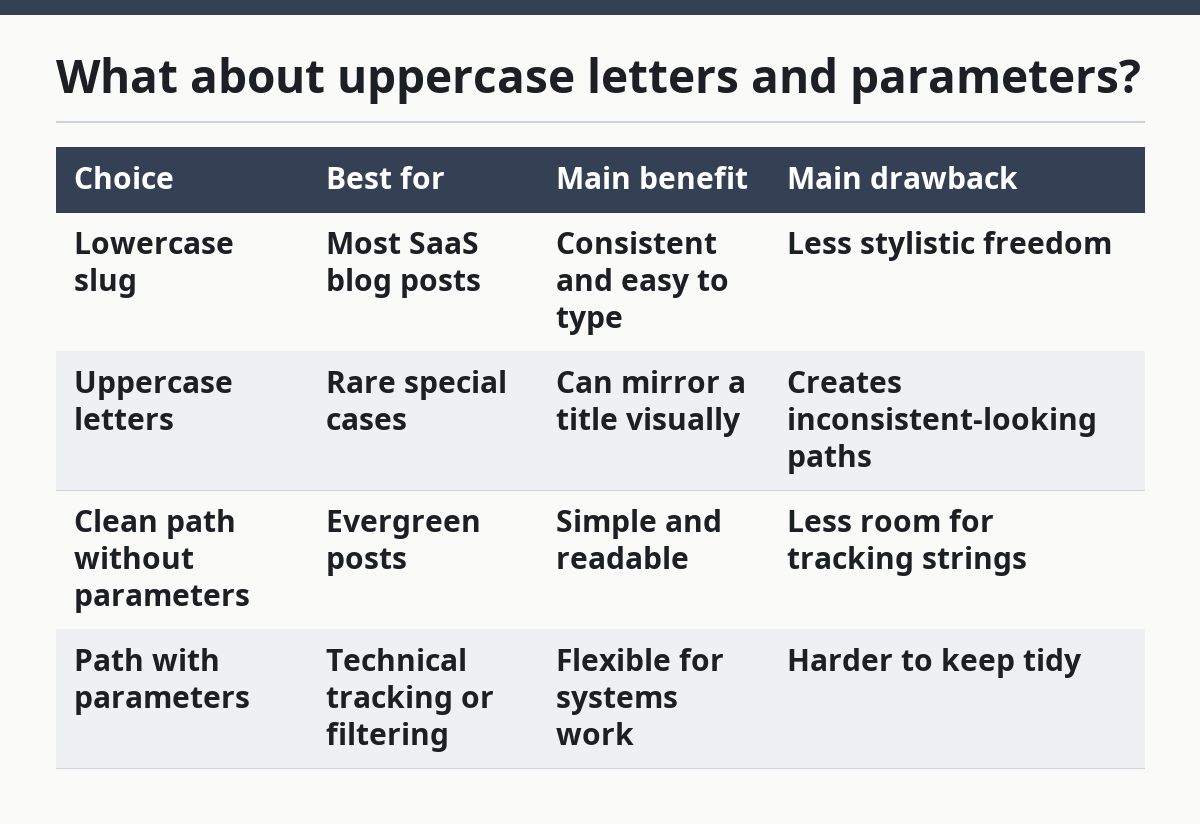
Since uppercase letters should be banned from blog URLs, parameters should be avoided unless there is a clear technical need. Lowercase paths are easier to type, easier to copy, and less likely to create duplicate-looking URLs.
Uppercase in a path creates avoidable inconsistency. One editor writes Product-Updates, another writes product-updates, and the result looks sloppy even if the system handles it. A naming standard should usually treat lowercase as the approved form, with mixed-case exceptions only when a technical system requires them.
Query parameters are a different problem. A URL like ?ref=... or other parameter strings can work for tracking or filtering, but they do not belong in the canonical naming standard for blog posts. The standard should say that the published blog URL is clean first, and parameters come later only when another system truly needs them.
That rule keeps the blog path readable and reduces confusion when a link is shared in email, chat, or a report. It also keeps the standard focused on one job: naming the post URL itself, not every possible way a browser might request it.
| Choice | Best for | Main benefit | Main drawback |
|---|---|---|---|
| Lowercase slug | Most SaaS blog posts | Consistent and easy to type | Less stylistic freedom |
| Uppercase letters | Rare special cases | Can mirror a title visually | Creates inconsistent-looking paths |
| Clean path without parameters | Evergreen posts | Simple and readable | Less room for tracking strings |
| Path with parameters | Technical tracking or filtering | Flexible for systems work | Harder to keep tidy |
How do I write the standard so people follow it?
Then write the standard in rules, examples, and one approval path. If the rule is only implied, editors will fill in the gaps with guesswork, and the blog path will drift within a few months.
A workable document has three parts:
- State the approved pattern for new posts.
- Show at least two approved examples and two disallowed examples.
- Name who can approve exceptions, if any exception is allowed.
The examples matter because abstract rules are easy to misread. “Use lowercase, hyphenated slugs” sounds clear until someone publishes saas-blog-urls-v2 or puts a date inside the slug. Concrete examples remove that ambiguity.
The standard should also say where the rule does not apply. If press posts, legal notices, or docs live outside the blog, say so. That keeps the blog naming standard from being stretched across every page type on the site.
This is also the place to mention related systems without mixing them into the naming rule itself. Canonical tags and redirects affect how search engines and users find pages, but they are separate from the naming standard. If the document starts trying to solve those too, it stops being a naming guide and turns into a migration manual. See also canonical tags and 301 redirects.
What are the common mistakes?
The common mistakes are making the slug too long, adding dates everywhere, and allowing folder sprawl. Each one makes the blog harder to run, and each one starts with a small exception that later becomes the norm.
A long slug usually costs readability first. It makes the URL harder to scan and easier to copy incorrectly. The fix is simple: cut modifier words until the slug still names the topic plainly.
Adding dates to every URL costs flexibility. It makes evergreen content look time-stamped even when the post is updated later. The fix is to keep dates in page metadata or editorial planning, not in the path unless the date itself is part of the page’s job.
Folder sprawl costs consistency. One team adds /blog/, another adds /resources/blog/, and a third invents a content-type folder for every topic. The fix is to keep the folder path shallow and stable, then use the slug to do most of the naming work.
Uppercase letters and query parameters are smaller mistakes, but they spread fast. They usually appear when no one has to check the URL before publishing. A standard only works if it is checked the same way every time, at the same stage in the publishing flow.
Which standard is the right one for a SaaS blog?
Ultimately, the right standard is the simplest one the team can keep for years. For most SaaS blogs, that means lowercase, hyphenated slugs, no dates in evergreen post URLs, shallow folder paths, and no parameters in the published path.
That recommendation is not for every site. It is a poor fit for a publication that is mostly time-stamped news or a blog that must mirror a larger documentation tree. It is also not a fit for a team that has not decided how redirects and canonical tags will be handled, because those questions belong in separate governance work.
The best standard is usually the one editors can apply without much debate. If every new post forces a fresh argument about slugs or folders, the standard is too loose. If the standard forces awkward exceptions for every post type, it is too rigid.
A SaaS blog that publishes often needs a URL system that is boring in the right way. It should be easy to read, easy to type, and easy to keep stable as the content library grows. That is why the naming standard matters more than the individual post title.
FAQ
Should SaaS blog URLs include dates?
Usually no for evergreen posts, yes only when the date is part of the page’s value. A dated path can help with release notes or news, but it makes long-lived posts look tied to a moment in time. For most SaaS blogs, dates belong on the page, not in the URL.
How long should a blog slug be?
A blog slug should be as short as possible while still naming the topic clearly. If the slug reads like a sentence, it is probably too long. If it becomes vague after trimming, it is too short, so the standard should favor plain topic words over extra modifiers.
Should blog URLs use categories or folders?
Only if the folder structure will stay useful for a long time. Categories and folders can help readers understand the site, but too many layers make URLs harder to keep stable. For most SaaS blogs, a shallow folder path is safer than a deep category tree.
Drafted with AI; not yet reviewed by a person.