SaaS content production and optimization — The Complete Guide: SaaS content production and optimization is the process of planning, writing, publishing…
Last updated: November 20, 2026
SaaS content production and optimization is the process of planning, writing, publishing, and improving pages that attract product-ready readers and help them move toward a trial, demo, or signup. It works best when production is tied to one clear search intent, one buyer stage, and one measurable page goal instead of a pile of disconnected blog posts.
Key takeaways
- Good SaaS content starts with one job: answer a buyer question that matches the page’s stage in the journey.
- Production and optimization are not separate jobs; the draft should already be built for search intent, page speed, internal links, and conversion.
- The best content systems for SaaS use a few page types on purpose, not dozens of random formats.
- Optimization is not just keyword placement. It includes structure, proof, links, clarity, and the next step on the page.
- A page can rank and still fail if it attracts the wrong reader or creates no path to a product action.
What is SaaS content production and optimization?

SaaS content production and optimization is the process of turning one customer problem into a page that search engines can understand and buyers can use. In practice, that means deciding what the page is for, drafting it in a useful format, and then improving it so it earns clicks, reads cleanly, and points to the product.
For SaaS, the biggest mistake is treating content like a volume game. A 30-post calendar with weak intent matching usually underperforms a smaller set of pages built around product problems, use cases, comparisons, and setup questions. Search engines are much better at spotting thin sameness than they were a few years ago, and readers are quicker to leave when a page sounds generic.
The right model is simple: one page, one primary question, one next action. A buyer who searches “how to reduce churn in a B2B SaaS trial” does not want a brand story. That reader wants a practical explanation, a structure, and examples tied to the problem. Google Search Central’s guidance on helpful content and the Search Essentials both point in the same direction: write for people first, not for a keyword list.
A second mistake is separating production from optimization as if optimization happens after publication only. In SaaS, the outline already needs the right headings, the right product fit, the right internal links, and the right call to action. If those pieces are missing at draft time, the page often needs a rewrite later, not a polish.
A useful rule is to treat each piece as a product asset with a job. A glossary page has one job. A comparison page has another. A feature page has another. If the job is vague, the page becomes vague too.
What should SaaS content actually produce first?
SaaS content should produce pages that match demand before it produces “content.” That means the first pages are usually not inspirational articles or broad thought pieces. They are the pages that answer questions buyers ask when they are comparing tools, learning a category, or trying to solve a task in a specific workflow.
The highest-value page types are usually these:
- problem pages, such as “how to reduce no-shows in demo booking”
- use case pages, such as “SaaS content calendar for small teams”
- comparison pages, such as “X vs Y”
- alternatives pages, such as “best alternatives to [category leader]”
- feature pages, such as “how the export workflow works”
- setup and how-to pages, such as “how to connect tool A to tool B”
That list is not a random content menu. It maps to real intent. The buyer who searches a comparison page is closer to evaluating software than the buyer who searches a definition. The buyer who searches a how-to page is usually trying to make the tool work faster or with fewer mistakes. Those pages can support traffic and product adoption at the same time.
A generic article often gets this wrong by starting with the most “interesting” topic instead of the most useful one. A SaaS site does not need 20 essays on the future of work if its audience keeps asking how to set up reporting, fix onboarding drop-off, or choose between two plans. The first 5 to 10 pages should answer the strongest demand signals, not the most creative brainstorm notes.
This is also where content production gets practical. If a page cannot be tied to a buyer stage, it should be questioned. A SaaS content system is not just a blog; it is a set of entry points. The best page type for early discovery is not always the best page type for a trial request. That difference matters.
A simple filter helps: if the page does not help a reader decide, do, or compare, it probably does not belong in the first production wave.
How do you optimize SaaS content without making it feel stiff?

SaaS content is optimized by making it easier to scan, trust, and act on, not by stuffing a page with repeated phrases. The page should still read like a clear answer, not a checklist of SEO tricks.
The first layer is structure. Use headings that follow the reader’s questions in order, not the writer’s outline. A strong SaaS page usually opens with the answer, then moves into context, proof, trade-offs, and next steps. If the reader has to hunt for the point, the page is already losing.
The second layer is specificity. Replace vague phrases with concrete details: workflow stages, user roles, product categories, standards, and examples. A line like “improve efficiency” says almost nothing. A line like “cut manual follow-up after demo requests” gives the reader something to test against their own process.
The third layer is evidence. SaaS readers want signs that the page is grounded in the market, not just in style. That can mean product names, standards like Core Web Vitals, policy references from Google Search Central, or workflow details from common SaaS stacks. It does not mean inventing statistics. If the page does not have real data, it is better to be plain than to guess.
The fourth layer is internal linking. A content page should connect to the next useful page on the site, not just to a homepage. A comparison article may link to a feature page, a pricing page, and a setup guide. That helps both the reader and the site architecture.
The fifth layer is conversion clarity. A reader should know what to do next after 30 seconds and again after 3 minutes. A demo CTA is not always the answer. Sometimes the right next step is a template, a checklist, a product page, or another comparison.
A common mistake is to optimize only for the search engine. That creates pages that look neat but feel empty. Another mistake is to optimize only for the buyer and ignore the crawl path. The page needs both.
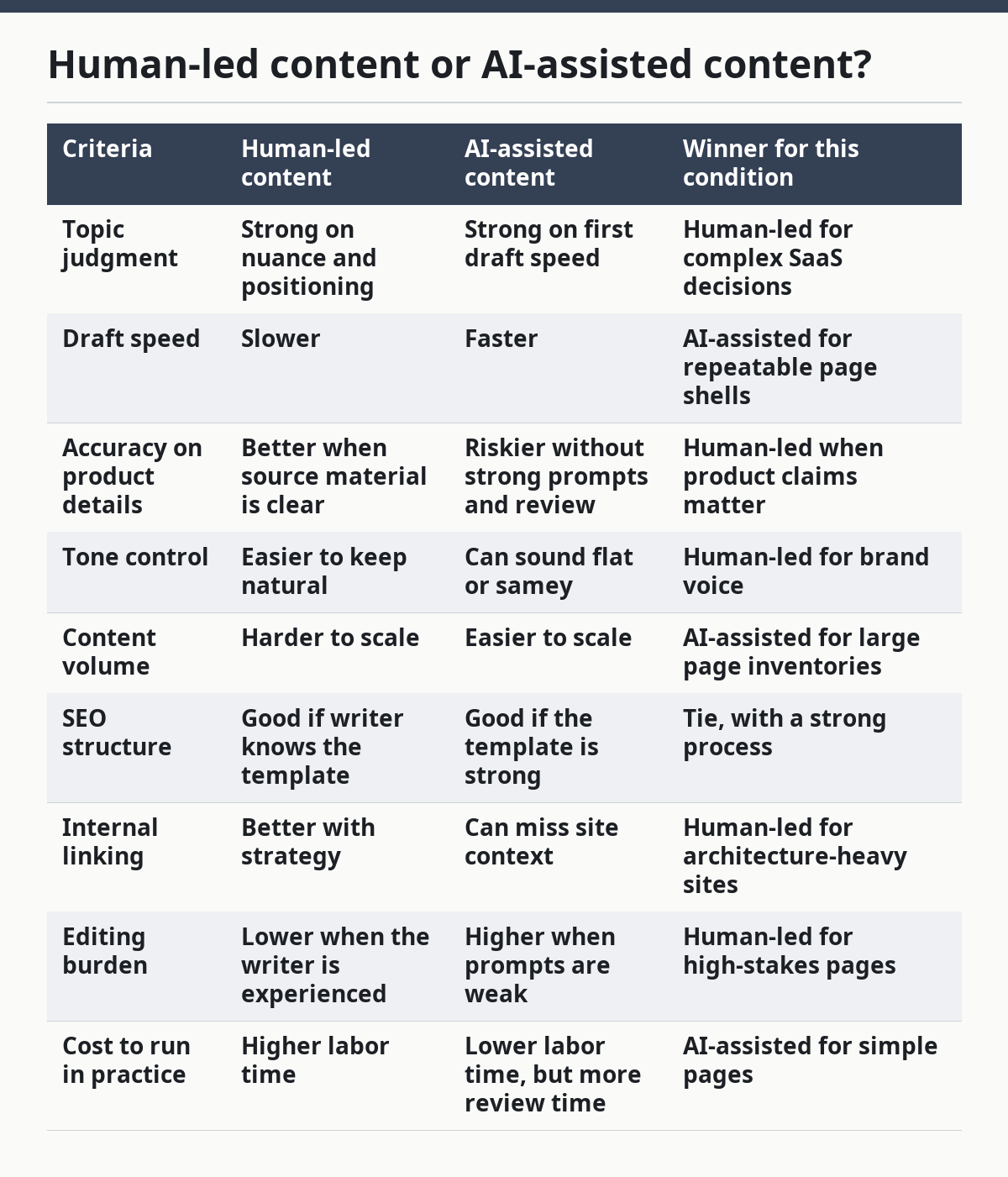
Human-led content or AI-assisted content?
AI-assisted content wins for speed and scale, while human-led content wins for judgment, accuracy, and nuance. The best choice depends on how complex the topic is, how much product proof the page needs, and how much risk there is if the page sounds generic.
Here is the honest side-by-side:
| Criteria | Human-led content | AI-assisted content | Winner for this condition |
|---|---|---|---|
| Topic judgment | Strong on nuance and positioning | Strong on first draft speed | Human-led for complex SaaS decisions |
| Draft speed | Slower | Faster | AI-assisted for repeatable page shells |
| Accuracy on product details | Better when source material is clear | Riskier without strong prompts and review | Human-led when product claims matter |
| Tone control | Easier to keep natural | Can sound flat or samey | Human-led for brand voice |
| Content volume | Harder to scale | Easier to scale | AI-assisted for large page inventories |
| SEO structure | Good if writer knows the template | Good if the template is strong | Tie, with a strong process |
| Internal linking | Better with strategy | Can miss site context | Human-led for architecture-heavy sites |
| Editing burden | Lower when the writer is experienced | Higher when prompts are weak | Human-led for high-stakes pages |
| Cost to run in practice | Higher labor time | Lower labor time, but more review time | AI-assisted for simple pages |
Human-led content wins when the page has to explain a hard trade-off, such as build-versus-buy, platform limits, compliance, or implementation risk. Those pages need judgment. If the content sounds polished but leaves out the real drawback, it fails the reader.
AI-assisted content wins when the page pattern is already clear and the source material is strong. It can be useful for first drafts of outlines, FAQ sections, metadata, or repetitive page variants. The catch is that the draft still needs a careful editor. AI often produces text that is correct in shape but weak in signal. It can sound confident while saying very little.
For SaaS, the best answer is usually not one or the other. A strong workflow uses AI for speed and a human for decisions. That means the model helps with structure and first passes, while a person handles the angle, the proof, and the final edit. If the site publishes comparison pages, product pages, or feature pages, the human review step matters even more.
A good rule: if a page could mislead a buyer, keep the human in charge of the final version.
What does a strong SaaS content workflow look like?
A strong SaaS content workflow starts with search intent, then moves through outline, draft, proof, optimization, and refresh. It should be repeatable in about 5 steps, not reinvented each time.
The first step is topic selection. Choose a question tied to a buyer stage. Search Console data, support tickets, sales objections, demo questions, and product usage patterns are all better inputs than a blank brainstorm.
The second step is the page promise. Decide what the reader will get in one sentence. That promise becomes the title, the intro, and the first H2. If the promise is fuzzy, the rest of the page will drift.
The third step is the outline. Use the actual sequence a reader needs. For example: answer, context, options, trade-offs, how to choose, and next step. A page about “content optimization” should not jump straight into tools before defining the problem.
The fourth step is production. This is where the draft gets written, but the draft should already include product relevance, examples, and the right headings. A strong draft does not bury the answer in paragraph 7.
The fifth step is optimization and refresh. Check the title, meta description, headings, on-page links, image alt text if used, and the final CTA. Then revisit the page later when the market shifts, the product changes, or the search result weakens.
A generic workflow often misses the refresh step. That is costly. SaaS products change, competitors change, and buyer language changes. A page that was accurate in one quarter can feel stale in the next. That does not mean the page needs a rewrite every month. It does mean the content system should include review dates and ownership.
If the workflow cannot show who updates what and when, it is not really a workflow. It is a publishing habit.
What do content teams get wrong most often?
Content teams most often get the intent wrong, then try to fix it with more words. That usually creates longer pages, not better ones.
The most common error is writing the top of funnel for a bottom-of-funnel page. A comparison page that spends 500 words defining the category before naming options is wasting the reader’s time. The same problem shows up in reverse when a how-to page pushes product pitch too soon. The reader came for help, not a sales script.
A second error is overvaluing originality at the expense of usefulness. SaaS content does not need to sound novel to work. It needs to answer a real question better than the other pages in the search results. That often means clearer headings, tighter examples, and a cleaner path to action.
A third error is publishing without a point of view. A page that says everything is “great” or “it depends” without naming the condition is too soft to be useful. For example, “This is best for smaller teams with limited admin time” is a useful position. “This is great for everyone” is not.
A fourth error is ignoring the page’s place in the site. A page with no internal links is isolated. A page with too many links and no order is noisy. The site needs a content map, not just articles.
A fifth error is treating optimization as a one-time cleanup. Titles change, search results shift, and new competitors appear. A page that is never reviewed can lose relevance even if the body text is still good.
The biggest hidden problem is mismatch between promise and proof. If the title promises a “complete guide,” the page needs enough substance to justify that claim. If it promises a “complete guide” and only gives a short overview, readers notice. Search systems notice too.
When does the strategy change completely?
The strategy changes when the site is too new, the category is too crowded, or the product itself is still shifting. In those cases, broad content production can burn time faster than it builds demand.
If the SaaS product is new and the category is undefined, the site may need fewer top-of-funnel articles and more direct pages about use cases, pain points, and product fit. A new product does not always have the authority to compete for broad educational terms right away. It may need to win with narrow, high-intent topics first.
If the market is crowded, comparison and alternatives pages often matter more than generic advice posts. That is because buyers are already choosing between options. A page that explains how the product differs from the obvious alternative can do more work than a general guide.
If the product changes often, content needs a shorter review cycle. A page that describes a workflow or feature from 12 months ago may be out of date now. That is especially true if the product has changed naming, onboarding, integrations, or pricing structure. A stale page can cost trust even when the traffic is still there.
If the site is built on a small team, production should be limited to the formats the team can maintain. Five strong pages that stay current are better than 25 pages that slowly drift. A content system that cannot be maintained is not a system.
A final exception: if the audience is mostly existing customers, the content plan should tilt toward adoption, support, and expansion rather than only acquisition. That changes the mix. The best page may be a setup guide or a workflow answer, not a discovery article.
Which content type should SaaS teams start with?
SaaS teams should start with the content type that matches their strongest buyer question, not the easiest page to write. For many teams, that means one comparison page, one use-case page, and one how-to page before they build a larger cluster.
A comparison page works when buyers already know the category. It helps readers make a choice and gives the site a chance to explain its position. That page should be honest about trade-offs and not pretend every option is the same.
A use-case page works when the audience knows the pain but not the tool. It can frame the problem in the reader’s own language and make the product feel relevant without forcing a hard sell.
A how-to page works when the audience is already inside the workflow. It can pick up search demand from people trying to do a job faster or fix a problem. Those pages often age well if the process itself stays stable.
The right first page depends on the market stage:
- early category: use-case pages often make the most sense
- crowded category: comparison pages often matter more
- active product use: how-to pages can drive strong utility
- broad awareness gap: educational pages can still help, but only if they connect to a real buyer problem
A generic plan that starts with “10 blog ideas” is too loose. The better plan asks: which 3 pages could help a real buyer this quarter? That question usually produces a better roadmap than a content calendar filled with broad topics.
What makes content optimization worth the effort?
Content optimization is worth the effort because it turns a page from “published” into “usable.” A page that ranks but confuses the reader is a weak asset. A page that ranks and helps the reader take the next step is a stronger one.
The payoff comes from compounding. A well-structured page can keep bringing in relevant visitors without constant rewrites. A poorly structured page may need repeated edits just to hold position. The difference is not cosmetic. It affects how much of the site’s traffic can turn into qualified interest.
Optimization also makes future production easier. Once a team knows the page types that work, new pages can follow the same pattern. That reduces random writing and cuts down on guesswork. It also makes editorial review faster because the checklist is familiar.
The biggest mistake is assuming optimization means chasing every signal. It does not. A page does not need every possible keyword variation, every schema type, or every design flourish. It needs clear intent, useful structure, credible detail, and a next step.
Google Search Central’s documentation on helpful content and the SEO starter guide both support a simple idea: create pages that serve people first and make them easy to understand. That principle is not flashy, but it is stable. Stability matters more than tricks in SaaS, where product and market changes are constant.
If the site has limited time, optimize the few pages that sit closest to revenue, activation, or retention. That is where better writing and better structure do the most work.
What should teams watch for after publishing?
Teams should watch for search intent drift, internal link gaps, and weak conversion paths after publishing. Those three issues show up often within the first review cycle.
Search intent drift happens when the query changes shape. A page that originally matched one kind of reader may start attracting another. The title, headings, and intro may still be “correct,” but they no longer match what the search result page is rewarding.
Internal link gaps happen when a page gets traffic but no route deeper into the site. That is a lost chance. A reader who found one useful answer should be able to move to the next question without hunting.
Weak conversion paths happen when the page ends without a clear next step. That does not always mean a demo button. It can be a product page, a feature comparison, a checklist, or a related guide. The right next step depends on the page’s job.
A clean review cadence helps. Check the page at 30 days, then again at a practical interval based on how quickly the product and market move. The exact cadence can vary, but the habit matters more than a fixed date. A content system that only looks at old posts once a year is too slow for SaaS.
A final check is editorial fit. Does the page still sound like the product and the market it serves? If not, it is time to revise the angle, not just the copy.
FAQ
How is SaaS content production different from generic blog writing?
SaaS content production is different because the page has to serve a product goal as well as a search goal. A general blog post can be interesting and still be useful, but a SaaS page needs a clear job: attract the right reader, answer the right question, and move that reader toward the next action.
What is the first thing to optimize on a SaaS page?
The first thing to optimize is the page’s match to intent. If the title, intro, and headings do not match what the reader is looking for, deeper edits will not fix the problem. After that, improve structure, proof, and internal links.
Should SaaS teams use AI for content production?
AI can help with outlines, first drafts, and repetitive sections, but it should not be left alone on pages that carry product risk. It works best when a human sets the angle, checks the facts, and edits for clarity. The more complex the topic, the more important the human review.
How often should SaaS content be updated?
A SaaS page should be updated whenever the product, market, or search result changes enough to make the old version weaker. There is no single date that fits every site. Fast-changing products need more frequent review than stable process pages.
What content type gives the fastest signal for SaaS?
Comparison pages and use-case pages often give a fast signal because they match stronger buyer intent. That said, the best starting point depends on what the audience is already searching for. A site with clear support questions may find how-to pages are the easiest place to start.
The verdict
Choose comparison and use-case pages if the category is already known and the buyer is deciding between options. Choose how-to and setup pages if the product is already in use and the audience needs help getting value faster. Neither if the site cannot maintain the pages, keep them accurate, or connect them to a clear next step.
For most SaaS teams, the strongest approach is a small set of high-intent pages built around real buyer questions, then refreshed on a regular editorial cycle. That beats a large volume of broad posts with no clear path to product value.
Drafted with AI; not yet reviewed by a person.