How to Build a SaaS Persona Library for Job Titles, Pain Points, and Buying Triggers: build a 7-field SaaS persona library in 5 steps. A SaaS persona…
Last updated: November 16, 2026
Quick answer: build a 7-field SaaS persona library in 5 steps. A SaaS persona library for job titles, pain points, and buying triggers is a working reference that ties each persona to a job title, a real pain point, a trigger event, and a use case, so topic choices and message angles stay specific. Build it from observable signals, not from a list of vague traits. The goal is not to describe “a user”; it is to make sure the next post, landing page, or email speaks to a named role with a clear reason to act.
Key takeaways
- A persona library works best when each entry has one job title, one main pain point, and one buying trigger.
- The useful unit is not a demographic profile. It is a decision profile tied to a use case and a moment in time.
- Keep the format short enough to scan in under 2 minutes, or the library turns into shelfware.
- A good library helps content teams choose topics, headlines, and proof points without guessing.
- The biggest risk is generic language that makes every persona sound the same.
What is a SaaS persona library?
Therefore, a SaaS persona library is a collection of documented personas that content, product marketing, and sales can use without reinventing the same notes every week. Each persona should read like a real working model, not a character sketch. If a person cannot tell which job title, pain point, and trigger event it belongs to in 10 seconds, the entry is too vague.
This is not the same thing as an audience segment map or a buyer segment map. Those tools group people by behavior, firmographic traits, or funnel stage; a persona library records how a role thinks, what it needs to do, and what makes it start looking. For a SaaS team, that difference matters because topic selection depends on the problem a role is trying to solve, not just the industry it sits in.
Specifically, a practical persona library usually covers 3 things at once: the role, the problem, and the buying moment. Job title tells the team who the content is for. Pain point tells it what hurts. Trigger event tells it why the issue is urgent now. Use case shows the work the product helps finish.
The cleanest test is simple: if the persona could be used to brief a writer on a 1,000-word blog post, a webinar invite, or a homepage headline, it is useful. If it only sounds smart in a slide deck, it is not. For a quick reference on persona basics, see Nielsen Norman Group and HubSpot’s guidance on personas and customer research, which both stress specificity over generic traits.Nielsen Norman Group HubSpot
Which fields belong in each persona?
Meanwhile, each persona should hold only the fields that change content decisions, not every fact you can collect. A long form with 20 fields often hides the few things that matter most. For SaaS content, the core fields are job title, team or function, main pain point, trigger event, use case, objections, and proof points.
The job title matters because it shapes the language. A VP of Operations cares about control, reporting, and team load. A RevOps Manager cares about process gaps, handoffs, and system clutter. A founder may care about speed and cash burn, but that should be tied to a concrete work problem such as runway pressure or a stalled process, not used as a stand-alone persona. If a persona does not name the title, the writing drifts toward “busy professionals,” which is too broad to guide anything.
The pain point needs to be stated as a friction in the work, not a personality trait. “Needs better visibility into pipeline handoffs” is useful. “Values transparency” is not. The trigger event should be concrete too: a new system rollout, a missed target, a team hire, a tool switch, or a process that broke under growth. That trigger is what turns interest into search intent.
Because of that, use case should describe the task, not the product. “Track lead sources across two pipelines” is better than “use analytics software.” A good persona entry also includes one or two common objections, because content that ignores objections ends up writing for a world where no one has budget limits, internal politics, or a stack full of other tools.
| Field | What it should say | What to avoid |
|---|---|---|
| Job title | One role a reader would actually hold | A vague seniority label like “decision-maker” |
| Pain point | A work problem or bottleneck | A soft trait or mood |
| Trigger event | A moment that makes the problem urgent | A general trend with no timing |
| Use case | The task the person needs to finish | A feature list |
| Objections | The main reason they delay or resist | “They want quality” type filler |
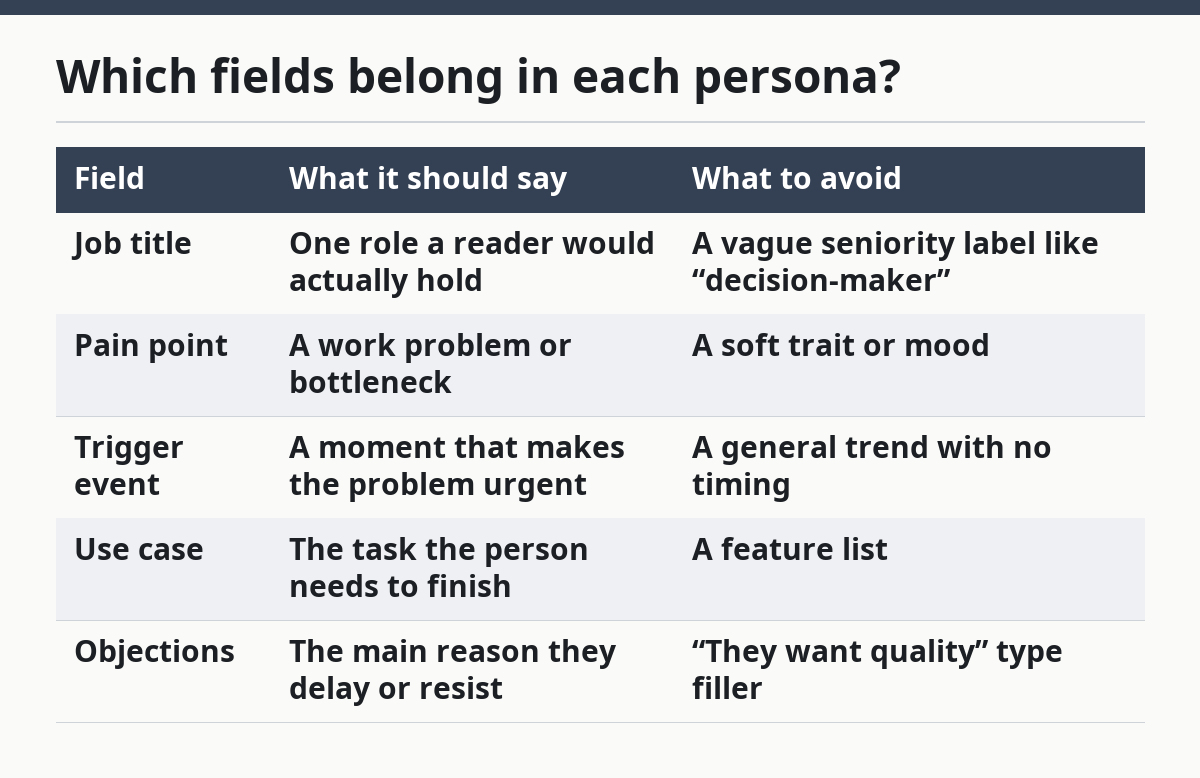
That table is the difference between a library and a scrapbook. A scrapbook collects notes. A library helps someone choose what to write next.
How do I build a SaaS persona library?
Next, build a SaaS persona library by starting with the roles you already sell to, then writing one short entry per role. The process works best as a 5-step pass that keeps each persona tied to a job title, a pain point, and a buying trigger. For a useful overview of persona research and content planning, Ahrefs and Content Marketing Institute both emphasize using real audience signals rather than assumptions.Ahrefs Content Marketing Institute
-
List the roles that show up in your pipeline and content requests. Use the job titles your team already hears in demos, support notes, and sales calls. Start with 5 to 10 roles at most, because a first pass that tries to cover 30 roles turns vague fast.
-
Write the job title exactly as people use it. Keep the title plain, such as “Head of Customer Success” or “Demand Generation Manager.” This keeps the persona grounded in a real search and a real inbox, not an abstract category.
-
Add one main pain point and one trigger event. Tie the pain point to a work failure or strain, then attach the event that makes it urgent. For example, a trigger can be a new hire, a missed SLA, a platform migration, or a reporting deadline. If the trigger could happen any year to any team, it is too soft.
-
Define the use case in one sentence. State the task the persona needs to complete and the context around it. Use case language keeps the library useful for topic planning, because writers can see whether the story should be about setup, comparison, troubleshooting, or evaluation.
-
Map content relevance to each persona. Note which topic types fit this role: how-to guides, comparison pages, pain-point posts, checklists, or objection-handling pages. If one persona only fits product pages and another only fits educational posts, that is a useful distinction, not a problem.
Ultimately, the best libraries stay compact enough to scan on one screen. A single persona entry that fits on one screen is more useful than a 4-page profile nobody opens twice.
How do job titles, pain points, and buying triggers work together?
Therefore, they work together by answering three different questions: who, why, and now. Job title names the person. Pain point names the problem. Trigger event explains why the problem is active today instead of “someday.”
This matters because the same job title can have different content needs depending on the trigger. A Finance Director who is calm with current tools is not looking for the same content as a Finance Director who just failed an audit review or inherited a messy stack. The title stays the same, but the buying trigger changes the angle.
Even so, a weak persona library can treat title as enough, and if your team is making customer-facing decisions in a regulated or high-stakes setting, consult a qualified professional or senior marketer before relying on broad assumptions. That leads to generic copy like “For busy marketing leaders.” A stronger library pairs title with the pressure point. For example, a RevOps leader dealing with lead routing errors needs different content from a RevOps leader who is standardizing reporting after a merger. Same title, different urgency, different post.
That distinction is also what keeps topic selection honest. If the persona has a trigger event tied to onboarding, the library should point writers toward setup, migration, and implementation content. If the trigger is a missed metric, the library should point them toward diagnosis and comparison content. If the trigger is team growth, the content may need to focus on scale, handoffs, and visibility.
In short, the trade-off is clear: the more specific the trigger, the more useful the persona becomes for content, but the fewer pages it will fit. That is a good trade for a SaaS site that wants relevance over volume. A broad persona is easier to reuse, but it usually produces blurrier writing.
What makes a persona library stay useful over time?
Since a persona library stays useful when it gets reviewed on a schedule and trimmed when the market changes, a library that never changes turns into old assumptions with nice formatting. The practical fix is to treat persona maintenance as part of content operations, not as a one-time workshop. If you are unsure how to structure that process, ask a qualified content strategist or marketing lead to review it.
The first habit is to check whether the job title still matches what people call themselves. Titles shift as teams grow, merge, or reorganize. If the title in the persona looks polished but nobody uses it in real conversations, the entry needs revision. The same goes for pain points that no longer show up in demos, support tickets, or page searches.
The second habit is to watch for duplicate personas with different names. Two entries that both say “needs more visibility” but use different titles and different trigger events are often the same persona wearing different clothes. That creates confusion for writers, and it makes messaging drift from page to page.
The third habit is to remove fields that nobody uses. A persona library should help a writer answer a brief in minutes, not force them to read a biography. If a field does not change the headline, angle, proof point, or call to action, it probably does not belong in the core version.
One honest limitation: a persona library will not fix bad positioning. If the product story is vague, the personas will still feel flat because they are carrying a weak message. The library can sharpen content, but it cannot invent relevance where the offer does not have it.
What should content teams do with it?
Then, content teams should use the persona library to choose topic angles, not to decorate every draft with labels. The library is most useful when it changes the brief before writing starts. If the persona says “IT Manager, pain point: manual access requests, trigger: security review,” then the post should not sound like a general productivity piece.
A good use of the library is to sort topics by intent. Some personas need educational posts that explain a problem. Some need comparison pages that show options. Some need proof-heavy pages that reduce risk. If a persona’s trigger is a tool switch, content should address migration and switching costs. If the trigger is a team milestone, content should address scale and control.
It also helps with editorial triage. When a topic idea comes in, the library should answer 3 quick questions: which persona is this for, what pain point does it hit, and what trigger makes it timely. If the answer to any of those is “everyone,” the topic is too broad for a strong SaaS page.
The biggest mistake is treating the persona library as a one-off planning doc. A useful library is a decision tool. It should sit close enough to the editorial process that someone can use it when a page brief is still rough, before the writing turns generic. For a practical example of how teams use customer research to guide messaging, Salesforce and the Content Marketing Institute both stress aligning content to real buying signals.Salesforce Content Marketing Institute
What belongs in a SaaS persona library?
Therefore, a SaaS persona library belongs on the page when it holds the few details that change content decisions: job title, pain point, trigger event, use case, objections, and the kind of content each role needs. It should stay close to the work, not become a long profile that reads like HR notes. If a field does not help a writer pick an angle in under 2 minutes, leave it out.
How many personas should a SaaS blog support?
So, a SaaS blog should support the few personas it can write for clearly, not every title the team can imagine. If the library gets too wide, the tone blurs and the topics start to overlap. A smaller set with sharp pain points and strong triggers usually works better than a large set with shallow detail.
How do I keep personas from becoming generic?
Finally, keep personas from becoming generic by tying each one to a specific job title, a real pain point, and a buying trigger that creates urgency. Generic personas usually sound like “busy, modern, data-driven leaders,” which helps nobody. Replace those phrases with the work problem, the moment it appears, and the use case that follows.
Drafted with AI; not yet reviewed by a person.