How to Read a SaaS Onboarding Guide for Activation Steps, Time-to-Value, and Friction: a SaaS onboarding guide usually points to activation in 3 to 5…
Last updated: November 16, 2026
Quick Answer: a SaaS onboarding guide usually points to activation in 3 to 5 steps. Read a SaaS onboarding guide for activation steps, time-to-value, and friction as a map, not as a product brochure. The guide should show the first path to value: the setup wizard, the welcome checklist, the quickstart guide, the first project, and the point where the product expects you to be active. If those pieces are clear, the software is built for faster activation; if they are buried, the product is probably heavier to adopt.
Key takeaways
- Look for the first task the guide asks you to finish, not the longest feature list.
- Time-to-value shows up in the path from signup to first project, first result, or first share.
- Friction is visible when the guide asks for too many fields, too many choices, or outside help.
- A short guide can still be hard if the setup sequence has hidden steps.
- A heavy guide can be a sign that the product needs real configuration before it works well.
What should you read first in a SaaS onboarding guide?
Read the first task, the setup path, and the first success marker in that order. Those three pieces tell you what the product thinks “getting started” means.
Start with the welcome checklist. If the checklist has 3 to 5 items, the product is usually trying to get you to one quick outcome. If it has a long list with admin setup, team invites, data import, and permissions all mixed together, the guide is signaling a longer implementation.
Then find the setup wizard. A wizard with clear steps often means the product expects guided setup inside the app. A guide that sends you to several separate pages before the wizard starts usually means more friction and more places to stall. According to Nielsen Norman Group, onboarding works best when it reduces uncertainty and moves users toward a first success quickly.
Next, look for the quickstart guide and the first project. Those two phrases matter because they show the first real use case, not just the login screen. A guide that gets you to a first project quickly is optimized for activation. A guide that spends most of its space on settings, roles, or admin controls is often built for deployment, not immediate value.
One practical way to read this page is through the path, not the prose. The phrases “welcome checklist,” “setup wizard,” and “first project” are the clues. For a broader internal overview, see the SaaS support hub, the help documentation guide, and the customer onboarding checklist.
How do I spot activation steps?
Activation steps are the actions that get a user from sign-up to a meaningful result. They are usually the shortest chain of tasks that ends in something useful, such as a dashboard, a sent message, a completed workflow, or a published project.
Read the guide like a sequence, not a summary. In a good SaaS onboarding guide, each step should point to a tool, a screen, or a choice the user can make right away. If the guide says “connect,” “create,” “import,” or “publish,” it is probably tracking activation. If it says “learn,” “explore,” or “review settings” with no outcome attached, it may be teaching the interface without moving the user forward.
A simple way to judge the chain is to count how many actions stand between signup and the first result. Fewer handoffs usually mean faster activation. More handoffs usually mean more setup overhead, especially if each step asks for another account, another permission, or another team decision.
This is where the term activation milestone matters. The milestone is the point where the product can claim the user has crossed from setup into use. That might be the first project, the first import, or the first successful run. If the guide never names that point, the product may not have one, or it may expect the user to discover it alone.
Read the action verbs closely. They are the backbone of activation. For activation terminology, compare the guide with the product adoption checklist and the software onboarding playbook.
How do I judge time-to-value?
Time-to-value is the gap between starting the guide and reaching the first useful result. A good guide makes that gap visible even when it does not give a number.
Look for the distance between the first screen and the first win. If the guide begins with email verification, workspace setup, role assignment, and data import before any output appears, the time-to-value is likely longer. If it moves from account creation to a first project in a few obvious steps, the product is aiming for a quicker payoff.
A useful guide often makes the first value small and concrete. That could be a draft, a sample dashboard, a connected source, or a completed template. The point is not scale; the point is proof. A user should know, within the first run, what the product does for them.
You can also judge time-to-value by what the guide leaves for later. If advanced settings, integrations, and team controls are pushed after the first result, the product is probably trying to shorten the initial path. If those items appear before the user gets anything back, the guide is asking for a heavier start.
Here is the trade-off in plain terms.
| Signal in the onboarding guide | What it usually means | What it costs in practice |
|---|---|---|
| First project appears early | Faster activation path | Less room for deep setup upfront |
| Setup wizard before first project | Guided start with some structure | More steps before value |
| Team admin tasks first | Heavier implementation path | Slower time-to-value |
| Quickstart guide with one main outcome | Narrow first use case | Less flexibility at the start |
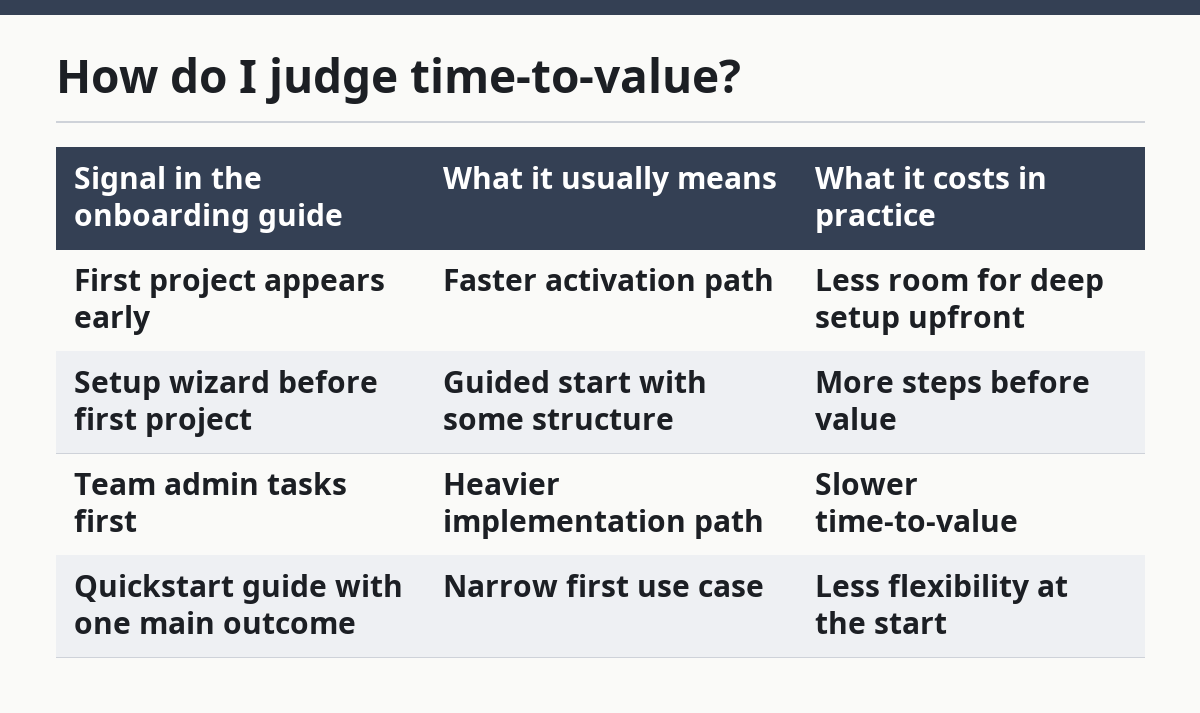
A guide that shows time-to-value clearly is easier to trust. A guide that hides it is often asking the user to believe the payoff will come later. See also the time-to-value framework and the SaaS adoption metrics guide.
Where does friction show up?
Friction shows up anywhere the guide makes a user stop, rethink, or ask for help. The biggest clues are extra fields, confusing branching steps, and setup that depends on another person.
Watch for the welcome checklist adding too many decisions at once. If the user must name the workspace, choose a plan, connect a tool, invite teammates, and set permissions before seeing a result, the friction is high. Each extra choice adds a chance to pause.
The setup wizard can hide friction too. A wizard that looks short but opens several nested forms is still heavy. A wizard that uses vague labels like “configure your environment” can be worse, because it forces the user to guess what belongs there.
Friction also shows up in the first project. If the guide makes the first project sound simple but then requires samples, CSV formatting, approval from an admin, or a separate integration, the promise and the path do not match. That gap is a warning sign.
A strong guide reduces guesswork. A weak one pushes the user into support tickets, trial-and-error, or abandonment. That is why friction matters more than polish. A pretty guide can still be hard to use.
The cheapest friction to spot is the kind that appears before the first result. If the guide makes the user work for 10 minutes before any visible output, that is not a small detail; it is the product’s real shape.
Is this guide for self-serve or heavy implementation?
This guide is for self-serve only when the first run reaches value without outside help. If the guide depends on admins, custom setup, or a long checklist of prerequisites, it is a heavy implementation path.
A self-serve guide usually keeps the first project close to the first login. It may use a quickstart guide, a setup wizard, and a small welcome checklist to get the user moving in one session. The product can still be complex, but the onboarding path is light enough that one person can finish it.
A heavy implementation guide looks different. It often spreads activation across several roles, several systems, or several decisions. The guide may ask for access to data, permission changes, or team coordination before the first value appears. That is not a flaw by itself. It is a sign that the software is built for a larger rollout.
This matters because the wrong reading leads to the wrong expectation. A buyer who wants immediate activation will be frustrated by a guide that behaves like an implementation manual. A team planning a bigger deployment may appreciate that same detail because it shows the real work up front.
The honest trade-off against the obvious alternative is simple: fast activation is easier to start, but lighter guides can hide limits later. Heavy implementation takes longer, but it can fit more complicated work. The guide tells you which path the product has chosen. For setup-heavy tools, compare this with the implementation planning guide and the admin setup checklist.
What should a good onboarding guide help you accomplish first?
A good onboarding guide should help you complete one meaningful action before anything else. That first action is usually the first project, not the entire setup.
The best first task is one you can finish in one sitting and one that proves value fast. It should not be a tour of every screen. It should be a working step, such as creating a project, importing a small set of data, or connecting one source and seeing output.
If the guide starts with broad education, slow orientation, or a long list of settings, the product is asking for patience before proof. That may be fine for a complex system, but it is not a fast activation path.
A practical reading method is to ask one question: what does the product want me to do first, and what do I get when I finish it? If the answer is clear, the onboarding path is doing its job. If the answer is vague, the guide is probably built to explain the interface rather than move the user to value.
This is also where the quickstart guide earns its place. A good quickstart does not try to cover everything. It gets the user to one outcome fast, then leaves deeper configuration for later. That split is a sign of a product that understands first-run guidance.
For a broader method on public signals, this page sits under the hub on SaaS support, help, and documentation analysis.
What are the common mistakes when reading onboarding docs?
The most common mistake is reading for completeness instead of sequence. A guide can mention many features and still hide a slow path to value.
A second mistake is treating a short guide as easy. A 4-step guide can still be hard if each step opens a new tool, a new permission, or a new decision. Length alone does not tell the story. If setup choices affect billing, security, or compliance, consult your admin or a qualified professional and follow the vendor documentation; see NIST SP 800-53 for control-setting context.
A third mistake is assuming every setup step matters equally. In a good SaaS onboarding guide, one step usually carries the weight of activation. The others are support steps. If you do not separate those, you can miss the real friction point.
Another mistake is ignoring what the guide postpones. If integrations, permissions, and team setup are all pushed after the first project, the product is trying to protect time-to-value. If those items come first, the product may be asking for a larger commitment before it gives anything back.
Read the guide for the first win, the hidden delay, and the step that cannot be skipped. That is where the truth sits.
How do I read the guide for limits and fit?
Read the guide for limits by asking what the product expects before the first result and what it expects after it. That tells you who the software is for.
If the guide assumes a solo user, a simple workflow, and one project, it is likely built for lighter use. If it assumes admin setup, shared access, approvals, and system connections, it is built for a larger team or a deeper rollout. The guide is not just teaching use; it is revealing the product’s working model.
This is where the SaaS onboarding guide becomes a filter. It shows whether the product is right for a quick start, a trial, or a real implementation. It also shows who should slow down. If you want a tool that is ready in one session, a guide with a long setup sequence is the wrong sign. If you need structure and control, that same sequence may be exactly what you want.
The guide is most useful when it is read against the job to be done. Fast activation, short first-run guidance, and a small first project point to lighter adoption. A heavier setup path points to software that needs more time and more context before it pays off.
What does a saas onboarding guide reveal?
A SaaS onboarding guide reveals the product’s real starting line. It shows what the software thinks a new user must do first, what counts as success, and how much setup stands between signup and value. It also shows whether the product is built for quick activation or for a deeper rollout.
How do I spot friction in onboarding docs?
Friction appears where the guide adds choices, delays, or handoffs before the first result. Long checklists, unclear wizard steps, and setup that depends on another person are the main signs. If the user has to stop and ask what comes next, the guide is already creating drag.
What should onboarding docs help users accomplish first?
Onboarding docs should help users complete one useful action first, not learn the entire product. That first action is often the first project, a connected source, or another small outcome the user can see right away. A good guide makes that result feel close, clear, and worth the setup.
Drafted with AI; not yet reviewed by a person.