How to Build a SaaS Pricing Audit Trail for Public Pages, Sales Quotes, and Procurement Approvals: build a 5-record audit trail that ties each public…
Last updated: November 17, 2026
Quick Answer: build a 5-record audit trail that ties each public pricing page to each sales quote, procurement form, approval email, and final contract. The point is not to store everything in one folder; it is to prove who saw which price, when they saw it, and what changed before approval. If a deal is audited later, the trail should show the path in 3 or 4 hops, not a pile of screenshots. For background on documenting pricing and approval records, see NIST SP 800-53 and Google’s data governance guidance.
Key takeaways
- A pricing audit trail is a record chain, not a pricing strategy.
- The trail should connect the pricing page, sales quote, procurement form, approval email, and contract.
- Capture time, owner, version, and source for each record so the history can be followed later.
- The biggest risk is mismatch: a public page says one thing while the quote or contract says another.
- This is useful for sales, finance, and procurement, but consult a professional if you need help deciding whether it belongs in redesigning plan structure or comparing feature lists.
What is a pricing audit trail?

A pricing audit trail is a dated record of how a SaaS price was shown, quoted, approved, and signed. For this topic, it should show at least 4 things: the public pricing page version, the sales quote version, the procurement approval path, and the signed contract.
A good trail is built for proof, not for memory. A screenshot with no date, no URL, and no owner is weak evidence. A contract alone is also weak if the quote promised a different seat minimum, discount, or billing term. The trail exists to connect the public claim to the internal approval path.
The cleanest way to think about it is simple: one price, one quote, one approval path, one contract. If any of those changes, the trail needs a new entry. That is the difference between a usable audit record and a folder full of loose files.
This page is about traceability, not plan design. It supports the larger map of pricing evidence across public pages and internal records, but it does not replace a pricing surface map or a feature comparison sheet.
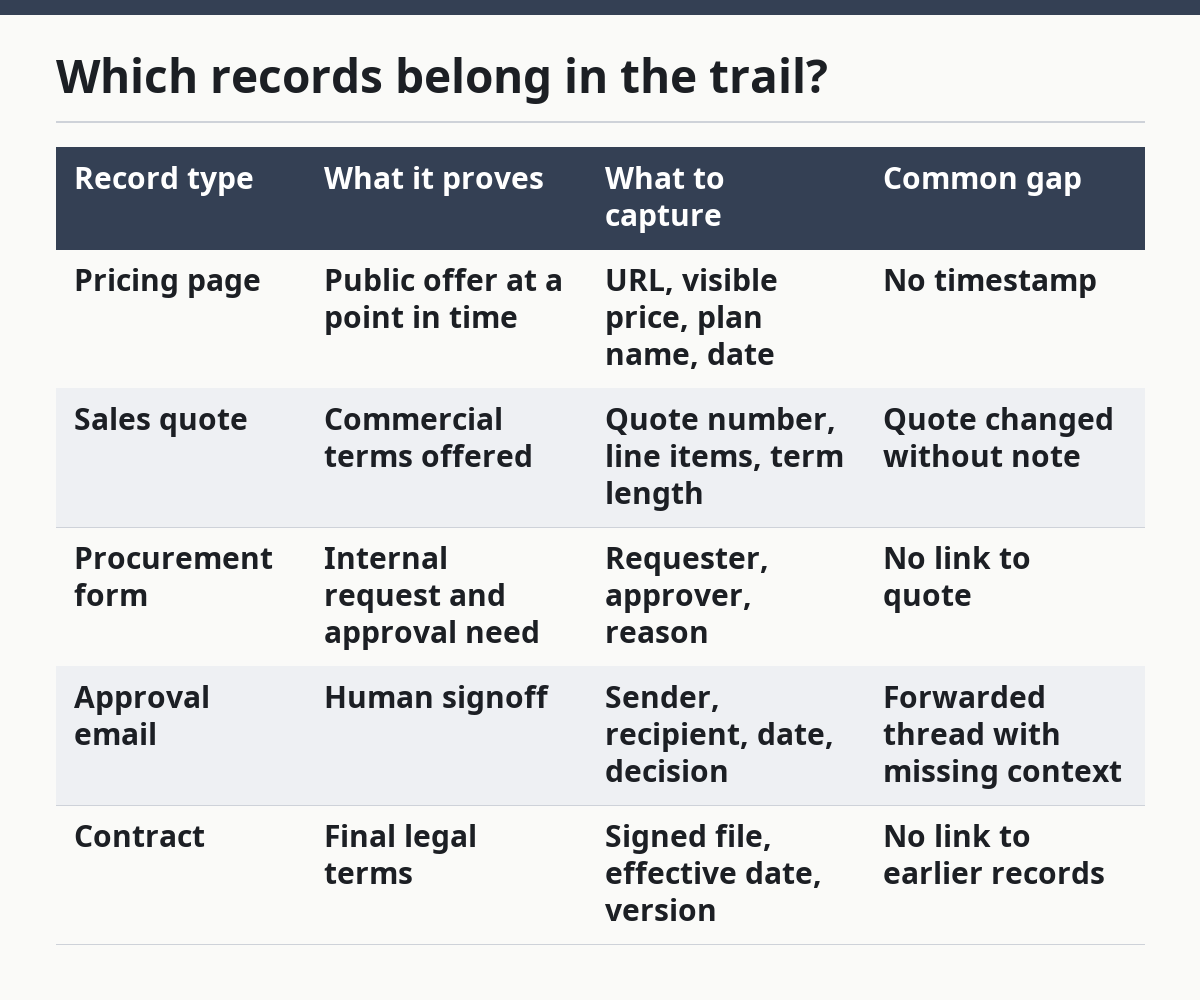
Which records belong in the trail?
The trail should include the pricing page, the sales quote, the procurement form, the approval email, and the contract. Those 5 records are the minimum set that shows how a public price became an approved purchase.
A pricing page capture should include the URL, the date, the visible plan name, and the exact price shown on screen. A quote should show the same plan name, the commercial terms, and the version or quote number. A procurement form should show the buyer’s request, the budget owner, and the reason for approval; if you are unsure how to structure that, consult a professional or procurement lead and use a documented template. An approval email should show who approved it and when. The contract should show the final agreed terms. For related recordkeeping practices, see SEC guidance on retention controls and ISO 15489 records management overview.
The mistake is to keep only the final contract. That hides the path that led there. Another mistake is to save only screenshots, because screenshots can be hard to sort when there are 2 or 20 versions. Text fields make later review much faster than image files alone.
| Record type | What it proves | What to capture | Common gap |
|---|---|---|---|
| Pricing page | Public offer at a point in time | URL, visible price, plan name, date | No timestamp |
| Sales quote | Commercial terms offered | Quote number, line items, term length | Quote changed without note |
| Procurement form | Internal request and approval need | Requester, approver, reason | No link to quote |
| Approval email | Human signoff | Sender, recipient, date, decision | Forwarded thread with missing context |
| Contract | Final legal terms | Signed file, effective date, version | No link to earlier records |
How do you build the pricing audit trail?

You build the pricing audit trail by capturing each source in order and tying it to one shared ID. The simplest version is a 6-step chain that starts with the public page and ends with the contract.
- Capture the pricing page with the URL, date, and visible plan details. Save the page as a PDF or image plus a text note for the key price shown.
- Record the sales quote number and exact terms in the quoting tool. Keep the quote attached to the same account or opportunity ID.
- Log the procurement form with the buyer name, approver name, and purchase reason. Keep the form tied to the same quote number.
- Archive the approval email thread with the sender, date, and decision. Save the full email, not only the final reply, so the 2 or 3 prior messages stay visible.
- Store the contract with its signed version and effective date. Link it back to the quote and procurement form.
- Index every record in one register that lists the shared ID, record type, date, owner, and storage location.
That shared ID matters more than the storage tool. You can keep the files in a contract system, a shared drive, or a CRM, but the chain must be searchable in under 1 minute. If the trail takes 5 minutes to reconstruct, it is already too slow for a pricing review.
The cleanest rule is this: every time the price moves, add a new dated record. If the pricing page changes on Monday and the quote is issued on Thursday, those are 2 separate entries. The trail should show the gap, not blur it away. For a related workflow example, see HubSpot’s deal record guidance and Salesforce opportunity tracking.
Where do approval history and audit records usually break?
Approval history usually breaks when the quote and the email say different things. The trail then looks complete on paper but fails in review because the approval email, procurement form, and contract do not match the same commercial terms.
The most common break is version drift. A pricing page is updated, but the quote still reflects the older figure. Another break is missing context on discounts or seat counts. If the public page says one thing and the quote uses a special exception, that exception needs its own record or the audit trail will look like an unexplained price cut.
A second problem is file sprawl. If one team saves screenshots in a drive and another team keeps approvals in email, the trail becomes hard to follow. A 3-folder system can help: one folder for public evidence, one for sales records, and one for approvals and contracts. That is not fancy, but it is easier to audit than scattered files across 4 tools.
The honest trade-off is speed versus proof. A light trail is faster to maintain, but it can miss important details. A heavy trail is slower, but it is better when procurement asks how a price moved from the public page to the signed deal. This is wrong for teams that only need informal quoting and never face procurement review.
What should you standardize first?
You should standardize the shared fields first: record type, date, owner, source, and version. Without those 5 fields, the trail becomes a search problem instead of a pricing record.
Start with one naming rule for every file. Use the same pattern for the pricing page capture, quote, approval email export, and contract PDF. For example, if one record says “Enterprise-2026-Q1” and another says “Ent Q1,” the system already lost consistency. Exact names matter more than file prettiness.
Then set a minimum timestamp rule. Every record should show when it was captured or approved, not only when it was created in the tool. If the public pricing page changes at noon and the procurement form is approved later that day, the trail should make that sequence visible. That is what lets a reviewer understand whether the deal used the live public price or an earlier version.
The other thing to standardize is ownership. One person or role should be responsible for keeping the chain complete, even if 3 teams touch it. If no one owns the trail, it will drift the first time a sales quote is revised after an approval email has already gone out.
Who should not use this approach?
This approach is not for teams that only need a simple price list with no procurement path. If no sales quote, approval email, or contract ever follows the pricing page, a full audit trail may be more process than you need.
It is also not the right answer if your real problem is feature comparison or pricing changes across old and new plan structures. Those are different records and need different treatment. A pricing audit trail is about proof of approval, not about explaining plan evolution or side-by-side feature differences.
The strongest use case is a SaaS team that sells through sales and procurement, where one deal can pass through public pricing, negotiated quote, formal approval, and signed contract. In that setting, the trail reduces confusion when a reviewer asks, “Which version was approved?” If the answer takes more than 2 or 3 clicks, the system still needs work.
What is a pricing audit trail?
A pricing audit trail is the record that shows how a public price became an approved deal. It ties together the pricing page, sales quote, procurement form, approval email, and contract so the full path can be checked later. Without that chain, you can see the final price but not how it got there.
How do you document approval history for SaaS pricing?
You document approval history by saving the approver name, date, decision, and linked quote or procurement form. Keep the full email thread or approval record, not just the last reply, so the sequence stays visible. If the approval includes an exception, discount, or term change, record that in the same entry. For compliance-oriented examples, see NIST’s control catalog and ISO records management guidance.
How do you connect public pricing to procurement records?
You connect public pricing to procurement records by using one shared ID across the pricing page capture, quote, procurement form, approval email, and contract. Capture the public page with the URL and date, then attach the quote and approval records to the same chain. That way, a reviewer can trace the approved price back to the public offer without guessing.
Drafted with AI; not yet reviewed by a person.