
How to Build a SaaS Contract Renewal Calendar for Dates, Notice Windows, and Escalations: Build a SaaS contract renewal calendar in 3 linked layers: one…
Last updated: November 18, 2026
Quick Answer: Build a SaaS contract renewal calendar in 3 linked layers: one master list, one reminder schedule, and one escalation path, so you can track renewal dates, notice windows, and owners before a contract rolls forward by surprise. A SaaS contract renewal calendar works best for teams that manage more than a handful of SaaS contracts and need clear reminders for the account manager, legal team, and finance or procurement. For background on calendar reminders and recurring events, see Google Calendar Help and Microsoft Support.
Key takeaways
- Put every contract in one place with the renewal date, notice period, and owner in the same row.
- Count the notice window backward from the contract’s renewal date, not from the day you remember to check it.
- Assign one person to each milestone so reminders do not stop at the inbox.
- Build escalation rules for missed checks, not just for the final notice date.
- Use a calendar for timing, but keep the contract file and renewal clause beside it so the team can confirm the rule fast.
What goes in a SaaS contract renewal calendar?
A SaaS contract renewal calendar tracks the date that matters, the date that action is due, and the person who must act. That means every contract row should include the contract name, renewal date, notice period, owner, backup owner, and escalation path.
The renewal date is the anchor. The notice period is the second clock, because many contracts require written notice days or months before renewal. If a contract renews on June 30 and needs 30 days’ notice, the alert should fire well before June 1, not on June 29.
A useful calendar also stores the contract term, the vendor name, and the source of truth for the clause. If the notice period came from the signed agreement, link or note the exact page so the legal team can verify it in seconds. A separate note for the account manager helps when the vendor sends a renewal email that does not match the contract text.
Do not turn the calendar into a contract summary. This page is for timing, not for every clause. The contract summary belongs elsewhere; this calendar only needs enough detail to tell the team when to move. For a cluster page on timing and related controls, see the hub on SaaS contract terms and renewal.
How do you build the calendar step by step?
You build it by pulling every renewal deadline into one list, then adding reminders that start before the notice window closes. The cleanest version is a spreadsheet or shared calendar with one line per contract and one reminder chain per milestone.
-
List every active SaaS contract in one sheet.
Use columns for vendor, product, contract date, renewal date, notice period, and owner. A row without a renewal date is not ready for a calendar and should be flagged for review. -
Add the notice period as a separate field.
Write it as days or months exactly as the contract states, such as 30 days or 60 days. That lets the calendar calculate the last date to send notice without guessing. -
Calculate the notice deadline backward from the renewal date.
If the renewal date is April 15 and the notice period is 30 days, the deadline sits on or before March 16, depending on how the contract counts days. If the agreement uses business days or a different counting rule, record that rule beside the date. -
Assign one primary owner and one backup.
The account manager usually owns the commercial check, while the legal team owns the notice language. A backup owner matters when someone is out for 1 week or more. -
Set reminders at more than one point in time.
A simple pattern is 60 days before renewal, 30 days before the notice deadline, and 7 days before the deadline. That gives the account manager time to act and the legal team time to review the notice. -
Escalate missed action automatically or by rule.
If no one marks the item complete, the reminder can move from the owner to a manager or procurement lead, depending on your policy and internal controls; consult legal or procurement professionals for your organization’s process. The point is not to send more email; it is to make sure the contract does not auto-renew because one inbox was ignored. -
Review the list on a fixed cadence.
A monthly review catches most timing errors before they become expensive. For contracts with short notice windows, a weekly check is safer during the final 60 days.
If you use Google Calendar or Microsoft Outlook, recurring reminders can help, but the calendar alone is not enough. The spreadsheet or contract register still needs the clause details, because calendar notes are easy to trim when the alert pops up on a phone. For setup guidance, see Google Calendar recurring events and Microsoft recurring meeting help.
How do notice periods change the calendar?

Notice periods change the calendar because they create a separate deadline that can arrive before the renewal date by days or months. A contract with a 90-day notice window needs earlier action than one with a 30-day window, even if both renew on the same date.
The mistake most teams make is setting a reminder only on the renewal date. That works for a courtesy check, but not for a contract that renews automatically if notice is late. The calendar should usually show the last safe notice date, the draft notice review date, and the send date.
A practical way to handle this is to use three milestone labels: review, approve, and send. Review is for the account manager and finance team. Approve is for legal. Send is the final date the notice must leave the building, usually by email or another contract-defined method.
A second mistake is treating all notice periods as the same; because contract language varies, it is safer to confirm the clause and consult legal or procurement professionals when the wording is unclear. Some contracts require written notice, some require notice to a named contact, and some require delivery by a specific channel. The calendar should carry that delivery rule in a notes field, because a notice sent to the wrong inbox can fail even if the date is right.
This is where a plain calendar outperforms memory. A date alone is easy to see, but a date plus a notice rule tells the team what action belongs there. Without the rule, the reminder becomes a vague warning instead of an operational task.
Who owns each renewal milestone?
Each renewal milestone should have one named owner, one reviewer, and one escalation path. The account manager usually owns the vendor relationship, while the legal team owns the notice text and the final check against the contract.
The owner assignment needs to be specific enough that nobody waits for someone else. For example, the account manager can own the 60-day review, legal can own the notice draft, and procurement or finance can own the final approval if spend is changing; consult legal or procurement professionals if your team needs to decide who should own each step. If the same person owns every step, the calendar is usually too thin and too fragile.
A simple ownership model works better than a large committee. Too many names on one milestone slow the process, and the notice window can close while everyone waits for consensus. That is why a backup owner matters. A backup is not a courtesy copy; it is the person who acts if the primary owner misses the reminder.
| Milestone | Primary owner | Backup | Common output |
|---|---|---|---|
| Renewal review | Account manager | Sales ops or procurement | Confirm term, cost, and vendor contact |
| Notice draft | Legal team | Contract ops | Written notice ready for approval |
| Notice send | Legal team or account manager, per policy | Backup owner | Notice sent before deadline |
| Final closeout | Procurement or finance | Contract ops | Renewal marked done or exit planned |
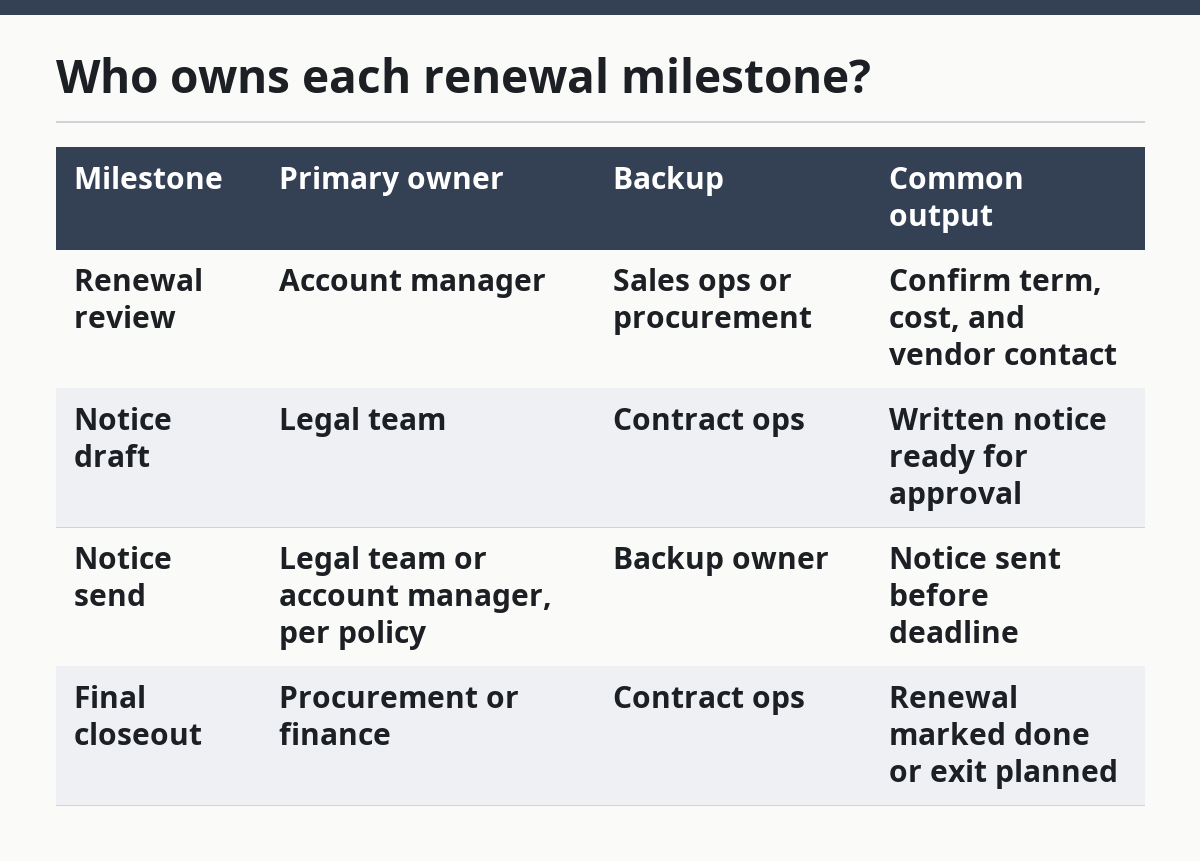
If the team does not have contract ops, the calendar owner can be a shared operations inbox or a named coordinator. The important part is that each milestone has one person who is accountable for moving it forward within the 30-day or 60-day window.
What escalation rules actually work?
Escalation rules work when they are tied to time, not to emotion. A missed reminder should trigger a next step after a fixed delay, such as 2 business days or 1 week, so the issue cannot sit unresolved in an inbox.
The cleanest rule is simple: first reminder to the owner, second reminder to the owner and backup, third reminder to the owner’s manager or the legal lead. That pattern gives the team a chance to act before the notice deadline and avoids surprise auto-renewals.
Escalation also needs a stop rule. Once a notice is sent or a renewal is approved, the reminders should close out immediately. Otherwise, the same contract keeps pinging people for weeks, and the team stops trusting the calendar.
A second useful rule is a risk flag for short notice windows. If a contract has a 14-day notice period, the calendar should mark it as high attention because the margin for error is small. If the notice window is 90 days, the calendar can allow more review time, but it still needs reminders.
The trade-off is obvious: more escalation rules create more admin work. Fewer rules are easier to maintain but easier to miss. For most teams, a three-step escalation chain is enough; anything more complex is only worth it when contract volume is high or notice windows vary a lot.
Which tool should hold the calendar?
The right tool is the one the team will keep current every month, not the one with the most features. A spreadsheet works for small sets of contracts, while a shared calendar or workflow tool works better when several people must react to each notice date.
A spreadsheet is strong when the team needs one view with filters for vendor, owner, and deadline. It is weak when reminders must route to different people automatically. A calendar tool is better for alerting, but weaker for holding contract detail unless the notes are disciplined.
| Tool type | Best for | Weak point | Typical use |
|---|---|---|---|
| Spreadsheet | One master list of contracts and deadlines | Manual reminder setup | Small to medium contract set |
| Shared calendar | Timed alerts and visible milestones | Limited contract detail | Owner-facing reminder schedule |
| Workflow tool | Escalations and task handoffs | More setup time | Teams with many contracts or tight notice windows |
A practical setup often uses both. The spreadsheet stores the contract facts, and the calendar holds the reminders. That split keeps the timing clean without forcing every detail into a calendar invite.
Google Calendar Help and Microsoft Support both document recurring events and reminders, which is useful when setting repeated checks on fixed intervals. The tool matters less than the habit of updating it the day a contract changes, because a stale calendar is worse than no calendar at all.
FAQ
How do you track SaaS contract renewals?
You track SaaS contract renewals by keeping one master list with the contract date, renewal date, notice period, owner, and backup owner. The list should feed a reminder schedule so the account manager and legal team see the same deadlines. A monthly review catches missing dates before the notice window closes.
What should a renewal calendar include?
A renewal calendar should include the renewal date, the last notice date, the notice period, the contract owner, the backup owner, and the escalation path. It should also note how notice must be sent, such as by written notice to a named contact. Without those fields, the calendar cannot tell the team what to do.
How do notice windows affect renewals?
Notice windows set the last date on which the team can act before an automatic renewal. A 30-day window leaves less room for review than a 60-day or 90-day window, so the reminders need to start earlier. In most cases, the calendar should count backward from the contract’s renewal date, not from memory.
Drafted with AI; not yet reviewed by a person.