How to Build a SaaS Pricing Version Control Log for Pages, PDFs, and Quote Attachments: A pricing version control log is the record that tells you what…
Last updated: November 18, 2026
A pricing version control log is the record that tells you what changed, when it changed, and which pricing page, PDF, or quote attachment carried that version. Build it as one source of truth with document versions, timestamping, and revision notes, or your sales team and product team will keep arguing over which file was current.
Key takeaways
- A pricing version control log should track the artifact, the version, the date, the owner, and the exact note about what changed.
- Use one format for pricing pages, PDFs, and quote attachments so the history can be compared without guessing.
- Store the live URL, the file name, and a snapshot of the old version together, or the log will be hard to trust.
- Keep revision notes short and factual, not a summary of strategy.
- If you cannot tell what changed in 30 seconds, the log is too vague to help.
What should a pricing version control log do?
A pricing version control log should answer one question fast: which pricing artifact was in force on a given date. That means it covers pricing pages, PDFs, and quote attachments as separate document versions, even when they share the same plan names.
Do not turn it into a change-request system or an approval trail. This log is for artifact history, not for debating who signed off on a discount or who approved an exception. If you mix those jobs together, the record gets noisy and the useful part gets buried under process.
The log also needs to support version history across formats. A pricing page can change at 9:00 a.m., a PDF can be regenerated at 2:15 p.m., and a quote attachment can be sent at 4:00 p.m. on the same day. If those three versions are not linked, you cannot reconstruct what a buyer saw.
This is why a plain spreadsheet often works better than a fancy system at the start. A spreadsheet can hold file names, timestamps, revision notes, and URLs in one line. The limit is obvious: once the team starts changing artifacts often, manual entry becomes easy to miss. That trade-off is the cost of a simple setup.
For formatting timestamps, use one standard and stick to it. RFC 3339 is a good fit because it records date and time in a way that avoids guesswork across time zones. The format matters more than the tool, and the log should not depend on someone remembering whether “02/03/2026” means March 2 or February 3. See RFC 3339 here: https://www.rfc-editor.org/rfc/rfc3339
What fields belong in the log?
A useful log entry should include the artifact name, the version label, the timestamp, the owner, and the revision note in one row. That is the smallest set that still lets a reader trace a pricing page, PDF, or quote attachment without opening three other tools.
Use these fields as a starting point:
- Artifact type: pricing page, PDF, or quote attachment.
- Artifact name: the exact page title or file name.
- Version label: v1, v2, or a dated label.
- Timestamp: use one time standard, ideally RFC 3339.
- Owner: the person or team that changed the file.
- Revision note: one line about what changed.
- Live link or file path: where the current or archived copy lives.
- Previous version reference: the version that came before it.
- Notes on scope: page-only, PDF-only, or quote-only.
The revision note should describe the change, not the reason for the change. “Annual plan price updated” is useful. “Made pricing more competitive” is not. The first tells a future reader what changed; the second leaves them guessing.
A good log also separates public pricing from sales-facing files. A public page may show one set of prices while a quote attachment carries a special term or bundle. If both get the same label, the log stops being precise. Precision is the point.
The other thing to track is file format. A PDF is not just a copy of a page; it is a fixed artifact that can circulate after the page changes again. That means the file version matters even when the content looks close to the page. Without that note, the log can say “updated PDF” and still fail to show which one a buyer received.
How do you build the log step by step?
You build the log by defining the fields, choosing one timestamp format, and then recording each new artifact version in the same order every time. The process is simple, but it only works if the steps are strict.
- Create a spreadsheet, database table, or tracking sheet for pricing pages, PDFs, and quote attachments.
- Set the required columns: artifact type, file name, version, timestamp, owner, revision note, and link.
- Choose one timestamp format, such as RFC 3339, and use it in every entry.
- Assign one version label pattern, such as incremental numbers or dated labels, and do not mix styles.
- Record the previous version in the same row so the chain stays visible.
- Attach the live URL or archived file path for the exact artifact version.
- Write the revision note as a short factual sentence about the change.
- Store the older copy instead of overwriting it, so the log points to a real artifact.
The order matters because a log that starts with the note and ends with the file path is easy to enter badly. Start with the artifact, then the version, then the timestamp, and finish with the note. That order mirrors how someone later searches for a file.
If you keep the log in a spreadsheet, protect the column structure. Adding free-text notes in random places makes revision history hard to scan. A rigid 8-column sheet may feel plain, but that plainness is what keeps the record usable 6 months later.
A practical rule helps here: one row per artifact version. Do not merge a pricing page update, a PDF refresh, and a quote attachment update into one entry unless they truly changed together. Separate rows make it possible to see which file changed first and which one followed.
How do you handle pricing pages, PDFs, and quote attachments?
You handle pricing pages, PDFs, and quote attachments as related but distinct artifacts, each with its own version history. That distinction is what keeps a sales-facing file from being confused with a public page or a static PDF.
| Artifact | What changes often | What to log | What can go wrong |
|---|---|---|---|
| Pricing page | Copy, plan names, prices, terms text | URL, timestamp, version, revision note | The live page changes without a saved record |
| Generated file content and file name | File version, export date, source page version | Old PDFs keep circulating after the page moves on | |
| Quote attachment | Deal-specific pricing, term notes, bundle details | Quote ID or file name, issue date, attached version | A buyer receives a file that no one can place in history |
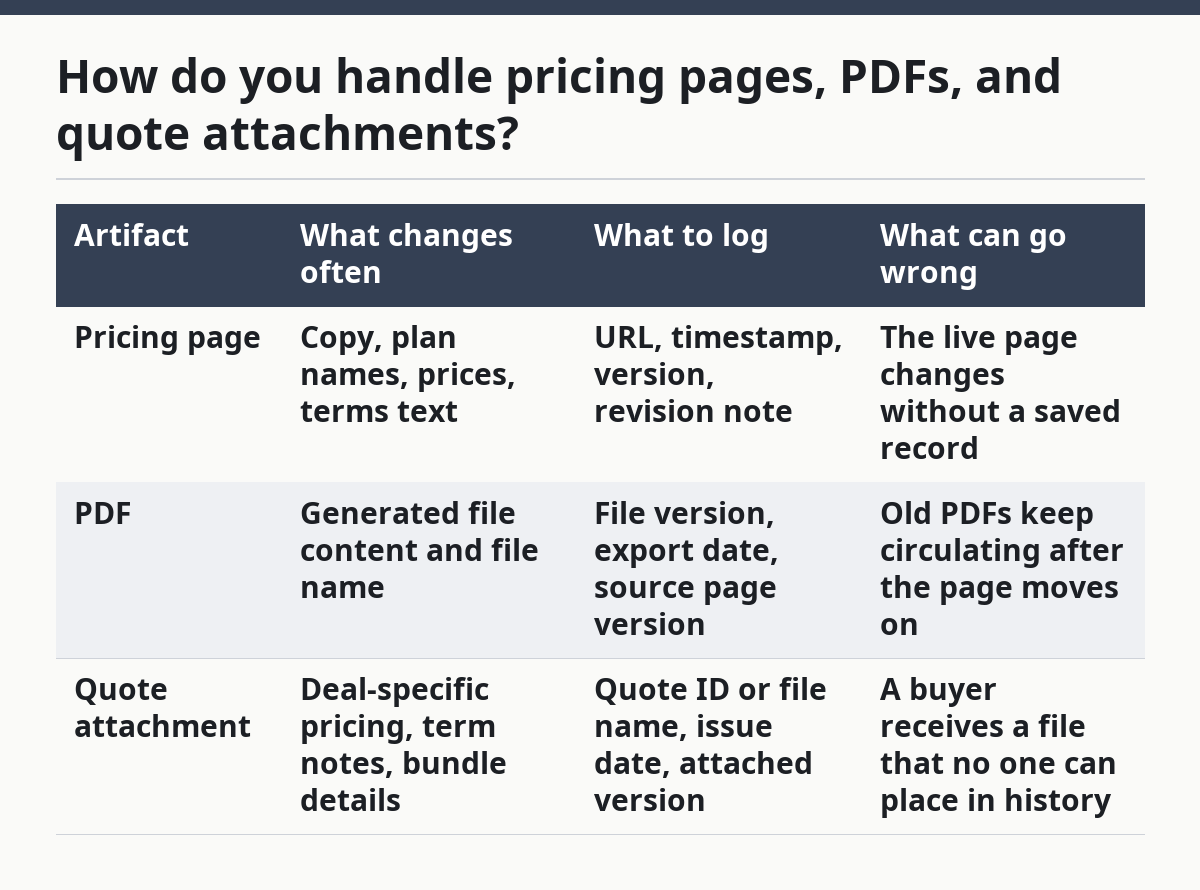
Pricing pages need the strongest link between the live URL and the saved version. If the page changes daily, the log should point to a captured copy or archived file so the old state is still available. A live URL alone is not enough when the content is mutable.
PDFs need clear file names because they are often forwarded outside the company. A name like “pricing-sheet-v3-2026-03-14.pdf” is easier to trace than “final-final.pdf.” The goal is not beauty; it is recoverability.
Quote attachments need the most discipline. They often sit beside a proposal, a rate card, or a custom pricing note, and those files can travel separately. The log should identify the exact attachment and the version of the pricing content inside it, not just the quote date.
This is the main trade-off against a simpler page-only log: a broader artifact log takes more entry time. It also gives you a stronger trail when a buyer asks which version was sent. If your team rarely uses PDFs or quote attachments, that extra effort may feel heavy. If your team sends them often, the added detail is worth the cost.
For more on the larger evidence system this sits inside, see the hub on SaaS pricing and packaging evidence systems.
How do you compare pricing revisions over time?
You compare pricing revisions over time by placing two versions side by side and recording only the differences that affect pricing, packaging, or terms. The point is to see what changed between version history entries, not to reread the whole artifact every time.
A simple comparison grid works well:
| Comparison point | Version A | Version B | What to note |
|---|---|---|---|
| Plan name | Old label | New label | Rename only, or rename plus scope change |
| Price | Old amount | New amount | Increase, decrease, or no change |
| Billing term | Old term | New term | Monthly, annual, or another term |
| Included units | Old units | New units | What moved in or out of the plan |
| Attachment text | Old wording | New wording | Any change to the buyer-facing file |
This kind of comparison is useful because it exposes hidden drift. A page can keep the same price and still change the included units or the wording of the plan. If the log only tracks the price field, the revision history looks clean while the substance changes.
The hardest part is deciding how much detail belongs in the comparison. Too little detail and you miss the real shift. Too much detail and the log becomes a document dump. The right level is the one that lets a teammate answer, “What changed in this version?” in under a minute.
For a page, compare the visible text and any linked PDF. For a PDF, compare the exported file and the source page version that created it. For a quote attachment, compare the attachment against the quote version that sent it. One artifact at a time keeps the review clear.
What mistakes make the log useless?
The most common mistake is treating the log like a folder list instead of a version record. A folder list tells you where a file is stored. It does not tell you what changed, when it changed, or which version a buyer saw.
Another mistake is skipping timestamps. Without a timestamp, you cannot order two edits made on the same day. That matters when a pricing page changes in the morning and a PDF refresh follows later. A date without a time is too blunt for artifact history.
A third mistake is writing vague revision notes. “Updated pricing” is nearly useless because it gives no clue about the scope of the change. A better note says what changed in the file, even if the reason stays out of the log.
Do not use one row for several artifacts unless they were issued together as one release. A combined row saves a little time at entry, but it makes later comparison much harder. The log becomes a compromise between convenience and clarity, and clarity should win.
The last mistake is overwriting old files. If the old PDF disappears, the log cannot prove what version existed. The cost is not just missing history; it is losing confidence in the whole record. Keep the old copy, label it, and point the log at it.
FAQ
How do you version pricing documents?
You version pricing documents by giving each pricing page, PDF, or quote attachment its own label, timestamp, and revision note. The record should show the old version and the new version, not just the current file. That makes the history readable when a buyer or teammate asks what changed between two releases.
What should a pricing version log track?
A pricing version log should track the artifact type, the exact file or page name, the version label, the timestamp, the owner, and the revision note. It should also point to the previous version or archived copy. Without those fields, the log may show activity but not real version history.
How do you compare pricing revisions over time?
You compare pricing revisions over time by lining up two versions and checking the fields that matter most: price, plan name, billing term, included units, and attachment text. The cleanest method is one comparison row per item, so the change is obvious at a glance. That keeps the review focused on the actual revision, not the whole document.
Drafted with AI; not yet reviewed by a person.