
How to Build a SaaS Blog Category Architecture for Pillars, Series, and Landing Pages: use 4 page types. Build SaaS blog category architecture for…
Last updated: November 20, 2026
Quick answer: use 4 page types. Build SaaS blog category architecture for pillars, series, and landing pages by giving each page type one job: pillar pages explain the main subject, category pages group related posts, series pages carry a repeatable theme, and landing pages handle a single intent. If those jobs overlap, the site feels muddy to readers and search engines.
Key takeaways
- Put one page type in charge of one task, not three.
- Use category pages for grouping, not for repeating a pillar page word for word.
- Keep series pages narrow enough that a reader can tell what belongs there in under 10 seconds.
- Plan the URL shape first, because it affects every slug that comes after.
- Leave room for navigation decisions later, but do not let navigation decide the page’s purpose.
What is SaaS blog category architecture?
SaaS blog category architecture for pillars, series, and landing pages is the way a blog’s pillar pages, category pages, series pages, and landing pages fit together without stepping on each other. The job is to make the site easy to scan, easy to expand, and easy to understand from a URL like /blog/pricing/ or /blog/customer-stories/.
A clean architecture does not start with 50 tags. It starts with 3 to 6 page types and a rule for each. If a reader can land on any page and tell whether it is a hub, a series index, or a single-purpose landing page in 5 seconds, the structure is working.
The best mental model is usually simple: a pillar page is a broad reference page, a category page is a sorting page, a series page is a repeated editorial format, and a landing page is a focused destination. The mistake most SaaS blogs make is trying to make one page do all four jobs at once.
That mistake usually shows up in the URL tree. A page at /blog/product-led-growth/ should not also act like a category archive, a campaign page, and a list of every post on the topic. The more jobs one page takes on, the harder it is to name the slug, write the intro, and decide what belongs under it.
The easiest way to keep the structure legible is to decide the page type before the content brief. One short planning rule saves hours later: if the page’s main value is “show me related posts,” it is a category page; if its main value is “teach me the topic,” it is a pillar page. That single distinction keeps the architecture from drifting.
Which page type does each job?
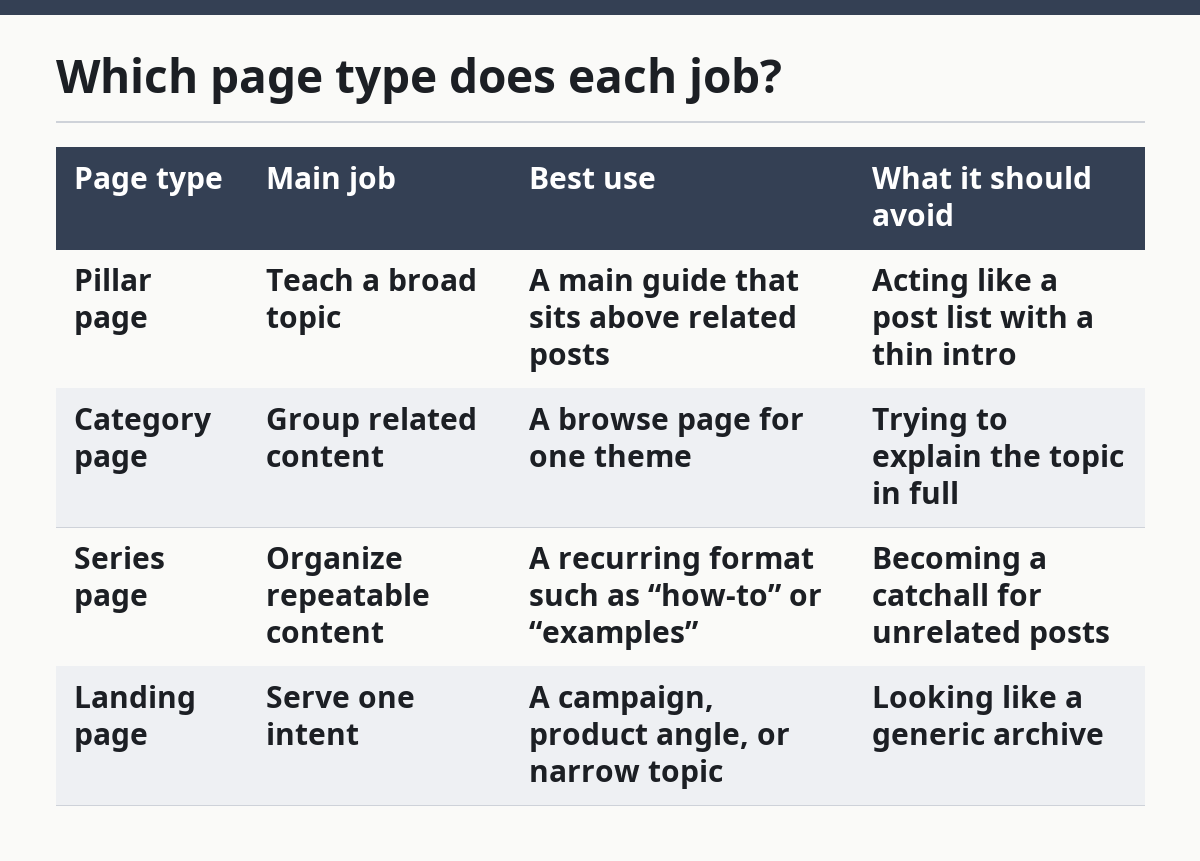
Each page type should answer one user need, and the trade-off is that it should resist the others. A pillar page wins on depth, a category page wins on sorting, a series page wins on consistency, and a landing page wins on focus.
| Page type | Main job | Best use | What it should avoid |
|---|---|---|---|
| Pillar page | Teach a broad topic | A main guide that sits above related posts | Acting like a post list with a thin intro |
| Category page | Group related content | A browse page for one theme | Trying to explain the topic in full |
| Series page | Organize repeatable content | A recurring format such as “how-to” or “examples” | Becoming a catchall for unrelated posts |
| Landing page | Serve one intent | A campaign, product angle, or narrow topic | Looking like a generic archive |
This split matters most for SaaS blogs because the audience is often split too. Some readers want education. Some want proof. Some want product context. If a page tries to satisfy all three, it usually satisfies none of them well.
A pillar page is wrong for a site that only needs quick browsing. A category page is wrong if the subject needs a full explanation before the reader can choose a post. A series page is wrong if the content varies too much from one entry to the next. A landing page is wrong if it is expected to do the work of a library.
The practical test is simple: if the page can be renamed without changing the URL logic, it is probably a category or series page; if the page would lose its purpose after a rename, it is probably a landing page or pillar. That distinction keeps the architecture from blurring into a pile of similar archives.
How do you build the structure step by step?
You build the structure by deciding the top-level page types first, then giving each one a slug pattern and a content rule. A simple rollout can be done in 6 steps.
-
List the 3 or 4 page types that the blog actually needs.
Start with pillar pages, category pages, series pages, and landing pages. If a page type cannot be named in one sentence, it is probably too vague to keep. -
Assign one purpose to each type.
Write a rule like “pillar pages explain,” “category pages group,” “series pages repeat,” and “landing pages target.” A page with 2 purposes is already drifting. -
Choose a slug pattern for each type.
Use one pattern for each family, such as/blog/topic-name/for pillars or/blog/series-name/for a series. Keep the pattern short enough that a reader can guess it from the navigation. -
Decide how deep the URL tree should go.
Try to keep the structure to 2 levels where possible, because deeper paths are harder to scan and harder to maintain. A long path should mean something specific, not just that the site kept adding folders. -
Separate explanation from discovery.
If the page explains the subject, it needs intro copy, headings, and links to related posts. If it only groups posts, it needs a tighter intro and clearer sorting. Do not write the same 700-word opening on both. -
Check the page against the content it will hold.
If the page will contain 12 posts, it probably needs stronger sorting. If it will contain 3 posts, it may not deserve a category page at all. The number is not a hard rule; the fit is what matters.
A useful standard here is the URL standard defined by the WHATWG and the general guidance in Google Search Central’s SEO documentation on clear, readable URLs. Those references are not a blog architecture blueprint, but they do support the same practical point: make the path easy to read and hard to misread. See the WHATWG URL Standard and Google Search Central’s SEO Starter Guide.
The trade-off is speed versus control. A loose structure is fast to publish but expensive to clean up later. A stricter structure takes more planning up front, but it reduces duplicate page types and strange slugs.
How should pillar pages and category pages differ?
Pillar pages and category pages should differ in content depth, page purpose, and link behavior. A pillar page is a teaching page; a category page is a sorting page.
A pillar page usually opens with a broader question and then explains the full subject in sections. It should help a reader understand the topic in one sitting, even if they still click onward for detail. A category page should not try to do that job. Its main duty is to point to related posts and make the group obvious.
That difference changes the writing. A pillar page can carry a longer intro, a fuller set of subheads, and a stronger editorial voice. A category page should stay shorter and clearer, with enough context to show why the group exists but not so much that it duplicates the pillar.
The same difference changes the URL shape. A pillar page often deserves a stable slug that reads like a subject, while a category page should read like a folder or archive. If both pages use the same phrase in the title, slug, and meta description, the architecture has probably collapsed into duplication.
The biggest mistake here is making every category page into a near-clone of the pillar. That costs crawl clarity and wastes page space. The better choice is to let the pillar hold the explanation and let the category page hold the index.
What role do series pages play?
Series pages give a blog one repeating format without forcing every post into the same mold. They are useful when the site needs a recognizable editorial shape, such as a monthly roundup, a recurring how-to format, or a themed set of examples.
A series page usually works best when it can be recognized in 3 seconds. The reader should know what belongs there, what does not, and how often the pattern repeats. If that is not obvious, the series is probably too loose to hold together.
Series pages are not the same as categories. A category groups by topic; a series groups by format or recurring editorial promise. That difference matters because a series can cut across more than one topic while still staying coherent. A category cannot do that cleanly without becoming a junk drawer.
This is where SaaS blogs often get messy. A team creates a series for “best examples,” another for “how it works,” and a third for “use cases,” then the same posts land in all three. The reader gets repetition, and the site gets weak page boundaries. A series should feel like a lane, not a net.
The honest trade-off is flexibility versus simplicity. Series pages are good for editorial rhythm, but they can confuse readers if the naming is too clever. A plain label beats a cute one every time, especially when the blog has more than 10 recurring posts.
What goes in the URL structure and site navigation?
The URL structure and site navigation should reflect the same hierarchy, even if they are not identical. If the URL says one thing and the menu says another, readers will feel the mismatch before they can name it.
A clean approach is to keep the folder names stable and short. Use one slug family for pillars, one for categories, and one for series, then put the most important paths in site navigation. That makes the structure visible both in the menu and in the browser bar.
The navigation does not need every page. It needs the pages a reader should recognize quickly. A blog with 20 categories in the nav usually has too many choices; a blog with 4 or 5 is easier to scan. The exact number depends on the size of the blog, but the rule is simple: if the menu starts to feel like a directory, trim it.
Use the URL to reinforce meaning, not to stuff keywords. A slug should be readable without looking awkward, and it should stay stable once it is published. Changing slugs later is possible, but it adds cleanup work and can create confusion if the old path still circulates.
The best version of this system is usually boring in a good way. A person should be able to guess where a page lives, then find it in the menu, then understand why it belongs there. That is the point of architecture: fewer surprises, fewer overlaps, and fewer pages fighting for the same role.
What should you avoid when building it?
You should avoid overlapping page types, duplicate naming, and category sprawl. Those three mistakes create most of the cleanup work later.
The first mistake is giving a category page the same purpose as a pillar page. That costs clarity because readers cannot tell which page is the main reference and which one is the archive. The fix is to choose one lead role and keep the other page lighter.
The second mistake is naming a series and a category with the same phrase. That costs the site a clean mental model. If both pages sound alike, the reader has to inspect the page to know what it is, and that slows down browsing.
The third mistake is creating too many categories too early. That costs maintenance time and makes navigation noisy. A blog with 2 strong categories is easier to manage than one with 15 thin ones, especially when the content library is still small.
A fourth mistake is treating every page as a place for every post. If you are not sure whether a page needs its own archive or should be folded into another structure, a content strategist or SEO professional can help you decide safely. A page should earn its slot by matching a real user job, not just by giving the site one more archive.
A good final check is the “one sentence test.” If you cannot say why the page exists in one clean sentence, the architecture is not finished yet. A page that fails that test often needs a different type, a different slug, or no page at all.
FAQ
How many blog categories should a SaaS site have?
A SaaS site should have only as many blog categories as it can explain clearly and keep distinct. If the site has to force similar topics into different buckets, the number is too high. A smaller set is easier to scan, easier to name, and easier to keep stable as the blog grows.
Should category pages be indexed?
Category pages should be indexed when they help readers and search engines understand the site’s structure. If a page is thin, repetitive, or only exists as a duplicate archive, indexing it can add noise. The better choice depends on whether the page has a clear purpose beyond repeating other pages.
How do pillar pages differ from category pages?
A pillar page explains a broad topic in depth, while a category page groups related posts under one label. The pillar page teaches; the category page sorts. If both pages try to do both jobs, the site usually ends up with duplicate structure and weaker clarity.
Can a series page also be a category page?
A series page can overlap with a category page, but it should not act like one unless the site has a very clear reason. A series is better when it tracks a repeatable format, not just a subject. If the distinction is hard to explain in one sentence, the pages probably need to be split.
Drafted with AI; not yet reviewed by a person.