How to Build a SaaS Content Experiment Log for Titles, Angles, and CTA Variations: use 8 to 10 fields, one row per test, and one hypothesis per entry. A…
Last updated: November 20, 2026
Quick answer: use 8 to 10 fields, one row per test, and one hypothesis per entry. A SaaS content experiment log for titles, angles, and CTA variations works best when it captures the original version, the variant, the date range, and a short performance note in plain words.
A SaaS content experiment log for titles, angles, and CTA variations is a simple record of what you changed in a title, angle, or CTA, why you changed it, and what happened next. Build it to track repeatable tests, not random edits, or the notes will be too messy to trust when the next brief comes in.
Key takeaways
- Keep one log for titles, angles, and CTA variations so each test has the same fields and the same review habit.
- Write down the hypothesis before the change, not after the result, or the log turns into a memory aid instead of a decision tool.
- Record the page, the variant, the date, the audience segment if there is one, and the performance notes in plain words.
- Use the log to decide what to repeat, what to stop, and what to test next.
- This is not the place for a content change log, a refresh priority sheet, or a quality checklist.
What should a content experiment log track?
A content experiment log should track the test itself, the reason for the test, and the outcome in one place. For a SaaS team, that usually means the page URL, the title variant, the angle or promise, the CTA copy, the start date, the end date, and a short performance note.
The point is not to capture every metric under the sun. The point is to make later decisions easier when you need to answer, “Did this title framing help?” or “Did this CTA move readers toward the next step?” If a field does not help with that question, it does not belong in the main log.
A good log also captures the baseline. That baseline can be the original title, the original angle, and the original CTA before the test starts. Without the original version, you cannot tell whether a new line of copy was a real change or just a cosmetic rewrite.
For this page, the log should stay focused on titles, angles, CTAs, experiments, and performance notes. It should not drift into a change log, a refresh priority matrix, or a quality checklist. Those are different jobs, and mixing them makes the log harder to read after a week, let alone after 6 months. If you are building the template from scratch, a content brief template can help keep the fields consistent before the test starts.
How do you set up the log?
You set up the log by giving each experiment one row and each decision field one column. A spreadsheet works well because it is easy to sort by date, filter by page type, and compare 2 or 3 variants without extra software.
Start with a simple structure:
- Test ID — give each experiment a short code, such as T-01 or CTA-04, so you can refer to it later without retyping the full page title.
- Page or asset — write the exact URL or page name, such as a blog post, landing page, or comparison page.
- Element tested — mark whether the change was a title, angle, or CTA.
- Original version — save the line that was live before the test.
- Variant — write the new line in full, not a summary.
- Hypothesis — note what you expected to happen and why.
- Start and stop dates — record the window in days, even if it is short.
- Performance notes — write what happened in plain language.
Keep the number of columns low at the start. A log with 8 to 10 fields is easier to maintain than one with 20 fields that nobody fills out after the first month. If your team later needs more detail, add one field at a time, not five. That approach also fits a SaaS content strategy process that depends on repeatable decisions rather than one-off edits.
This setup works best for teams that run repeatable content tests. It is a poor fit for a one-person operation that only makes occasional edits and never reviews them in a set cadence. In that case, a lighter note file may be enough. For context on testing discipline, Nielsen Norman Group and Optimizely both explain A/B testing as a one-variable process, which aligns with keeping a log focused on one change at a time.
How do you test blog angles?
You test blog angles by changing the promise, the frame, or the reader problem, while keeping the page topic the same. That means the article still covers the same subject, but the angle shifts from one lens to another, such as “save time,” “avoid mistakes,” or “pick the right tool.”
The cleanest angle tests are narrow. Change one angle at a time, not the title and the CTA in the same pass. If the title, angle, and CTA all change together, you will not know which part moved the result.
A practical way to log the angle is to write it as a one-line claim. Example: “This version focuses on speed for small SaaS teams.” That is better than vague notes like “more compelling” or “stronger hook,” which do not tell a future editor what was actually different.
Use the same judgment for both successful and weak angles. If an angle underperforms, note whether the problem was the promise itself, the fit for the reader, or the level of specificity. That habit matters because a weak result is still useful if it tells you what not to repeat.
If you want a reference point for how experimentation is framed in broader testing practice, Nielsen Norman Group and Optimizely both publish material on A/B testing. Their work is about experimentation in general, not SaaS editorial logs specifically, but the discipline is the same: one clear variable, one recorded hypothesis, one outcome. The SaaS content planning page is a useful companion if you want the log to sit inside a wider editorial process.
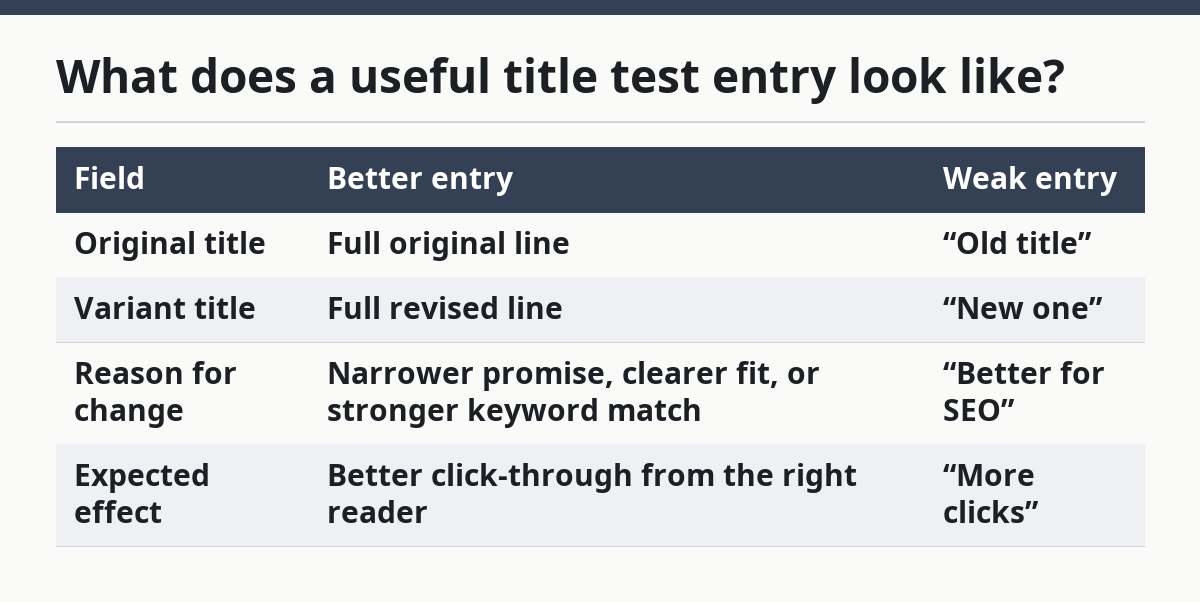
What does a useful title test entry look like?
A useful title test entry shows the exact original title, the exact variant, and the reason the new title should win. Titles are easy to rewrite badly because a small wording change can alter the reader’s expectation in a big way.
A strong title entry records the angle inside the title, not just the title words. For example, if the title shifts from “How to Build a SaaS Content Experiment Log” to a version that emphasizes “titles, angles, and CTA variations,” the log should note that the new title is more specific, not just “clearer.”
Here is a simple comparison of what to capture:
| Field | Better entry | Weak entry |
|---|---|---|
| Original title | Full original line | “Old title” |
| Variant title | Full revised line | “New one” |
| Reason for change | Narrower promise, clearer fit, or stronger keyword match | “Better for SEO” |
| Expected effect | Better click-through from the right reader | “More clicks” |
The trade-off with title testing is speed versus certainty. Quick changes are easy to run, but they can muddy your notes if you test too many title patterns at once. A slower, cleaner test gives you a better learning record, even if it feels less exciting in the moment.
Do not use the title log to store general writing feedback. If the note says “needs work,” it is useless later. If the note says “title now leads with the exact process instead of the outcome,” that is something a future writer can reuse or reject with context. If you need a place to capture the brief before writing, a content brief template can keep the title decision tied to the original hypothesis.
How do you record CTA variation tests?
You record CTA variation tests by logging the CTA text, the placement, and the action you expect the reader to take after reading the page. CTA work is not just about button copy. It also includes nearby text, the offer shape, and whether the CTA asks for a low-friction action or a bigger commitment.
A clean CTA entry should answer three questions: what changed, where it changed, and what behavior it was meant to affect. If the CTA sat above the fold in one test and at the bottom in another, write that down. Placement changes can matter as much as wording changes, and a later reader needs both facts.
Use short, concrete labels in the log. “Book a demo” and “Read the guide” are not the same kind of ask, so they should not be grouped as if they were. A CTA that asks for a 30-minute commitment is different from one that asks for a 2-minute read, and the log should show that difference.
CTA tests can get noisy fast if the page already has several competing links. If you change the main button but leave side links, inline links, and pop-ups untouched, note that the test environment was not isolated. That does not make the entry useless, but it does lower confidence in the result.
This is where many generic articles go wrong: they treat CTA testing like a design task only, but a safer approach is to consult a professional if the test setup is complex. It is also an editorial task, because the words around the CTA shape the reader’s next step. The log should therefore capture copy, context, and placement together. For a broader testing framework, Optimizely’s guidance on A/B testing is a useful external reference.
What should the performance notes say?
The performance notes should say what happened in plain English, not just whether the test “won” or “lost.” A useful note answers what changed in reader behavior, what stayed flat, and what you still do not know.
Avoid stuffing the notes field with raw numbers alone. A line that says “higher engagement” or “more clicks” is too vague, but a dump of metrics without a conclusion is not much better. Write one sentence that connects the result to the hypothesis, then one sentence on the likely reason.
For example, a note might say that a more specific title pulled the right reader but a softer CTA reduced next-step intent. That is the kind of note a future editor can use. A note that says only “performed well” cannot teach anything.
It also helps to mark the confidence level in words. If the test ran for only a short window or across a small section of the site, say so. A brief note like “early signal only” is better than pretending the result is settled. Google’s own documentation on structured data and helpful content also reinforces the value of clear, self-contained wording for machines and readers alike.
This section is where the log earns its keep. The better logs do not just store outcomes; they also preserve the reasoning behind them. A page can be rewritten 3 times, but if the notes are thin, the team starts from zero each time.
What rules keep the log useful over time?
The log stays useful when each entry follows the same 3 rules: one hypothesis, one primary change, one clear note on the result. If an entry tries to capture 4 ideas at once, it will be hard to compare with the next test.
Set a review rhythm that fits your publishing pace. For a busy SaaS editorial team, a weekly review works better than a loose end-of-month catch-up because the details are still fresh. In that review, sort by page type, test type, or result so patterns are easy to spot.
Use this simple rule: if a test does not change a future decision, it does not count as a completed learning. That does not mean every test must produce a win. It means every test must produce a note you can use later.
The log is not the place to document site-wide changes, refresh priorities, or quality checks. Those belong in other systems because they answer different questions. If you put them here, the log becomes a dumping ground and the title, angle, and CTA records stop being reliable.
The trade-off is obvious: a stricter log takes a few extra minutes per entry. The benefit is that, after 10 or 20 tests, you can see which copy patterns are worth repeating and which ones only looked good in the draft stage. For a process-heavy team, that is a better use of time than chasing isolated wins.
How do you turn the log into repeatable learning?
You turn the log into repeatable learning by grouping similar tests and pulling out the pattern that holds across them. One isolated win is a note; three similar wins start to become a rule.
Start by sorting entries into 3 buckets: title tests, angle tests, and CTA tests. Then ask what keeps showing up. Maybe specific titles work better when they name the reader’s job, or maybe certain angles land better when they remove jargon. The log should make those patterns visible without guessing.
Write the takeaway in one short line after each review cycle. Keep it in the same field every time, so future readers know where to look. A line like “Specific problem framing outperformed broad benefit framing for this page type” is more useful than a paragraph of scattered comments.
This is also where you decide what not to do next. A good log does not only preserve winners. It also saves you from repeating weak angles, broad titles, or CTA copy that asks for too much too early.
For the broader content planning system on this site, this page sits under the SaaS topic planning and editorial strategy hub. That matters because the log is one piece of a larger process, not a replacement for editorial judgment.
FAQ
What should a content experiment log track?
A content experiment log should track the page, the exact change, the date range, the hypothesis, and the performance note. For SaaS content tests, that usually means titles, angles, and CTA variations in one record. If a field does not help explain the result later, it does not belong in the log.
How do you test blog angles?
You test blog angles by changing the frame of the article without changing the topic itself. Keep one variable at a time, such as speed, risk, or outcome, and note what you expected that frame to do. The log should show the original angle, the new angle, and the reason the test mattered.
How do you document content learnings?
You document content learnings by writing the result in plain language and linking it back to the original hypothesis. A useful note says what happened, why it probably happened, and whether the signal is strong enough to repeat. Short, consistent notes are easier to reuse than long, vague ones.
Drafted with AI; not yet reviewed by a person.