How to Build a SaaS Topic Universe Map for Categories, Angles, and Adjacent Questions: A SaaS topic universe map is a planning sheet that turns one…
Last updated: November 20, 2026
A SaaS topic universe map is a planning sheet that turns one product area into a full set of categories, angles, and adjacent questions, so content can be grouped before briefs are written. It is the fastest way to see what to cover, what to skip, and where the coverage gaps are before a site starts publishing around a SaaS product.
What is a SaaS topic universe map?
A SaaS topic universe map is a structured view of the subject areas around one software product, usually spread across 3 layers: broad categories, narrower content angles, and adjacent questions. It is not a list of article ideas in random order. It is a map of the territory a site wants to own.
For a SaaS site, that matters because readers do not search one neat term. They search for feature questions, buyer questions, setup questions, comparison questions, and problem-solving questions. A topic universe map keeps those queries in the same system so the site does not publish five posts that all chase the same angle while leaving a key subject area uncovered.
The map also keeps search intent visible. A query about pricing, a query about onboarding, and a query about integrations may all sit under the same product, but they do not belong in the same content bucket. Google Search Central’s guidance on people-first content and Nielsen Norman Group’s work on search intent both point to the same truth: match the page to the job the reader is trying to do, not just the keyword phrase.
This is the right tool for a site that needs to plan 20, 50, or 200 pages around one SaaS category. It is not the right tool for a one-page microsite or a single blog post with no follow-up plan.
Why does a SaaS site need one?
A SaaS site needs one because content without a map tends to duplicate itself in 2 common ways: the same subject appears under different headlines, or one important subject never gets covered at all. Both problems waste time and weaken topical coverage.
The map solves that by forcing a choice at the planning stage. If one angle already exists, the next idea has to earn its place by answering a different buyer question, serving a different intent, or filling a gap in a subject area. That sounds simple, but it is the difference between a tidy cluster and a pile of near-duplicates.
The map also helps with internal structure later. A product category might hold 5 subject areas, each with 3 angles and 4 adjacent questions. That is enough depth to build a pillar page, cluster pages, comparison pages, and support articles without guessing at the last minute.
The trade-off is real: a good map takes more planning up front than a loose editorial list. For a small team, that can feel slow. The payoff is fewer rewrites, fewer overlapping briefs, and a clearer path from one topic to the next.
How do you build one step by step?
You build one by starting with the product, then sorting every likely question into categories, angles, and adjacent questions in a single sheet or board. A basic version can be made in 45 minutes; a better one often takes a few rounds of cleanup.
-
Write the product name and the core job in one line.
Use a plain phrase such as “project management software for agencies” or “billing software for small SaaS teams.” That sentence sets the boundary for the whole map and stops the list from drifting into unrelated software topics. -
List 5 to 8 subject areas around that product.
Common subject areas include features, setup, pricing, integrations, reporting, security, use cases, and alternatives. The exact set depends on the product, but the list should stay small enough to scan in under 2 minutes. -
Split each subject area into content angles.
An angle is the way the topic is framed. “Integrations” might become setup, limitations, best-fit tools, or troubleshooting. “Pricing” might become cost drivers, plan fit, or hidden running costs. -
Add adjacent questions under each angle.
These are the nearby questions a reader asks next, such as “Can it connect to X?” or “What happens when a team grows?” Keep these short and specific. If a question needs 2 or 3 paragraphs to answer, it probably deserves its own page later. -
Mark the search intent for each item.
Tag each line as informational, commercial, or transactional. A topic universe map is not a buyer journey map, but intent still matters because it tells the content team whether the page should explain, compare, or help a reader take action. -
Circle overlaps and remove duplicates.
If two items answer the same reader question in nearly the same way, keep one and cut the other. This cleanup step matters because a map with 30 lines and 10 repeats is not a map; it is a cluttered list. -
Review for coverage gaps.
Look for missing subject areas, not just missing keywords. A product might have plenty of feature content and almost no setup content, or lots of comparisons and no adjacent questions. That gap shows where the next content block should go.
Which buckets should the map include?
A useful SaaS topic universe map usually has 4 buckets: subject areas, content angles, buyer questions, and adjacent questions. Each bucket does a different job, and mixing them together makes the map harder to use.
| Bucket | What it holds | What it does not hold | Best use |
|---|---|---|---|
| Subject areas | Broad parts of the product space | Narrow article ideas | Sets the map’s main structure |
| Content angles | Ways to frame a subject area | Full outlines | Helps avoid repetitive pages |
| Buyer questions | Questions tied to evaluation or purchase | Random keyword variants | Shows what prospects want answered |
| Adjacent questions | Nearby follow-up questions | Full competitor comparisons every time | Expands coverage without drifting |
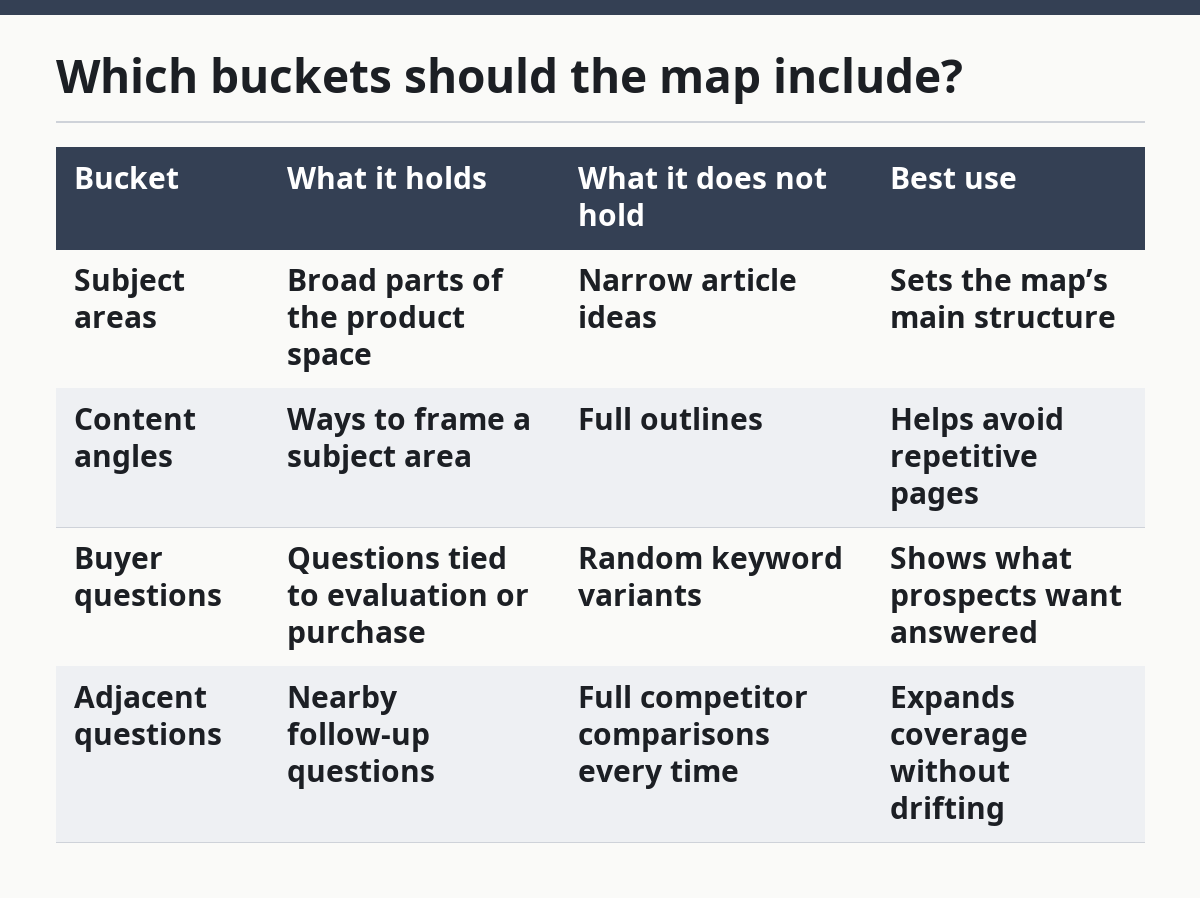
The subject area is the top layer. The angle is the lens. The buyer question is the reason a page exists. The adjacent question is the next thing a reader asks after the first answer.
A common mistake is to skip the middle two buckets and jump straight from a broad category to article titles. That creates a map that looks full but does not show how each page differs. Another mistake is to fill the map with only buyer questions and forget adjacent questions, which are often where useful cluster depth comes from.
The best version is simple enough to fit on one screen. If the map becomes a giant spreadsheet with 40 columns, it stops being a planning tool and becomes a storage problem.
What counts as an adjacent question?
An adjacent question is a follow-up question that sits one step away from the main query. It is not the same thing as the original topic, but it is close enough that a reader would ask it next.
For example, if the main topic is a feature category, adjacent questions might be about limits, setup time, edge cases, or compatibility. If the main topic is a comparison, adjacent questions might be about switching costs, team fit, or what changes after launch. These questions are useful because they expose the next content opportunity without forcing the site to repeat the same angle.
A good test is this: if the answer can be given in 2 or 3 short paragraphs, it may belong as a section inside another page. If it needs 600 to 900 words and introduces a different search intent, it probably deserves its own article later.
This is where topic expansion happens without bloating the map. A product that starts with 3 subject areas can quickly grow into 12 or more pages once adjacent questions are added, but only if the questions are distinct. Without that filter, the site risks creating five pages that all say the same thing with different headings.
How do you spot coverage gaps?
Coverage gaps show up when one subject area has 6 angles and another has only 1, or when a product has strong feature content but no pages for setup, limits, or comparison. The gap is not just “missing keywords.” It is missing reader coverage.
A simple way to spot gaps is to scan the map row by row and ask three questions: Which subject areas have the most lines, which have the fewest, and which have no adjacent questions at all? That takes 10 minutes and usually reveals the weakest parts of the plan. Another useful check is to look for repeated intent tags. If everything is informational, the map may be missing commercial or transactional pages that belong later in the funnel.
The point is not to make every subject area equal. Some topics deserve more space because they matter more to buyers. The point is to make the imbalance visible on purpose, so the team knows where depth exists and where it is still thin.
A map with gaps is not a failure. It is a signal. It tells the site where the next 3 to 5 articles should go instead of letting the next brainstorm pick whatever sounds easy.
What should you not do?
You should not turn the map into a keyword dump, a content brief, or a full content inventory. Those are different jobs, and mixing them makes the planning stage harder than it needs to be.
A keyword dump gives you raw search terms, but it does not show category structure. A content brief gives you page-level direction, but that is too detailed for the map stage. A content inventory tells you what already exists, but that is a separate audit. If this page tries to do all 3, the result is clutter and unclear ownership.
The same problem happens when the map is built only around volume or only around product features. A high-volume keyword can still be the wrong fit if it sits in the wrong intent bucket. A feature can still be the wrong anchor if no buyer question naturally follows it.
The honest trade-off is that a topic universe map is less precise than a final brief. It should be. Its job is to show the full field in 1 pass, not to settle every page decision. That is why a clean map can stay useful for months, while a brief may change after a single rewrite.
When is this the right tool?
This is the right tool when a SaaS site needs to plan a category before it writes the pages. It works best for teams that want to own a subject area over time, not just publish a few isolated posts.
It is especially useful when there are many buyer questions and many possible angles, because that is where overlap starts. A 1-page topic list may be enough for a narrow niche, but once the site starts covering features, pricing, integrations, alternatives, and adjacent questions, a map becomes the cleaner way to see the whole field.
It is not the right tool if the goal is only to draft a single article. In that case, the map is extra work. It is also not the right tool if the team already has a full content inventory and only needs to refresh existing pages. A map plans the future; it does not replace an audit.
Used well, the topic universe map gives a SaaS site a clearer shape. It shows what the site owns, what it still lacks, and where the next topic should come from.
Key takeaways
- A SaaS topic universe map is a planning tool, not a keyword list.
- The useful layers are subject areas, content angles, buyer questions, and adjacent questions.
- Search intent should be tagged early so pages do not blur together.
- A map is strongest when it exposes gaps, overlap, and next-step topics.
- It is best for category planning, not for writing final briefs or auditing old content.
FAQ
How do you map a SaaS topic universe?
Start with the product’s core job, then list 5 to 8 subject areas around it, such as features, pricing, integrations, and setup. After that, add angles and adjacent questions under each area, then label the intent for each item. The result should show what the site can cover without turning into a keyword dump.
What is the difference between a topic map and a cluster map?
A topic universe map is broader and shows the full field of categories, angles, and adjacent questions around a SaaS product. A cluster map is narrower and usually focuses on how pages connect inside one cluster. The topic map comes first because it helps decide what clusters should exist at all.
How do you find adjacent content questions?
Look at the next question a reader would ask after the main one, then keep moving one step outward. If the main topic is a feature, the adjacent questions may be about limits, setup, or fit. If the main topic is a comparison, the adjacent questions may be about switching, costs, or team size.
Drafted with AI; not yet reviewed by a person.