A SaaS blog metadata standard usually comes down to 4 required fields per post — title tag, meta description, canonical URL, and robots meta. This guide…
Last updated: November 20, 2026
Quick answer: a SaaS blog metadata standard usually comes down to 4 required fields per post — title tag, meta description, canonical URL, and robots meta. This guide, How to Build a SaaS Blog Metadata Standard for Titles, Descriptions, and Canonicals, shows how to set those rules so a blog can be published consistently, with fewer duplicate URLs and clearer search snippets. A SaaS blog metadata standard gives every post the same rules for title tags, meta descriptions, canonical tags, robots meta tags, and CMS fields so pages can be published without guessing. It is often the most practical way to keep search snippets, duplicate URLs, and index rules under control when many people touch the blog.
Key takeaways
- A metadata standard is not a content brief; it is the rule set for page-level fields that search engines read first.
- Title tags should carry the page’s main topic, stay distinct, and avoid repeated boilerplate that makes every result look the same.
- Canonical tags matter most when one post can appear at more than one URL, such as with tracking parameters, tag archives, or print-style variants.
- Robots meta tags are for index control, not for fixing weak pages.
- The easiest standard to maintain is one that lives in the CMS as required fields, dropdowns, and validation rules rather than in a document nobody opens.
What should the metadata standard do?
A metadata standard should tell the team exactly what to enter in each field and when to change it. For a SaaS blog, that means defining the title tag, meta description, canonical tag, robots meta tag, and the CMS fields that store each one.
Because the goal is operational consistency, not clever wording, the rules should be simple enough to apply on a normal publish day and after a migration. A standard that works on Monday, after a migration, and after a junior editor publishes at 5 p.m. is better than a polished document that only one person remembers.
A useful standard answers five questions in plain language: what each field is for, who fills it in, when it is mandatory, what values are allowed, and what to do when a post has more than one URL. That last part matters because metadata breaks most often when a post is republished, filtered, tracked, or copied into a new campaign path.
The cleanest version is simple enough to enforce in the CMS. A field that is optional on paper but required in the editor becomes required in practice. If the team can publish without a title tag or canonical, the standard is not a standard yet.
How should SaaS blog title tags be formatted?
SaaS blog title tags should lead with the post’s main topic, stay specific to one page, and avoid repeating the same brand-heavy pattern across every post. A title tag is the strongest on-page signal in this standard, so it needs a format the team can repeat without thinking.
A good rule is to define the shape, not just the tone. For example, the standard can say: use the topic first, keep the wording human, include the brand only when the title would otherwise be unclear, and do not reuse the same phrase for multiple posts. That prevents two posts from competing with nearly identical titles; if the team is unsure how far that rule should go, it should consult an SEO professional and review guidance from Google Search Central on title links. (Source: Google Search Central)
Title tags also need a limit in practice, even if the exact pixel cutoff changes. The standard should say to keep titles short enough that the key phrase survives truncation and the reader can still tell the post apart in search results. If a post title is already long, the title tag should not copy it word for word. Google’s title link guidance is useful here because it explains that search engines may rewrite display text when the title is vague or repetitive. (Source: Google Search Central)
The easiest mistake here is making every title follow the same template. That can help at first, but it creates a wall of same-looking results and makes updates harder later. A title standard should allow room for different post types, while still forcing a clear topic and a unique angle.
How should SaaS blog title tags be formatted?
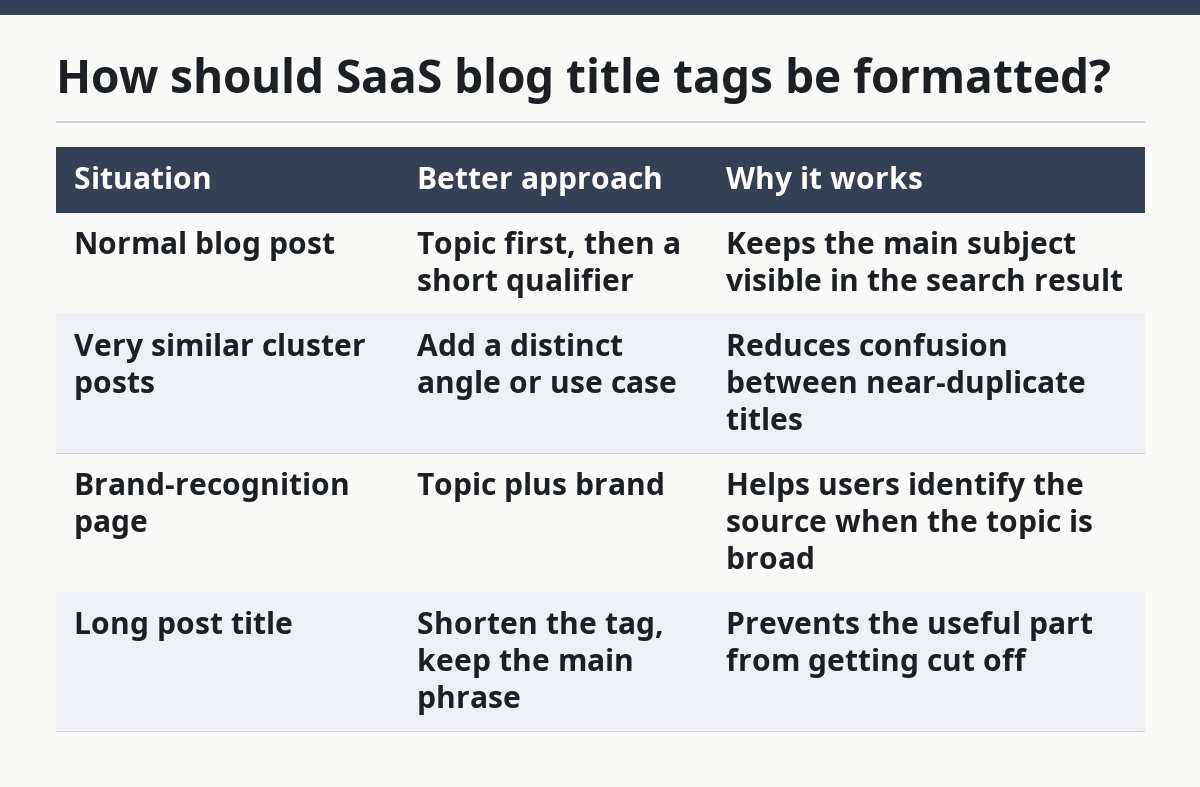
The title tag should follow one pattern for most posts and one fallback pattern for edge cases. A simple standard is easier to train, easier to QA, and easier to spot when something is wrong.
| Situation | Better approach | Why it works |
|---|---|---|
| Normal blog post | Topic first, then a short qualifier | Keeps the main subject visible in the search result |
| Very similar cluster posts | Add a distinct angle or use case | Reduces confusion between near-duplicate titles |
| Brand-recognition page | Topic plus brand | Helps users identify the source when the topic is broad |
| Long post title | Shorten the tag, keep the main phrase | Prevents the useful part from getting cut off |
The standard should also define what not to do. Do not stack several keywords in one title tag, and do not make every post start with the same three words. That kind of repetition does not help the reader decide which result to open.
This is the place to set a review rule for duplicates. If two title tags are too close, the editor should rewrite one before publish. That is a metadata rule, not a content quality rule, and it belongs in the standard because the fix happens in the field itself.
What belongs in the meta description?
A meta description should summarize the post in one clear line that helps searchers choose the result, even though it is not a ranking field in the same way a title tag is. The standard should treat it as a snippet control field, not a place to cram in extra keywords; if the team is unsure, it should consult an SEO professional and check Google Search Central’s snippet guidance. (Source: Google Search Central)
A good rule is to describe the post’s payoff in plain English. For a SaaS blog, that often means what the reader will learn, what problem the post addresses, or what angle it covers. The description should not repeat the title tag word for word, because the two fields have different jobs.
The standard should also define who writes it. If the CMS can store one description field per post, that field should be required at publish time. If the team relies on search engines to write snippets automatically, the standard still needs a preferred description so the page has a fallback.
The most common mistake is writing a description that sounds like a homepage slogan. That wastes the field. A meta description should match the post, not the brand mood. It should also stay specific enough that a person can tell the post apart from the next result in the list.
When should a canonical tag be added?
A canonical tag should be added whenever more than one URL can show the same or nearly the same blog content. That includes duplicates created by parameters, alternate paths, tag pages, or CMS behavior that surfaces one post in more than one place.
The standard needs a simple rule: every indexable blog post gets one preferred URL, and every alternate version points to it. That makes the canonical tag part of publish setup, not a later cleanup task. It also helps after redesigns, when old paths and new paths can both exist for a while. The W3C HTML standard defines the canonical link relation as a page-level hint, which is why it belongs in the CMS rather than in scattered notes. (Source: W3C HTML)
The canonical field should be mandatory in the CMS if the platform can create alternate URLs. If the system only ever produces one clean URL per post, the standard can still require a canonical tag that points to the self-referencing URL. That keeps the rule consistent across the site.
The main trade-off is that canonical tags do not fix everything. They do not solve thin pages, messy IA, or duplicate copy on their own. They only tell search engines which URL is preferred. If the page set is badly duplicated, the standard still needs page-level cleanup elsewhere.
Which robots meta rules should the standard set?
Robots meta rules should tell search engines whether a page may be indexed and whether its links may be followed. For a SaaS blog metadata standard, that usually means defining the default as indexable unless there is a clear reason not to index.
The standard should list the page types that stay out of index, such as thin internal utility pages or blocked variants that are not meant to rank. It should also say who can set noindex, because that field has real consequences and should not be used casually.
A clean rule is better than a long list of exceptions. If the blog has only a few content types, the default should apply to most of them and the exceptions should be rare. If editors can choose any robots value without guidance, the field becomes a patch for mistakes instead of a control.
Robots meta is also where teams make one of the costliest mistakes: using noindex on a page that should have been canonicalized, or canonicalizing a page that should simply not exist in search. The standard should separate those cases. Canonical handles duplicate preference. Robots handles index permission.
How do you put the standard into the CMS?
You put the standard into the CMS by making the right fields required, restricting bad values, and showing editors the rules where they publish. A document alone will not hold up once multiple people start publishing to the blog.
The practical setup looks like this:
- Create fields for title tag, meta description, canonical URL, and robots meta. The result is that each post has one place for each rule, instead of burying decisions in theme code or manual notes.
- Mark the needed fields as required for publish. This turns the standard into a gate, not a reminder.
- Add guidance text beside each field. A short note such as “use the preferred URL” or “write a unique snippet summary” prevents guesswork at the point of entry; if the team is unsure how strict the wording should be, it should consult an SEO professional and review Google Search Central’s guidance on snippets and title links. Google Search Central Google Search Central
- Limit robots choices to approved values. That avoids accidental noindex or other combinations that do not fit the policy.
- Build a QA pass for duplicates and missing values before publish. The result should be obvious: the post either meets the metadata standard or it does not.
- Store the preferred canonical target in a single place. If the URL changes, the field should update with it, not depend on someone remembering a redirect chain.
The CMS is where the standard becomes real. If the fields are hidden, optional, or easy to ignore, the rules will drift within a few dozen posts. A standard that editors can see and fail fast is worth more than a longer policy document.
How does this affect SERP snippets?
A metadata standard affects SERP snippets by making the title and description predictable enough for search engines and readers to use. It does not guarantee a chosen snippet, but it gives the page a cleaner default.
Title tags matter most because they usually show first and carry the strongest clue about the page. Meta descriptions matter because they can improve the odds that the snippet reads like a useful summary instead of a random line from the page.
The standard should assume that snippets can be rewritten by search engines, especially if the metadata is vague or duplicated. That means the goal is not to force one exact snippet. The goal is to give the engine a better option than it would invent on its own.
A common mistake is writing metadata only for internal approval, not for the search result. The search result is the public face of the page. If the title and description are vague, repetitive, or off-topic, the snippet becomes harder to click and harder to trust.
A simple source of guidance here is Google Search Central’s title link and snippet documentation, which explains how search results may choose or rewrite display text. The W3C’s HTML standard is also useful for understanding the canonical link relation and meta elements as page-level constructs. Those references help keep the standard tied to actual markup, not just editorial habit.
What should the standard say about exceptions?
The standard should say which exceptions are allowed and who can approve them, because no metadata rule survives first contact with a migration. A page moved to a new path, a campaign variant, or a merged post can all create edge cases.
The most useful exception rule is short: if a post has more than one URL, point all nonpreferred versions to the preferred one; if a post should not be indexed, use robots directives rather than hoping canonical alone will hide it. That keeps two separate problems from being mixed together.
The standard should also allow one-off title or description changes when the post has a strong reason to stand out. For example, a critical update post may need a different title shape from a general guide. That does not break the standard if the reason is documented and the field still follows the same basic rules.
This is where the standard should stop short of becoming a governance model. It does not need to define ownership chains, approval ladders, or change logs on this page. It only needs to define the page-level metadata behavior that editors and CMS fields must follow.
What is the honest trade-off here?
The honest trade-off is that a strict metadata standard reduces flexibility while it improves consistency. It is right for teams that publish often and wrong for teams that want every post to be treated as a one-off experiment; if the team cannot decide where that line belongs, it should consult a professional before locking the rules.
A tight standard helps when many people edit the blog, when duplicate URLs are likely, or when the site grows fast enough that manual cleanup falls behind. It is less useful if the blog is tiny, if publishing is rare, or if the CMS cannot enforce the fields at all.
The other trade-off is time. Writing a real standard takes longer than leaving metadata to editors. But leaving it vague pushes the work into search results, where the cost shows up as duplicates, confusing snippets, and inconsistent indexing. That is a bad place to do policy by accident.
The clean rule is this: if the site depends on blog traffic, the metadata standard should be specific enough to enforce in the CMS. If it cannot be enforced there, it is not ready yet.
How should SaaS blog title tags be formatted?
SaaS blog title tags should put the topic first and stay distinct from every other post on the site. A standard should define one repeatable pattern, a length target that keeps the key phrase visible, and a rule for when the brand name belongs at the end. If two titles feel interchangeable, one of them should be rewritten before publish. For SaaS teams that need a simple rule set, this is the core of a SaaS blog metadata standard for titles and canonicals.
When should a canonical tag be added?
A canonical tag should be added whenever one post can be reached through more than one URL. That includes tracking parameters, archive variants, duplicate CMS paths, and republished content that points back to a preferred version. If there is only one clean URL, the canonical can still point to itself so the rule stays consistent.
What metadata should every blog post have?
Every blog post should have a title tag, a meta description, a canonical tag, and a robots meta setting in the CMS. Those four fields control how the page is named, summarized, preferred, and indexed. If one of them is missing, the post is harder to manage and easier to duplicate by accident.
Drafted with AI; not yet reviewed by a person.