A SaaS launch rollout timeline usually uses 4 stages—teaser, beta, GA, and follow-up—and it works best when one owner and one dependency are assigned to…
Last updated: November 20, 2026
Quick answer: a SaaS launch rollout timeline usually uses 4 stages—teaser, beta, GA, and follow-up—and it works best when one owner and one dependency are assigned to each date. This article on How to Build a SaaS Launch Rollout Timeline for Teasers, Beta, GA, and Follow-Up Posts explains how to build that sequence around one launch calendar, so the teaser, beta, general availability, and follow-up posts land in the right order on the right channel. The point is not to publish more often; it is to make sure every post lands in the right order, on the right channel, with no gap between beta, general availability, and the follow-up.
Key takeaways
- Start with the launch date, then work backward for teaser and beta timing.
- Put each post on one launch calendar so marketing, product, and support see the same order.
- Give every milestone one owner and one dependency so handoffs do not stall.
- Keep GA separate from follow-up content; they solve different jobs.
- Skip extra posts when a channel has no clear role, because more posts can create more confusion.
What should the timeline do?

A launch rollout timeline should tell people what goes out, when it goes out, who owns it, and what must happen first. For a SaaS launch, that usually means a teaser, a beta post, a GA announcement, and one or more follow-up posts tied to product or customer proof.
The mistake most teams make is treating the timeline like a content list, though you should check your launch workflow with a launch manager or product marketer if the release is complex. A list says “write teaser, write beta, write GA.” A rollout timeline says “teaser goes 10 days before beta, beta waits on a small user group, GA waits on final copy and support readiness, and follow-up waits until there is something real to report.” That sequencing matters more than the words themselves. For a related planning framework, see this launch checklist and release notes guide.
This is why a launch calendar is the right working document. It turns one launch into a chain of decisions instead of a pile of tasks. If a teaser has no beta behind it, the teaser can create interest that the team cannot satisfy. If GA posts before the product is ready, support gets the first wave of questions without a clean answer.
The launch rollout timeline is not a full internal operations calendar, and it is not a feature-flag plan. It stays focused on public timing and handoffs across teaser, beta, GA, and follow-up posts. That narrow scope keeps it useful for the person who has to publish the next asset, not only the person managing the release.
For background on release-plan structure and post sequencing, Atlassian’s release plan template is a useful reference point: Atlassian release plan template. For launch-message planning and timing around product posts, Intercom’s launch-planning content is also worth comparing with your own calendar. For a broader launch framework, see our product launch plan.
How do you build the launch calendar?
You build the launch calendar by anchoring it to one GA date, then placing teaser, beta, and follow-up posts in a backward and forward chain. Keep each step tied to a date, a channel, and one owner.
- Set the calendar in a spreadsheet and put GA on the top line, so every earlier date can be counted back from one fixed point.
- Place the teaser in the calendar before beta, so the first public signal creates interest without promising availability.
- Add the beta to the calendar after the teaser, so the launch has a testable stage before the full release.
- Mark GA in the calendar as the point where the product is publicly available and the main announcement goes live.
- Schedule follow-up posts in the calendar after GA, so the launch keeps momentum with proof, updates, or customer stories.
The timeline works best when each entry includes a short owner line, such as marketing for teaser copy, product for beta notes, and support for GA messaging. If the owner is missing, the date is only decoration. If the dependency is missing, the date can slip without warning.
A practical launch calendar usually needs at least three kinds of dates: publish dates, review dates, and handoff dates. A review date lets someone approve copy before it is live. A handoff date gives the next owner time to work before the calendar turns. If you need a template, use our launch calendar template.
The trade-off here is simple. A tighter calendar is easier to follow, but it leaves less room for copy changes and late product notes. A looser calendar absorbs change, but it also makes launch day feel soft and vague. For most SaaS launches, the better choice is a clear calendar with one buffer date before GA and one buffer date after it.
How do you sequence teaser, beta, and GA?
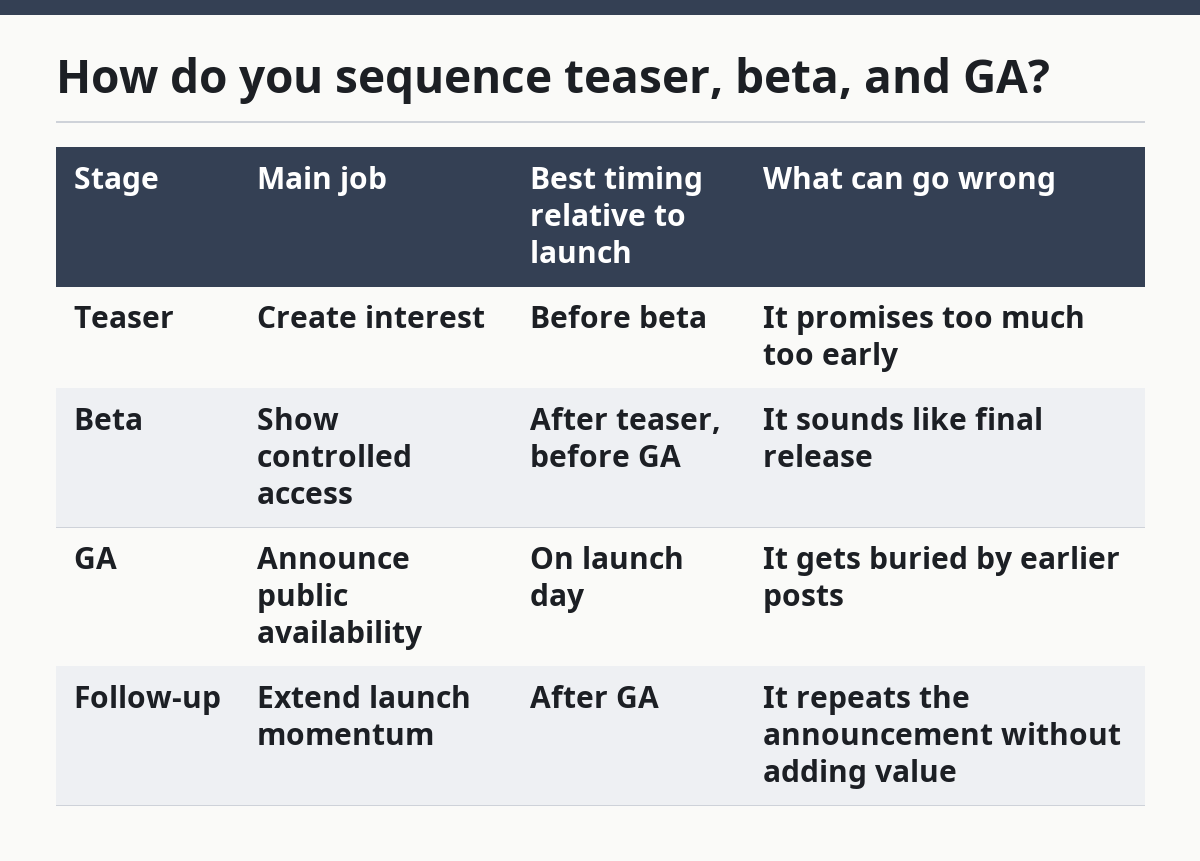
You sequence teaser, beta, and GA by giving each stage a different job, not by posting the same message three times. The teaser opens interest, the beta shows controlled access, and GA confirms public availability.
The teaser should be the earliest public touch. Its job is to say that something is coming, not to explain every detail. If it lands too close to GA, it can feel redundant. If it lands too early, people may forget it before the beta or launch announcement arrives.
The beta belongs after the teaser because it gives the team a real middle stage. It is the point where the product is visible enough to discuss, but not yet fully released. That makes it the right place to gather feedback, adjust message framing, and prepare the team for GA questions.
GA closes the main sequence. It should not be treated as simply another post in the same style as the teaser. GA is the milestone that lets you use more direct language, clearer product claims, and a stronger call to action because the product is now available to the broader audience.
| Stage | Main job | Best timing relative to launch | What can go wrong |
|---|---|---|---|
| Teaser | Create interest | Before beta | It promises too much too early |
| Beta | Show controlled access | After teaser, before GA | It sounds like final release |
| GA | Announce public availability | On launch day | It gets buried by earlier posts |
| Follow-up | Extend launch momentum | After GA | It repeats the announcement without adding value |
This sequence is not right for every product. It is a good fit when the launch needs public buildup, a visible beta, and a clear moment of availability. It is a poor fit when the launch is tiny, the audience is already warm, or the team cannot support multiple public touchpoints. For a related comparison, see beta launch strategy.
Who owns each launch step?
Each launch step should have one owner, one reviewer, and one dependency. That keeps the timeline from turning into a shared file that everybody edits and nobody finishes.
The teaser usually belongs to marketing or product marketing, because it is the earliest outward-facing message. The owner needs to know the channel, the tone, and the date. The reviewer should check for wording that overpromises before the product is ready.
The beta often needs product plus marketing input, because it sits between internal release work and public messaging. One person should own the invite or announcement copy, while another owns the product details that make the beta accurate. If beta access is limited, that access rule becomes the dependency that controls when the post can go out.
GA usually needs the clearest assignment of all. One person owns the announcement, one owns the support handoff, and one owns final approval. The GA post should not wait on a chain of loose replies in chat. It should wait on a named approval and a known finish line.
Follow-up posts often get ignored because they look optional. They are not optional if the launch needs proof, clarification, or a second wave of attention. One owner should decide whether the follow-up is a customer example, a feature reminder, or a correction to what people asked after GA.
A good owner matrix also shows what the person does not own. That can help reduce overlap. The teaser owner should not have to write the beta FAQ. The GA owner should not have to chase every internal asset alone. Clear edges save hours, even in a small team.
What are the launch checkpoints?
Launch checkpoints are the moments when the team decides whether the next post can go live. They are the safety rails of the timeline, and they should sit before beta, before GA, and before any follow-up post.
The first checkpoint is message approval. That means the teaser, beta, or GA copy is final enough to publish. The second checkpoint is product readiness, which matters most before beta and GA. The third checkpoint is support readiness, which matters most before GA because that is where customer questions tend to spike.
A fourth checkpoint is channel readiness. If the launch includes email, social, blog, or in-app posts, each channel should have the final version at the same time or with a known delay. A channel that lands two days late can make the whole launch feel out of sync.
These checkpoints are not the same as a full readiness audit. They only answer one question: can the next public step happen on time? That narrow question keeps the rollout timeline from becoming a second project. If the answer is no, the timeline should show the blocker, not hide it.
Use a simple rule: no launch date moves forward until the blocker is named. A vague “almost ready” note is not a checkpoint. It is a delay without a decision. For more on launch readiness, see our SaaS launch checklist.
What mistakes break a rollout timeline?
The biggest mistakes are bad order, unclear ownership, and follow-up posts that are written too late. Each one costs time, because it forces the team to redo copy or scramble for approval after the date is already on the calendar.
Bad order is the easiest mistake to spot. A teaser that runs after beta makes the launch feel backward. A GA post that lands before the beta ends makes the beta look like a mistake instead of a stage. The fix is to anchor every post to one launch calendar and one launch date.
Unclear ownership is more expensive than it looks. It usually shows up as a missing approval, a late handoff, or a channel that never gets the final asset. The fix is to assign one owner per milestone and one backup reviewer if the owner is unavailable.
Late follow-up posts waste the chance to answer what people asked at GA. A follow-up written three days after launch can still work, but one written after the conversation has moved on usually lands flat. The fix is to reserve at least one follow-up slot before GA, even if the final angle changes later.
Another mistake is trying to make every post do the same job. That creates repeat copy and weakens the launch. Teaser, beta, GA, and follow-up each need a different message, even if they point to the same product.
When should you not use this structure?
You should not use this structure when the launch is so small that teaser, beta, GA, and follow-up would only create noise. If the audience is already tiny, or the product changes do not need public buildup, a shorter timeline can be cleaner.
This structure is also a poor fit when the team cannot support multiple checkpoints. A launch calendar with four stages only works if the people who own the stages can actually approve them. If there is no one to own beta or follow-up, the timeline becomes fake precision.
The honest trade-off is that a multi-step rollout creates more control, but it also creates more moving parts. That is useful for launches that need public pacing, message discipline, and a visible release path. It is not useful when the team needs speed above all else.
If the launch is mainly internal, or if the main problem is operational sequencing rather than public timing, a different calendar may fit better. This page is for teaser, beta, GA, and follow-up posts. It is not the right tool for internal milestone tracking or feature-flag release planning. For a different workflow, see feature release planning.
How do you sequence a product launch timeline?
You sequence a product launch timeline by starting with GA, then placing beta before it and teaser before beta. A common order follows the audience’s point of view: first they hear that something is coming, then they see limited access, then they get the full release.
That order gives each stage a separate job. It also makes the launch easier to manage in a launch calendar, because every date points to the next one.
What comes before beta in a rollout?
A teaser usually comes before beta in a rollout. The teaser gives the audience a first signal without asking them to use the product yet.
If the launch needs more context, a short internal approval checkpoint can sit between teaser and beta, but the public sequence still starts with the teaser.
How do you plan follow-up launch posts?
You plan follow-up launch posts by reserving them before GA, then giving each one a distinct angle. One can answer common questions, one can show a use case, and one can point back to the launch announcement.
The key is to avoid reposting the same message. A follow-up should add something new, or it becomes background noise after launch day.
Drafted with AI; not yet reviewed by a person.