In 10 steps, you can build a SaaS audience segmentation map that separates buyers, users, champions, decision makers, and other stakeholders so each group…
Last updated: November 16, 2026
Build a SaaS Audience Segmentation Map
Quick answer: In 10 steps, you can build a SaaS audience segmentation map that separates buyers, users, champions, decision makers, and other stakeholders so each group gets the right message at the right stage. This guide explains how to build a SaaS audience segmentation map for buyers, users, and champions in a way that supports content planning, buyer persona work, and account-based messaging.
A SaaS audience segmentation map is a working chart that separates buyers, users, champions, decision makers, and other stakeholders so each group gets the right message at the right stage. It works best when it shows who pays, who uses the product daily, who pushes the deal forward, and who can block it.
Key takeaways

- A useful map is role-based first and content-based second.
- Buyers, users, and champions need different proof, even inside the same account.
- The map should include decision makers and other stakeholders, not just the loudest contact.
- Activation and churn signals help keep the map current after the first contact.
- A map that treats every contact the same can create bland content and weak follow-up, according to role-based segmentation guidance from sources such as Harvard Business Review and Salesforce.
What is a SaaS audience segmentation map?
A SaaS audience segmentation map is a simple role chart that shows how content should change for each person around a deal or account. It is not a buyer persona sheet and it is not a broad market segment grid; it is a practical way to assign messages to buyer, user, champion, decision maker, and stakeholder roles.
That matters because the same product problem can mean different things to different people. The buyer may care about cost, risk, and fit. The end user may care about speed, steps, and daily work. The champion may care about getting internal support, while the decision maker may care about approval, standards, and rollout.
A generic article often gets this wrong by turning every role into one profile. That can make content bland. It also hides the fact that one account can contain several people with different goals, and those people may want different proof at the same time.
A good map is useful even when the sales cycle is short. It gives the content team a place to put the facts that belong to each role, instead of forcing one page to do all the work. If the map cannot tell the difference between a buyer and an end user, it is too vague to guide content.
How do I build a SaaS audience segmentation map?
Build a SaaS audience segmentation map by listing the roles in the buying group, naming the question each role asks, and tying each role to the content it should see. The result is a map that tells you who needs product detail, who needs proof, and who needs internal support material.
Start with the account-level view. Then split the map into the people around the account, not just the account itself. In SaaS, that means you are mapping roles such as buyer, end user, champion, decision maker, and stakeholder.
-
List the roles that can appear in one deal or one account.
Include buyer, user, champion, decision maker, and stakeholder. The result is a map with real audience slices instead of one mixed group. -
Write the main job of each role in one line.
Keep it plain: the buyer approves spend, the user works in the tool, the champion promotes the tool, the decision maker signs off, and the stakeholder affects the outcome. That gives you a role anchor you can build around. -
Add the main concern for each role.
Buyers often care about risk and budget. Users care about workflow and ease of use. Champions care about momentum and internal buy-in. Decision makers care about fit, control, and rollout. Stakeholders care about what changes for them. -
Match each role to one content type.
A buyer may need comparison pages, pricing context, and procurement support. A user may need onboarding help, feature guides, and short how-tos. A champion may need internal decks, rollout notes, or proof points they can share. -
Mark where the same person can hold more than one role.
In smaller teams, one contact may act as both user and champion. In larger deals, those roles may split across several people. The map should show overlap so content does not assume one audience per person. -
Keep the map tied to account signals, not guesswork.
Use observable actions and role clues from the account, then update the map when new people join the thread. A map that stays fixed for 6 months will miss the real buying group.
The trade-off is plain: a more detailed map takes more work, but it gives cleaner targeting. A thin map is faster to make, but it usually collapses buyer, user, and champion into one generic audience, which weakens content.
Which roles belong on the map?
The map should include the roles that shape the deal, not every person in the company. The core set for SaaS is buyer, end user, champion, decision maker, and stakeholder.
| Role | What they care about | Content that fits | Common mistake |
|---|---|---|---|
| Buyer | Cost, risk, fit, approval path | Pricing context, comparison pages, procurement help | Treating them like a product user |
| End user | Daily workflow, speed, setup | Feature guides, onboarding, task-based content | Giving them budget language they will skip |
| Champion | Internal support, momentum, proof | Shareable summaries, rollout notes, value proof | Assuming they can close the deal alone |
| Decision maker | Approval, standards, rollout risk | Executive summary, business case, clear outcomes | Giving them only feature detail |
| Stakeholder | Impact on their team or process | Change notes, role impact, short FAQs | Leaving them out because they are not the signer |
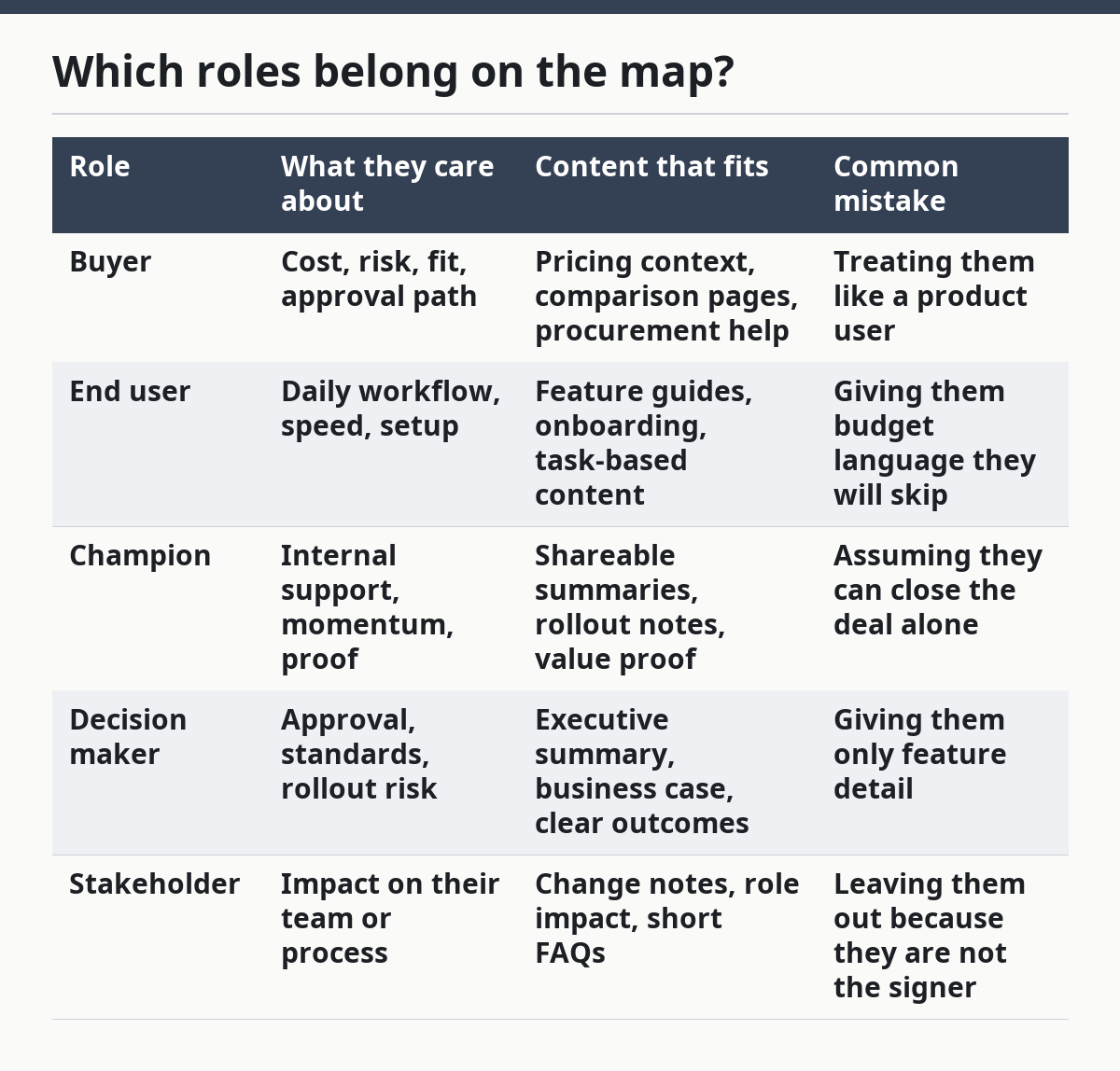
This split matters because each role asks a different question. The buyer asks, “Should I fund this?” The user asks, “Can I do my work faster?” The champion asks, “Can I get others to back this?” The decision maker asks, “Is this safe to approve?” The stakeholder asks, “What changes for me?”
A generic map often merges champion and decision maker. That can be a costly mistake, according to common sales-ops and content-targeting practice. A champion can push the conversation forward without having authority to approve spend, and a decision maker can approve a deal without ever becoming an active advocate. Treating those roles as the same can lead to weak content and weak follow-up.
This is also where the map protects the content team. It stops a how-to guide from being turned into a sales page, and it stops a pricing page from trying to teach daily product use. One page should not serve all five roles equally.
How do buyer, user, and champion content differ?
Buyer, user, and champion content differ because each role needs a different level of proof, detail, and action. Buyers need business logic, users need task support, and champions need material they can reuse inside the account.
The difference is easiest to see in how they read. A buyer may scan a page for risk, cost, and fit in under a minute. A user may want a 3-step workflow they can follow right away. A champion may need a concise summary they can forward to a manager, finance lead, or teammate.
Here is the practical split:
- Buyer content: show why the product deserves budget.
- User content: show how the product changes daily work.
- Champion content: show how to build support across the team.
The honest trade-off is that one asset rarely serves all three well. A feature page packed with interface detail can help users, but it may bore buyers. A high-level business case can help buyers and decision makers, but it may leave users with no clue how to start. The map exists to prevent that blur. For a deeper look at role-specific messaging, see our SaaS messaging framework.
A useful rule is to ask what “yes” means for each role. For the buyer, yes may mean approval. For the user, yes may mean adoption. For the champion, yes may mean internal momentum. For the decision maker, yes may mean low-risk rollout. For the stakeholder, yes may mean minimal disruption.
That is why content targeting should never stop at one persona label. If a page is aimed at “the customer,” it is aimed at nobody in particular. If it is aimed at a buyer, user, or champion, it can say something specific and useful.
Where do decision committees change the map?
Decision committees change the map by adding more people, more questions, and more checkpoints before a deal moves forward. In a committee, the map has to show who influences approval, who shapes adoption, and who can stop the deal.
A committee is not just a bigger version of one buyer. It is a set of roles with different pressure points. One person may care about budget, another about IT risk, another about rollout, and another about daily use. That is why the map should track relationships between roles, not just list names.
Use the map to mark three things:
- who brings the problem into the room,
- who can approve or block the next step,
- who will have to live with the rollout.
If those three are not separate, the content plan will drift. The champion may get the wrong proof. The decision maker may get too much product detail. The user may never get onboarding help. The stakeholder may only hear from sales, which is often too late.
The map also helps with committee content order. Early-stage material should make the problem clear. Mid-stage material should answer objections. Late-stage material should show rollout steps and what support looks like after approval. That order matters more than one long content asset that tries to satisfy everyone at once.
One common mistake is to assume the loudest internal contact is the whole committee. That often costs time because the map misses hidden blockers. A finance lead, operations lead, or team manager may not appear in the first call but can still shape the outcome.
How do I keep the map current?
Keep the map current by updating it when role signals change, especially after onboarding, product use, or account risk changes. A map that stays static for months will drift away from the account it is meant to reflect.
There are a few useful signals. Activation status can be a custom boolean or score based on onboarding completion, core feature use in 7 days, and team invites, according to eggknite.com. That kind of signal tells you whether the account has moved from interest to real use. If the user side changes, the content plan should change too.
Churn risk can also be tracked at account level using declining usage, failed payments, shrinking seats, and a product health score, according to eggknite.com. That matters because a map is not only for acquisition. It also helps you spot when a buyer has gone quiet, when a user group is slipping, or when a champion has lost traction.
A practical update rhythm is simple:
- review the map after new people enter the account,
- adjust role labels when usage changes,
- flag accounts when churn signals appear,
- retire labels that no longer match the account.
The drawback is that this takes discipline. A map is not a one-time worksheet. It is a living model of how the buying group behaves. If the team cannot update it after onboarding or a role change, it will slowly turn into old paperwork.
What mistakes break a segmentation map?
The biggest mistakes are flattening roles, overloading one page, and using the map as a naming exercise instead of a content tool. Each one costs clarity, and clarity is the whole point.
The first mistake is treating buyer, user, and champion as the same person. That can hurt precision. The fix is to assign one primary job to each role and to let overlap exist only where it is real.
The second mistake is making the map too broad. That can hurt usefulness. If every stakeholder gets the same message, nobody gets a message that fits. Keep the map tied to the content type each role actually needs.
The third mistake is skipping decision makers because they are harder to reach. That can hurt deals. Decision makers may not use the product every day, but they still shape approval. Their questions belong on the map even when they are not the loudest voice.
The fourth mistake is forgetting the account after the first touch. That can hurt relevance. A map built from one lead can miss how the account changes once onboarding starts or usage drops. Activation and churn signals help prevent that drift.
The fifth mistake is writing the map in a way nobody can use. That can hurt adoption inside the team. If the map cannot tell a writer what page to create or tell sales what proof to send, it is just a neat chart.
The best maps are simple enough to use in under 10 minutes and specific enough to change the next piece of content. If it takes a meeting to decode the map, it is probably too heavy.
FAQ
What is audience segmentation in SaaS content?
Audience segmentation in SaaS content means splitting the audience by role, need, and stage so each group gets a different message. In practice, that usually means separating buyers, users, champions, decision makers, and stakeholders instead of writing one page for everyone. The point is to make content fit the job each person is trying to do.
How do I separate buyers from users?
Separate buyers from users by asking what each one is trying to approve or accomplish. Buyers care about budget, risk, and fit, while users care about daily work, setup, and speed. If one page tries to answer both sets of questions at once, the message usually gets dull and less useful.
Why does SaaS content need different audience segments?
SaaS content needs different audience segments because one account can contain several people with different goals. A buyer may approve the spend, a user may adopt the product, and a champion may push the deal forward. If content does not match those roles, it often misses the questions that move the account.
How do champions fit into the map?
Champions fit into the map as the people who create momentum inside the account. They are not always the buyer or the decision maker, but they often help gather support, share proof, and keep the conversation moving. Leaving them out can weaken the whole path from interest to approval.
Drafted with AI; not yet reviewed by a person.