How to Build a SaaS Launch Operations Calendar for Internal Milestones, External Posts, and Follow-Up Tasks: To build a SaaS launch operations calendar…
Last updated: November 18, 2026
To build a SaaS launch operations calendar, map your release backward from a single launch date across product, marketing, support, and sales teams to align internal readiness with public announcements. This operational schedule replaces disconnected spreadsheets with a unified timeline covering engineering milestones, outward communications, assigned task owners, and post-launch maintenance.
This operational blueprint directly supports the broader discipline of saas product launch operations by turning go-to-market plans into trackable team responsibilities.
Key Takeaways
- A functional launch calendar schedules backwards from a fixed target date, establishing hard gates for code freezes and customer support enablement before any public messaging goes out.
- Every entry demands three explicit fields: a single named owner, a hard due date tied to a launch-day offset (such as T-14 days), and a verifiable delivery artifact.
- Internal milestones must reach completion 3 to 5 business days ahead of corresponding external announcements to prevent public promotion of incomplete features.
- Operational follow-up work requires dedicated resourcing across the 30-day post-launch window to handle bug escalations, funnel drop-offs, and onboarding bottlenecks.
What is a SaaS launch operations calendar?
A SaaS launch operations calendar is a centralised operational schedule that coordinates cross-functional activities across product, marketing, sales, and support for a software release. Unlike a standard editorial calendar that schedules blog entries or social media updates, this operations calendar tracks the dependencies between engineering readiness and outward-facing activities.
[T-30 to T-14: Internal Base] -> [T-7 to T-1: Go/No-Go Gates] -> [Day T: Rollout & Comms] -> [T+1 to T+30: Retros & Support]
- Feature Complete • Support Dry Run • DNS & Infrastructure • Bug Triage Burndown
- Sales Enablement Deck • Executive Sign-Off • Outbound Comms Live • Drop-Off Analysis
When engineering adjusts a release date, an operations calendar forces an immediate recalculation of sales training, support readiness, and customer-facing announcements. It serves teams building business-to-business (B2B) and business-to-consumer (B2C) web applications where delivering a broken feature damages retention metrics.
The primary difference between a marketing timeline and an operations calendar lies in the ownership of risk. A marketing plan tracks when an email sends or an ad campaign begins. An operations calendar tracks whether the application infrastructure handles peak concurrency, whether customer service representatives have access to troubleshooting macros, and whether sales engineers can demo the feature without engineering assistance.
This framework suits software companies running structured 4-week to 12-week release cycles. It is the wrong tool for early-stage teams doing continuous deployment of minor interface fixes multiple times per day. For those micro-releases, lightweight issue trackers like GitHub Issues provide lower overhead without formal coordination documents.
How do you build a SaaS launch operations calendar?
Building a SaaS launch operations calendar requires establishing a reverse timeline anchored to your public release day (Day T), standardising entry fields, and locking cross-team operational dependencies. The following five-step process creates a working launch operations structure for mid-market and enterprise releases.
“`
+———————————————————————————————————+
| LAUNCH OPERATIONS CALENDAR WORKFLOW |
+————————————+———————————–+——————————–+
| PHASE 1: REVERSE CADENCE | PHASE 2: DEPENDENCY MAPPING | PHASE 3: VERIFICATION GATES |
| • Anchor Day T | • Tag dependent paths | • Stage code freezes |
| • Calculate offsets (T-30 to T-1) | • Identify blocking bottlenecks | • Run support dry-runs |
| • Schedule T+1 to T+30 work | • Flag single-point failures | • Conduct Go/No-Go reviews |
+————————————+———————————–+——————————–+
“`
- Establish your launch date and backward offsets. Anchor the schedule to Day T, then calculate every working deadline in reverse using working days (T-30, T-14, T-7, T-2). This prevents dates from floating when broader roadmap deadlines shift.
- Assign a single owner and verifiable artifact to every entry. Record the owner by name rather than department, and define the required outcome as a tangible link or document (for example, “Knowledge Base URL published to staging” rather than “work on docs”).
- Map upstream dependencies between departments. Link public-facing tasks to their operational requirements, such as requiring the production billing webhook test (product) before the promotional discount code activates in the checkout flow (marketing).
- Schedule the internal Go/No-Go gate. Set a mandatory evaluation session at T-3 days where product managers, engineering leads, support directors, and product marketing managers review blockers against established operational criteria.
- Add the post-launch operational phase (T+1 through T+30). Populate the calendar with operational maintenance items, including daily error-budget reviews for the first 72 hours, weekly pipeline attribution tracking, and a 30-day post-mortem review.
How do you structure internal milestones against external announcements?
Structure internal milestones against external announcements by enforcing a 3-to-5-day buffer between internal technical verification and public promotional campaigns. If your team plans an external launch announcement on October 15 (Day T), internal code completion must lock by October 8 (T-5), with production smoke tests completed by October 12 (T-2).
External messaging must never run on the assumption that engineering will deliver assets minutes before an email broadcast. The table below illustrates how to phase milestones across different functional groups across a standard 30-day timeline.
Launch Milestones and Responsibility Matrix
| Timeline Offset | Product & Engineering Milestone | Marketing & Comms Milestone | Support & Success Milestone | Sales Enablement Milestone |
|---|---|---|---|---|
| T-30 Days | Feature complete on staging environment | Messaging hierarchy and launch brief approved | Documentation gaps audit initiated | Target account segment lists defined |
| T-14 Days | Internal security audit and code freeze | Drafts completed for external announcements | Knowledge Base articles written and reviewed | Sales battlecards and call scripts distributed |
| T-7 Days | Production environment deployment behind flags | Asset staging (email templates, social, media) | Support team trained on common error flows | Live demo certification for frontline reps |
| T-3 Days | Formal Go/No-Go meeting; stress tests | Outbox queues staged and tracking links verified | Ticket macros and routing tags enabled | Inbound SDR playbooks reviewed and active |
| Day T (Launch) | Feature flags toggled to target audience | External announcements go live across channels | Real-time queue coverage active; triage room open | Outreach to pipeline accounts initiated |
| T+7 Days | First stability patch and bug burndown review | Initial channel performance and conversion review | Top 10 customer ticket themes summarized | First-touch deal conversion feedback sync |
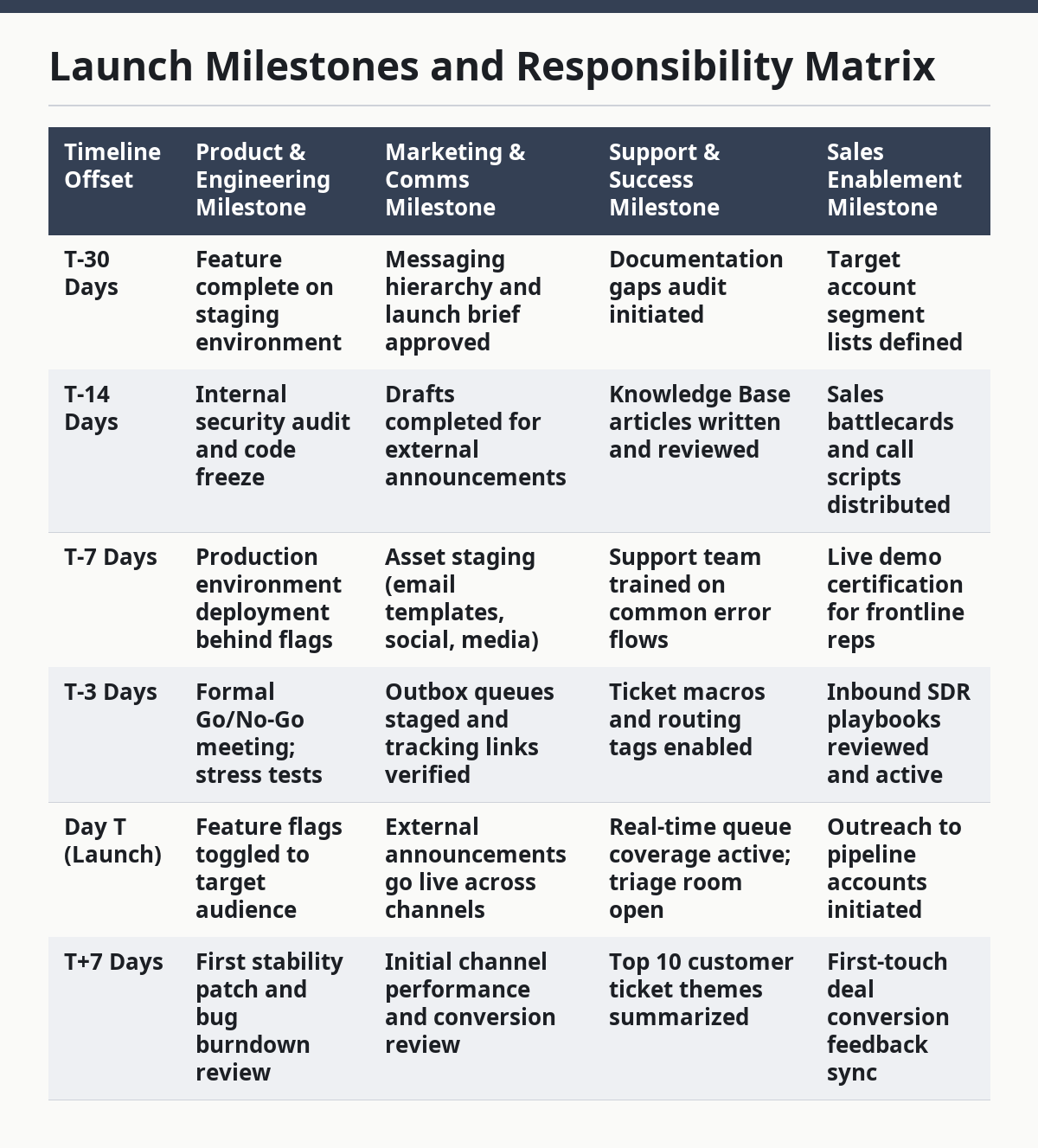
Aligning teams this way protects your brand reputation. Customer service representatives must not encounter a user interface change for the first time while handling an incoming ticket. By establishing a T-7 training milestone for customer-facing teams, your company ensures customer support can answer questions the moment outbound emails land in customer inboxes.
Which tool should you use for your launch operations calendar?
The best tool for a launch operations calendar balances dependency tracking with cross-departmental accessibility. Selecting the right platform depends on your team size, existing tooling, and the technical complexity of your product deployment.
CALENDAR PLATFORM SELECTION

                                                |

                     +--------------------------+--------------------------+

                     |                                                     |

             Team Size < 15                                         Team Size >= 15

                     |                                                     |

           Spreadsheets / Sheets                                 Cross-Functional Tools

         (Low cost, high speed,                                (Automated dependencies,

          manual dependencies)                                  audit trails, dashboards)

                                                                           |

                                                     +---------------------+---------------------+

                                                     |                                           |

                                            Non-Technical Heavy                     Engineering Aligned

                                                     |                                           |

                                              Asana / Monday                         Jira Work Management
Tool Comparison for Launch Operations
| Tool Category | Core Strengths | Operational Drawbacks | Best For | Typical Overhead |
|---|---|---|---|---|
| Spreadsheets (Google Sheets, Excel) | Infinitely customizable, zero learning curve, easy to share externally. | No native dependency automation, high risk of accidental edits, no audit log. | Seed-stage teams (under 15 people) with simple release profiles. | 1-2 hours weekly maintaining manual links and formulas. |
| Relational Workspaces (Airtable, Notion) | Multiple views (Gantt, Kanban, Table), custom formulas, clear ownership tags. | Formula maintenance required, can become sluggish with thousands of tasks. | Series A to B SaaS teams needing visual flexibility across teams. | 2-3 hours weekly managing views, filters, and records. |
| Dedicated PM Tools (Asana, Monday.com) | Automated dependent date shifts, native workload balancing, visual Gantt. | Cost per user scales rapidly, non-technical teams may resist adoption. | Mid-market teams (50-250 employees) with cross-functional dependencies. | 1 hour weekly managing automated rules and task statuses. |
| Engineering Trackers (Jira, Linear) | Direct linkage to code commits, pull requests, and automated build pipelines. | Hostile interface for non-technical staff; poor content calendar visualization. | Developer-tool SaaS companies where engineering runs the launch. | 2 hours weekly aligning non-technical staff into workflows. |
Choose spreadsheets when speed matters most and your launch team has fewer than ten total members. Transition to relational systems like Airtable or dedicated project platforms like Asana once missed dependencies start impacting your target launch dates.
Avoid using separate tools for different teams during a launch; running engineering in Jira while marketing runs in Monday.com creates blind spots that cause launch-day failures.
What are the common operational mistakes in a SaaS launch?
The most frequent operational mistakes in a SaaS launch stem from undefined ownership, omitted rollback procedures, and disconnected dependencies. These structural errors damage team velocity, inflate customer churn, and cause public launch delays.
The Floating Date Trap
Teams often assign tasks to arbitrary calendar dates rather than relative offsets. When an unexpected production blocker shifts the core launch from Tuesday the 12th to Thursday the 21st, team members miss updating dependent deadlines.
- The Operational Cost: Marketing launches campaigns for features still behind dark feature flags, generating negative reviews and confusion.
- The Correction: Tie all dates to Day T in your tracking sheet. Use automated formula fields (such as
=[LaunchDate]-7) so updating the core launch date automatically reschedules every dependent task.
Multi-Owner Ambiguity
Assigning tasks to multiple team members or broad departments (for example, “Product & Marketing”) creates bystander apathy. When nobody owns a task individually, nobody completes it.
- The Operational Cost: Needed pre-launch tasks—like validating transactional emails or verifying analytics pixels—remain untouched on launch morning.
- The Correction: Enforce a strict single-owner policy on every calendar line. If two people must collaborate, appoint one as the primary accountable owner and list the other as a supporting contributor.
“`
POOR PRACTICE:
[ ] Configure In-App Onboarding Flow | Owner: Product Team | Due: Oct 12
Correct practice:
[ ] Configure In-App Onboarding Flow | Lead: Sarah T. (PM) | Contributor: Dave M. (Eng) | Due: T-3 Days
“`
Omitting the “No-Go” Protocol
Teams frequently treat launches as inevitable, marching toward a release even when critical telemetry or support systems fail pre-flight validation.
- The Operational Cost: Major outages, data loss, or high ticket volumes that exhaust customer support and engineering teams on launch day.
- The Correction: Formally define minimum operational requirements for release at the T-14 mark. These criteria should cover test coverage thresholds, maximum open P1 bugs (typically zero), documentation sign-offs, and infrastructure capacity targets. If the team fails any criteria at the T-3 review, trigger an automatic delay.
How do you manage follow-up tasks and post-launch operations?
Manage post-launch operations by maintaining active tracking for 30 days after Day T, focusing on technical stability, user behavior metrics, and operational reviews. Launches do not end when outward-facing announcements publish; the 30 days following an announcement dictate whether newly acquired users convert into retained accounts.
| 30-DAY POST-LAUNCH CADENCE |
+————————————+———————————–+——————————–+
| T+1 to T+3: TRIAGE & STABILITY | T+4 to T+14: FUNNELS & ADOPTION | T+15 to T+30: RETROSPECTIVE |
| • Open engineering war room | • Review onboarding analytics | • Reconcile forecast vs actual |
| • Hourly error budget tracking | • Clear tier-2 ticket backlogs | • Complete formal post-mortem |
| • Daily stakeholder triage standup | • Gather early customer feedback | • Archive launch assets |
+————————————+———————————–+——————————–+
“`
The First 72 Hours: Triage and System Monitoring
The first three days demand rapid issue identification and response. The launch calendar should reserve engineering capacity to address immediate issues rather than immediately shifting the entire team to new feature development.
- War Room Operations: Schedule twice-daily operational check-ins between customer support and lead engineers to review incoming ticket categories and resolve critical blockers.
- Error Budget Audits: Monitor application metrics using monitoring tools against baseline performance standards. Track error counts, database queries, and page delivery speeds.
- Communication Loops: Prepare status update templates for customer-facing teams to notify impacted users if early bugs disrupt access to new workflows.
Days T+4 to T+14: Adoption and Friction Tracking
Once basic system stability is confirmed, operational focus shifts to user engagement patterns and identifying drop-offs in customer journeys.
- Onboarding Funnel Audits: Inspect onboarding funnels using web analytics platforms. If users stall at a specific step in your updated setup flow, document the issue as a high-priority product fix.
- Support Macro Updates: Update support macros and knowledge base articles based on real questions submitted by early adopters.
- Sales Deal Reviews: Run feedback sessions with account executives and sales development reps to identify common prospect objections regarding new pricing or functionality.
Days T+15 to T+30: The Operational Retrospective
The calendar concludes with a formal retrospective to review execution quality and update team workflows for the next development cycle.
- Metric Reconciliation: Compare actual signups, activated accounts, and infrastructure costs against the forecasts established in the T-30 launch brief.
- Retrospective Documentation: Record operational wins, near misses, and communication breakdowns using standard project evaluation formats, such as those maintained by the Project Management Institute.
- Workspace Cleanup: Archive staging flags, remove temporary user permissions, close out the launch-specific communications channel, and integrate unresolved lower-priority tickets into your standard product backlog.
Frequently Asked Questions
What belongs in a SaaS launch calendar?
A SaaS launch calendar must contain internal development milestones, external marketing dates, cross-functional dependencies, named task owners, and verification gates. It tracks code freezes, documentation updates, operational readiness reviews, and outbound promotions across a unified schedule. This structure links public announcements directly to underlying engineering stability, ensuring teams do not promote features before infrastructure, support, and sales operations are prepared to handle customer demand.
How do you schedule launch tasks?
Schedule launch tasks by working backward from your selected launch date using working-day offsets rather than static calendar days.
Drafted with AI; not yet reviewed by a person.