How to Build a SaaS Content Inventory for Existing Articles, Gaps, and Consolidation: build a SaaS content inventory in 8 to 10 columns, then use it to…
Last updated: November 16, 2026
How to Build a SaaS Content Inventory for Existing Articles, Gaps, and Consolidation
Quick answer: build a SaaS content inventory in 8 to 10 columns, then use it to decide which articles to keep, refresh, merge, redirect, or retire. A **SaaS content inventory** is a spreadsheet of every article you already have, plus the gaps, duplicates, and merge candidates that shape what to keep, refresh, or redirect.
In particular, this guide to How to Build a SaaS Content Inventory for Existing Articles, Gaps, and Consolidation shows how to turn a long URL list into a decision-making sheet. It is often one of the clearest ways to see which pages deserve work and which ones are dragging the site down, although it is not the only method.
Key takeaways

- Start with a full URL list before you judge quality or traffic.
- Track one row per page, then add fields for topic, intent, owner, and status.
- A content gap is not “anything you have not written yet”; it is a missing page that matters to a cluster.
- Overlap is usually a sign to merge, redirect, or assign clearer canonical pages.
- The inventory only helps if it leads to a decision: keep, refresh, consolidate, or retire.
What is a SaaS content inventory?
A SaaS content inventory is a complete list of your existing articles, with enough detail to show where the library is thin, repetitive, or outdated. It is the starting point for content audit work when the real question is not “How good is this page?” but “What does the whole site already cover?”
For a SaaS site, that list usually begins with blog articles, guides, comparison pages, glossary pages, and product education articles. A simple spreadsheet is enough if it includes the URL, title, main topic, search intent, publication date, last update date, and a status field. If you skip those fields, you end up with a list of links, not an inventory.
However, this matters because SaaS sites grow by accumulation. One team member writes a pricing explainer, another writes a comparison article, and a third publishes a near-duplicate guide 6 months later. Without a content inventory, the site looks busy while search performance gets split across articles that should have been one strong canonical page.
A good inventory is not the same as a full content audit sheet, though the two work together. The inventory is the map of what exists. The audit sheet adds judgment: traffic, links, search intent match, freshness, and consolidation opportunity. Google Search Central’s guidance on duplicate and canonical URLs is useful here, especially the pages on consolidating duplicate URLs and canonicalization. Those pages explain why one strong version often beats several weak ones.
If you are building the site structure from scratch, this article supports the broader SaaS topic cluster map. It does not replace that map; it gives you the raw inventory that makes the map accurate.
How do I build a SaaS content inventory?

Build a SaaS content inventory by collecting every live URL, then tagging each page so you can spot gaps, duplicates, and consolidation candidates in one pass. The order matters because judgment comes after collection, not before it.
Use these steps in order:
- Export every indexable URL. Pull a URL list from your CMS, sitemap, and analytics tool if needed, then dedupe the list so each page appears once. You want the full live set, not a hand-picked sample.
- Add core fields to a content audit sheet. Use columns for URL, title, content type, primary topic, intent, publication date, last update date, status, and notes. Keep the sheet plain so it stays readable on a phone or laptop.
- Tag each page by topic and intent. Mark whether a page is educational, product-led, comparison-led, or support-led. This is often the quickest way to see when two articles are chasing the same query.
- Mark page performance signals. Add fields for organic traffic, backlinks, conversions, or any other signal you already track. Even a rough “high / medium / low” label helps separate useful pages from dead weight.
- Flag overlap and missing coverage. Look for two pages that answer the same question, then note the topic where you have no page at all. That is your content gap list.
- Assign a next action. Each row should end with one decision: keep, refresh, merge, canonicalize, redirect, or retire. Without that field, the inventory becomes a filing cabinet instead of a work plan.
The common mistake is to spend too long on formatting and too little on structure. A polished sheet with 40 columns but no action label does not help. A plain sheet with the right 8 to 10 fields usually works better because it surfaces the real choice: one page, two pages, or none.
Because of that, a second mistake is treating every old article as a rewrite candidate. Some pages only need a title fix or a better internal link. Others need a merge because they cover the same topic from 2 angles. If the page affects medical, legal, financial, or other high-stakes decisions, consult a qualified professional and review authoritative guidance such as Google Search Central before making a major change. The inventory should make that difference visible.
What belongs in the content audit sheet?
A strong content audit sheet records the facts you need to decide what happens next, not every detail you could possibly measure. The useful fields are the ones that help you compare articles across a site of 50, 500, or 5,000 URLs.
At minimum, I would keep these fields in the sheet:
- URL
- Page title
- Content type
- Primary topic
- Search intent
- Publication date
- Last updated date
- Status
- Overlap notes
- Gap notes
- Next action
That list is enough to find duplicate coverage and missing coverage without turning the sheet into a database. If you already track traffic or links, add them as separate columns, but do not let the sheet become so wide that nobody wants to use it. A 12-column sheet is easier to maintain than a 30-column one.
The most important field is the next action. It turns review into execution. A page that is “good but stale” may only need a refresh plan. A page that repeats another article may need a redirect to the canonical page. A thin page with no clear role may need to be retired. The inventory should make those outcomes obvious.
One trade-off is speed versus precision. If you try to capture every possible data point on day one, the project slows down and stalls. If you keep the sheet too thin, you will miss the pattern behind the mess. For most SaaS teams, a first pass with 8 to 10 columns is enough to expose the work.
How do I find overlapping SaaS articles?
You find overlapping SaaS articles by comparing topic, intent, and target query, not by reading titles alone. Two articles can look different on the surface and still compete for the same search demand.
However, the fastest way is usually to sort your inventory by topic and then by intent. If you see two articles on “customer onboarding” where one is a how-to guide and the other is also a how-to guide, you likely have overlap. If one is a product page and the other is an educational article, they may still overlap, but the fix could be clearer positioning rather than a merge.
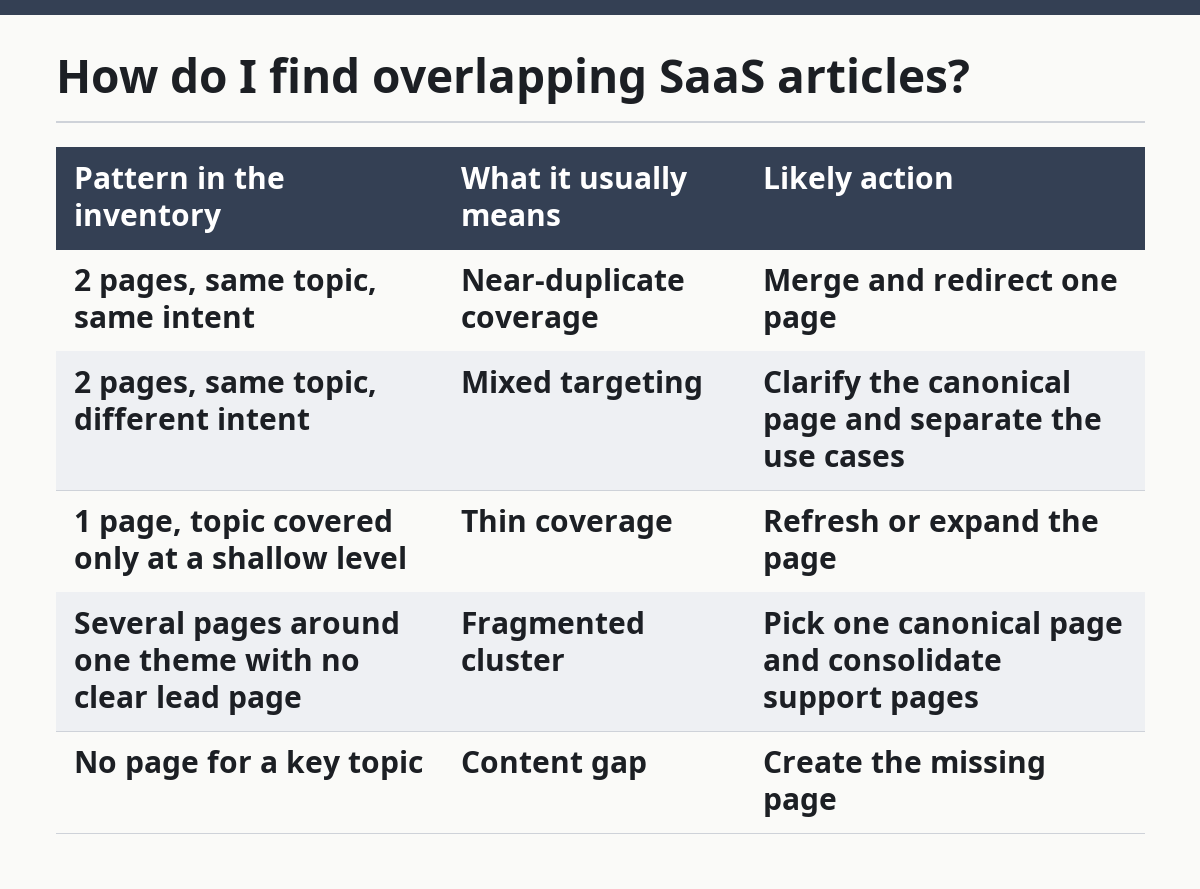
Use this table to decide what overlap usually means:
| Pattern in the inventory | What it usually means | Likely action |
|---|---|---|
| 2 pages, same topic, same intent | Near-duplicate coverage | Merge and redirect one page |
| 2 pages, same topic, different intent | Mixed targeting | Clarify the canonical page and separate the use cases |
| 1 page, topic covered only at a shallow level | Thin coverage | Refresh or expand the page |
| Several pages around one theme with no clear lead page | Fragmented cluster | Pick one canonical page and consolidate support pages |
| No page for a key topic | Content gap | Create the missing page |
The real mistake here is assuming every overlap is bad. Some overlap is normal in SaaS, especially when a topic has both educational and product-led angles. The problem starts when the articles cannibalize each other or when neither article is strong enough to rank well on its own.
A practical rule is to ask which article deserves to be the canonical page. If the answer is unclear, the inventory has done its job: it showed that the structure is the problem, not just the copy. Google Search Central’s canonical guidance is useful when you need a page-level decision that search engines can follow.
Where are the content gaps that matter?
The content gaps that matter are the missing pages that block a topic cluster, not every keyword you have not written about yet. A gap is useful only if it fits the site’s existing structure and the reader’s path.
There are 3 kinds of gaps that show up in a SaaS content inventory. First, there is the missing core page, like a primary explainer that should anchor a cluster. Second, there is the missing support page, like a page that answers a very specific question within that cluster. Third, there is the missing comparison or decision page, which often matters near the bottom of the funnel.
The inventory should label those gaps differently. A missing core page is higher priority than a narrow support article. A missing decision page can also matter more than another top-of-funnel article, because it helps the site move a reader from interest to action.
Do not call every untapped keyword a gap. If a topic has no clear fit with the rest of the site, it may be a distraction. The right question is not “Can I write about this?” but “Does this page complete a cluster or create a stray island?”
This is also where the inventory protects you from churn. Teams often add more content because the site feels thin, then discover the real issue was consolidation. If 3 articles already cover the topic, the better move may be to merge them into one stronger article and then fill the true gap that remains.
When should I merge, redirect, or keep a page?
You should merge, redirect, or keep a page based on overlap, intent, and the page’s role in the cluster, not on age alone. A page that is old is not automatically bad, and a page that is new is not automatically useful.
Use this decision logic:
- Keep it when the page has a distinct role, clear intent, and no close duplicate.
- Refresh it when the topic is right but the page is stale, thin, or poorly framed.
- Merge it when 2 or more pages cover the same question and one stronger page can carry the topic better.
- Redirect it when a merged page or retired page has links or history worth preserving.
- Set a canonical page when multiple URLs must stay live but one version should be treated as the main one; consult a qualified SEO professional and follow Google Search Central’s canonical guidance before implementing this.
A redirect is usually the final step after a merge or retirement. The point is to move users and search engines to the best page, not to leave dead ends in place. If a page has no value on its own and no external links that matter, redirecting it to a relevant canonical page is cleaner than keeping it around as a weak duplicate.
The trade-off is that consolidation can reduce page count. That is not a loss if the remaining article is stronger, clearer, and easier to maintain. It is a bad move only when consolidation erases a genuinely different intent. For example, a product comparison article and a beginner guide may share a topic, but they do not always deserve the same page.
What should I do after the inventory is done?
After the inventory is done, turn it into a 3-part action list: refresh, consolidate, and create. That list is the point of the whole exercise.
Start with pages that are close to winning but need work. Those are usually the fastest wins because the topic already exists and the page already has a role. Then handle merge candidates and redirects, since those decisions clean up the site structure. After that, use the gap list to decide what deserves a new page.
This is the point where a lot of teams go wrong. They treat the inventory like a one-time cleanup and never update it again. A useful content inventory is a living sheet, even if you only review it every 30 or 60 days. Without that habit, the same duplicate articles and missing pages return a quarter later.
Keep the inventory simple enough that someone can use it twice. If the sheet takes too long to update, it will stop being trusted. If it stays current, it becomes the easiest way to plan future content without guessing which articles already exist.
What should be included in a content inventory?
A content inventory should include the URL, title, content type, primary topic, search intent, publication date, last updated date, status, and next action. Those fields are enough to show what exists, what overlaps, and what needs work. If you already track traffic or backlinks, add them as support fields, not as the core of the sheet.
How do I find overlapping SaaS articles?
I find overlapping SaaS articles by sorting the inventory by topic and intent, then looking for articles that answer the same question or target the same query. Titles alone are not enough, because different headlines can still cover the same ground. The clearest sign is two articles that could both serve as the canonical page for the same search demand.
When should I merge or delete content?
I merge content when 2 pages cover the same topic and one page can become the stronger version. I delete or redirect content when a page has no distinct role, no useful links, and no reason to stay live. If the page still serves a different intent, it should usually be kept or repositioned, not removed.
Drafted with AI; not yet reviewed by a person.