A SaaS topic cluster map usually works best with 1 pillar page, 3 to 10 spoke pages, and a clear internal-link path between them. This guide on How to…
Last updated: November 17, 2026
Quick Answer: A SaaS topic cluster map usually works best with 1 pillar page, 3 to 10 spoke pages, and a clear internal-link path between them. This guide on How to Build a SaaS Topic Cluster Map for Pillar Pages, Spokes, and Internal Links shows how to plan that structure so one topic has one clear home. If you build it well, readers can move from broad to specific without getting lost, and search engines can see the site as one organized content hub instead of a pile of overlapping posts.
Key takeaways
- A topic cluster map starts with one pillar page and a set of spoke pages that each handle one narrow job.
- The map is not a keyword list. It is an architecture plan for page roles, URL structure, and internal links.
- A good map can prevent two pages from answering the same question in slightly different words.
- You need one clear hub for the main subject, then spokes that support it without stealing its job.
- The honest trade-off is simple: tighter structure means less room for random publishing, but more clarity for topical authority.
What does a SaaS topic cluster map include?
A SaaS topic cluster map includes the pillar page, the spoke pages, the internal links between them, and the URL structure that keeps the group readable. It is the blueprint for one content hub, not a loose set of blog ideas.
Think of it as a page-role chart. The pillar page handles the broad topic at a high level, while spoke pages each answer one narrower question, one workflow step, or one comparison. The map should also show which page is the primary home for the topic, because that stops two posts from competing for the same search intent.
A generic post often misses this part: the map is not just about search terms. It is about editorial boundaries. If a page on “pillar pages” also tries to explain “how to write a pillar page,” “how to choose keywords,” and “internal linking strategy,” the site turns muddy fast. One page should own one job.
A useful map also records URL structure. For example, if a pillar page sits at a short, stable URL and the spoke pages live under a related folder or naming pattern, the cluster is easier to scan by humans and easier to maintain over time. The exact format matters less than consistency across the cluster.
Google Search Central’s guidance on helpful content and crawlable links is a good baseline here, because the site should be built for clarity first, not tricks. Google Search Central also emphasizes helpful, people-first content. That lines up with a simple standard: one main page, many supporting pages, and links that make the relationship obvious.
How do I decide which page is the pillar?
The pillar page is the broadest page in the cluster, and it should be the one a reader would expect to open first. It owns the 1-to-many view of the topic, while spokes own the narrower questions.
A pillar page deserves that role when the subject is big enough to support several subtopics without collapsing into a single long post. For SaaS blogs, that usually means the topic has enough real search demand and enough practical angles to justify a hub. The page should introduce the subject, frame the subtopics, and point readers to deeper pages.
Use this simple test: if a page tries to answer five different reader jobs in one sitting, it is probably a pillar candidate. If it only answers one precise job, it is a spoke candidate. A map works when that difference stays visible.
One honest trade-off matters here. A pillar page is not the place to cram every detail. If you overload it, the page gets thin in places and the cluster loses shape. If you keep it too narrow, it stops acting like a hub and becomes just another blog post.
Strong pillar pages also stay stable. Topics that change every month, such as a live product release note or a short-lived trend, usually do not make strong pillars. A pillar should be durable enough to hold a cluster together for 6 months or longer without constant rewrites.
Which pages should become spokes?
Spoke pages should become the pages that answer one specific subquestion, comparison, or task that hangs off the pillar. They are the pieces that make the hub useful instead of decorative.
A good spoke page handles one intent cleanly. It might explain a single concept, compare two related choices, or walk through one workflow step. If you can explain the page in one sentence without using “and also,” it is probably a strong spoke. If the page title needs three commas, it is probably doing too much.
Because that narrow job matters, it helps to group candidate spokes by function before you worry about wording. One cluster might need pages for definitions, one for process, one for examples, and one for troubleshooting. That is better than creating 12 posts that all orbit the same vague keyword and repeat the same paragraphs.
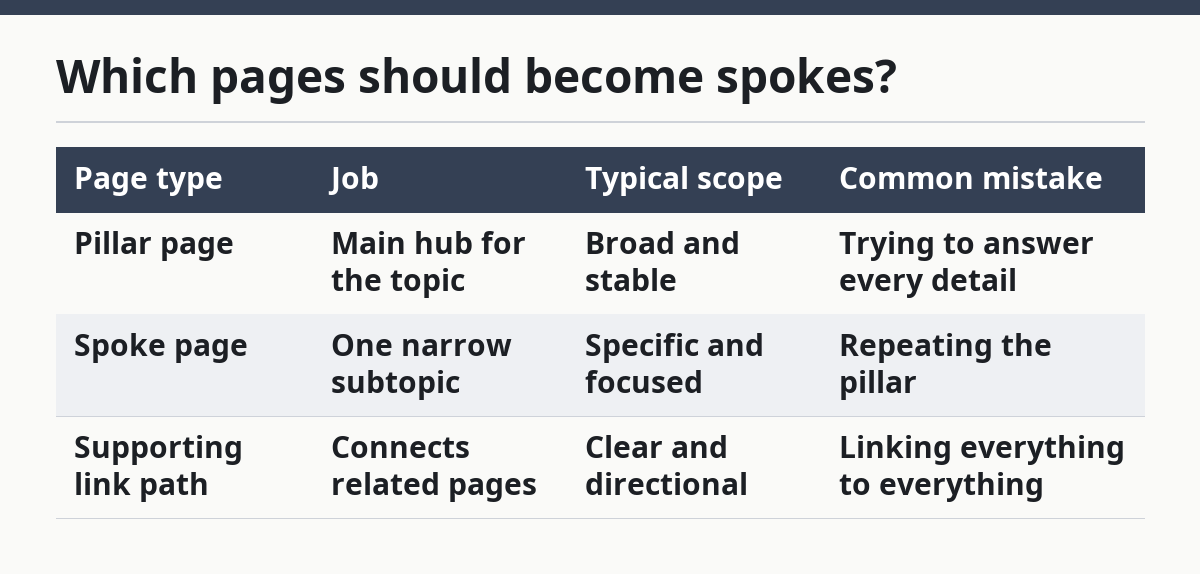
Here is a simple comparison of page roles:
| Page type | Job | Typical scope | Common mistake |
|---|---|---|---|
| Pillar page | Main hub for the topic | Broad and stable | Trying to answer every detail |
| Spoke page | One narrow subtopic | Specific and focused | Repeating the pillar |
| Supporting link path | Connects related pages | Clear and directional | Linking everything to everything |
The mistake most teams make is turning a spoke into a second pillar by accident. That creates overlap and weakens both pages. A spoke should support the hub, not compete with it. If a spoke can stand on its own as a deep guide, that is fine, but it still needs a single job inside the cluster.
How should the topic cluster map be built?
The topic cluster map should be built in a fixed order: define the hub, sort the spokes, assign roles, then draw the links. The order matters because it keeps the cluster from becoming a keyword pile.
Use this 5-step process:
- Pick the main topic for the hub and write it as one plain-language page title. The result should be a page a buyer or learner would recognize in 3 seconds.
- List the subtopics that naturally break off from that hub. Group them by intent, not by how many search terms they contain.
- Mark one page as the pillar and mark the rest as spokes. If a page overlaps with another page, merge, prune, or reassign it before publishing.
- Map the internal links. Every spoke should link up to the pillar, and the pillar should link down to the spokes that expand its sections.
- Check the URL structure. Keep the pattern consistent so the cluster reads like one content hub instead of a random archive.
A map that skips step 4 usually fails in practice. The posts may exist, but the reader has to hunt for the next useful post. Internal links are what turn a folder of posts into a navigable path.
A map that skips step 5 causes a different problem. If URLs are scattered and naming conventions change from page to page, the cluster feels accidental. Consistent URL structure helps the whole system look intentional, even before a reader opens a single post.
A simple spreadsheet or board often works for this process, with columns for page title, role, primary intent, target URL, and link targets. That is enough for most teams. You do not need a complex model to create clear site architecture.
How do internal links hold the cluster together?
Internal links hold the cluster together by showing which page is the main hub and which pages are the supporting detail. Without those links, the pages may cover the same subject, but they do not behave like a cluster.
Each spoke should point to the pillar page in a way that makes sense in the flow of the post. The pillar should also point back to the spoke where the reader needs depth. That two-way pattern helps a person move from overview to detail and back again without losing context.
The link text matters, but not because it needs to be clever. It should describe the page destination plainly. A link that says “read more” does little work. A link that says “how to write a SaaS pillar page” or “internal linking for a content hub” tells the reader what they will get.
A common mistake is to link every post to every other post in the cluster. That feels active, but it usually creates noise. The better pattern is selective: link where the topic naturally continues, not where you can squeeze in another URL. A cluster with 8 clear links is usually more useful than one with 28 vague ones.
Google Search Central’s link guidance is relevant here because crawlable, descriptive links help systems and readers understand relationships. The point is not to flood the post with links. The point is to make the route through the content obvious. Internal linking best practices explain why clear anchor text and crawlable links matter.
How do I stop overlapping coverage?
You stop overlapping coverage by assigning one exact job to each post before you write it. If two posts can answer the same question in the same way, one of them is probably unnecessary.
The cleanest way to avoid overlap is to write a one-line post promise for every post in the map. For example: one post explains the cluster at a high level, one post explains the terminology, one post explains the workflow, and one post explains the links between them. If a sentence does not fit the promise, cut it or move it.
This is where many SaaS sites slip. They publish one post for “pillar page,” another for “hub page,” and a third for “content cluster,” then all three explain the same thing with slightly different headings. That creates cannibalization, but the deeper problem is editorial drift. The map should prevent that before the first draft starts.
A good check is to compare the H2s across the cluster. If two posts share most of the same subheads, the map needs surgery. Either merge the posts or split the intent more sharply. One topic cluster works better with fewer, cleaner posts than with a long list of near-duplicates.
The honest limitation is that not every topic deserves a full cluster. If the subject only supports one or two real subtopics, forcing a pillar-plus-spokes structure can make the site feel inflated. In that case, keep the post set smaller and let the cluster grow only when the topic truly earns it.
What should a finished map look like?
A finished map should look like a small editorial system with one hub, several spokes, and clear paths between them. If you can explain the structure in under 30 seconds, the map is probably usable.
The simplest version includes these pieces: the pillar page title, 3 to 10 spoke page titles, a note on each page’s job, the primary internal link targets, and a consistent URL structure. That is enough detail to prevent overlap and keep publishing aligned with the architecture.
The map should also answer one hard question: which page deserves hub status if the site can only promote one? That choice matters because hub pages get the job of organizing the subject. If you give that role to the wrong page, the cluster becomes lopsided and the rest of the posts have to work around the mistake.
Here is the standard I would use: if a page can explain the cluster, point to the right next step, and sit at the center of the internal link graph, it belongs at the hub. If it cannot do those three things, it is a spoke or it does not belong in the cluster at all.
A good map is plain, not flashy. It reads like a working diagram a team could actually use during the next 10 posts, which is the real test. If the map only looks good in a deck, it is too vague to guide publishing.
What is a topic cluster map?
A topic cluster map is the plan for how related posts fit together around one main subject. It identifies the pillar page, the spoke pages, the links between them, and the URL structure that keeps the group organized.
How many spokes should a SaaS pillar have?
A SaaS pillar should have as many spokes as the topic genuinely supports, and no more. If the cluster starts repeating itself or stretching to fill space, the topic is too thin for a larger hub.
How do internal links support topical authority?
Internal links support topical authority by showing which page is the main resource and which pages add depth. They help readers move through the topic in a clear order, and they help search systems understand how the pages belong together.
Drafted with AI; not yet reviewed by a person.